GitHub Actions
Use GitHub Actions wen you want make repository translate changed documentation automatically an open pull request wit di generated outputs.
Start wit di standard GITHUB_TOKEN setup, even for organization repositories wey policy allow am. See GitHub App Setup wen your organization require App identity or you need automatic downstream workflow runs.
Human edits: these workflows go retranslate changed source files full, an fit overwrite wording wey get edited for dia translations. Make you review each PR before you merge. Markdown block-level preservation of accepted edits need custom integration wit di Python API translation state provider.
Your first README translation PR
Start wit one root README.md an one target language. Dis workflow dey translate Markdown only, so Azure AI Vision no required.
- Copy translate-readme.yml (view di template on GitHub) go put am for
.github/workflows/translate-readme.ymlinside di repository wey you want translate, an commit am to dat repository's default branch. Di template dey use di root ActionAzure/co-op-translator@main, wey dey install di CLI from di same source ref. Pin a reviewed commit so runs go dey reproducible. - Open Actions > Translate README > Run workflow, choose a language, an leave Preview only checked. Check di token estimate for di preview step. Preview no go call model providers, no write translations, nor create PR.
- Add di secrets for one text provider, an enable Allow GitHub Actions to create and approve pull requests under Settings > Actions > General. Di template requests
contents: writeanpull-requests: writefor its job; you no need change di default permissions for every workflow. If organization policy block these permissions or dis setting, ask administrator about approved GitHub App. - Run di workflow again wit Preview only unchecked. E go preview, translate, run
co-op-review --readme-only, an create or update translation PR only after translation an review succeed. Di workflow summary go link to di PR. - Review di wording an file changes inside di PR, den merge when you ready. Di workflow no dey merge automatically.
Di PR go contain only translations/<language>/README.md an im language metadata file. Di source README go remain unchanged, an links to oda documents go still point to di source documents. Di PR body go list changed files an structural review results. If translation or review fail, check di workflow summary an failed step logs; no PR go get created. If no changes dey, no new PR needed.
Organization and CI note: A GitHub App dey optional, e no be requirement for organization ownership. Wit GITHUB_TOKEN, pull-request workflows for opening, updating, or reopening a PR need person with write access to select Approve workflows to run. Push workflows no dey triggered by dis token. For unattended downstream CI, see GitHub App Setup an GitHub's workflow triggering rules.
Prerequisites
Before you create di workflow, configure di AI service secrets wey your translation run need.
Text translation need one language model provider:
- Azure OpenAI:
AZURE_OPENAI_API_KEY,AZURE_OPENAI_ENDPOINT,AZURE_OPENAI_MODEL_NAME,AZURE_OPENAI_CHAT_DEPLOYMENT_NAME,AZURE_OPENAI_API_VERSION - OpenAI:
OPENAI_API_KEY,OPENAI_CHAT_MODEL_ID, plus optionalOPENAI_ORG_IDandOPENAI_BASE_URL - Anthropic:
ANTHROPIC_API_KEY,ANTHROPIC_MODEL, plus optionalANTHROPIC_BASE_URL
For image translation you go need Azure AI Vision too:
AZURE_AI_SERVICE_API_KEYAZURE_AI_SERVICE_ENDPOINT
See Configuration an Azure AI Setup for local configuration details.
Standard Setup
After you don try di README workflow, use dis setup to translate repository Markdown files into plenti languages. E go run a Markdown review before e open PR an e no need Azure AI Vision.
Step 1: Add Repository Secrets
For your target repository, open Settings > Secrets and variables > Actions, den add di provider secrets wey your workflow go use.
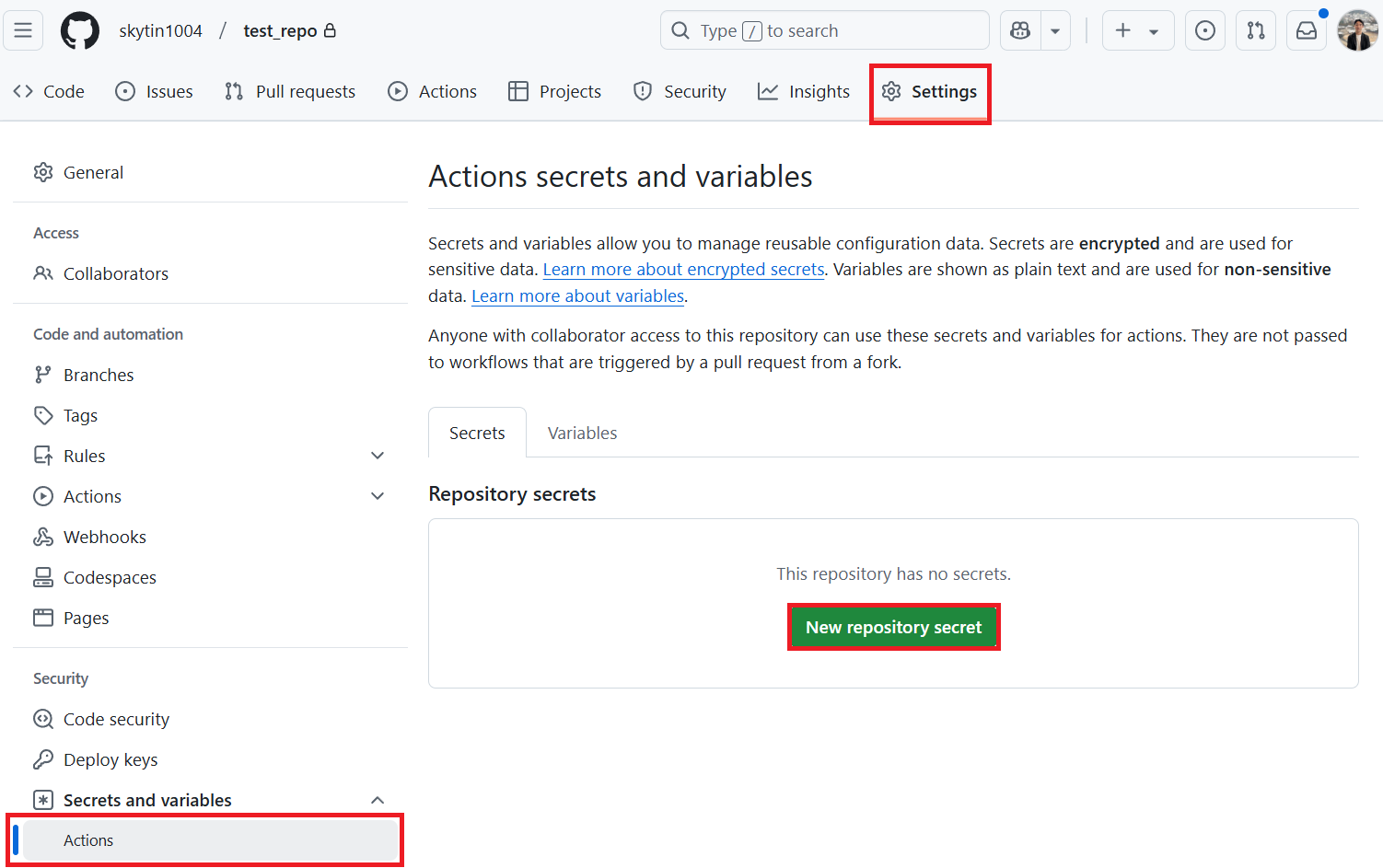
Step 2: Enable Workflow Permissions
Open Settings > Actions > General.
Under Workflow permissions:
- Enable Allow GitHub Actions to create and approve pull requests.
- Save di setting.
The job below requests contents: write an pull-requests: write explicitly. Keep di repository's default workflow permissions unchanged. If organization policy blocks PR creation, ask administrator about approved GitHub App.
Step 3: Add the Workflow
Create .github/workflows/co-op-translator.yml:
name: Co-op Translator

on:
  push:
    branches:
      - main

jobs:
  co-op-translator:
    runs-on: ubuntu-latest
    env:
      TARGET_LANGUAGES: "es fr de"

    permissions:
      contents: write
      pull-requests: write

    steps:
      - name: Checkout repository
        uses: actions/checkout@v4
        with:
          fetch-depth: 0

      - name: Set up Python
        uses: actions/setup-python@v7
        with:
          python-version: "3.11"

      - name: Install Co-op Translator
        run: |
          python -m pip install --upgrade pip
          pip install co-op-translator

      - name: Run Co-op Translator
        env:
          PYTHONIOENCODING: utf-8
          AZURE_OPENAI_API_KEY: ${{ secrets.AZURE_OPENAI_API_KEY }}
          AZURE_OPENAI_ENDPOINT: ${{ secrets.AZURE_OPENAI_ENDPOINT }}
          AZURE_OPENAI_MODEL_NAME: ${{ secrets.AZURE_OPENAI_MODEL_NAME }}
          AZURE_OPENAI_CHAT_DEPLOYMENT_NAME: ${{ secrets.AZURE_OPENAI_CHAT_DEPLOYMENT_NAME }}
          AZURE_OPENAI_API_VERSION: ${{ secrets.AZURE_OPENAI_API_VERSION }}
          OPENAI_API_KEY: ${{ secrets.OPENAI_API_KEY }}
          OPENAI_ORG_ID: ${{ secrets.OPENAI_ORG_ID }}
          OPENAI_CHAT_MODEL_ID: ${{ secrets.OPENAI_CHAT_MODEL_ID }}
          OPENAI_BASE_URL: ${{ secrets.OPENAI_BASE_URL }}
          ANTHROPIC_API_KEY: ${{ secrets.ANTHROPIC_API_KEY }}
          ANTHROPIC_MODEL: ${{ secrets.ANTHROPIC_MODEL }}
          ANTHROPIC_BASE_URL: ${{ secrets.ANTHROPIC_BASE_URL }}
        run: |
          translate -l "$TARGET_LANGUAGES" -md -y

      - name: Review Markdown translations
        run: |
          python - <<'PY'
          import os
          from co_op_translator.api import run_review

          run_review(
              language_codes=os.environ["TARGET_LANGUAGES"].split(),
              markdown=True,
              notebook=False,
              output_format="github",
          )
          PY

      - name: Create Pull Request with translations
        uses: peter-evans/create-pull-request@v5
        with:
          token: ${{ secrets.GITHUB_TOKEN }}
          commit-message: "Update translations via Co-op Translator"
          title: "Update translations via Co-op Translator"
          body: |
            This PR updates translations for recent changes to the main branch.
            Markdown structure, freshness, and local links were reviewed.
            Review translation wording before merging.

            Generated by Co-op Translator.
          branch: update-translations
          base: main
          labels: translation, automated-pr
          delete-branch: true
          add-paths: |
            translations/
Change TARGET_LANGUAGES to di languages wey your project need. Di review dey use di Python API to check only Markdown, wey match di translation step. If translation or review error happen e go stop di job before PR creation. Di workflow no go merge di PR automatically. For large repositories, add paths: filter under on.push so di workflow go run only when documentation changes.
Optional: notebooks and images
For notebooks, add -nb to di translation command an set notebook=True in di review step. For image text, configure di two Azure AI Vision secrets, pass dem in di translation step's env, add -img to di command, an add translated_images/ to di PR step's add-paths. Review translated images by eye; di deterministic review no dey certify image text or linguistic accuracy.
GitHub App Setup
Use approved GitHub App when your organization require App identity, or when di generated PR need to trigger downstream CI without di GITHUB_TOKEN approval step. App no go bypass organization policy; administrators still dey control installation an permissions.
Step 1: Create or Install a GitHub App
Use existing organization-provided App if e dey, or create one wey get read/write access to Contents an Pull requests. Install am on di target repository with any required organization approval.
Record:
- App ID
- Private key contents
Store dem as repository secrets:
GH_APP_IDGH_APP_PRIVATE_KEY
Step 2: Generate an App Token
Add dis step immediately before di existing pull request step. For di README template, use di same success condition so previews an failed translations no go request App token:
      - name: Authenticate GitHub App
        id: generate_token
        if: ${{ !inputs.preview && steps.translate.outcome == 'success' && steps.review.outcome == 'success' }}
        uses: actions/create-github-app-token@v2
        with:
          app-id: ${{ secrets.GH_APP_ID }}
          private-key: ${{ secrets.GH_APP_PRIVATE_KEY }}
          permission-contents: write
          permission-pull-requests: write
Then change only di existing pull request step's token input to ${{ steps.generate_token.outputs.token }}. Keep im success condition, branch, PR body, an add-paths unchanged. Di token scoped to di current repository by default. When you dey adapt di standard setup instead of di README template, omit di if above: dat workflow uses di default success condition, so token creation an PR creation go run only after translation an review succeed.
See di official create-github-app-token Action for installation an token permissions.
Runner Limits
GitHub-hosted runners get maximum job duration. Big repositories or many target languages fit pass dat limit.
For big translation workloads:
- Translate fewer languages per run.
- Use content flags such as
-md,-nb, or-img. - Use a self-hosted runner when repository size or model latency makes hosted runners unreliable.
Review in CI
Use co-op-review when a pull request suppose validate generated translations without calling LLM or Vision providers.
      - name: Review translated outputs
        run: |
          co-op-review --changed-from "origin/${{ github.base_ref }}" --format github
co-op-review na beta deterministic review command. Im checks an output schema fit change, but e design to be safe for CI because e no go write files nor call model providers.