GitHub Actions
Use GitHub Actions when you want a repository to translate changed documentation automatically and open a pull request with the generated outputs.
Start with the standard GITHUB_TOKEN setup, including for organization repositories where policy allows it. See GitHub App Setup when your organization requires an App identity or you need automatic downstream workflow runs.
Human edits: these workflows retranslate changed source files in full and can overwrite wording edited in their translations. Review each PR before merging. Markdown block-level preservation of accepted edits requires a custom integration with the Python API translation state provider.
Your first README translation PR
Start with one root README.md and one target language. This workflow translates Markdown only, so Azure AI Vision is not required.
- Copy translate-readme.yml (view the template on GitHub) to
.github/workflows/translate-readme.ymlin the repository you want to translate, and commit it to that repository's default branch. The template uses the root Action inAzure/co-op-translator@main, which installs the CLI from the same source ref. Pin a reviewed commit for reproducible runs. - Open Actions > Translate README > Run workflow, choose a language, and leave Preview only checked. Review the token estimate in the preview step. Preview does not call model providers, write translations, or create a PR.
- Add the secrets for one text provider, and enable Allow GitHub Actions to create and approve pull requests under Settings > Actions > General. The template requests
contents: writeandpull-requests: writefor its job; you do not need to change the default permissions for every workflow. If organization policy blocks these permissions or this setting, ask an administrator about an approved GitHub App. - Run the workflow again with Preview only unchecked. It previews, translates, runs
co-op-review --readme-only, and creates or updates a translation PR only after translation and review succeed. The workflow summary links to the PR. - Review the wording and file changes in the PR, then merge when ready. The workflow does not merge automatically.
The PR contains only translations/<language>/README.md and its language metadata file. The source README stays unchanged, and links to other documents continue to point at the source documents. The PR body lists changed files and structural review results. If translation or review fails, inspect the workflow summary and failed step logs; no PR is created. If there are no changes, no new PR is needed.
Organization and CI note: A GitHub App is optional, not a requirement of organization ownership. With GITHUB_TOKEN, pull-request workflows for opening, updating, or reopening a PR require a user with write access to select Approve workflows to run. Push workflows are not triggered by this token. For unattended downstream CI, see GitHub App Setup and GitHub's workflow triggering rules.
Prerequisites
Before creating the workflow, configure the AI service secrets your translation run needs.
Text translation requires one language model provider:
- Azure OpenAI:
AZURE_OPENAI_API_KEY,AZURE_OPENAI_ENDPOINT,AZURE_OPENAI_MODEL_NAME,AZURE_OPENAI_CHAT_DEPLOYMENT_NAME,AZURE_OPENAI_API_VERSION - OpenAI:
OPENAI_API_KEY,OPENAI_CHAT_MODEL_ID, plus optionalOPENAI_ORG_IDandOPENAI_BASE_URL - Anthropic:
ANTHROPIC_API_KEY,ANTHROPIC_MODEL, plus optionalANTHROPIC_BASE_URL
Image translation additionally requires Azure AI Vision:
AZURE_AI_SERVICE_API_KEYAZURE_AI_SERVICE_ENDPOINT
See Configuration and Azure AI Setup for local configuration details.
Standard Setup
After trying the README workflow, use this setup to translate a repository's Markdown files into several languages. It runs a Markdown review before opening a PR and does not require Azure AI Vision.
Step 1: Add Repository Secrets
In your target repository, open Settings > Secrets and variables > Actions, then add the provider secrets your workflow will use.
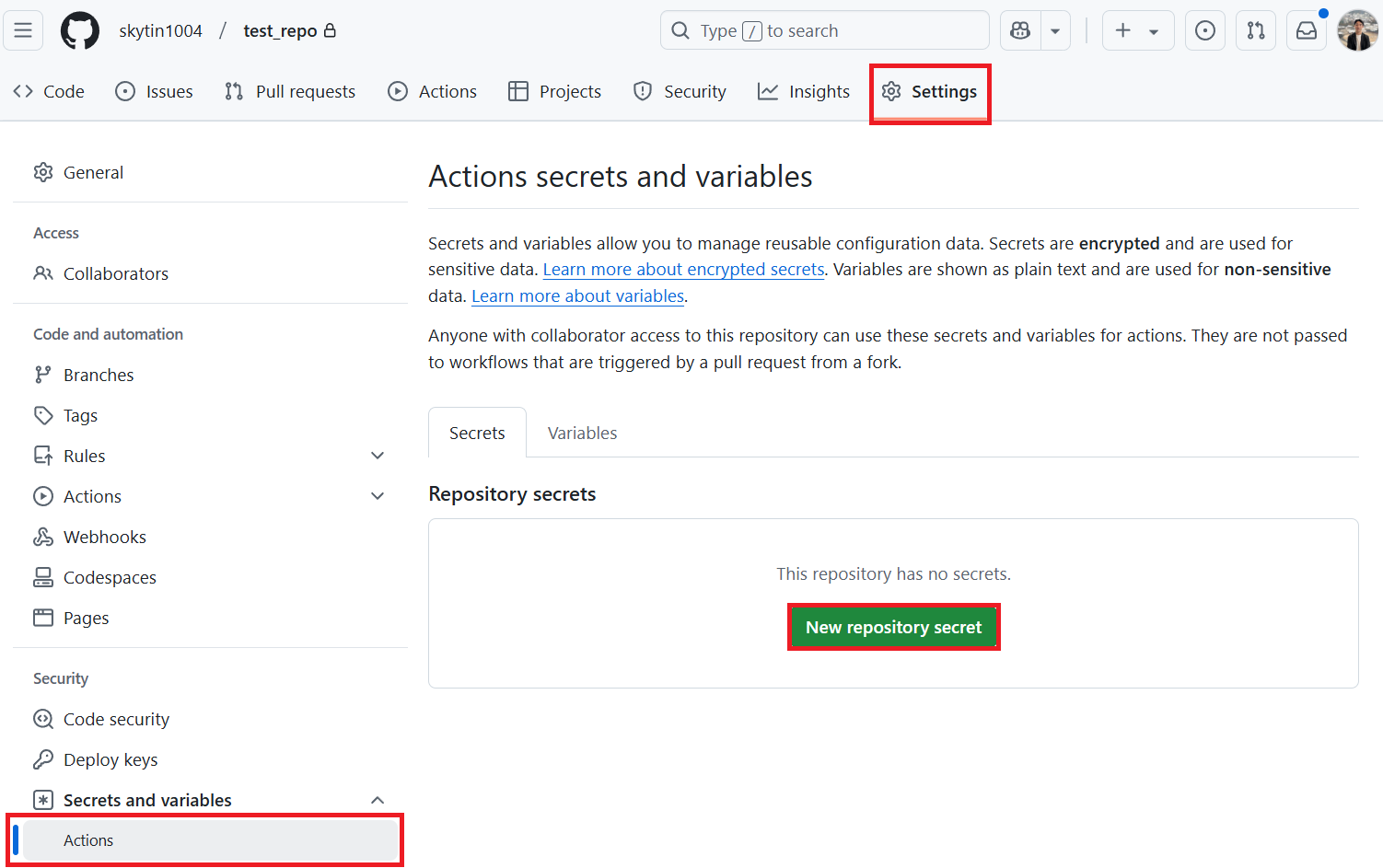
Step 2: Enable Workflow Permissions
Open Settings > Actions > General.
Under Workflow permissions:
- Enable Allow GitHub Actions to create and approve pull requests.
- Save the setting.
The job below requests contents: write and pull-requests: write explicitly. Keep the repository's default workflow permissions unchanged. If organization policy blocks PR creation, ask an administrator about an approved GitHub App.
Step 3: Add the Workflow
Create .github/workflows/co-op-translator.yml:
name: Co-op Translator

on:
  push:
    branches:
      - main

jobs:
  co-op-translator:
    runs-on: ubuntu-latest
    env:
      TARGET_LANGUAGES: "es fr de"

    permissions:
      contents: write
      pull-requests: write

    steps:
      - name: Checkout repository
        uses: actions/checkout@v4
        with:
          fetch-depth: 0

      - name: Set up Python
        uses: actions/setup-python@v7
        with:
          python-version: "3.11"

      - name: Install Co-op Translator
        run: |
          python -m pip install --upgrade pip
          pip install co-op-translator

      - name: Run Co-op Translator
        env:
          PYTHONIOENCODING: utf-8
          AZURE_OPENAI_API_KEY: ${{ secrets.AZURE_OPENAI_API_KEY }}
          AZURE_OPENAI_ENDPOINT: ${{ secrets.AZURE_OPENAI_ENDPOINT }}
          AZURE_OPENAI_MODEL_NAME: ${{ secrets.AZURE_OPENAI_MODEL_NAME }}
          AZURE_OPENAI_CHAT_DEPLOYMENT_NAME: ${{ secrets.AZURE_OPENAI_CHAT_DEPLOYMENT_NAME }}
          AZURE_OPENAI_API_VERSION: ${{ secrets.AZURE_OPENAI_API_VERSION }}
          OPENAI_API_KEY: ${{ secrets.OPENAI_API_KEY }}
          OPENAI_ORG_ID: ${{ secrets.OPENAI_ORG_ID }}
          OPENAI_CHAT_MODEL_ID: ${{ secrets.OPENAI_CHAT_MODEL_ID }}
          OPENAI_BASE_URL: ${{ secrets.OPENAI_BASE_URL }}
          ANTHROPIC_API_KEY: ${{ secrets.ANTHROPIC_API_KEY }}
          ANTHROPIC_MODEL: ${{ secrets.ANTHROPIC_MODEL }}
          ANTHROPIC_BASE_URL: ${{ secrets.ANTHROPIC_BASE_URL }}
        run: |
          translate -l "$TARGET_LANGUAGES" -md -y

      - name: Review Markdown translations
        run: |
          python - <<'PY'
          import os
          from co_op_translator.api import run_review

          run_review(
              language_codes=os.environ["TARGET_LANGUAGES"].split(),
              markdown=True,
              notebook=False,
              output_format="github",
          )
          PY

      - name: Create Pull Request with translations
        uses: peter-evans/create-pull-request@v5
        with:
          token: ${{ secrets.GITHUB_TOKEN }}
          commit-message: "Update translations via Co-op Translator"
          title: "Update translations via Co-op Translator"
          body: |
            This PR updates translations for recent changes to the main branch.
            Markdown structure, freshness, and local links were reviewed.
            Review translation wording before merging.

            Generated by Co-op Translator.
          branch: update-translations
          base: main
          labels: translation, automated-pr
          delete-branch: true
          add-paths: |
            translations/
Change TARGET_LANGUAGES to the languages your project needs. The review uses the Python API to check only Markdown, matching the translation step. A translation or review error stops the job before PR creation. The workflow does not merge the PR automatically. For large repositories, add a paths: filter under on.push so the workflow only runs when documentation changes.
Optional: notebooks and images
For notebooks, add -nb to the translation command and set notebook=True in the review step. For image text, configure the two Azure AI Vision secrets, pass them in the translation step's env, add -img to the command, and add translated_images/ to the PR step's add-paths. Review translated images visually; the deterministic review does not certify image text or linguistic accuracy.
GitHub App Setup
Use an approved GitHub App when your organization requires an App identity, or when the generated PR needs to trigger downstream CI without the GITHUB_TOKEN approval step. An App does not bypass organization policy; administrators still control its installation and permissions.
Step 1: Create or Install a GitHub App
Use an existing organization-provided App when available, or create one with read/write access to Contents and Pull requests. Install it on the target repository with any required organization approval.
Record:
- App ID
- Private key contents
Store them as repository secrets:
GH_APP_IDGH_APP_PRIVATE_KEY
Step 2: Generate an App Token
Add this step immediately before the existing pull request step. For the README template, use the same success condition so previews and failed translations do not request an App token:
      - name: Authenticate GitHub App
        id: generate_token
        if: ${{ !inputs.preview && steps.translate.outcome == 'success' && steps.review.outcome == 'success' }}
        uses: actions/create-github-app-token@v2
        with:
          app-id: ${{ secrets.GH_APP_ID }}
          private-key: ${{ secrets.GH_APP_PRIVATE_KEY }}
          permission-contents: write
          permission-pull-requests: write
Then change only the existing pull request step's token input to ${{ steps.generate_token.outputs.token }}. Keep its success condition, branch, PR body, and add-paths unchanged. The token is scoped to the current repository by default. When adapting the standard setup instead of the README template, omit the if above: that workflow uses the default success condition, so token creation and PR creation run only after translation and review succeed.
See the official create-github-app-token Action for installation and token permissions.
Runner Limits
GitHub-hosted runners have a maximum job duration. Large repositories or many target languages can exceed that limit.
For large translation workloads:
- Translate fewer languages per run.
- Use content flags such as
-md,-nb, or-img. - Use a self-hosted runner when repository size or model latency makes hosted runners unreliable.
Review in CI
Use co-op-review when a pull request should validate generated translations without calling LLM or Vision providers.
      - name: Review translated outputs
        run: |
          co-op-review --changed-from "origin/${{ github.base_ref }}" --format github
co-op-review is a beta deterministic review command. Its checks and output schema may evolve, but it is designed to be safe for CI because it does not write files or call model providers.