Azure AI Setup
Use this guide when you want to configure Azure OpenAI for text translation and Azure AI Vision for image text extraction.
Prerequisites
- An Azure subscription.
- Permission to create or use Azure AI resources and model deployments.
- A project in Azure AI Foundry or equivalent access to Azure OpenAI and Azure AI Vision resources.
Create an Azure AI Project
- Open Azure AI Foundry.
- Create or select a project.
- Create or select an AI hub for the project.
- Open the project overview after creation.
Deploy an Azure OpenAI Model
- In the project, open Models + endpoints.
- Select Deploy model.
- Choose a GPT model such as
gpt-4o. - Deploy the model.
- Record the endpoint, deployment name, model name, API key, and API version.
Note
The Azure OpenAI API version is separate from the model version shown in Azure AI Foundry. Choose a supported API version for your deployment.
Configure Azure AI Vision
Image translation uses Azure AI Vision to extract text from source images before the text is translated.
In your Azure AI project, find the Azure AI Services key and endpoint.
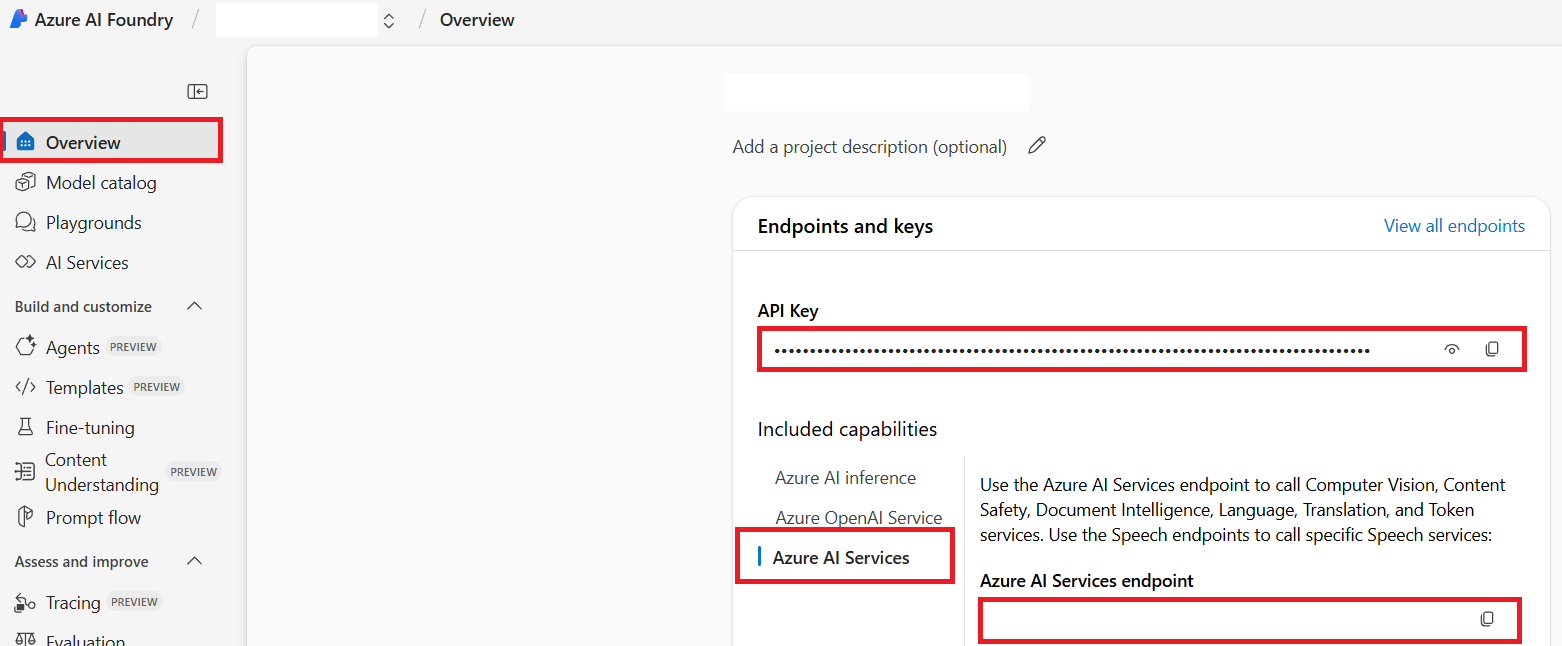
Record:
- Azure AI Service endpoint
- Azure AI Service API key
Environment Variables
Add the credentials to your .env file or CI secrets.
# Azure AI Vision, required for image translation
AZURE_AI_SERVICE_API_KEY="..."
AZURE_AI_SERVICE_ENDPOINT="https://<resource>.cognitiveservices.azure.com/"

# Azure OpenAI, required for text translation
AZURE_OPENAI_API_KEY="..."
AZURE_OPENAI_ENDPOINT="https://<resource>.openai.azure.com/"
AZURE_OPENAI_MODEL_NAME="gpt-4o"
AZURE_OPENAI_CHAT_DEPLOYMENT_NAME="<deployment>"
AZURE_OPENAI_API_VERSION="2024-12-01-preview"
Co-op Translator also supports optional fallback credential sets. Duplicate a complete provider set with suffixes such as _1 or _2; all variables in a fallback set must share the same suffix.
AZURE_OPENAI_API_KEY_1="..."
AZURE_OPENAI_ENDPOINT_1="https://<resource-1>.openai.azure.com/"
AZURE_OPENAI_MODEL_NAME_1="gpt-4o"
AZURE_OPENAI_CHAT_DEPLOYMENT_NAME_1="<deployment-1>"
AZURE_OPENAI_API_VERSION_1="2024-12-01-preview"
Next Steps
- Return to Configuration to set up local or CI environment variables.
- Use CLI Reference for translation commands.
- Use GitHub Actions to automate translation pull requests.