Azure AI Setup
Use dis guide if you wan configure Azure OpenAI for text translation and Azure AI Vision to comot text from images.
Wetin you need
- Azure subscription.
- Permission to create or use Azure AI resources and model deployments.
- Project for Azure AI Foundry or similar access to Azure OpenAI and Azure AI Vision resources.
Create an Azure AI Project
- Open Azure AI Foundry.
- Create or select one project.
- Create or select an AI hub for the project.
- Open the project overview after you don create am.
Deploy an Azure OpenAI Model
- For the project, open Models + endpoints.
- Select Deploy model.
- Choose one GPT model like
gpt-4o. - Deploy the model.
- Abeg record the endpoint, deployment name, model name, API key, and API version.
Note
Di Azure OpenAI API version different from di model version wey dem dey show for Azure AI Foundry. Make you choose API version wey dem support for your deployment.
Configure Azure AI Vision
Image translation dey use Azure AI Vision to comot text from source images before dem go translate am.
For your Azure AI project, find di Azure AI Services key and endpoint.
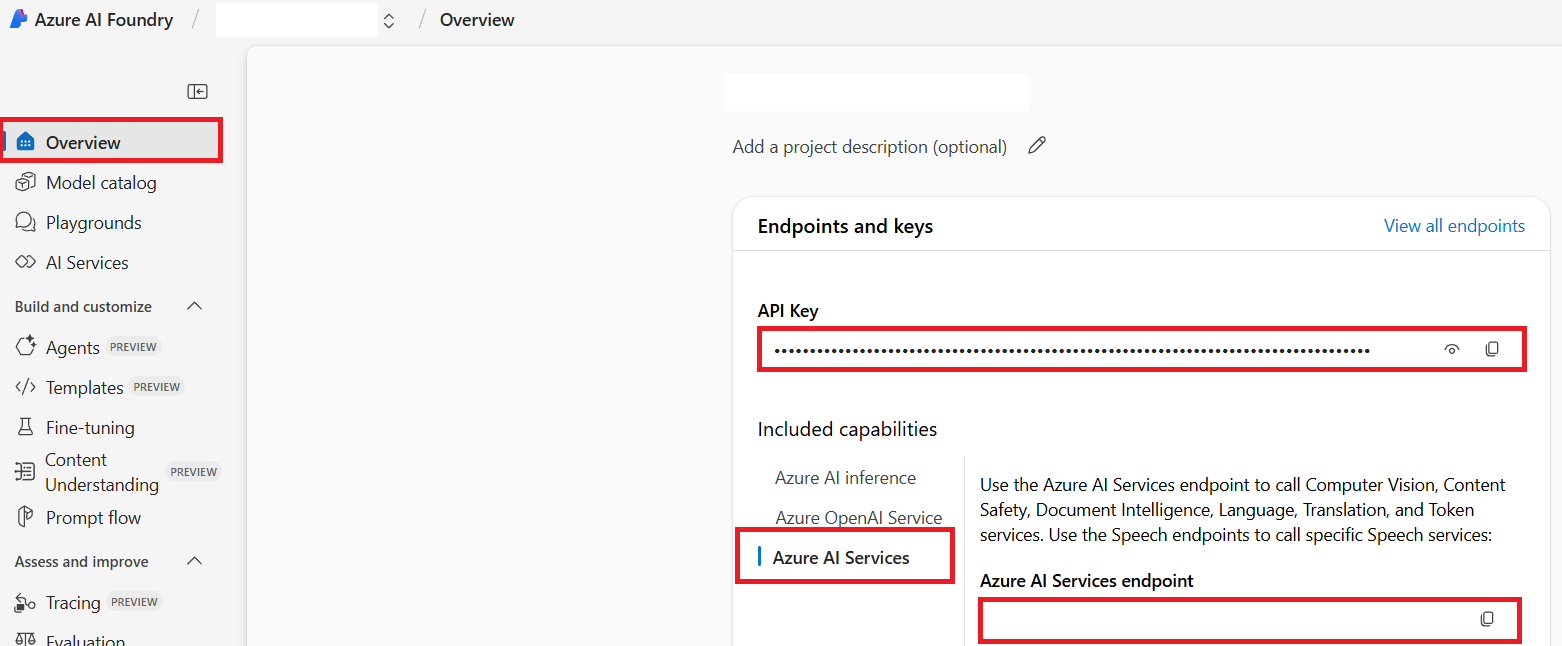
Record:
- Azure AI Service endpoint
- Azure AI Service API key
Environment Variables
Put di credentials for your .env file or CI secrets.
# Azure AI Vision, wey dem need for picture translation
AZURE_AI_SERVICE_API_KEY="..."
AZURE_AI_SERVICE_ENDPOINT="https://<resource>.cognitiveservices.azure.com/"

# Azure OpenAI, wey dem need for text translation
AZURE_OPENAI_API_KEY="..."
AZURE_OPENAI_ENDPOINT="https://<resource>.openai.azure.com/"
AZURE_OPENAI_MODEL_NAME="gpt-4o"
AZURE_OPENAI_CHAT_DEPLOYMENT_NAME="<deployment>"
AZURE_OPENAI_API_VERSION="2024-12-01-preview"
Co-op Translator still dey support optional fallback credential sets. Duplicate whole provider set and add suffix dem like _1 or _2; all variables for one fallback set must get the same suffix.
AZURE_OPENAI_API_KEY_1="..."
AZURE_OPENAI_ENDPOINT_1="https://<resource-1>.openai.azure.com/"
AZURE_OPENAI_MODEL_NAME_1="gpt-4o"
AZURE_OPENAI_CHAT_DEPLOYMENT_NAME_1="<deployment-1>"
AZURE_OPENAI_API_VERSION_1="2024-12-01-preview"
Next Steps
- Go back to Configuration to set up local or CI environment variables.
- Use CLI Reference for translation commands.
- Use GitHub Actions to automate translation pull requests.