Quick Deployment Guide - Non-Production
This guide provides the fastest path to deploying AI Citadel Governance Hub for development and testing environments. For production deployments, see the Full Deployment Guide.
Prerequisites
Required:
- Azure subscription with Contributor or Owner permissions
- Azure Developer CLI (azd) installed
- Azure CLI installed
Optional:
- VS Code with Bicep extension
- Git for version control
💡 Tip: You can use Azure Cloud Shell which has all tools pre-installed.
Private-only Logic App: Ordinary Cloud Shell and public hosted CI runners should not be assumed to reach private SCM. Workflow publishing requires a privately connected machine with suitable DNS; see private publishing prerequisites.
Deployment Options
Getting the template
First, initialize your local project in an empty folder (e.g. ai-hub-citadel-deployment):
azd init --template Azure-Samples/ai-hub-gateway-solution-accelerator -e ai-hub-citadel-dev --branch citadel-v1

# or use git clone:
# git clone https://github.com/Azure-Samples/ai-hub-gateway-solution-accelerator.git
# git checkout citadel-v1

# Make the repository your current directory:
cd ai-hub-citadel-deployment # it may differ if you used git clone
Then proceed to choose your deployment method:
Option 1: Default Quick Deploy (Recommended)
Deploy with minimal configuration using intelligent defaults:
# Authenticate to Azure
# append --tenant-id <your-tenant-id> if needed
azd auth login

# Initialize environment
azd env new ai-hub-citadel-dev-01

# Provision and deploy everything based on defaults
azd up
This will:
- ✅ Create a new resource group
- ✅ Deploy all infrastructure with default settings
- ✅ Create new Virtual Network with private endpoints
- ✅ Create new Log Analytics workspace
- ✅ Deploy 2 AI Foundry instances with sample models
- ✅ Enable all core features (PII detection, content safety, API Center)
The Logic App retains public access by default and does not create its own private endpoint unless explicitly enabled. Other services keep their existing defaults.
Expected deployment time: 30-45 minutes
Option 2: Customized Quick Deploy
Customize key settings using environment variables:
# Authenticate and initialize
azd auth login
azd env new ai-hub-citadel-dev

# Set custom environment variables
azd env set AZURE_LOCATION eastus2
azd env set APIM_SKU Developer

# Deploy
azd up
Common Environment Variables
| Variable | Default | Description |
|---|---|---|
AZURE_LOCATION |
eastus |
Primary Azure region |
APIM_SKU |
StandardV2 |
API Management SKU |
COSMOS_DB_RUS |
400 |
Cosmos DB throughput |
EVENTHUB_CAPACITY |
1 |
Event Hub capacity units |
ENABLE_API_CENTER |
true |
Enable API Center registry |
LOGIC_APP_USE_PRIVATE_ENDPOINT |
false |
Create a Logic App inbound private endpoint |
LOGIC_APP_PUBLIC_NETWORK_ACCESS |
true |
Allow public website and SCM/Kudu access |
For full list of variables, see /bicep/infra/main.bicepparam.
For a private-only initial deployment, set LOGIC_APP_USE_PRIVATE_ENDPOINT to true and LOGIC_APP_PUBLIC_NETWORK_ACCESS to false, and run workflow publishing from a privately connected machine. For existing VNets, also configure the existing DNS zone and links or forwarding. See the Logic App parameter reference for DNS and optional endpoint-name overrides, and the network guide for setup details.
Option 3: Parameter File Deploy
Use the pre-configured dev parameter file:
# Authenticate
azd auth login

# Deploy using parameter file
az deployment sub create \
  --name citadel-dev-deployment \
  --location eastus \
  --template-file ./bicep/infra/main.bicep \
  --parameters ./bicep/infra/main.parameters.dev.bicepparam
The main.parameters.dev.bicepparam file includes:
- Developer SKU for cost savings
- Minimal capacity settings
- Public network access enabled (easier development)
- Application Insights dashboards enabled
- API Center disabled (reduce costs)
Exception: Existing Resource Group Deploy
Use this path only when subscription-scoped deployment is not possible and a resource group already exists. Create your own resource-scope parameter file, such as resources.parameters.dev.bicepparam, with the values for that environment. This exception uses direct Bicep deployment with resources.bicep.
# Preview the resource-group deployment
az deployment group what-if \
  --resource-group <existing-hub-resource-group> \
  --template-file ./bicep/infra/resources.bicep \
  --parameters ./bicep/infra/resources.parameters.dev.bicepparam

# Deploy infrastructure into the existing resource group
az deployment group create \
  --resource-group <existing-hub-resource-group> \
  --template-file ./bicep/infra/resources.bicep \
  --parameters ./bicep/infra/resources.parameters.dev.bicepparam
Deploy the Logic App workflow separately after the infrastructure deployment completes.
If Logic App public access is disabled, publish from a machine that meets the private SCM prerequisites, then complete the private connectivity checks.
Post-Deployment Configuration
1. Verify Deployment
Deployment state are visible under Deployments in used resource group in the Azure Portal.
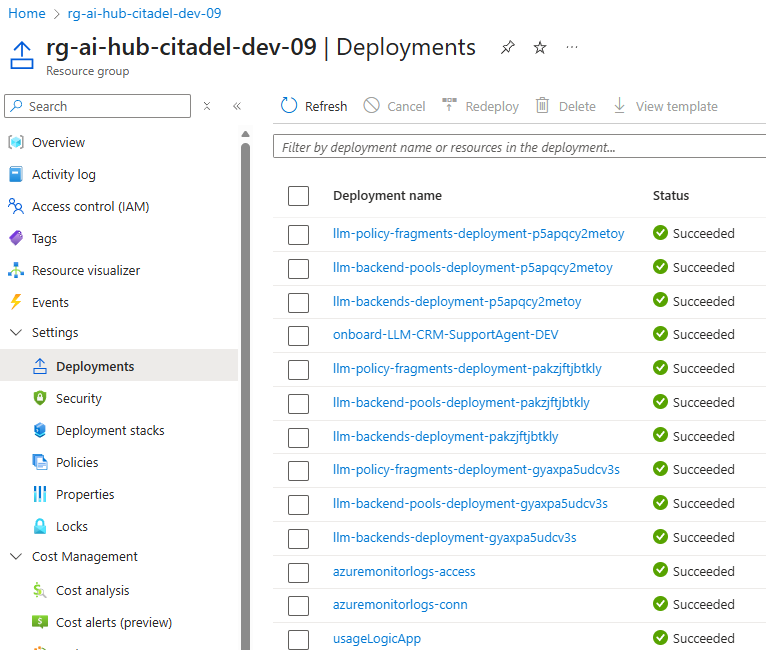
Also you can retrieve key information via AZD CLI:
# Get deployment outputs
azd env get-values
2. Access AI Citadel Governance Hub
Head to validation part of this template to run through various validation and activities related to using Citadel Governance Hub.
Monitor Your Deployment
Application Insights
- Navigate to Azure Portal
- Find Application Insights associated with APIM resource (name:
appi-apim-*) - View:
- Live Metrics
- Application Map
- Failures
- Performance
Usage Analytics
- Navigate to Cosmos DB resource
- Open Data Explorer
- Query
usage-dbdatabase,usagecontainer
SELECT * FROM c
WHERE c._ts > (GetCurrentTimestamp()/1000 - 3600)
ORDER BY c._ts DESC
Clean Up
Remove All Resources
# Delete all deployed resources
azd down --purge
Troubleshooting
Deployment Fails
Check provider registration:
az provider register --namespace Microsoft.ApiManagement
az provider register --namespace Microsoft.CognitiveServices
az provider register --namespace Microsoft.DocumentDB
az provider register --namespace Microsoft.EventHub
az provider register --namespace Microsoft.Insights
az provider register --namespace Microsoft.Logic
Check quota limits:
If you got quota errors, check your subscription limits.
APIM Takes Too Long
API Management deployment can take 30-45 minutes in classic tiers (Developer and Premium). This is normal.
Default Configuration
The quick deployment uses these defaults (from main.bicepparam):
| Component | Setting | Value |
|---|---|---|
| APIM SKU | apimSku |
StandardV2 |
| APIM Units | apimSkuUnits |
1 |
| Cosmos DB | cosmosDbRUs |
400 RU/s |
| Event Hub | eventHubCapacityUnits |
1 |
| Network | useExistingVnet |
false (creates new) |
| Log Analytics | useExistingLogAnalytics |
false (creates new) |
| API Center | enableAPICenter |
true |
| PII Detection | enableAIGatewayPiiRedaction |
true |
Next Steps
For Development:
For Production:
Pro Tips
- Use Azure Cloud Shell - No local setup required
- Start Small - Use Developer SKU and minimal capacity
Need Help?