Deploy full stack with Bicep
Objective
Deploy the Azure infrastructure and the Agent Application with its default
layout: Foundry hosts the orchestrator, Agent App UI runs in Container Apps,
and Foundry IQ manages source ingestion and retrieval. The default
hosted-no-panel layout omits the administrative panel and Agent Application
Cosmos DB. Foundry can require separate backing resources.
This procedure uses the default Bicep provider. For Terraform, use
Deploy full stack with Terraform; application
configuration and deployment are shared.
What you'll have after this runbook
Your Agent Application deployed with a Container Apps UI, a Foundry-hosted orchestrator and native Foundry IQ ingestion and retrieval.
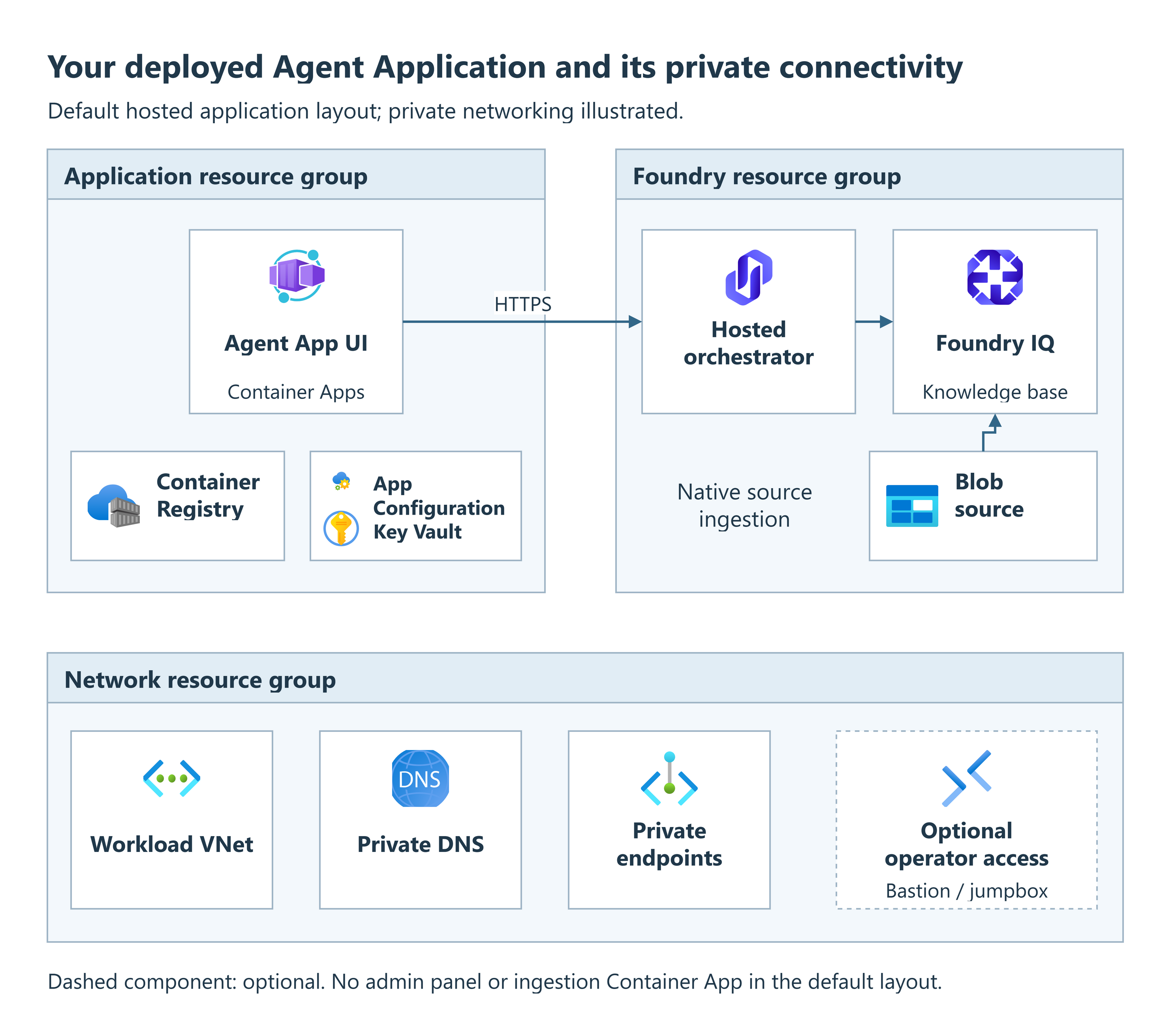
Default hosted application
- Application resource group: Agent App UI runs in Container Apps, alongside Container Registry, App Configuration and Key Vault.
- Foundry resource group: the UI calls the hosted orchestrator over HTTPS. The orchestrator uses the Foundry IQ knowledge base, with native ingestion from the Blob source.
- Network resource group: the illustrated private layout uses the workload VNet, private DNS and private endpoints. Bastion or jumpbox operator access is optional.
Deployment options
This diagram illustrates the default hosted application layout, not a fixed list of resources for every deployment.
Optional components are included only when enabled. The actual resources depend on your application, network and deployment settings; existing resources may be reused.
When to use
Use this runbook for a new Agent Application deployment or to add it to its already configured Agent foundation. For a customer-owned application, use the Bring your own app runbook. Only need infrastructure? Use the Deploy infra only runbook. For the relationship between the template, its manifest and lifecycle hooks, see How it works.
Prerequisites
Review the capability readiness matrix before choosing acceptance criteria: the supplied chat, optional capabilities and protected retrieval do not have the same integration requirements.
- Permissions: Contributor for resource deployment plus
Microsoft.Authorization/roleAssignments/writeat the required scopes, for example through Role Based Access Control Administrator. Service configuration needs separate data-plane roles. Shared networks, DNS and monitoring can require additional scoped access. Subscription Owner is not a blanket prerequisite; see resource group permissions and default hosted permissions. - Subscription readiness: accepted Responsible AI terms, registered resource providers, supported service/model regions and sufficient quota for the selected parameters. Review regional considerations for constraints that preflight cannot eliminate.
- Private deployments: an authorized deployment host connected to the Azure virtual network (VNet), directly or through a virtual private network (VPN). It must resolve private service hostnames. An Azure Container Registry (ACR) Tasks build pool is not that host.
- Identity inputs: obtain the delegated Foundry audience and tenant consent
plan from your identity administrator.
HOSTED_AGENT_RESOURCE_SCOPEmust be that audience followed by/.default, for examplehttps://ai.azure.com/.defaultwhen that is the deployed audience. It is not the UI'sapi://<client-id>/user_impersonationlogin scope. - Application access: arrange the Entra registration, HTTPS callback, Key Vault credential reference and user permissions in the ordered login setup. Complete its registration/consent steps before provision, then its callback/settings steps once the frontend URL is available. Deployment does not perform tenant consent.
Protected retrieval keeps the signed-in user's permissions
The UI and hosted maf_lite strategy integrate delegated Search
authorization with RETRIEVAL_AUTH_MODE=native_search. The UI performs
the downstream OBO exchange; the hosted connector supplies that credential
to Search separately from its workload transport identity. A custom
Toolbox integration is not required for this built-in path.
Arrange downstream consent and source permissions, retain permission ingestion, and verify an allowed and a denied user before admitting sensitive content. Missing credentials fail closed. Do not enable anonymous retrieval, substitute service identity or weaken source permissions to recover from an authorization failure.
| Tool | Required for |
|---|---|
Azure Developer CLI (azd) and Azure CLI (az) |
Provisioning and lifecycle hooks; use current supported versions |
| PowerShell 7 | Windows hooks and cross-platform preflight checks |
| Bash, jq and curl on Linux/macOS | POSIX hooks and dependency bootstrap |
| Git | Fetching selected, pinned application sources |
| Python 3.12 with pip and venv | Validation, composition and service configuration |
Foundry agents azd extension (azure.ai.agents) |
Hosted deployment; install with azd extension install azure.ai.agents if absent |
Blocks marked bash use Bash syntax. In PowerShell, put commands with a
trailing backslash (\) on one line and remove the continuation backslashes.
Replace every <placeholder>. Run powershell blocks as written.
Cost and time
Provisioning creates billable resources before the application is ready. Review the foundation inventory and cost scenarios and cost guide, then budget for application runtime, model usage and data. First deployments take longer because of resource creation, image builds, role propagation and private-link approvals. No fixed completion time is guaranteed.
Procedure
Run Steps 1-4 in order. After selecting a checkout, run lifecycle commands from its platform root with the intended environment selected.
Step 1: Get the code
git clone https://github.com/Azure/agent-landing-zone.git
cd agent-landing-zone
The checkout's manifest.json pins the compatible runtime components;
the deployment hooks fetch them automatically.
Alternatively, azd init -t Azure/agent-landing-zone initializes the current
default template in an empty directory. Reuse the environment it creates rather
than creating it again in Step 2.
Prepare Python
From the repository root:
python -m venv .venv
On Linux/macOS, use python3 if python is unavailable. Activate
.\.venv\Scripts\Activate.ps1 in PowerShell or
source .venv/bin/activate in Bash. Install the dependencies:
python -m pip install -r config/requirements.txt
Keep this environment active for the lifecycle commands.
Working from your own repository
An unmodified deployment needs only the platform checkout. Hooks fetch selected runtime components automatically; four forks are not required. Fork or mirror the platform when you maintain deployment inputs or automation, and fork only the runtime components whose source you change.
Keep reviewed, nonsecret inputs in source control and apply them explicitly
with azd env set; an environments/ folder is not loaded automatically.
Protect .azure/, credentials, sibling component workspaces and deployment
logs. For private components, configure Git read access on the actual deployment
host separately from Azure authentication. Never embed tokens in repository URLs.
See Custom applications for source pinning and composition.
Step 2: Select the deployment target
The following creates a new environment. Replace all placeholders:
az login
azd auth login
az account set --subscription <subscription-id>
azd env new <environment-name>
azd env set AZURE_SUBSCRIPTION_ID <subscription-id>
azd env set AZURE_LOCATION <region>
For an existing environment, use azd env select <environment-name> instead
and preserve its approved inputs. Isolate DEV, TEST and PROD with separate
environments, resource groups, identities, configuration stores, secrets and
data. Promote the same reviewed source revision with stage-specific inputs.
New environments use three resource groups:
rg-<environment-name> for Foundry, rg-<environment-name>-app for the
application and rg-<environment-name>-network for workload networking.
To choose a different Foundry/root name, set AZURE_RESOURCE_GROUP before
provision. The hook creates missing additional groups by default; the deploying
identity needs permission to create them. To reuse pre-created groups or select
one or two groups, set the
resource group destinations
now. Existing environments keep their mapping.
Step 3: Choose the application and network
Set the deployment choices below in the selected azd environment with
azd env set before provisioning. Settings containing lists or groups of related
fields go in the root main.parameters.json file, as described in the linked
infrastructure choices.
How it works explains input processing;
Deployment settings identifies input ownership.
Orchestrator topology
Set the default layout explicitly for this new environment.
DEPLOYMENT_TOPOLOGY chooses the runtime layout, not the VNet design:
azd env set DEPLOYMENT_TOPOLOGY hosted-no-panel
azd env set HOSTED_AGENT_RESOURCE_SCOPE <approved-foundry-audience>/.default
azd env set DEPLOY_INGESTION_CONTAINER_APP false
Expect no administrative panel or Agent Application Cosmos DB. Preserve the
recorded layout when recovering an existing environment. See
Hosted agents for separately configured capabilities.
Keep the runtime strategy AGENT_STRATEGY=maf_lite and retrieval backend
RETRIEVAL_BACKEND=foundry_iq; inspect their effective agent-lz settings
after service configuration. Runtime keys are not all azd env inputs.
Ingestion and custom applications
Use native Foundry IQ ingestion for the configured Blob source. Keep its protected source policy; source ingestion does not prove user-authorized retrieval works. Review Ingestion if conversation uploads or custom processing are required. They are additional capabilities, not default deployment steps.
For a different application, stop here and follow the Bring your own app runbook before first provision. One environment binds to one application ID.
Network and build mode
Use private networking for production and workloads with sensitive data. Choose a self-contained private network or a private connection to your organization's existing hub.
The template defaults to NETWORK_ISOLATION=false, so set true explicitly
before provisioning a private environment. Public endpoints are an exception for
approved, short-lived evaluations or demonstrations without sensitive data,
not the recommended production setup.
| Choice | Inputs and preparation |
|---|---|
| Private, self-contained network | azd env set NETWORK_ISOLATION true; review the standalone design |
| Private spoke using an existing hub | NETWORK_ISOLATION=true, explicit hub routing, peering, DNS and shared-service inputs from the hub-and-spoke reference |
| Existing VNet | Choose subnet ownership and apply the matching inputs; review delegations and NSGs before provision |
| Public service endpoints, evaluation only | Read the public-endpoint conditions and commands first. Authentication does not make an endpoint private. |
Apply the approved foundation inputs from
infrastructure choices.
Do not change NETWORK_ISOLATION on an existing environment as a retry shortcut.
With isolation enabled, run configuration, preparation and deployment from the
connected host. If creating that host first, use the
deferred post-provision procedure.
| Image build path | Selection |
|---|---|
| Public registry, remote builds | Set BUILD_MODE to acr-task with the command below; builds use regular ACR Tasks |
| Private registry, remote builds | Also set DEPLOY_ACR_TASK_AGENT_POOL to true before provision; builds use the provisioned VNet pool |
azd env set BUILD_MODE acr-task
For the private registry path, also run:
azd env set DEPLOY_ACR_TASK_AGENT_POOL true
Hosted image preparation uses Azure Container Registry (ACR) Tasks, not local Docker. With isolation enabled, keep the private build pool. See network isolation for build egress, DNS and private-link readiness requirements.
Step 4: Deploy
Deployment has two stages: provision creates and configures the Azure resources; deploy builds and publishes the application. Run both from the platform root with the same azd environment selected.
Before you deploy
Confirm the runner has Foundry agent authoring access on the exact project (Foundry User or an appropriate equivalent), account read access and the required scoped role-assignment authority. Review private-runner permissions and hosted identities for the required scopes.
Review the resource scopes, public access, routes and role changes before
approving provisioning. Also review the application's
outbound network requirements
with python -m config.deployment.egress --plan --environment <environment-name>.
Deployment applies managed firewall rules automatically. If you use an external
firewall, give the generated report to its owner to arrange the required access.
Default Foundry orchestrator (hosted-no-panel)
For a new environment, run these commands in order:
azd provision
azd deploy
Alternatively, run azd up to perform both stages in one command.
These commands work on Windows, Linux and macOS. The normal deployment runs
its configuration checks automatically; no manual preparation command is needed.
Optional: check configuration before provisioning
For an early check before azd provision, the following commands show the
selected subscription, environment and region, then validate the application
definition and check that it matches the environment:
azd env get-value AZURE_SUBSCRIPTION_ID
azd env get-value AZURE_ENV_NAME
azd env get-value AZURE_LOCATION
azd hooks run preup
Running this check manually is recommended but optional. azd provision
also validates the configuration; azd up runs preup automatically.
| Stage | Result |
|---|---|
| Provision | Creates the foundation and configures its services; no running hosted agent or placeholder image is created |
| Deploy: image | Automatically fetches the pinned orchestrator source, builds its hosted image when needed, records an immutable digest and binds it to the existing foundation |
| Deploy: applications | Creates the hosted version, bootstraps its limited runtime grants, tests a greeting and deploys selected apps |
Image preparation is part of azd deploy; no separate preparation command or
second provision is required. If provisioning deferred configuration, complete
that work from a connected host before deployment. Do not replace the digest
with an image tag or bypass permission, network or configuration failures.
For an already configured infrastructure-only environment, reuse the same
checkout, inputs and bound application, then run azd deploy.
Review hook logs even after success: some configuration sections can log
failures and continue. Resolve those failures before validation.
Optional: preview infrastructure changes before deployment
You do not need a preview for the normal deployment above. If you want to run
azd provision --preview, first follow the
preview preparation instructions.
Unlike normal provisioning, preview skips the preparation hook, so you must
prepare the selected environment's parameters and any additional resource groups
first. This preparation can create resource groups. Neither preparation nor
preview confirms that private application connections work.
For an initial deployment, continue to Validation now. Use the maintenance procedures below only for a later operational change.
Lifecycle preparation
Run these tasks from the platform root with the intended environment selected, Python active, both CLIs authenticated and private connectivity available when required. Record the source revision, manifest, definition, approved inputs and hosted digest before a change. Back up configuration and relevant data using service-specific procedures.
Reapply a reviewed deployment
- Select the reviewed compatible source and pin files. Keep the platform's
infra/with that source, rather than replacing only that directory. - Preserve the environment's layout, component selection, names and source bindings. Back up affected data and separately managed configuration.
- If previewing, follow the selected-environment preparation,
then review infrastructure changes with
azd provision --preview. - Run Step 4. Deployment prepares the image automatically, including when its recorded generated-source provenance is stale.
- Repeat Validation before promotion.
Redeploy applications only
When foundation outputs, application binding and component selection remain compatible:
azd deploy
Agent Application Container Apps use the manifest's verified sibling checkouts. Preserve
local work and relocate a stale checkout so the hook can fetch the selected
revision; it does not advance an existing checkout automatically. Child logs
are under each component's .logs directory and can contain sensitive details.
Hosted deployment reuses a generated digest only when its recorded source pin
and startup command match. Missing or stale generated images are built during
azd deploy, without another provision.
An operator-managed digest is not rebuilt automatically: verify its provenance,
compatibility and registry availability. When rebuilding the same source in
each environment, compare the resulting image digests before promotion.
Infrastructure, RBAC, topology or ingestion-selection changes require the full workflow, not deploy-only. Changing a selection does not delete previously deployed resources or revoke old permissions; retirement is separately authorized.
Change a runtime setting
First check Deployment settings for ownership and overwrite behavior. Provisioning-managed inputs must be changed in their source and applied through the full workflow. For a directly managed, nonsecret runtime key:
az appconfig kv set --endpoint <app-config-endpoint> --auth-mode login \
  --key <KEY> --value <value> --label agent-lz --yes
Restart each affected Container App revision to reload configuration:
az containerapp revision restart -g <resource-group> -n <container-app-name> \
  --revision <revision-name>
For a hosted version, run root azd deploy with the compatible handoff.
Process environment inputs declared in hosted-agent/azure.yaml are immutable
version inputs and require a new agent version. An App Configuration edit
cannot replace a process-only setting such as APP_CONFIG_TLS_COMPATIBILITY.
Use agent-lz within each environment's separate configuration store.
Rotate a secret
Inspect the Key Vault reference before rotating. An unversioned URI resolves the current secret version when configuration reloads; a versioned URI must be updated deliberately. Add the new secret version through your approved secure process, preserve required access, then restart affected Container App revisions or redeploy the hosted version. Verify the new credential before retiring the old one. Never place secrets in plaintext App Configuration or command logs.
Recover hosted runtime access
The Agent Application post-deploy hook normally bootstraps the discovered runtime principal. To review the exact read-only role plan from the root's selected environment:
python -m config.deployment.hosted_access --azd-env --plan
An authorized administrator can reconcile only that plan with the idempotent wrapper:
pwsh scripts/bootstrapHostedAccess.ps1
On Linux/macOS use ./scripts/bootstrapHostedAccess.sh. The wrapper selects
hosted-agent / orchestrator-agent by default; custom services use their own
project/service context. Allow role propagation, then retry root azd deploy
so the greeting and remaining deployment gates run before cutover.
The closed bootstrap set grants App Configuration Data Reader, model access, native retrieval's scoped Search transport access and, when configured, access to the exact audit secret. It is not a grant to delegated users or a replacement for all capability profiles. Do not grant Owner or remove unrelated assignments to recover. See hosted identities.
Remove an environment
Destructive action
Use the commands below only for an environment whose entire deletion scope is dedicated to this deployment and approved for removal. Confirm the subscription, resource group and deletion prompt. Export or back up required documents, indexes, configuration and conversation data. If the scope contains shared resources or retained data, stop and arrange itemized removal with the owners instead. Check retention obligations first.
For the default three-group layout, or any other multi-group path, inventory every configured destination
and its shared dependencies before cleanup. The root group alone is not the
complete inventory. A predown safety hook blocks azd down for split-group
deployments, with no automatic deletion or bypass option.
Arrange itemized,
owner-approved manual removal instead; do not bypass the hook or delete shared
groups. Additional groups created by the feature are not tagged azd-env-name.
Partial provisioning is not authorization to delete a group. The single-group
path below is unchanged.
azd env select <environment-name>
azd env get-value AZURE_SUBSCRIPTION_ID
azd env get-value AZURE_RESOURCE_GROUP
azd down
Do not add purge options as a retry. Permanent deletion requires separate authorization and removes recovery options. Reused resources outside the deletion scope and manually created links can remain and continue incurring charges. For a spoke, retire only its own hub peering/DNS links with their owners; do not delete shared hub, DNS or monitoring resources.
Related runbooks
- Connect Copilot Studio to a private Foundry agent
- Deploy infra only
- Deploy with Azure DevOps for optional reviewed promotion and automation
Validation
-
Confirm the platform revision and frontend source, then inspect the deployed Container Apps rather than accepting a placeholder response:
git rev-parse HEAD
git -C ../agent-app-ui rev-parse HEAD
git -C ../agent-app-ui status --porcelain
azd env get-value AZURE_RESOURCE_GROUP
azd env get-value AZURE_APP_RESOURCE_GROUP
az containerapp list -g <application-resource-group> \
  --query "[].{name:name,state:properties.runningStatus,revision:properties.latestReadyRevisionName}" -o table
Compare the platform commit with your approved record and the UI commit with its
manifest.jsonentry. The UI source should have no unexpected edits; matching HEAD alone does not prove the built source was unchanged. Apply the same check to ingestion only when that component is selected.The automatic hosted build clones the pinned orchestrator into a temporary directory; a sibling
agent-app-orchestratorcheckout is not required and is not evidence of the image that was deployed. -
Read
AZURE_CONTAINER_REGISTRY_ENDPOINTfor the registry login hostname. The hosted repository isHOSTED_AGENT_IMAGEwhen explicitly set, otherwiseagent-app-orchestrator, as declared inhosted-agent/azure.yaml. For an automatically generated image, readazd env get-value HOSTED_AGENT_IMAGE_SOURCE_COMMITand compare it with the orchestrator commit inmanifest.json. Retain the build record andHOSTED_AGENT_IMAGE_STARTUP_COMMAND_SHA256as startup provenance. For an operator-supplied digest without generated-source metadata, require the image owner's build/provenance record instead; do not assume the manifest proves its source.Use that registry's resource name, repository and recorded digest below (
<sha256-digest>includes thesha256:prefix):azd env get-value HOSTED_AGENT_IMAGE_VERSION az acr repository show --name <registry-name> \ --image <hosted-repository>@<sha256-digest> --query digest -o tsvExpect the exact same
sha256:value, not merely matching tags. In Foundry, inspect the actively routed agent version and confirm its full image reference uses that registry, repository and digest. Record the agent name/version with the source and build evidence. Local source or registry existence alone does not prove that version is serving requests. -
Open the frontend URL from the deployment outputs or UI ingress configuration. Use a connected browser for private endpoints. Complete Entra sign-in and delegated authentication.
- Exercise an agent task and configured tools with representative identities. For documents, ingest a harmless test document through the configured source. With the integrated delegated retrieval path and downstream consent, test both permitted retrieval and denial to a user without that document's permission. Test uploads only when their additional capabilities are selected.
- Correlate the task with runtime telemetry. The deployment's greeting checks basic response only; test actual UI login, OBO and source authorization.
Record unmet capability gates as blocked, not passed. Without validated continuity, chat context lasts only for the active UI session. Default deployment does not promise persistent history, feedback integration or uploads. Use Troubleshooting for failures.
For optional channel distribution after acceptance, use the Publish to Teams and M365 runbook. Publication is not part of this deployment.
Rollback
- Stop promotion and record the failed revision, inputs and deployed state. Select the previous tested complete compatible combination, not an independent component tip. Check compatibility with current data and settings.
- Restore the recorded platform commit, manifest, definition and reviewed parameters without overwriting uncommitted work. Align existing sibling checkouts with the restored manifest after preserving their local work.
- Preview infrastructure or configuration reversals before applying them. Keep the approved authentication and network posture.
- Follow Step 4 with the previous compatible source and inputs: provision, then deploy; deployment prepares the pinned image automatically. If retaining an operator-managed digest, verify its availability and compatibility; deployment does not rebuild it.
- Restore directly managed runtime keys separately from the source checkout, reload affected components and repeat Validation before cutover.
Restoring code does not restore data or reverse schema changes. If reversal is unsupported, arrange an approved forward repair or service-specific recovery. Do not delete the environment as rollback.