Agent Landing Zone
Agent Landing Zone provides Azure infrastructure for agents and the Agent Application, a reference application built on Microsoft Foundry. The infrastructure includes the selected networking, identities, AI services and data stores. It can run the Agent Application or your own application.
An agent uses an AI model to answer questions and can call configured tools. The supplied application provides web chat and can retrieve information from connected knowledge sources.
Source code: Azure/agent-landing-zone
Architecture overview
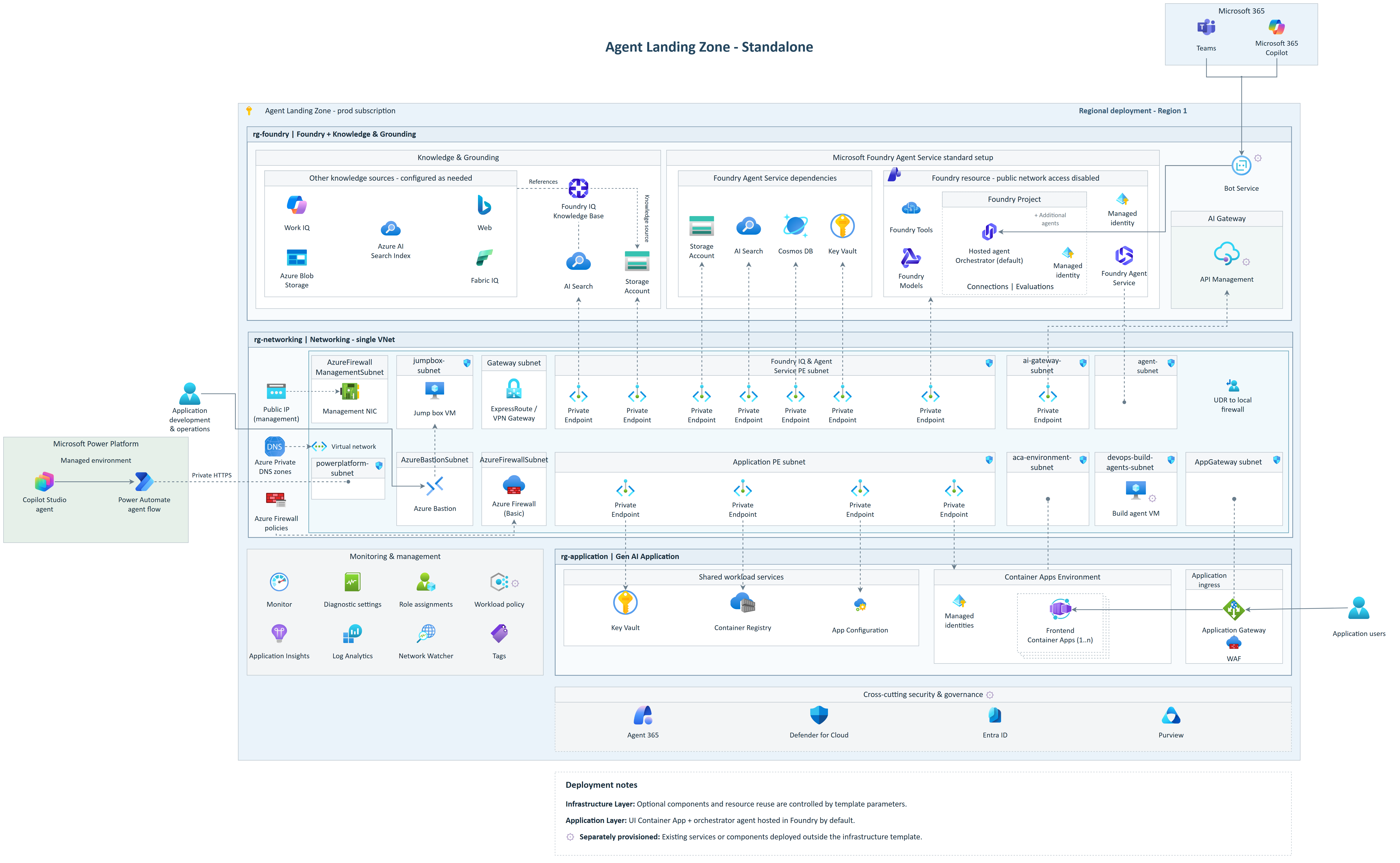
Infrastructure and application
The deployment template creates Azure resources separately from the application code that runs on them. Choose the outcome first, then the infrastructure provider. Bicep is the default; integrated Terraform uses the same azd application lifecycle.
| Outcome | With Bicep | With Terraform |
|---|---|---|
| Deploy infra only: create and configure Azure resources without application code | Runbook | Runbook |
| Deploy full stack: create infrastructure and deploy the Agent Application, including a Foundry hosted agent | Runbook | Runbook |
The default full-stack deployment runs the agent in Foundry Agent Service, the Microsoft Foundry service that hosts and operates agents. A web chat interface connects users to it. Agent Application explains the components, knowledge sources and application behavior.
The planning and Agent Application pages explain concepts and settings. Execution steps stay together in the Runbooks, with prerequisites, commands, validation and rollback.
Where do I start?
- What does the template do? How it works introduces the deployment flow and explains where settings belong.
- What needs planning? Deployment choices covers resources, network integration and deployment tools. The Design checklist supports architecture and security review.
- How much capacity and budget are needed? Sizing and capacity and Cost planning describe the starting points.
- Do I only need Azure resources? Deploy infra only with Bicep or with Terraform.
- Do I want the supplied application running? Deploy full stack with Bicep or with Terraform.