Workflows & human input
A Microsoft Agent Framework (MAF) Workflow is a published process with explicit steps, conditions and typed input. It is not a chat prompt that happens to ask for approval. Use a conversational Agent for open-ended chat and a Workflow when the application must track a process and wait for an authorized person.
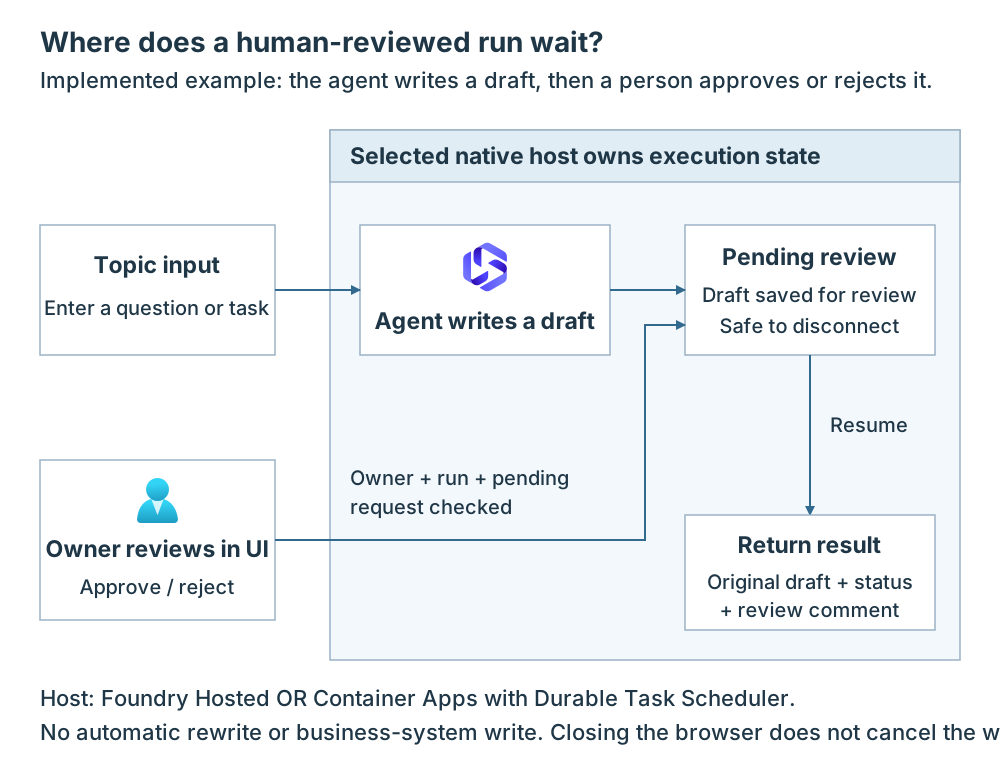
The native host persists the wait. A topic produces a draft and a pending review request. The authenticated owner submits approval or rejection through the UI; the native workflow returns the draft and decision. This reference process does not write to a business system.
Before you start
Have a provisioned application, working UI sign-in and a compatible workflow image. The deployment identity prepares resources and grants; the runtime identity calls its configured model/tools; the authenticated user owns the run. Use synthetic topics until source access and denied-user checks pass. The host activation procedure links the provider-specific prerequisites.
Select the process experience
APPLICATION_MODE selects conversational, workflow or both; the default
is conversational. The UI presents a named process alongside chat when both
are selected. It does not expose a hosting or strategy picker.
ORCHESTRATION_HOST selects hosted or container_apps.
Hosted publishes the conversation and workflow separately, with distinct
endpoints. Container Apps uses the official standalone Durable Extension
worker/client and Durable Task Scheduler (DTS).
See Agent hosting and
native execution selection.
Human review
The reference application includes a draft-and-review workflow. It accepts a user-supplied topic and runs the configured agent to produce a draft, using its enabled tools when needed.
The workflow pauses for a person to approve or reject the draft, with an optional comment. It then finishes by returning the original draft, the decision and the comment.
Approval is not permission to write to a business system. Connecting a production write action requires its own tool authorization, idempotency and approval policy.
The native registrations are agent-lz-conversation for the conversational Agent
and agent-lz-research-review for the review Workflow.
The process business input is:
{"topic":"Summarize the document retention policy"}
Human review supplies the typed business reply:
{"decision":"approve","comment":"The summary is ready to use"}
decision is approve or reject. These are business inputs passed through
the selected host's native client, not one universal HTTP protocol.
Topic input is at most 8,000 characters and review comment at most
4,000. Native terminal output is ResearchReviewResult, not an invented
conversation envelope.
The pending request/run identifiers come from native state and must match
before a reply is sent.
Try the reference process
- Before provision, from the platform root set
azd env set APPLICATION_MODE workflow(orboth) and select one host. Follow the full-stack procedure through provision, post-provision login and deploy. Workflow selection creates UI metadata even with history disabled. - After deploy, confirm
agent-lz-research-reviewis registered and the UI uses its workflow endpoint or matching durable binding. Do not reuse the Hosted conversational publication endpoint. - At runtime, follow the steps below with the topic and decision shapes
above. Expect
approvedorrejected, the originaltopicanddraft,review_commentandconfiguration_revision. - Repeat with rejection, reconnect and a stale/duplicate reply. Check the acceptance checks, not only the submission message.
The UI supplies native pending identifiers; do not make up a request_id,
revision or owner. For scripted authenticated checks, use the
API reference rather than treating
the business JSON examples as complete HTTP requests.
Complete a review
- Sign in and start the published process with the required input.
- The workflow performs its configured research/draft step and reaches native pending human input.
- Chainlit displays actions for that pending request. Review the content before submitting the requested choice.
- The BFF checks the authenticated owner, run and currently pending request before forwarding the reply through the selected official client.
- The native workflow resumes and returns the approved or rejected result.
Rejection returns a
rejectedresult; neither decision writes to a business system in the supplied graph.
The authenticated UI exposes /api/native/sessions/{id}/start, /progress
and /actions. Start carries topic; actions carry the current request_id,
revision and business response. Progress returns id, status, pending,
revision and output. Unknown/nonowned IDs return 404 before backend
access and stale/duplicate actions return 409.
Delivery reported as submitted is not worker admission or completion. Read progress for the actual native result.
Hosted start uses stored Responses input. Pending request_info is a native
function_call with arguments.request; reply uses previous_response_id
and function_call_output with its actual call_id.
DTS uses native typed
state/output and the runtime's native.contracts codecs. Do not flatten
typed list/yield output or replace it with a custom workflow protocol.
Private attachments are not supported in this workflow.
Disconnect and resume
Foundry or DTS persists the pending human input. A browser socket, Chainlit timeout or waiting Python coroutine is not the system of record. Closing the browser does not approve or reject a process.
Reconnect through the authenticated UI and reopen the same owner-bound run.
Known workflow resume is available with ENABLE_CHAT_HISTORY=false;
saved listing and history reads require that flag to be enabled.
The client reads current native state before displaying a pending action. Replies for a stale request, another run or an already completed action must not advance an execution. Duplicate submission is not a second approval.
Do not recreate a workflow as a new run simply because a progress stream disconnected. Check the existing native run and report state-read failures.
Configuration and authorization
A run captures its functional App Configuration values when it starts. Supported dynamic changes affect new runs after refresh, not the functional snapshot of a run already waiting for review.
Authorization is not part of that frozen snapshot. Recheck the current user, ownership, pending request and source/tool permissions on each interaction. A shared managed identity, session/run ID or body-supplied user claim is not end-user authorization. Missing trusted context fails closed. See Sign-in & access.
Operate each host explicitly
| Concern | Hosted | Container Apps |
|---|---|---|
| State and pending requests | Native Foundry workflow persistence | Native durable workflow state in DTS |
| Client | Official Hosted Responses integration | Official durable client |
| Availability | Published workflow and its service dependencies | Worker availability, scheduler connectivity and dependency access |
| UI progress | Selected Hosted protocol | Durable process progress; not a promise of per-token streaming |
The product metadata store keeps owner maps, display information and feedback.
Its /principal_id value is tid:oid. It contains no transcripts, file bytes
or tokens. Workflow mode and both select it even when history and feedback
are off.
It is not a second copy of execution checkpoints. Redis is not required to imitate Hosted streaming. No ALZ queue, scheduler or custom workflow-state engine is introduced.
For operational failures, follow Troubleshooting.
Acceptance checks
Before admitting users, verify the exact deployed application:
- A process reaches pending review and is read from a fresh authenticated client after disconnect.
- A Container Apps workflow remains pending across an owned worker restart, then resumes to the deterministic expected result.
- Approval and rejection return their respective
approvedandrejectedstatuses with the original draft; neither performs an external write. - Duplicate, stale, wrong-request, wrong-run and different-owner replies do not advance another or completed execution.
- A functional configuration update affects a new run while the waiting run retains its snapshot; revoked authorization still blocks interaction.
Use published compatible SDK packages and bounded tests with synthetic data. Local mocks and a sample-only cloud run do not establish support for a different product image, private-network parity, long-duration recovery or exactly-once external writes.