Regional qualification determines which Azure regions should be prepared to support workload requirements. It does not determine whether an individual workload should use multiple regions or define its multi-region architecture. Those are workload-specific design decisions. Use the following four checks to evaluate candidate regions consistently.
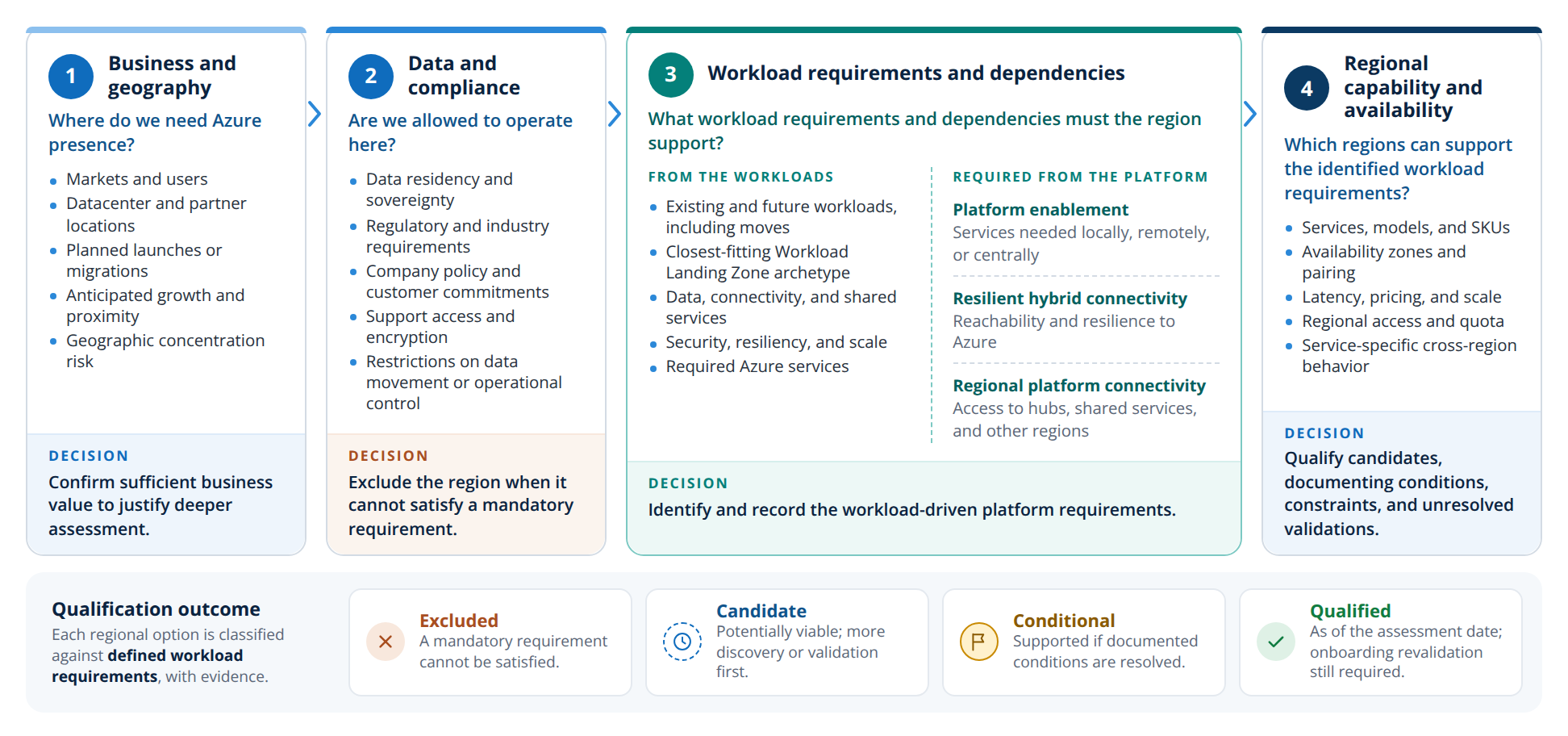
- Markets and users
- Datacenter and partner locations
- Planned launches or migrations
- Anticipated growth and proximity
- Geographic concentration risk
Confirm sufficient business value to justify deeper assessment.
- Data residency and sovereignty
- Regulatory and industry requirements
- Company policy and customer commitments
- Support access and encryption
- Restrictions on data movement or operational control
Exclude the region when it cannot satisfy a mandatory requirement.
- Existing and future workloads, including moves
- Closest-fitting Workload Landing Zone archetype
- Data, connectivity, and shared services
- Security, resiliency, and scale
- Required Azure services
Identify and record the workload-driven platform requirements.
- Services, models, and SKUs
- Availability zones and pairing
- Latency, pricing, and scale
- Regional access and quota
- Service-specific cross-region behavior
Qualify candidates, documenting conditions, constraints, and unresolved validations.
| Check | Question | Decision | Outcome if not met |
|---|---|---|---|
| 1. Business and geography | Where do we need Azure presence? | Confirm that the region has sufficient business value to justify deeper assessment. | No deeper assessment is needed. |
| 2. Data and compliance | Are we allowed to operate here? | Exclude a region when it cannot satisfy a mandatory data, compliance, or policy requirement. | Excluded. |
| 3. Workload requirements and dependencies | What workload requirements and dependencies must the region support? | Identify and record the workload-driven platform requirements that check 4 validates and step 3 uses. | Candidate while requirements aren't known. Complete discovery, or set guardrails and assess at onboarding. |
| 4. Regional capability and availability | Which regions can support the identified workload requirements? | Qualify candidate regions, documenting conditions, constraints, and unresolved validations. | Conditional, or excluded if the gap is mandatory. Record material gaps, required changes, and validation owners. |
A region that meets all four checks is qualified for the defined workload requirements as of the assessment date.
Tip
Use the region planning workbook to answer the four checks for each candidate region, compare service availability, prices, and latency, and export the result to Excel.
Assessment outcome#
Consolidate the workload requirements and platform needs identified through the four checks. Assess each candidate region against the same criteria and document the result, key tradeoffs, and outstanding validation. Reuse the assessment in architecture reviews and regional planning.
Classify each regional option as:
- Excluded: A mandatory requirement cannot be satisfied.
- Candidate: The region is potentially viable, but additional discovery or validation is required before qualification.
- Conditional: Current evidence supports the defined workload requirements if one or more documented conditions are resolved.
- Qualified as of the assessment date: Current evidence supports the defined workload requirements, platform ownership is established, and workload-onboarding revalidation is still required.
Record the evidence date, review date, workload requirements in scope, key constraints, outstanding validations, owner, and revalidation triggers. Add the platform connectivity profile when you select it in step 3.
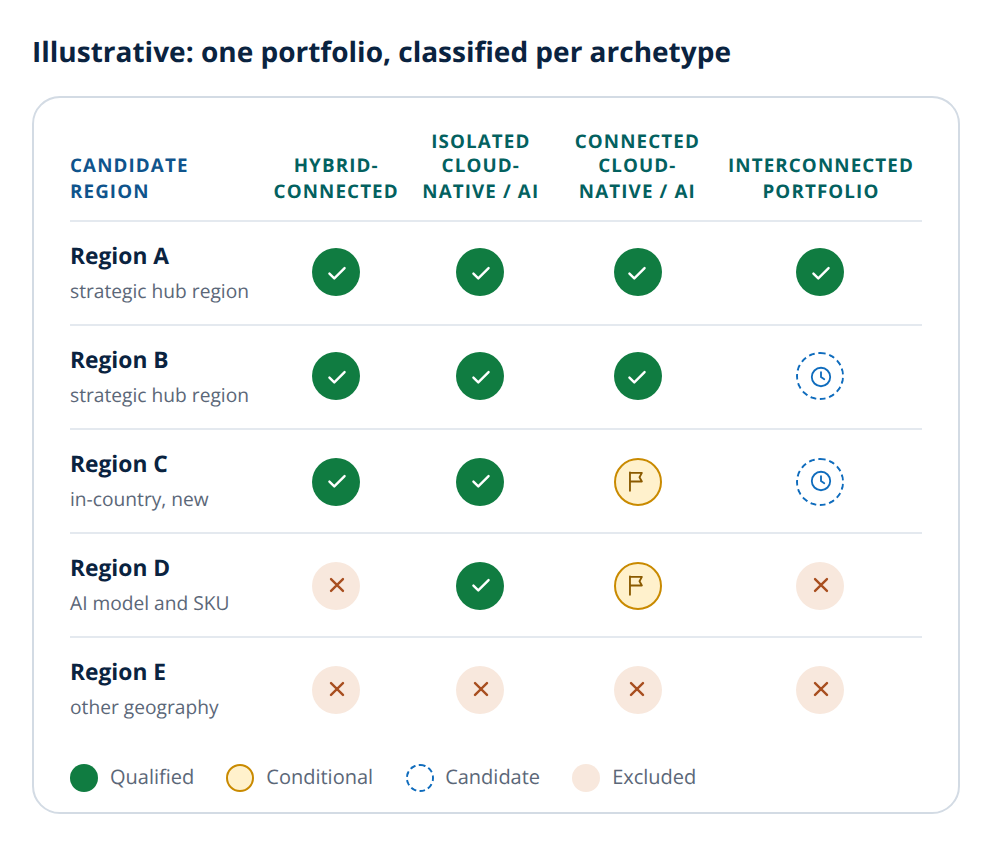
| Candidate region | Hybrid- connected | Isolated cloud-native / AI | Connected cloud-native / AI | Interconnected portfolio |
|---|---|---|---|---|
| Region Astrategic hub region | ||||
| Region Bstrategic hub region | ||||
| Region Cin-country, new | ||||
| Region DAI model and SKU | ||||
| Region Eother geography |
The same region can be qualified for one set of requirements, conditional or a candidate for another, and excluded for a third. Qualification is a dated planning input, not permanent approval; decision-time validation at onboarding remains authoritative.
Should this region be qualified?#
Apply the tree per candidate region and set of defined workload requirements. Each question is one of the four checks. Use the tree to structure the conversation, not as a gate: most paths are short, and a "no" or "not yet" is a valid, low-cost answer that you record and revisit when conditions change.
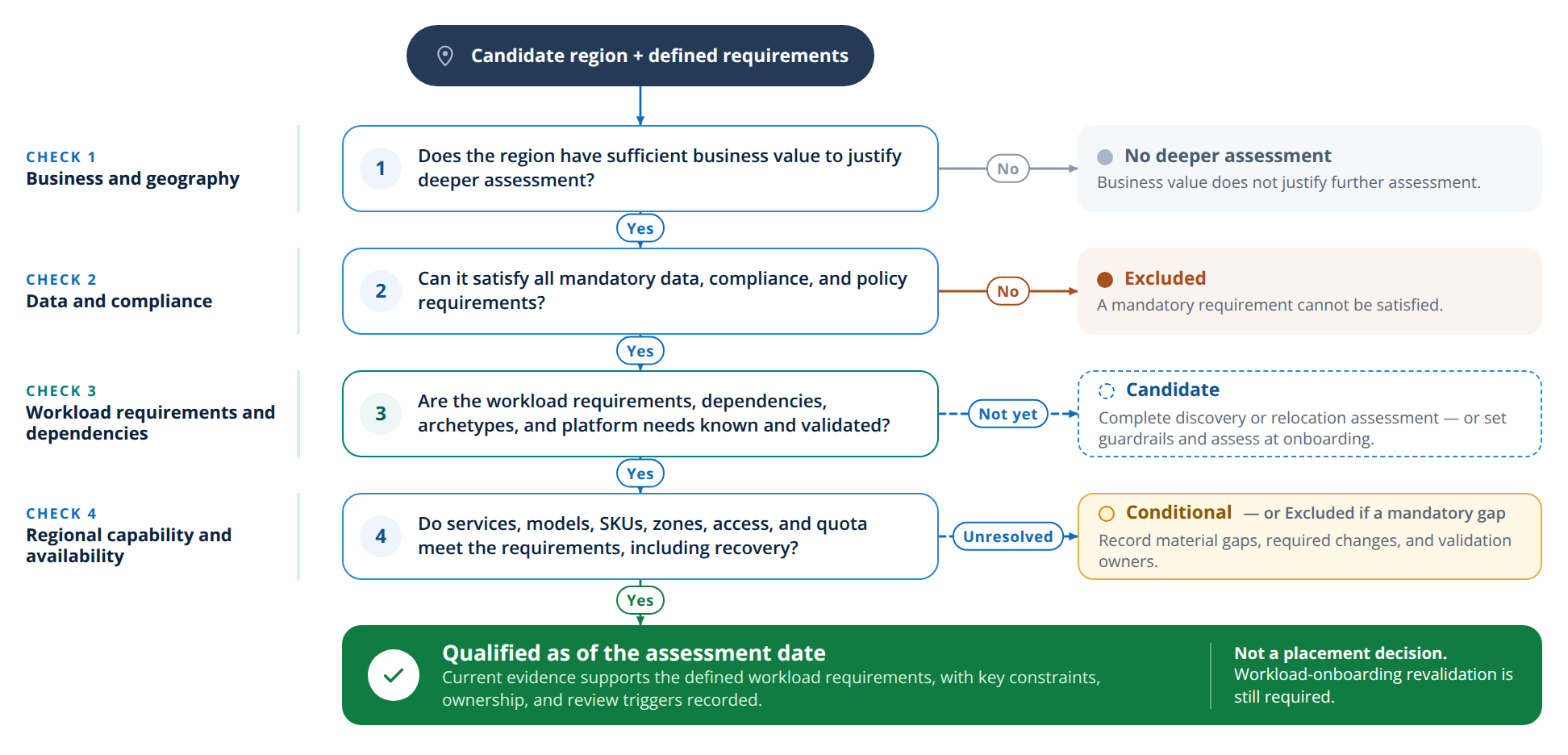
For a qualified region, the next step is to select its regional design.
Tip
Questions 1 and 2 need no technical assessment. Answer them for every candidate region first, so that deeper work is spent only on the regions that pass.