Selecting the regional design is a set of decisions, not a deployment. For each qualified region, you make three choices, each from a short list. Nothing is built yet: deployment follows later, through the automation you already run.
Each choice follows from the workloads you expect in the region, not from the footprint of an existing hub.
| Choice | You select | Page |
|---|---|---|
| 1. Connectivity profile | One of four: Disconnected Spokes, Remote Hub Connected, Minimal Regional Hub, or Full Regional Hub. | Select the connectivity profile |
| 2. Shared-service placement | For each shared service the workloads depend on: local, remote, or global. | Place shared services |
| 3. Hybrid connectivity | Reuse the existing foundation, change it, or confirm that none is required. | Confirm hybrid connectivity |
Tip
The region planning workbook walks through the three choices for each selected region and produces the regional design record.
Start from workload requirements#
Use the workload requirements identified earlier to determine how workloads should consume regional and centralized platform capabilities. Workload Landing Zone archetypes can help inform the assessment, but the resulting connectivity design should be based on the actual dependencies and requirements of each workload.
- For existing workloads, particularly those with legacy or hybrid dependencies, use validated application, network, datacenter, and shared-service dependencies to determine whether existing geographic hubs can continue to support the workload or whether additional regional capabilities are required.
- For new workloads, derive connectivity needs from the intended architecture and known dependencies, using the Workload Landing Zone archetypes as a planning aid. Reuse existing geographic hubs, shared services, and platform capabilities where they meet those needs; a new region does not automatically require a new platform footprint.
Existing and new workloads follow the same rule: requirements and dependencies determine the regional connectivity profile. Known requirements can shape platform planning in advance; validate workload-specific fit during onboarding and add regional capabilities only when justified.
Three choices on one path#
The three choices sit on one path, from on-premises locations to the workloads in the region. They influence one another, but each has different requirements and tradeoffs. Connectivity that is specific to one application isn't decided here. It is designed when the workload is placed.
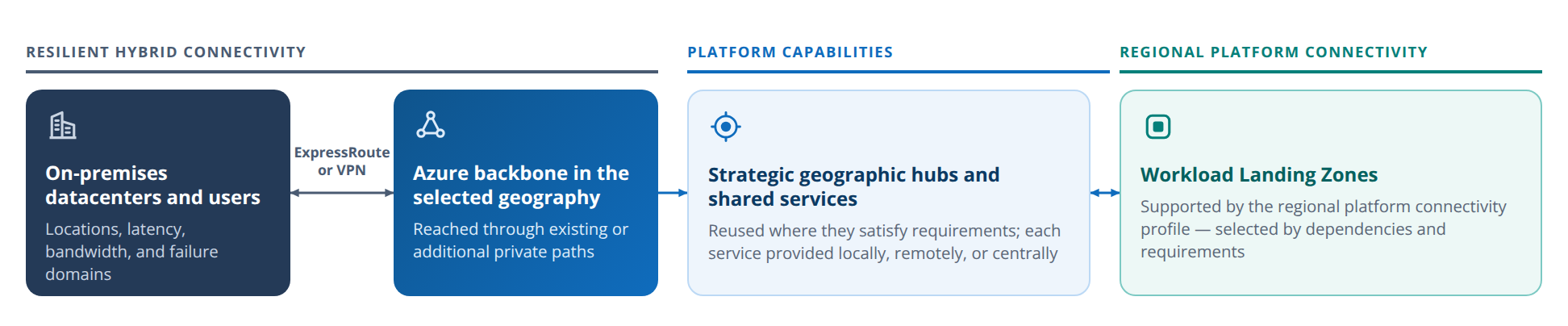
or VPN
The regional design record#
Keep one record per region. Record the selected profile, the placement of each shared service (and which hub provides the remote ones), the hybrid connectivity decision, the owner, the date, and the triggers that would reopen the decision.
| Region | Connectivity profile | Shared services | Hybrid connectivity | Open conditions |
|---|---|---|---|---|
| Region C | Minimal Regional Hub | Local: gateway, DNS forwarding. Remote from Region A: firewall, domain controllers. | Reuse: existing circuit, new gateway. | None |
| Region E | Remote Hub Connected | Remote from Region A. | Reuse. | Latency test with representative traffic. |
| Region G | Disconnected Spokes | None required. | Not required. | None |
Illustrative example. Regions and choices are examples only.
A region with a complete record is selected. Record the open conditions of a conditional region with it, and update the record when a reassessment trigger applies.
In this section#
- Select the connectivity profile: the selection principles, the decision tree, and what each step up costs.
- Place shared services: where each shared service is provided, with a default for each profile.
- Confirm hybrid connectivity: whether the hybrid connectivity you already have is enough.