Preparing a region is a targeted change to the platform you already run, not a new landing zone. You build only what the selected connectivity profile and shared-service placement call for, through your existing landing-zone automation. For two of the four profiles there is no hub to build.
What each profile adds#
| Profile | What you add in the region | What you reuse |
|---|---|---|
| Disconnected Spokes | The region in policy and in landing-zone provisioning. Workload spokes with their own internet ingress and egress. No hub, no gateway, no peering. | Governance, identity, policy, monitoring, and automation. |
| Remote Hub Connected | The same, plus a cross-region connection from each spoke to an existing hub, with routing and DNS settings. No hub. | An existing geographic hub: its gateways, firewall, DNS, and shared services. |
| Minimal Regional Hub | The same, plus a hub in the region with only the components you selected. | The geographic hub, for everything you didn't make local. |
| Full Regional Hub | The same, plus a complete hub in the region. | The landing-zone foundation and, where they meet requirements, the existing ExpressRoute circuits. |
The Cloud Adoption Framework already describes how to add a new region to an existing landing zone, including a new hub in the region. That path is the Full Regional Hub. The other three profiles do part of it, for regions whose workloads need less.
What is global and needs no action#
Most of the landing zone isn't tied to a region:
- Management groups, subscriptions, and access control. No action. Don't create management groups to model regions.
- Policy. Definitions and assignments apply everywhere. Update only the assignments that restrict allowed locations, so that they admit the new region.
- Private DNS zones. They are global. Create them once and link virtual networks to them.
- Platform subscriptions. Use the existing connectivity and identity subscriptions, with a new resource group for the region.
Order of work#
The order is the same for every profile. The profile decides how much each item contains.
- Allow the region in policy, for the workload requirements it is qualified for.
- Reserve address space that doesn't overlap the rest of the estate, even for Disconnected Spokes.
- Build the network part that the profile calls for: nothing, connections to an existing hub, or a hub.
- Extend the shared services that must be local, such as DNS forwarding or domain controllers.
- Turn on landing-zone provisioning for the region, so that workload teams receive spokes that match the profile.
- Extend operations: monitoring, security coverage, backup, and runbooks.
- Run the platform readiness checklist.
Profiles coexisting across one estate#
Different profiles can coexist across the estate. A region's profile changes only when workload and platform requirements change, not because regions are expected to progress along a maturity path.
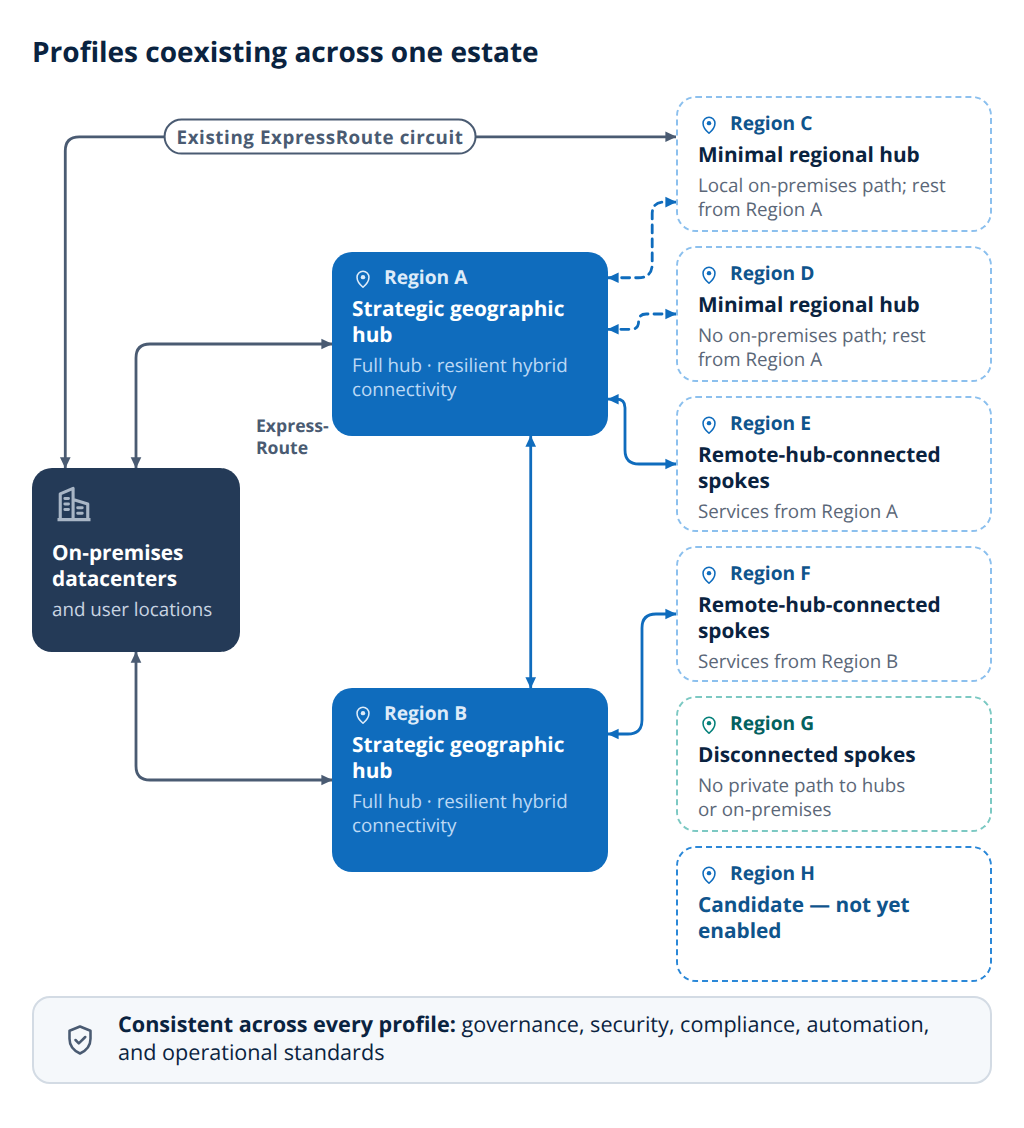
Route
When the region is ready#
A region is ready for workloads when the required capability set is in place through standard automation, its open conditions are resolved, and every applicable item on the platform readiness checklist is true. Workloads can then onboard without platform exceptions.
In this section#
- Disconnected Spokes, Remote Hub Connected, Minimal Regional Hub, and Full Regional Hub: what to deploy for each profile.
- Platform readiness checklist: what must be true before workloads arrive.
Reference links#
- Landing zone regions — How to add a region to an existing landing zone, area by area.
- Management groups — Why the management group structure doesn't change for more regions.
- Subscription vending — Automated provisioning of application landing zones, including their networking.