Workload Landing Zone archetypes are a planning abstraction that groups recurring application connectivity and dependency requirements. An archetype describes what an application or application portfolio requires from the platform. It doesn't replace the existing Azure landing-zone hierarchy.
Assign each workload the closest-fitting archetype and record any material requirements that fall outside it. Portfolio-level dependencies can also affect the platform capabilities needed across several workloads.
Use archetypes during regional qualification to anticipate the capabilities a candidate region may need to support. Where future workload requirements aren't yet defined, they give you planning guardrails without constraining later placement, which happens once the workload's current requirements, regional capabilities, and platform readiness are known.
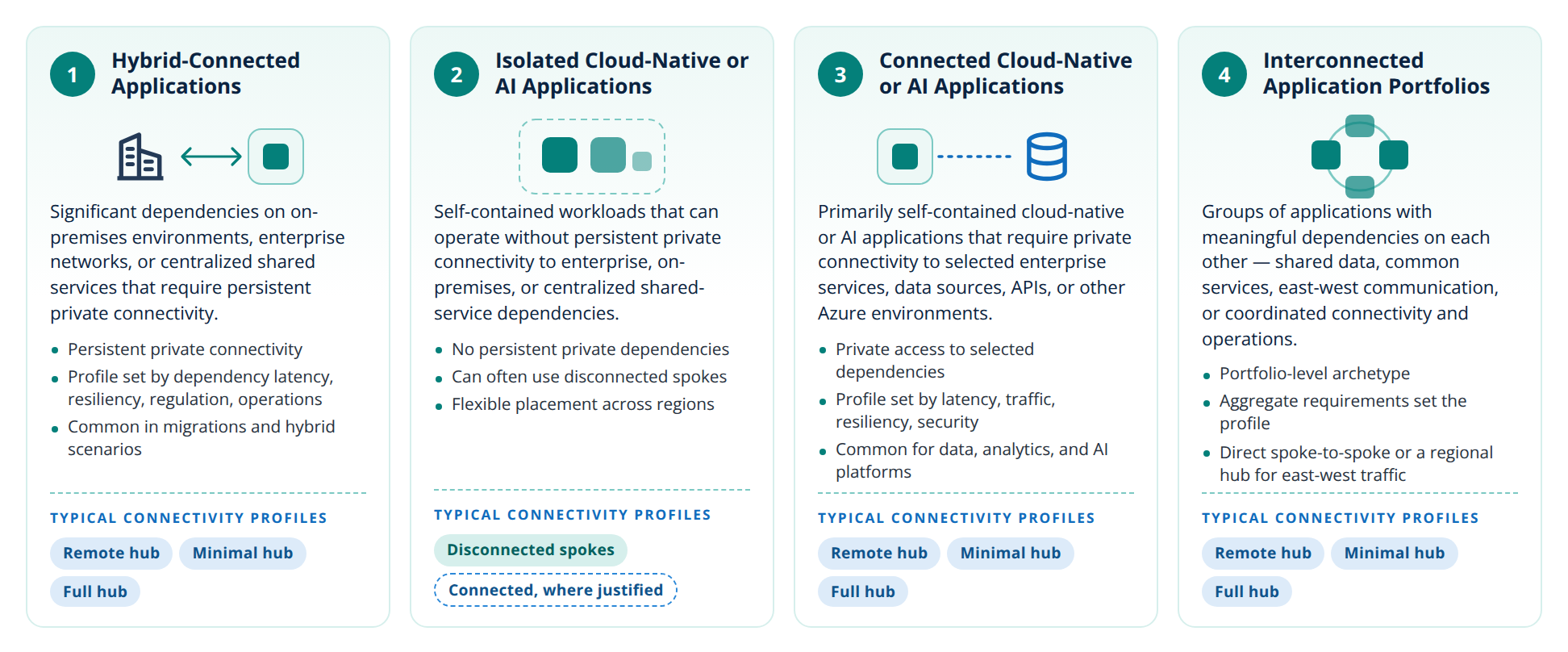
- Persistent private connectivity
- Profile set by dependency latency, resiliency, regulation, operations
- Common in migrations and hybrid scenarios
- No persistent private dependencies
- Can often use disconnected spokes
- Flexible placement across regions
- Private access to selected dependencies
- Profile set by latency, traffic, resiliency, security
- Common for data, analytics, and AI platforms
- Portfolio-level archetype
- Aggregate requirements set the profile
- Direct spoke-to-spoke or a regional hub for east-west traffic
Hybrid-Connected Applications#
Applications with significant dependencies on on-premises environments, enterprise networks, or centralized shared services that require persistent private connectivity to the wider enterprise environment.
These workloads typically use Remote Hub Connected, Minimal Regional Hub, or Full Regional Hub, depending on dependency latency, resiliency, regulatory, operational, and shared-service requirements.
Isolated Cloud-Native or AI Applications#
Self-contained workloads that can operate without persistent private connectivity to enterprise, on-premises, or centralized shared-service dependencies.
These workloads can often use Disconnected Spokes. A connected profile may still be selected where platform requirements such as private management, security, data access, or centralized services justify connectivity.
Connected Cloud-Native or AI Applications#
Cloud-native or AI applications that are primarily self-contained but require private connectivity to selected enterprise services, data sources, APIs, or other Azure environments.
These workloads can use Remote Hub Connected, Minimal Regional Hub, or Full Regional Hub, depending on dependency latency, traffic patterns, resiliency, security, and operational requirements.
Interconnected Application Portfolios#
Groups of applications with meaningful dependencies on each other, including shared data, common services, east-west communication, or coordinated connectivity and operations across applications, regions, or business domains.
Where significant east-west traffic exists within a region, evaluate whether direct spoke-to-spoke connectivity or a regional hub provides a more appropriate path than routing traffic through a remote hub. Direct connectivity may suit a limited number of tightly coupled workloads, while a Minimal Regional Hub or Full Regional Hub may be more appropriate where broader connectivity, shared routing, traffic inspection, resiliency, or operational requirements justify regional platform capabilities.
Because this is a portfolio-level archetype, its combined dependencies may require capabilities beyond those needed by any individual application. Select the appropriate connectivity profile based on the portfolio's aggregate connectivity, shared-service, resiliency, scale, and operational requirements rather than the requirements of a single workload.
How archetypes map to connectivity profiles#
Archetypes describe what applications require; connectivity profiles describe what the platform provides. An archetype doesn't dictate a profile: one archetype can use different profiles, and one profile can serve several archetypes. Use the archetypes expected in a region to understand what it needs, then choose the most efficient profile that meets those needs. For example, a hybrid-connected application might run well on a Remote Hub Connected profile in one region and need a Minimal Regional Hub in another, depending on latency, traffic, and resiliency requirements.
The archetype-to-profile matrix shows the typical options for each archetype.
How archetypes differ from other architecture terms#
Several architecture concepts help identify and organize workload requirements, but they describe different aspects of a workload and should not be used interchangeably. An archetype is the only one of them that describes what a workload requires from the platform.
| Term | What it describes | Examples | Level |
|---|---|---|---|
| Architecture style | The fundamental structural organization of an application | Microservices, N-tier, event-driven, web-queue-worker, big compute | Application architecture |
| Architecture or design pattern | A reusable solution to a recurring technical problem | Circuit Breaker, Retry, CQRS, Strangler Fig, Competing Consumers | Design technique |
| Workload pattern | A recurring workload behavior or set of operational characteristics that can influence platform requirements | Latency-sensitive, data-intensive, batch-oriented, globally distributed, hybrid-dependent | Workload characteristics |
| Workload Landing Zone archetype | A classification of a workload based on the platform connectivity and dependency capabilities it requires | Hybrid-Connected, Connected Cloud-Native or AI, Isolated Cloud-Native or AI, Interconnected Application Portfolios | Platform-consumption model |
Note
The Azure landing zones reference architecture also uses archetypes: built-in definitions of what must be true for a landing zone to meet environment and compliance requirements at a given scope. Workload Landing Zone archetypes in this guidance describe what a workload requires from the platform, which is a different concept.
Reference links#
- Architecture styles — Supports the discussion of workload architecture, including N-tier, microservices, and event-driven approaches.
- Built-in Azure landing zone archetypes — Describes what needs to be true for a landing zone to meet the expected environment and compliance requirements at a specific scope.