Private DNS zones are global resources, so adding a region doesn't require new zones. Most workloads can continue using the existing landing zone's centrally managed privatelink.* zones. Resources with private endpoints in more than one region need additional DNS planning.
This page covers centralized DNS designs that share private DNS zones across regions. Decentralized designs, such as isolated spokes with their own zones, are outside its scope.
Why resources need private endpoints in multiple regions#
A private endpoint is deployed in a virtual network and belongs to that network's region. Clients in other regions need routing to reach it. A resource may need private endpoints in multiple regions for:
- Disaster recovery. The service, the application, or both can fail over to another region. A private endpoint in the recovery region lets clients there reach the service without depending on the primary region.
- Active/active. The application runs in both regions simultaneously. Each region uses a local private endpoint to keep traffic local.
Why a single global zone can be a problem#
When private endpoints for the same resource register the same fully qualified domain name (FQDN) in a shared private DNS zone:
- The zone holds a single A record for that FQDN, pointing to the private endpoint registered last.
- Clients in both regions receive the same IP address, so clients in the other region use cross-region connectivity.
- If the selected endpoint's region becomes unavailable, clients can't reach the resource until the record is updated to point to the surviving endpoint, even if the resource itself is healthy.
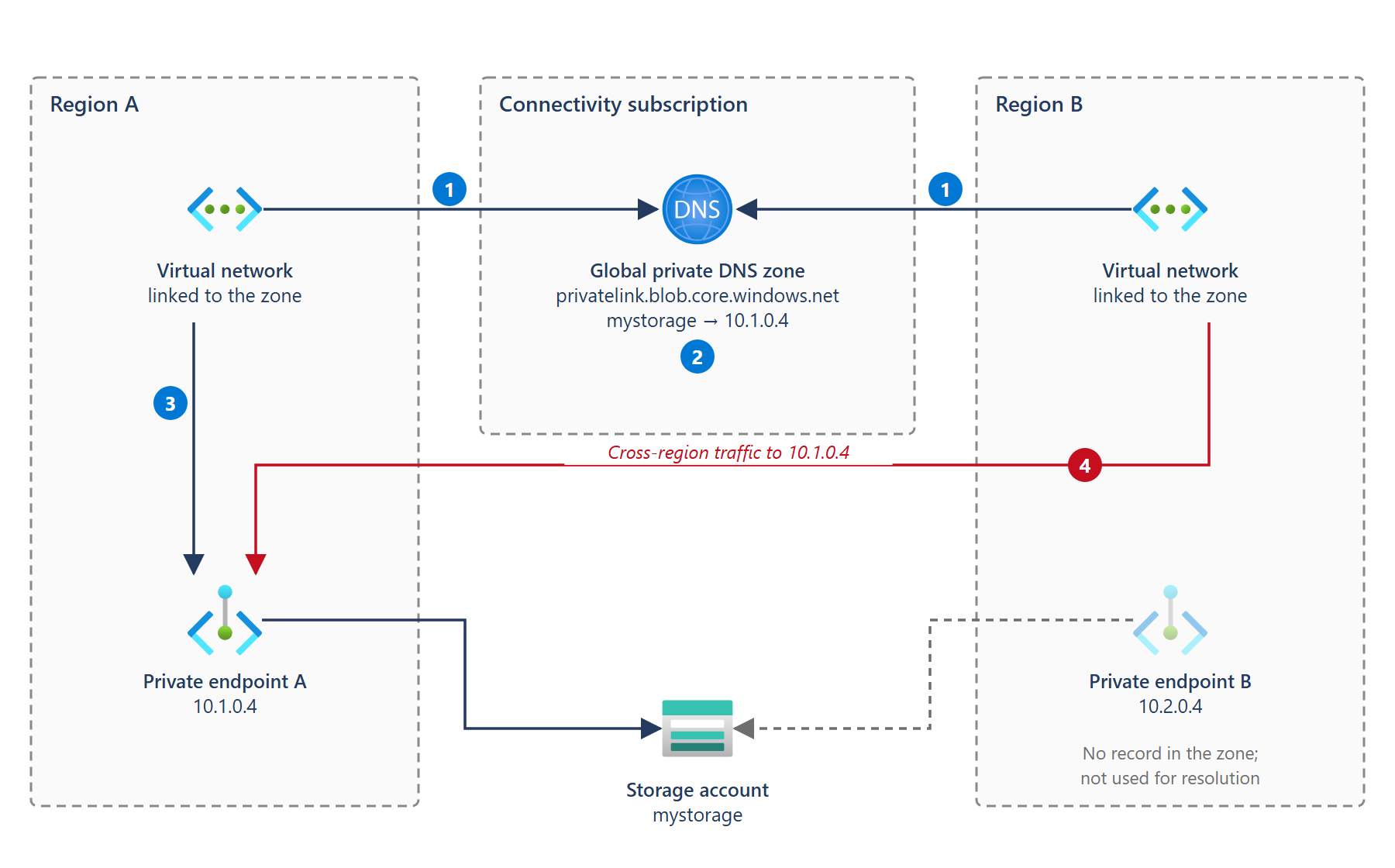
- Clients in both regions use the same global private DNS zone.
- The record for
mystoragepoints to the private endpoint in Region A. - Clients in Region A use their local private endpoint.
- Clients in Region B receive the same IP address and use cross-region connectivity. Their local private endpoint isn't used. If Region A becomes unavailable, the record must be updated before clients can reach the resource.
There is no conflict when the primary and secondary instances have different DNS names and each has a private endpoint only in its own region. If both instances also have private endpoints in the other region, each name has two endpoints competing for the same DNS record.
Choose an approach#
For a resource with private endpoints in multiple regions, choose one of two approaches:
- Use a global zone and update the record during failover. The A record normally points to the private endpoint in the primary region. During failover, update it to the secondary region's private endpoint, manually or through automation in the disaster recovery runbook.
- Use regional zones. For each required zone name, such as
privatelink.blob.core.windows.net, create one private DNS zone per region. Link each zone only to that region's virtual networks. These zones are still global Azure resources; "regional" describes their use and virtual network links. Each zone resolves the FQDN to the local private endpoint, so no DNS record change is needed during failover.
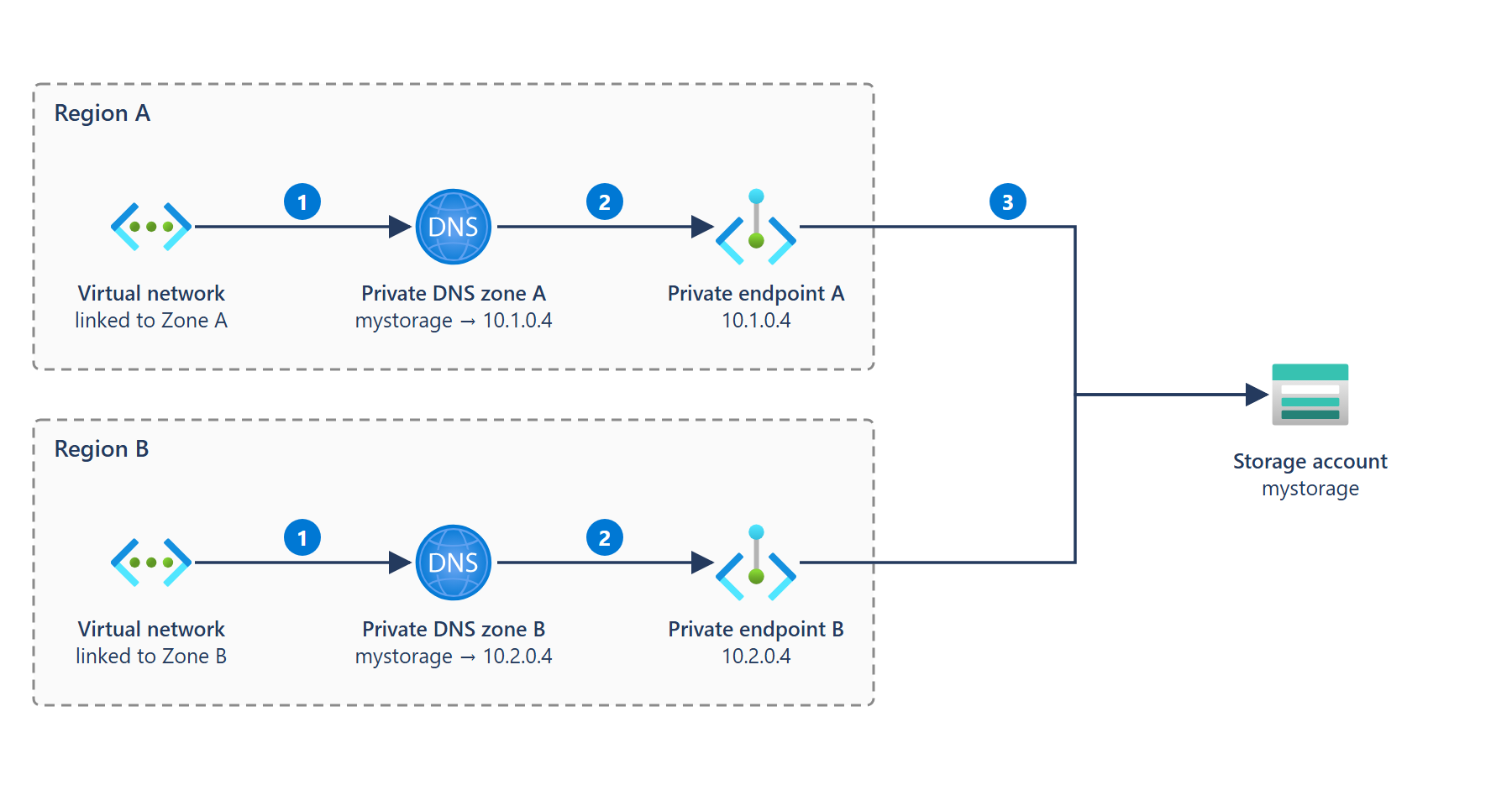
- Clients use the zone linked to their region's virtual networks.
- Each zone resolves the resource name to the local private endpoint.
- Clients access the resource through that endpoint without a DNS record change during failover.
| Consideration | Global zones | Regional zones |
|---|---|---|
| Design | One zone for each required privatelink.* name, shared across regions |
A separate zone with the same name for each region, linked only to that region |
| A records per FQDN | One | One per region |
| Resource with private endpoints in two regions | Clients use one endpoint. Failover requires a record update. | Each region uses its local endpoint. No DNS record update is needed during failover. |
| Operations | One set of zones. Azure landing zone DeployIfNotExists policies work unchanged. |
Separate sets of zones, with records and policy assignments managed per region. |
| Cross-region access | All regions using the shared zone can resolve the resource. | Each region can resolve only the records in its zone. |
| On-premises | Resolvers using the shared zone return the same answer. | The answer depends on which regional resolver receives the query. |
Use regional zones when a resource needs a private endpoint in each region for disaster recovery or active/active operation. A global zone is an alternative if cross-region connectivity is available, latency is acceptable, and DNS record updates during failover meet the recovery time objective (RTO).
Updating the record during failover#
With a global zone, DNS record updates become part of the failover process. This approach is suitable when:
- The RTO allows for a manual or automated DNS update.
- Cross-region routing lets clients reach the active private endpoint during normal operation, with acceptable latency.
Include the following in your recovery plan:
- Update DNS during both failover and failback. Document the update in each affected resource's runbook, automate it where possible, and test it.
- Account for DNS caching. Clients can continue using the previous IP address until the record's time to live (TTL) expires. Choose a TTL that supports the RTO.
Disaster recovery examples by service#
| Service | Disaster recovery model | Private endpoints for disaster recovery | Zone |
|---|---|---|---|
| Azure Storage (GRS/GZRS) | Account failover; the account name stays the same. | One per region, so clients use a local private endpoint after failover. | privatelink.blob.core.windows.net and zones for other subresources in use |
| Service Bus Premium and Event Hubs | Geo-Replication: a single namespace that can fail over between regions. Geo-Disaster Recovery: two namespaces, one in each region. |
Create a private endpoint for each namespace in both regions: one endpoint per region for Geo-Replication, and two per region for Geo-Disaster Recovery. | privatelink.servicebus.windows.net |
| Azure SQL Database | A failover group has primary and secondary logical servers in different regions. The listener name follows the primary. | Create a private endpoint for each server in its own region. Both servers can share one private DNS zone. | privatelink.database.windows.net |
The deciding factor is whether the same FQDN maps to private endpoints in multiple regions, not how many service instances exist. If it does, use regional zones or plan for DNS updates during failover. Different resource names can share a global zone without this conflict.
Note
Check each service's current documentation for its DNS behavior and private endpoint requirements.
Considerations for regional zones#
- Choose the pattern per zone name, not per resource. A virtual network can link to only one zone with a given name. If you use regional zones for
privatelink.blob.core.windows.net, all storage account names under that zone are resolved through the zone linked to the client's network. - Include every record that clients need. Region B's zone doesn't automatically contain records for private endpoints in Region A. Either add those records to Region B's zone and provide cross-region routing, or create local private endpoints in Region B and register them in its zone.
- Target the correct zone in policy and automation. The
DeployIfNotExistspolicy takes a private DNS zone ID as a parameter. Assign it per region with the corresponding zone ID. - Use separate resource groups. A resource group can't contain two zones with the same name.
- Check on-premises DNS forwarding. On-premises clients receive the answer from whichever regional resolver they query. Verify forwarding and resolution during both normal operation and failover.
Reference links#
- Private Link and DNS integration at scale (Cloud Adoption Framework)
- Azure Service Bus Geo-Replication: private endpoints
- Azure Service Bus Geo-Disaster Recovery: private endpoints
- Azure Event Hubs geo-replication: private endpoints
- Azure Event Hubs geo-disaster recovery: private endpoints
- Failover considerations for storage accounts with private endpoints
- Configure a failover group for Azure SQL Database: use Private Link
- Multi-region use of Azure Private Link