Summary#
-
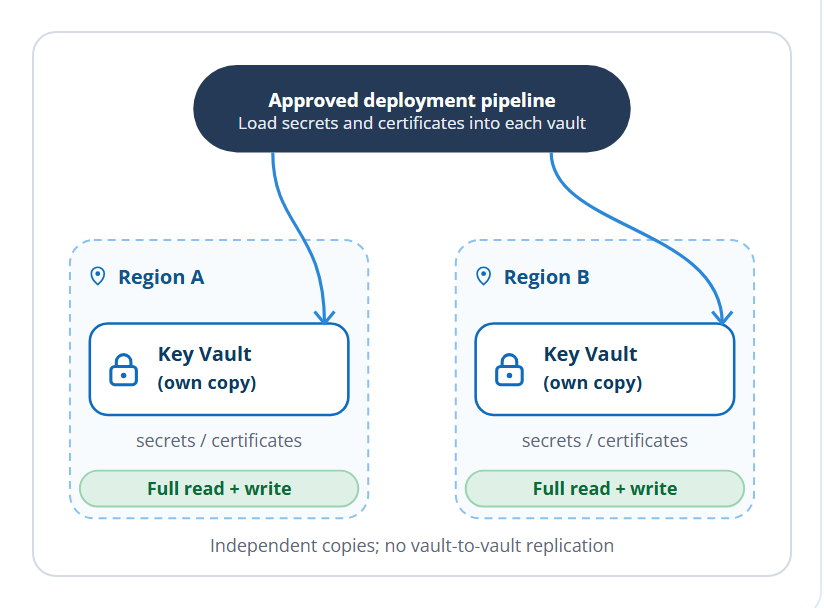
Certificates and secrets: Use a Key Vault in each region. Manage objects in each vault through deployment pipelines, with customer-managed application failover.
-
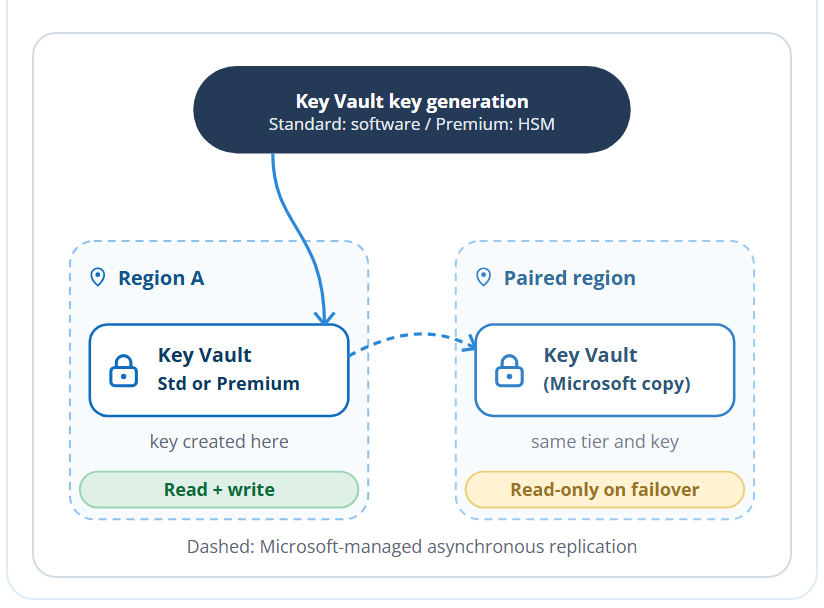
Single KEK (key encryption key): Use Key Vault paired-region replication with Microsoft-managed failover. The primary and paired vault regions do not need to match the consuming services' regions. Alternative: Managed HSM with geo-replication.
-
Dual KEK (key encryption key): Use a Key Vault in each region. Manage objects in each vault through deployment pipelines, with customer-managed application failover. Alternative: Managed HSM with geo-replication.
Microsoft-managed failover#
Microsoft-managed failover for Azure Key Vault Standard or Premium#
Keep using the same vault URI; Microsoft reroutes requests after failover. You cannot trigger this failover. Initiation can take hours or longer, independently of other services. Asynchronous replication means recent changes can be lost.
Important
- Microsoft-managed failover is best effort, not a customer-triggered recovery mechanism or a guaranteed application recovery time. Once initiated, public endpoint convergence is designed to take a few minutes; private endpoints can require up to an additional 20 minutes. Do not treat those routing timings as the total outage duration.
- When using Key Vault in paired regions (for certificates, secrets, and dual KEK (key encryption key) scenarios), Key Vault replica instances do not need to be in the same region as the consuming services. Confirm any consuming-service-specific requirements for vault and key placement.
| Scenario | Microsoft-managed failover | What to verify |
|---|---|---|
| Reciprocally paired regions within the same geography | Supported | Use the Azure regions list to confirm that the primary and paired regions are within the same geography and paired with each other. |
| Paired regions in different geographies | Unsupported | Use the Azure regions list to compare the geography of the primary and paired regions. A pairing across geographies does not qualify. |
| Nonreciprocal (asymmetric) region pairing | Unsupported | Region A is paired with Region B, but Region B is paired with another region or has no pair. A one-way pairing does not qualify. |
| Regions without a pair | Unsupported | The primary region has no paired region for Microsoft-managed failover. |
Microsoft-managed failover for Azure Key Vault Managed HSM#
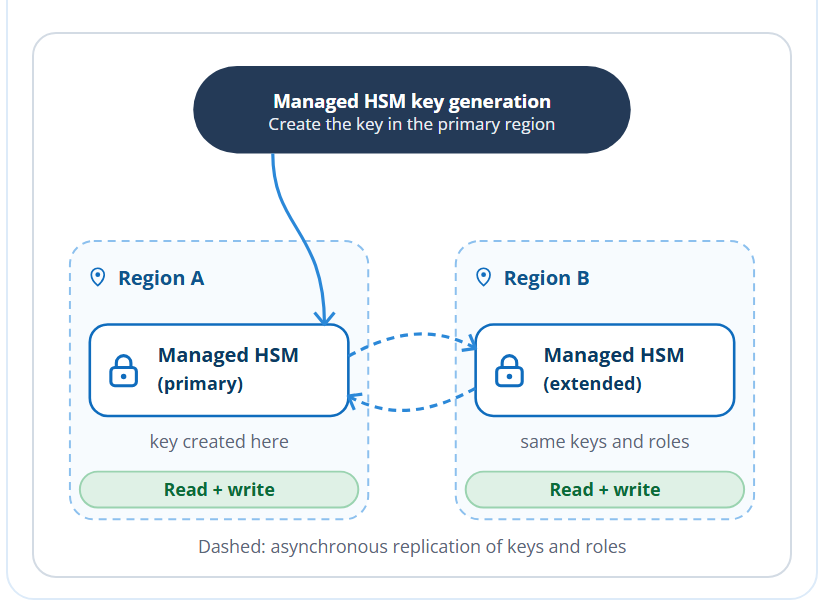
Managed HSM resources are deployed into a single Azure region. If the region becomes unavailable, your Managed HSM is also unavailable. Managed HSM supports multiregion replication, which you can use to extend a Managed HSM pool from one Azure region (the primary region) to a second Azure region (the extended region).
For reliability details, see Reliability in Azure Key Vault Managed HSM.
Important
If a primary or extended region goes down, you can still perform both read and write operations.
- Regions: Any Managed HSM region can be primary; extended-region support varies. No pairing required.
- Routing: DNS selects the closest available region (5-second TTL); caching can delay failover.
- Replication: Key and role changes can take up to 6 minutes; cross-region consistency isn't guaranteed during this window. External keys (EKM) aren't supported by multiregion replication.
See Managed HSM multiregion replication for more details.
| Scenario | Microsoft-managed failover | What to verify |
|---|---|---|
| Primary region unavailable with multiregion replication configured | Supported | The healthy extended region continues serving read and write requests. Configure replication to a supported extended region before an outage; region pairing isn't required. |
| Extended region unavailable with multiregion replication configured | Supported | The healthy primary region continues serving read and write requests. |
| Single-region deployment without multiregion replication | Unsupported | If the region becomes unavailable, the Managed HSM is also unavailable. |
| Unsupported extended region | Unsupported | Check Azure region support before selecting the extended region. |
| Managed HSM with External Key Management (EKM) | Unsupported | Multiregion replication isn't supported with external keys, so there is no geo-replicated failover target. |
Customer-managed failover#
Consider customer-controlled failover design patterns when Microsoft-managed failover does not meet your application's recovery time objectives (RTOs). These patterns let you choose regions for your workloads, subject to product availability, supported extended regions, and consuming-service requirements.
Important
- Prepare identities, permissions, networking, and required versions in each region.
- For independent vaults, configure application fallback and test failover and return to the primary before production. A second vault alone is not enough.
- Key Vault backups are point-in-time and restore only within the same subscription and Azure geography.
| Service | Regional deployment and recovery | Artifact provisioning | Failover behaviour |
|---|---|---|---|
| Key Vault Standard or Premium (Keys, Secrets, Certificates) |
|
|
|
| Key Vault Managed HSM (Keys) |
|
|
|
Secrets and certificates scenarios#
Your workload decides whether each region uses independent secrets and certificates or shares common ones. It uses the Key Vault in its own region and can optionally fail over to secrets and certificates in a recovery region if its primary region is unavailable.
Patterns you can use:
| Pattern | Object provisioning | Recovery behavior | Diagram |
|---|---|---|---|
| Standard or Premium vault in each region | An approved deployment pipeline populates each regional vault with secrets and certificates. | Each region has independent read/write access. The application manages failover to a recovery-region vault; there is no vault-to-vault replication. |
Single KEK (key encryption key) scenarios#
A single KEK design uses a shared key encryption key to protect the data encryption keys (DEKs) for the same data across regions, rather than a different KEK in each region. The DEKs encrypt the data; the KEK wraps and unwraps those DEKs. Recovery requires access to the original key material and any historical versions used by existing data or backups.
Important
Key Vault regions can be selected independently of the consuming services' regions. For Standard or Premium vaults, choose a region with a reciprocal region pair in the same Azure geography. This enables Microsoft-managed failover to the paired region for recovery during a regional outage. Failover remains best effort, without a guaranteed recovery time.
Patterns you can use:
Use one of these shared-key patterns for the scenarios below, subject to each service's requirements.
| Pattern | Key origin | Recovery behavior | Diagram |
|---|---|---|---|
| Standard or Premium vault with paired-region replication | Created in Azure Key Vault; software-protected in Standard or HSM-protected in Premium. | Both data copies depend on Microsoft-managed vault recovery. Failover is best effort, and the recovered vault is read-only. | |
| Managed HSM with geo-replication | Created in Managed HSM. | Maintain access to the shared key through geo-replication; both regions support reads and writes. | |
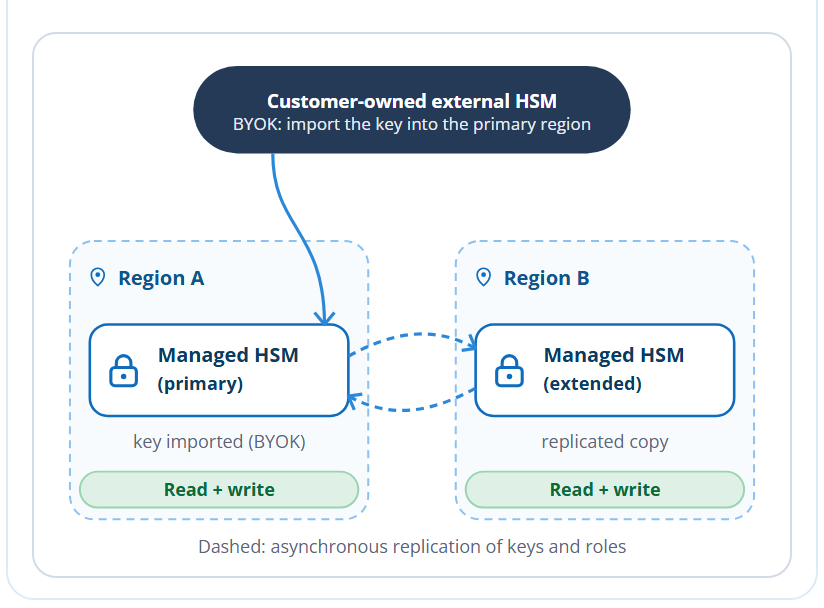
| Managed HSM geo-replication with external HSM and BYOK | Created in an external HSM and imported using BYOK. | Maintain access to the shared key through geo-replication; both regions support reads and writes. |
Application-level encryption#
- Application-level encryption commonly uses one shared KEK across regions, but this is a design choice, not a technical requirement. Because you control the encryption algorithm and key-management logic, you can also use a Dual KEK approach with separate regional keys.
Azure Storage - Geo-redundant storage (GRS)#
- When you configure customer-managed keys for a storage account, Azure Storage wraps the root data encryption key for the account with the customer-managed key in the associated key vault or managed HSM. The protection of the root encryption key changes, but the data in your Azure Storage account remains encrypted at all times. You don't need to take any additional action to ensure that your data remains encrypted. Protection by customer-managed keys takes effect immediately.
- GRS copies are replicas of one storage account, not independently configured accounts. Both primary and secondary storage account replicas need access to the same Key Vault or Managed HSM and the account's CMK. Independent regional vaults do not let you assign a different key store to each GRS replica. Consider a replicated key store and test key access during account failover. See Storage CMKs.
Azure SQL Database, Azure SQL Managed Instance and Azure Cosmos DB geo-replication#
- Database replicas need access to the same Azure Key Vault as the primary. When replicating across countries, pair replication with online key rotation. Online key rotation requires both primary and secondary database instances to be online and their Azure Key Vault instances to be accessible, making it unsuitable as a disaster recovery solution.
- These customer-managed key access and rotation concerns do not apply when replicating databases using Microsoft-managed keys (MMK).
- Azure Key Vault Managed HSM is the preferred solution in these cases, where supported by the consuming database service. Customers can geo-replicate their single-tenant Azure Key Vault Managed HSM to a supported region of choice, and failover preserves the Azure Key Vault Managed HSM endpoint's fully qualified domain name (FQDN).
See SQL customer-managed TDE and Cosmos DB CMKs.
Azure SQL Database, Azure SQL Managed Instance and Azure Cosmos DB geo-restore#
- Restoring data does not restore access to its encryption keys. Retain all historical keys required by the backup, authorize the restored service, and verify the target region/geography against that service's restore rules.
Important
Geo-restore is not possible for Microsoft-managed key (MMK) or Customer-managed key (CMK) scenarios when using paired regions in different geographies.
Purview Information Protection#
- Non-exportable keys, inability to re-encrypt old content at scale.
- Customers can import an on-premises HSM key for use in Microsoft 365, but only by first transferring it into an Azure Key Vault (or Azure Key Vault Managed HSM). There is no direct, real-time use of an on-prem HSM by Microsoft 365 services. See supported HSMs. When using BYOK, customer becomes fully responsible for key generation, rotation, and protection. Improper key rotation or accidental deletion of keys can irreversibly lock the customer out of their data. For example, deleting or disabling a key that is still in use will make any data it protected permanently inaccessible, even Microsoft cannot recover it without the key.
- All encryption operations depend on the Azure Key Vault. If the key vault (or managed HSM) experiences downtime or is unreachable, critical services (like Exchange Online, SharePoint, OneDrive, Teams, etc.) may become unable to decrypt or encrypt data, leading to potential service disruption.
Important
Default to Microsoft-managed keys unless regulation clearly requires customer control; where customer-managed keys are mandatory, create and preserve keys outside the primary geography and validate recovery design before production rollout.
Dual KEK (key encryption key) scenarios#
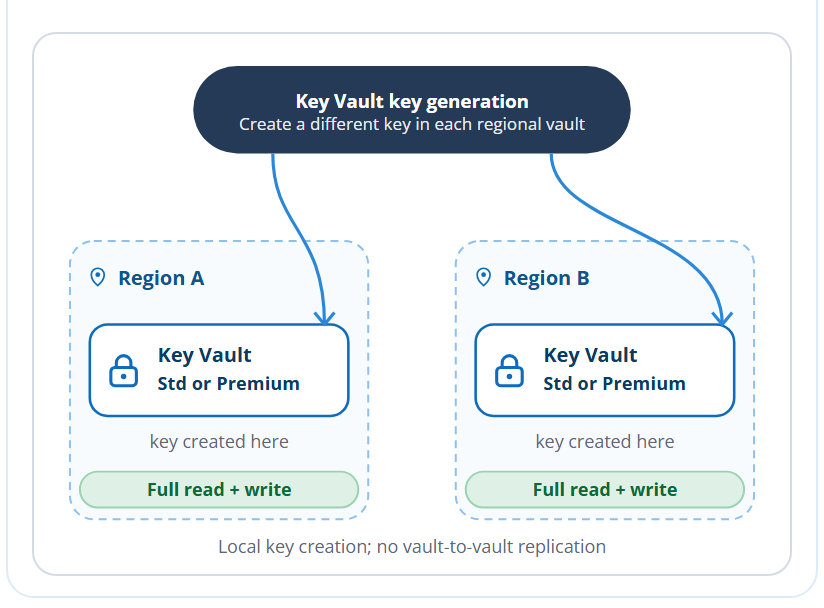
A dual KEK design uses separate key encryption keys for the primary and recovery regions, rather than one shared KEK. Each KEK protects the data encryption keys (DEKs) used by its regional data copy. The consuming service must support independent regional keys and make the recovery data decryptable with the recovery region's key. Provision and test regional key access, and preserve the key material and versions required by existing data and backups.
Patterns you can use:
Use the following patterns subject to each service's requirements.
| Pattern | Key origin | Recovery behavior | Diagram |
|---|---|---|---|
| Standard or Premium vault in each region | A separate key is generated in each regional vault. | Each surviving region retains full local read and write access; the service uses its configured regional key. | |
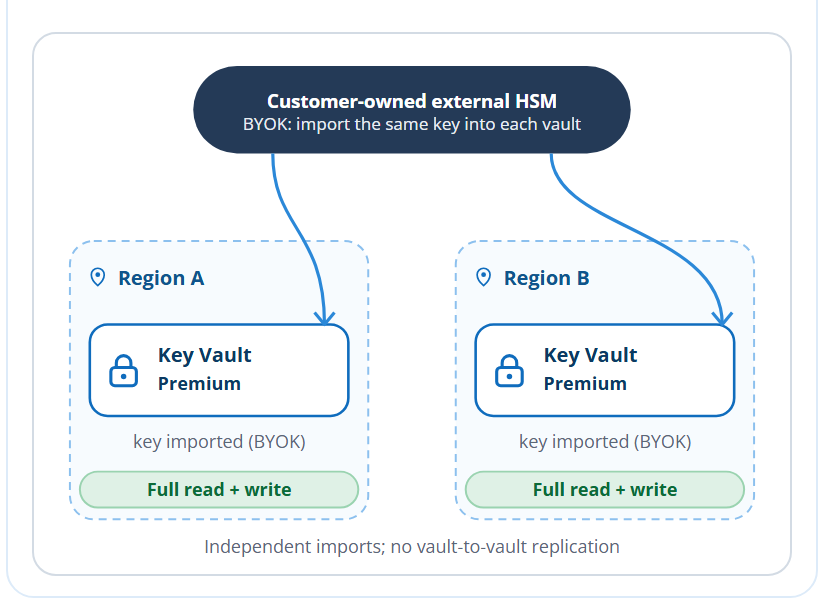
| Premium vault per region with external HSM and BYOK | Created in an external HSM and imported into each Premium vault. | Each surviving region uses its local imported key. Coordinate imports, versions, rotation, and service configuration. | |
| Managed HSM with geo-replication | Created in Managed HSM. | Maintain access through Managed HSM geo-replication; both regions support reads and writes. | |
| Managed HSM geo-replication with external HSM and BYOK | Created in an external HSM and imported using BYOK. | Maintain access through Managed HSM geo-replication; both regions support reads and writes. |
Application-level encryption#
Your application decides whether each region uses an independent key or a common key. Preserve the key identifier and version needed to decrypt existing data. EKM is designed for compatible CMK encryption-at-rest integrations and exposes a restricted operation set; do not assume arbitrary application signing or encryption works unchanged. See key operations and external key lifecycle.
The application must handle independent regional keys or regional imports. When using Managed HSM, use supported operations, including imported keys for BYOK.
Azure Storage - Object replication for block blobs#
Source and destination are separate accounts, so their CMK configuration can be independent. Validate each account's identity, key versions, and recovery behavior. Do not carry GRS's shared-account constraint into this topology. See object replication.
Source and destination accounts can use independent keys. For BYOK, import and authorize keys for each account. With Managed HSM, configure each account's CMK integration.
PostgreSQL and MySQL Flexible Server#
Distinguish read replicas, geo-redundant backups, and geo-restore. Their key, region, and identity requirements are not interchangeable. Provision recovery-region keys and identities as required; verify each product separately. See PostgreSQL encryption and MySQL encryption.
Meet regional key and identity requirements; for BYOK, validate key import for the recovery feature. Confirm Managed HSM support and regional requirements for that feature, including BYOK import where used.
VM disk encryption#
You can choose to manage encryption at the level of each managed disk, with your own keys. When you specify a customer-managed key, that key is used to protect and control access to the key that encrypts your data.
Azure managed disks handle encryption and decryption by using envelope encryption. Envelope encryption lets you rotate keys periodically without affecting your VMs. During rotation, the Storage service re-wraps DEKs with the new key version, and the underlying disk data isn't re-encrypted. Keep both the old and new key versions enabled until re-wrapping completes. See Server-side encryption of Azure managed disks.
Configure regional Disk Encryption Sets and keys, including regional imports for BYOK. With Managed HSM, satisfy the disk/key-store regional requirements, including imported key access for BYOK.
Important
Key Vault must be in the same region as each Disk Encryption Set.
Azure Site Recovery#
Pre-create a compatible target-region Disk Encryption Set and authorize it to access its regional key vault. Include the source disks and cache storage account in the design. Site Recovery does not automatically apply encryption-key changes to protected VMs: the documented procedure requires disabling and re-enabling replication to adopt changes. Do not infer Site Recovery support from a general disk-encryption capability. See replication with CMK-enabled disks.
Important
ASR uses Single KEK and Dual KEK. It uses Storage GRS for the temporary replication cache (using Single KEK) and disk encryption for the VM disks in the source and target regions (using Dual KEK).
Use only Standard or Premium vault in each region or Premium vault per region with external HSM and BYOK. The documented regional-vault approach requires target-region Disk Encryption Set access. For BYOK, validate the imported key and complete Site Recovery configuration.
Secrets and certificates patterns#
For secrets and certificates, choose between independent regional vaults and a vault with Microsoft-managed paired-region replication. Managed HSM does not support secrets or certificates.
Treat each independent region as a deployment stamp. Do not store secret values in the IaC repository. Optional application-level fallback to another vault requires explicit identity, networking, and version-selection design; a second endpoint alone does not provide safe fallback.
Pattern 1: Standard or Premium vault in each region#
- Deployment: One Standard or Premium vault per workload per region, configured consistently through infrastructure as code (IaC).
- Artifact origin: An approved secret-management process supplies secrets and certificates; the pipeline populates each regional vault.
- During an outage: Each surviving region uses its own vault with full read and write access.
- Best for: Workloads that need recovery independent of Microsoft-managed vault failover.
- Watch for: Keep versions, renewal, access policies, identities, and private connectivity ready before an outage. Roll changes out sequentially, not globally at once.
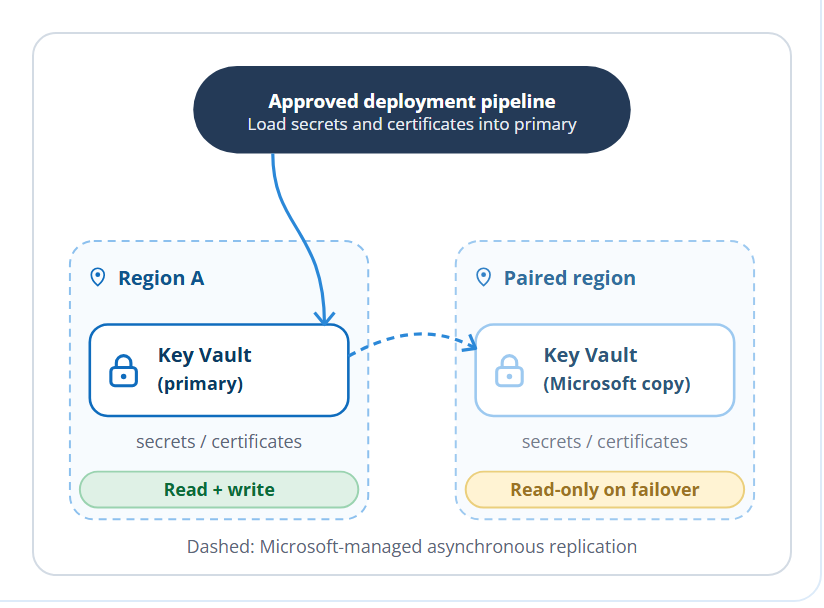
Pattern 2: Standard or Premium vault in a paired region#
- Deployment: One Standard or Premium vault in a region eligible for Microsoft-managed paired-region replication.
- Artifact origin: The pipeline populates the primary vault; Microsoft asynchronously replicates its contents.
- During an outage: Microsoft decides when to fail over. Afterward you can read, but cannot create, update, renew, or rotate objects until normal operation returns.
- Best for: Workloads that can tolerate Microsoft-managed recovery timing and read-only access.
- Watch for: Confirm the same-geography pairing, service exclusions, and recovery path rather than assuming any pair qualifies.
Keys management patterns#
Customer-managed keys (CMKs) protect a service's data encryption keys; the data service still encrypts and decrypts the data. Bring your own key (BYOK) means importing externally generated key material. Here, BYOK refers to the supported HSM-to-HSM transfer process, not generic software-key import.
The six patterns below separate regional deployment from key protection. Standard supports software-protected keys; Premium supports HSM-protected keys. Both tiers share the same paired-region recovery model. The HSM-backed BYOK patterns use Premium or Managed HSM.
| Compare | Standard or Premium vault with paired-region replication | Standard or Premium vault in each region | Premium vault per region with external HSM and BYOK | Managed HSM with geo-replication | Managed HSM geo-replication with external HSM and BYOK | Managed HSM with external key management |
|---|---|---|---|---|---|---|
| Key origin | Primary vault | Each regional vault | Customer-owned external HSM | Primary Managed HSM | Customer-owned external HSM | Customer-owned external HSM |
| Distribution | Microsoft replication | Independent keys | Import into each vault | Geo-replication | Import, then geo-replicate | Register external key reference |
| Outage behavior | Read-only after failover | Local read/write | Local read/write | Healthy-region read/write | Healthy-region read/write | Recover failed component |
| Main constraint | Microsoft recovery timing | Service must allow separate vaults/keys | Same as Pattern 2; manage imports | Asynchronous replication window | Replication window and import lifecycle | No geo-replication or end-to-end SLA |
Pattern 1: Standard or Premium vault with paired-region replication#
- Deployment: One Standard or Premium vault with an eligible Microsoft-managed paired-region copy.
- Key origin: Generate the key in the primary vault. Use Standard for software-protected keys or Premium for HSM-protected keys.
- Distribution: Microsoft replicates the same vault's contents; you do not create an independent secondary vault.
- During an outage: Read-only key access after Microsoft-managed failover; no key creation or rotation until normal operation returns.
- Best for / watch for: Services that accept Microsoft-managed recovery timing. Choose the tier for the required key protection and consuming-service support; Premium does not improve regional recovery control compared with Standard. Validate whether the application can meet its recovery objective.
Pattern 2: Standard or Premium vault in each region#
- Deployment: One Standard or Premium vault per workload per region.
- Key origin: Generate a separate key in each vault.
- Distribution: No vault-to-vault replication; each service instance uses its configured regional key.
- During an outage: Each surviving region retains full local read and write access.
- Best for / watch for: Services that support independent regional keys. Do not apply this topology to a single GRS account or a shared-key dependency without service-specific support.
Pattern 3: Premium vault per region with external HSM and BYOK#
- Deployment: One Premium vault per workload per region.
- Key origin: A customer-owned external HSM.
- Distribution: The BYOK process imports key material into each vault. This is not automatic vault-to-vault replication.
- During an outage: Each surviving region uses its local imported key with full read and write access.
- Best for / watch for: External key-origin requirements with independent regional vaults. Coordinate imports, versions, rotation, and consuming-service configuration. Pattern 2's service constraints still apply.
Pattern 4: Managed HSM with geo-replication#
- Deployment: One Managed HSM pool with a primary and one supported extended region.
- Key origin: Generate the key in Managed HSM.
- Distribution: Asynchronous replication shares key material, roles, and permissions between regions.
- During an outage: The healthy region continues serving reads and writes through the pool's endpoint.
- Best for / watch for: Supported services requiring a shared key store and a customer-selected recovery region. Changes replicate within six minutes; recent changes can be lost if the primary is unrecoverable.
Pattern 5: Managed HSM geo-replication with external HSM and BYOK#
- Deployment: The same primary/extended-region pool as Keys - Pattern 4.
- Key origin: A customer-owned external HSM.
- Distribution: Import the key into the primary pool through BYOK, then use Managed HSM geo-replication.
- During an outage: The healthy region continues serving reads and writes.
- Best for / watch for: External key-origin requirements plus replicated Managed HSM. Plan the import lifecycle and the same asynchronous replication window as Pattern 4; imported key material now resides in Azure HSMs.
Pattern 6: Managed HSM with external key management#
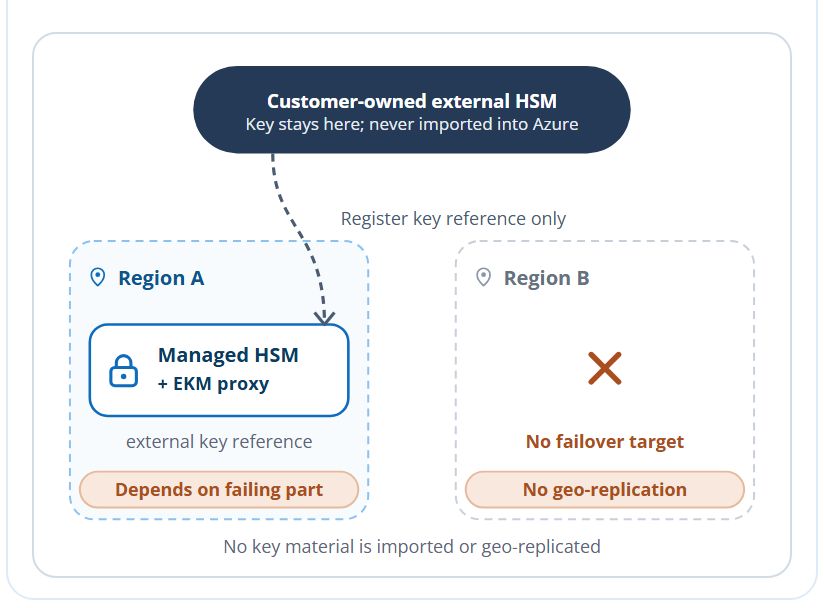
- Deployment: Managed HSM, an EKM proxy, and your external HSM; no Managed HSM geo-replication for external keys.
- Key origin: A customer-owned external HSM; the key encryption key never leaves it.
- Distribution: Register an external key reference, not an imported copy of the key material.
- During an outage: Recovery depends on Managed HSM, the proxy, external HSM, networking, or the region. There is no geo-replicated failover target.
- Best for / watch for: A requirement for physical key custody outside Microsoft. Every external operation adds network round trips. No end-to-end Microsoft SLA covers the external components. Recreate an external key reference rather than attempting unsupported backup/restore.
For replicated Managed HSM, respect DNS time to live (TTL) so clients can reach a healthy region. Keep soft delete, purge protection, historical key versions, identities, and networking in the recovery plan. See multi-region replication, BYOK, and EKM scope and limitations.
Decision tree#
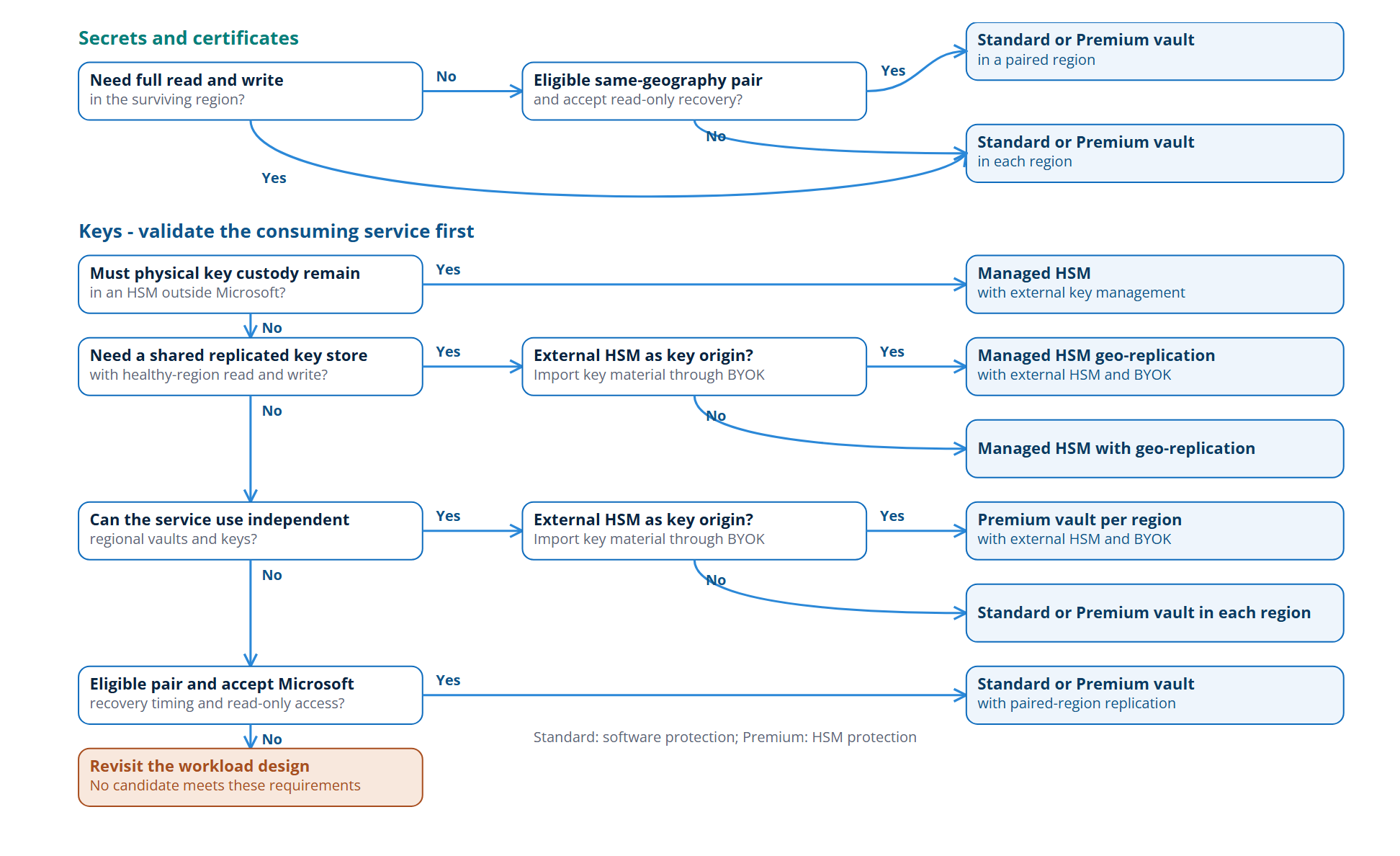
Check the scenario conditions before following the chart. Results identify candidate patterns, not universal service support. "Secrets and certificates" uses Pattern 1; "Keys" uses Patterns 1-6.
Reference links#
- Azure Key Vault security worlds
- Azure paired regions
- External key management
- HSM-protected key import
- Key Vault availability and redundancy
- Key-management product selection
- Managed HSM multi-region replication
- Microsoft-managed failover to a paired region
- Reliability in Azure Key Vault Managed HSM
- Services that support CMKs