Deployment Tools: Draft Tool Integration
The extension bundles the Draft tool to scaffold
deployment assets for your project. The version is set by the aks.drafttool.releaseTag
setting; for the version currently pinned, see
Pinned versions.
Available commands
| Command | Where |
|---|---|
| AKS: Create a GitHub Workflow | Command Palette, and right-click your AKS cluster > Develop & Deploy > Create a GitHub Workflow |
| AKS: Run Deployment Safeguards YAML Validation | Command Palette, right-click your AKS cluster > Develop & Deploy > AKS: Run Deployment Safeguards YAML Validation, and the Explorer context menu on a folder or a .yaml / .yml file |
| AKS: Create Argo CD Application | Command Palette, and the Explorer context menu on a folder. See Argo CD GitOps Integration |
Creating a GitHub workflow and creating an Argo CD application both require an open
workspace folder. The Argo CD command is also gated by aks.argoCDEnabled, which is on
by default.

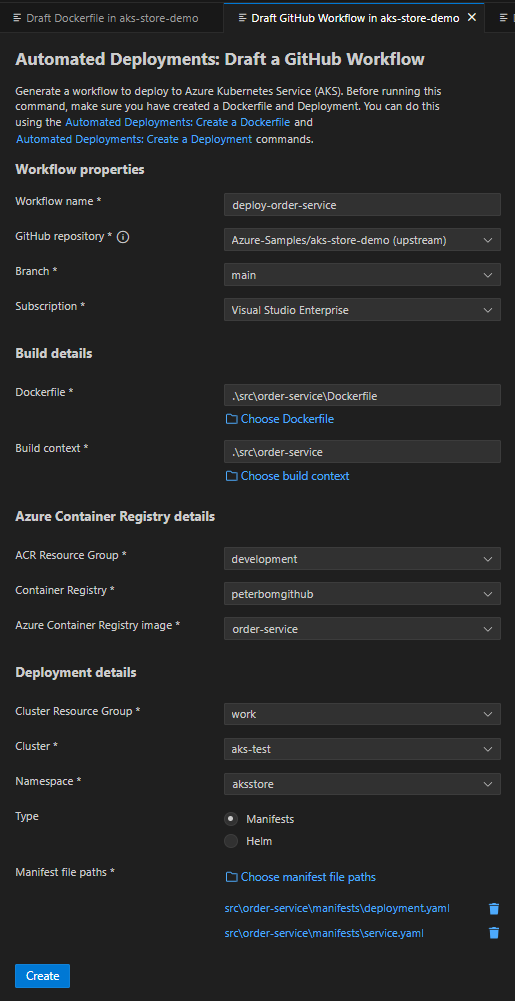
Create a GitHub Workflow
Generates a starter GitHub Actions workflow, pre-populated with the selected cluster and resource names, for deploying to AKS with either Helm or Kubernetes manifests.
Run Deployment Safeguards YAML Validation
Validates Kubernetes manifests against Deployment Safeguards and reports findings, so you can catch policy violations before applying them to a cluster.
Generating Dockerfiles and manifests
To scaffold a Dockerfile and Kubernetes manifests for an application, use Container Assist.
The older Draft Dockerfile and Draft Deployment screens are still present, but they are not in the Command Palette or on any menu. They open only from links inside other Draft screens — the GitHub workflow screen reaches both, from the Deployment Tools: Create a Dockerfile and Deployment Tools: Create a Deployment links in its opening paragraph.