Overview
This module introduces what’s possible when you build Azure Logic Apps as MCP servers. It explains how you can empower your agents with unique capability of invoking the workflows as MCP tools. While the UX is still in the works, we can manually enable this feature by changing some configuration values.
Azure Logic App as MCP Server
Typically, large language models (LLMs) work with AI agents that handle and fulfill requests by using prebuilt tools that agents call to complete tasks, like send an email, query a database, or trigger a workflow. In Azure Logic Apps, you can jumpstart building these tools by reconfiguring a Standard logic app as your own remote Model Context Protocol (MCP) server. This capability means that you can expose existing workflows as tools that LLMs, AI agents, and MCP clients can use to interact with enterprise resources and assets. In this context, remote means that the MCP server runs outside the environment where the interface for your AI agent interface.
MCP is an open standard that lets LLMs, AI agents, and MCP clients work with external systems and tools in a secure, discoverable, and structured way. This standard defines how to describe, run, and authenticate access to tools so agents can interact with real-world systems like databases, APIs, and business workflows. Consider an MCP server as a bridge between an LLM, AI agent, or MCP client and the tools they use.
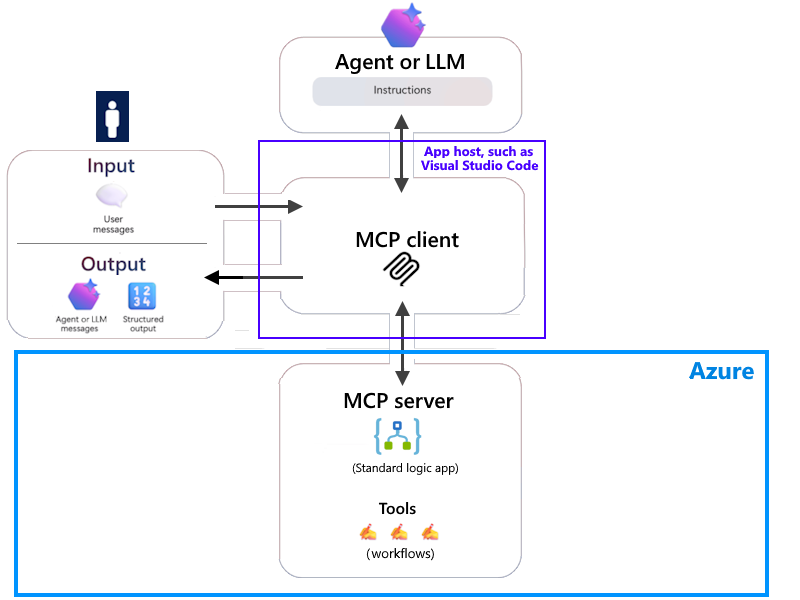
For example, suppose you have a Standard logic app-based MCP server that runs in Azure. On your local computer, Visual Studio Code has an MCP client that you use to remotely connect to your MCP server. This scenario differs from local MCP servers that run on your computer. The following diagram shows relationships between the different components at work in this scenario:
-
The interactions between your MCP client and your MCP server, which provides logic app workflows as tools
-
The interactions between your MCP client and the agent or model
-
The inputs that go in through the MCP client to the agent or model
-
The outputs from the agent or model that go out through the MCP client
Which workflow can be an MCP tool?
If a workflow meets following criteria, it can be used as an MCP tool.
- State is enabled
- Has a trigger of type "Request" and kind "http".
- Has a Response action.
- Is a conversational agent.
Course Outline
This course will help you create your first MCP server. Starting from configuring the logic app to enable it as an MCP server to adding workflows to it as MCP tools. We will also see how to create multiple MCP server within a logic app.
Build an MCP Server
This module teaches you how to enable the MCP server features in a logic app. This will activate MCP specific endpoints that your agent can work with. Then we will add workflows and use them as tools in agent loop.