02 - Manage API key for your MCP Server in Azure Logic Apps
In this module, you will learn how to manage the API Key for your MCP server in Azure Logic Apps. Retrieve an expiring APIKey using primary or secondary access key and also learn how to rotate it.
We will use open source HTTP client Bruno for this lab.
To call the APIs from Bruno, you will need Bearer token. You can get it from ARMClient. Install it, login and get token by calling armclient.exe token {subscriptionId}
1. Retrieve API Key for MCP Server
To obtain an API key, call the following endpoint with the query parameter getApikey=true
REST Endpoint: POST /listMcpServerUrl
If you have MCP Servers with name and description, then you can use this for getting correct MCP server url.
REST Endpoint: POST /listMcpServers POST https://management.azure.com/subscriptions/{subscriptionId}/resourceGroups/{RGName}/providers/Microsoft.Web/sites/{LAName}/hostruntime/runtime/webhooks/workflow/api/management/listMcpServers?api-version=2021-02-01&getApikey=true
Request Body (JSON) - Optional
Request Body is optional and can take 2 properties
{
    "keyType": "primary",
    "notAfter": "2025-11-14T10:04:24Z"
}
- keyType: Determines which access key (primary or secondary) is used to generate the API key. If not specified, primary is used as default.
- notAfter: Sets the expiration time for the API key. If not specified, the API Key expires in 24 hours from the request.
Response (JSON)
{
  "value": "https://{LAName}.azurewebsites.net/api/mcpservers/{serverName}/mcp",
  "method": "POST",
  "basePath": "https://{LAName}.azurewebsites.net/api/mcpservers/{serverName}/mcp",
  "headers": {
      "X-API-Key": "sanitized"
  }
}
2. Regenerating the Access Key
To invalidate all API keys generated from a specific access key, regenerate the access key using: Endpoint: POST /regenerateMcpServerAccessKey POST https://management.azure.com/subscriptions/{subscriptionId}/resourceGroups/{RGName}/providers/Microsoft.Web/sites/{LAName}/hostruntime/runtime/webhooks/workflow/api/management/regenerateMcpServerAccessKey?api-version=2021-02-01
Request Body (JSON)
{
    "keyType": "primary"
}
Response : 200
This returns empty JSON if operation is successful.
- keyType: Required property that determines which access key (primary or secondary) is to be rotated.
- This action immediately invalidates all API keys derived from the specified access key.
- Use this when rotating credentials or responding to a security event.
3. Usage
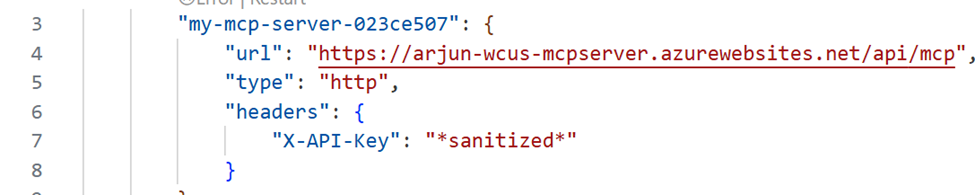
When you configure the MCP Server in hosts with MCP Clients like VS Code, you can provide the api key in the header X-API-Key. Here are some examples:
Agent Loop
Use the API Key Auth type when you try to add MCP Server to Agent Loop. Check out 02 - Add BYO MCP tools to your agent
VS Code: (mcp.json)
Claude Code
Command:
claude mcp add --transport http MyKeybasedLogicAppMcpServer https://arjun-wcus-mcpserver.azurewebsites.net/api/mcp --header "X-API-Key:*sanitized*"