co-op-translator
Co-op Translator GitHub Action ഉപയോഗിച്ച് പ്രവർത്തനം (സംഘടനാ മാർഗ്ഗനിർദ്ദേശം)
ലക്ഷ്യ പ്രേക്ഷകർ: ഈ മാർഗ്ഗനിർദ്ദേശം Microsoft ഉള്ളിലെ ഉപയോക്താക്കൾ അല്ലെങ്കിൽ Co-op Translator GitHub App-ന്റെ മുൻകൂട്ടി നിർമ്മിച്ച ക്രെഡൻഷ്യലുകൾ ലഭ്യമുള്ള ടീമുകൾ അല്ലെങ്കിൽ അവരുടെ സ്വന്തം GitHub App സൃഷ്ടിക്കാൻ കഴിവുള്ളവർക്കാണ്.
Co-op Translator GitHub Action ഉപയോഗിച്ച് നിങ്ങളുടെ repository-യിലെ ഡോക്യുമെന്റേഷൻ സ്വയംമാറ്റം ചെയ്യുക. നിങ്ങളുടെ സോഴ്സ് Markdown ഫയലുകൾ അല്ലെങ്കിൽ ചിത്രങ്ങൾ മാറ്റുമ്പോൾ, പുതുക്കിയ വിവർത്തനങ്ങളുള്ള pull request-കൾ സ്വയം സൃഷ്ടിക്കാൻ ഈ മാർഗ്ഗനിർദ്ദേശം നിങ്ങളെ സഹായിക്കുന്നു.
[!IMPORTANT]
ശരിയായ മാർഗ്ഗനിർദ്ദേശം തിരഞ്ഞെടുക്കൽ:
ഈ മാർഗ്ഗനിർദ്ദേശം GitHub App IDയും Private Keyയും ഉപയോഗിച്ച് സജ്ജീകരണത്തെ വിശദീകരിക്കുന്നു. നിങ്ങൾക്ക് സാധാരണ
GITHUB_TOKEN-ന്റെ അനുമതികൾ പരിമിതമായ സാഹചര്യത്തിൽ ഈ “സംഘടനാ മാർഗ്ഗനിർദ്ദേശം” ആവശ്യമാകും. പ്രത്യേകിച്ച്,GITHUB_TOKEN-ന് ആവശ്യമായwriteഅനുമതികൾ (ഉദാ:contents: writeഅല്ലെങ്കിൽpull-requests: write) അനുവദിക്കാത്ത സാഹചര്യത്തിൽ, Public Setup Guide-ൽ workflow പരാജയപ്പെടും. GitHub App-ന്റെ പ്രത്യേകമായി അനുവദിച്ച അനുമതികൾ ഉപയോഗിച്ച് ഈ പരിമിതിയെ മറികടക്കാം.മുകളിൽ പറയുന്നവ നിങ്ങൾക്ക് ബാധകമല്ലെങ്കിൽ:
നിങ്ങളുടെ repository-യിൽ
GITHUB_TOKEN-ന് മതിയായ അനുമതികൾ ഉള്ളെങ്കിൽ (ഉദാ: നിങ്ങൾക്ക് സംഘടനാ പരിമിതികൾ തടസ്സമല്ല), Public Setup Guide using GITHUB_TOKEN ഉപയോഗിക്കുക. ഈ പൊതുമാർഗ്ഗനിർദ്ദേശം App ID-കൾ അല്ലെങ്കിൽ Private Key-കൾ കൈകാര്യം ചെയ്യേണ്ടതില്ല, മാത്രമല്ലGITHUB_TOKEN-നും repository permissions-നും മാത്രം ആശ്രയിക്കുന്നു.
മുൻവശങ്ങൾ
GitHub Action സജ്ജീകരിക്കുന്നതിന് മുമ്പ് ആവശ്യമായ AI സേവന ക്രെഡൻഷ്യലുകൾ തയ്യാറായിരിക്കണം.
1. ആവശ്യമായത്: AI Language Model Credentials നിങ്ങൾക്ക് കുറഞ്ഞത് ഒരു Language Model-ന്റെ ക്രെഡൻഷ്യലുകൾ ആവശ്യമുണ്ട്:
- Azure OpenAI: Endpoint, API Key, Model/Deployment Names, API Version ആവശ്യമാണ്.
- OpenAI: API Key ആവശ്യമാണ്, (ഓപ്ഷണൽ: Org ID, Base URL, Model ID).
- വിശദാംശങ്ങൾക്കായി Supported Models and Services കാണുക.
- സജ്ജീകരണ മാർഗ്ഗനിർദ്ദേശം: Set up Azure OpenAI.
2. ഓപ്ഷണൽ: Computer Vision Credentials (ചിത്ര വിവർത്തനത്തിനായി)
- ചിത്രങ്ങളിലെ ടെക്സ്റ്റ് വിവർത്തനം ചെയ്യേണ്ടതുണ്ടെങ്കിൽ മാത്രമേ ആവശ്യമായുള്ളൂ.
- Azure Computer Vision: Endpoint, Subscription Key ആവശ്യമാണ്.
- ഇത് നൽകാത്ത പക്ഷം, പ്രവർത്തനം Markdown-only mode-ലേക്ക് മാറും.
- സജ്ജീകരണ മാർഗ്ഗനിർദ്ദേശം: Set up Azure Computer Vision.
സജ്ജീകരണവും കോൺഫിഗറേഷനും
Co-op Translator GitHub Action നിങ്ങളുടെ repository-യിൽ സജ്ജീകരിക്കുന്നതിന് താഴെ പറയുന്ന ഘട്ടങ്ങൾ പിന്തുടരുക:
ഘട്ടം 1: GitHub App Authentication ഇൻസ്റ്റാൾ ചെയ്യുകയും കോൺഫിഗർ ചെയ്യുകയും ചെയ്യുക
Workflow നിങ്ങളുടെ repository-യുമായി സുരക്ഷിതമായി ഇടപെടാൻ (ഉദാ: pull request-കൾ സൃഷ്ടിക്കാൻ) GitHub App authentication ഉപയോഗിക്കുന്നു. ഒരു ഓപ്ഷൻ തിരഞ്ഞെടുക്കുക:
ഓപ്ഷൻ A: മുൻകൂട്ടി നിർമ്മിച്ച Co-op Translator GitHub App ഇൻസ്റ്റാൾ ചെയ്യുക (Microsoft ഉള്ളിൽ ഉപയോഗത്തിനായി)
-
Co-op Translator GitHub App പേജിലേക്ക് പോകുക.
-
Install തിരഞ്ഞെടുക്കുക, നിങ്ങളുടെ ലക്ഷ്യ repository ഉള്ള അക്കൗണ്ട് അല്ലെങ്കിൽ സംഘടന തിരഞ്ഞെടുക്കുക.
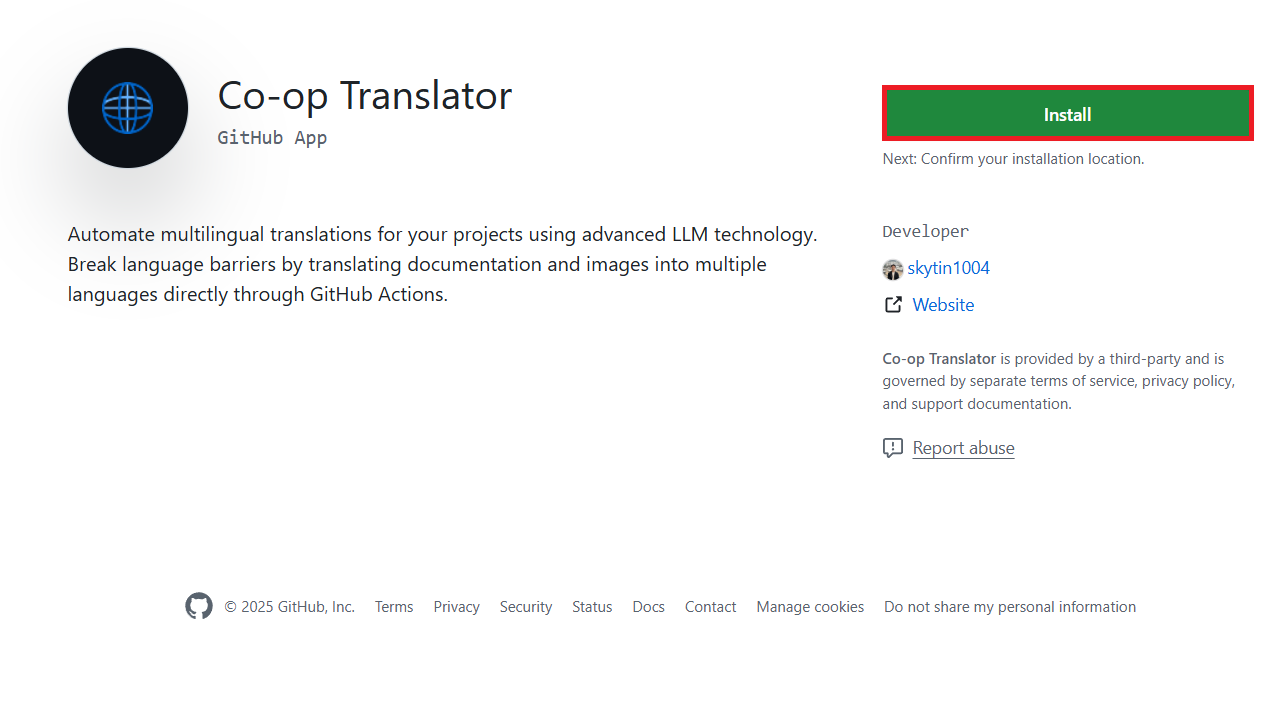
-
Only select repositories തിരഞ്ഞെടുക്കുക, നിങ്ങളുടെ ലക്ഷ്യ repository (ഉദാ:
PhiCookBook) തിരഞ്ഞെടുക്കുക. Install ക്ലിക്ക് ചെയ്യുക. നിങ്ങൾക്ക് authentication ആവശ്യമായേക്കാം.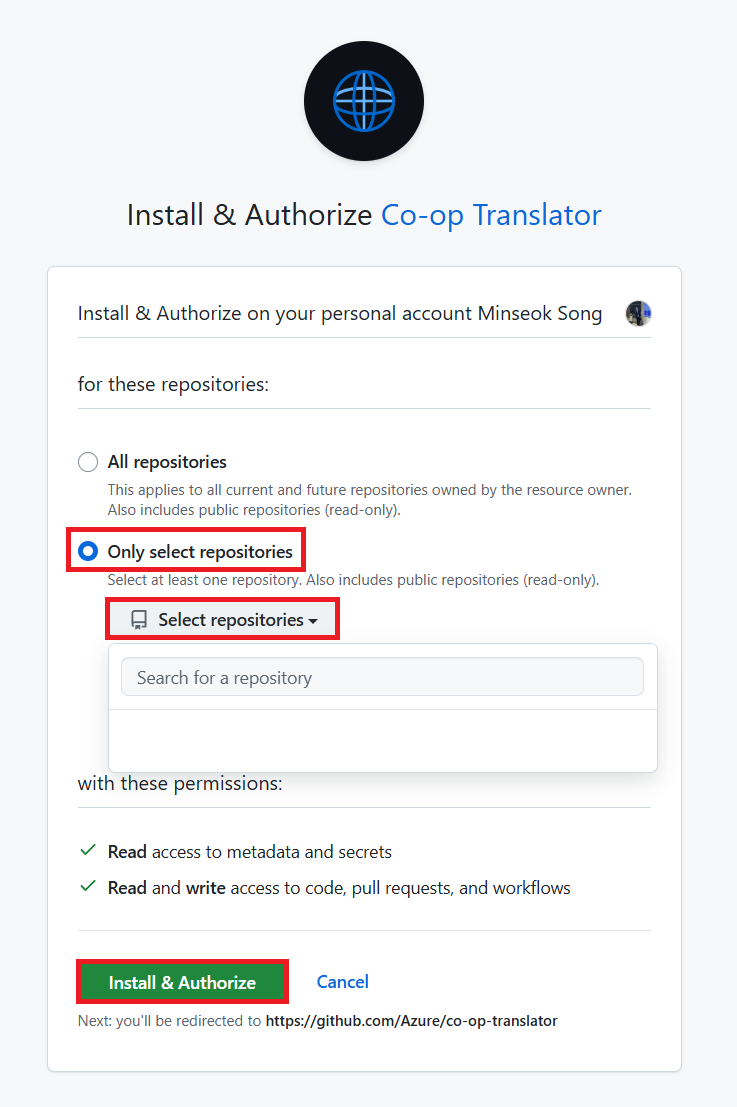
- App Credentials നേടുക (ആന്തരിക പ്രക്രിയ ആവശ്യമാണ്): Workflow-ന് app ആയി authenticate ചെയ്യാൻ, Co-op Translator ടീം നൽകുന്ന രണ്ട് വിവരങ്ങൾ ആവശ്യമുണ്ട്:
- App ID: Co-op Translator app-ന്റെ പ്രത്യേക ID. App ID:
1164076. - Private Key:
.pemprivate key ഫയലിന്റെ മുഴുവൻ ഉള്ളടക്കം maintainer-ൽ നിന്ന് നേടണം. ഈ key ഒരു പാസ്വേഡിനെപ്പോലെ സംരക്ഷിക്കുക.
- App ID: Co-op Translator app-ന്റെ പ്രത്യേക ID. App ID:
- ഘട്ടം 2-ലേക്ക് നീങ്ങുക.
ഓപ്ഷൻ B: നിങ്ങളുടെ സ്വന്തം Custom GitHub App ഉപയോഗിക്കുക
- നിങ്ങൾക്ക് ഇഷ്ടമുള്ളതെങ്കിൽ, നിങ്ങളുടെ സ്വന്തം GitHub App സൃഷ്ടിക്കുകയും കോൺഫിഗർ ചെയ്യുകയും ചെയ്യാം. ഇത് Contents, Pull requests എന്നിവയ്ക്ക് Read & write access ഉണ്ടായിരിക്കണം. App ID, Private Key ആവശ്യമാകും.
ഘട്ടം 2: Repository Secrets കോൺഫിഗർ ചെയ്യുക
GitHub App ക്രെഡൻഷ്യലുകളും നിങ്ങളുടെ AI സേവന ക്രെഡൻഷ്യലുകളും repository settings-ൽ encrypted secrets ആയി ചേർക്കണം.
-
നിങ്ങളുടെ GitHub repository (ഉദാ:
PhiCookBook) തുറക്കുക. -
Settings > Secrets and variables > Actions-ലേക്ക് പോകുക.
-
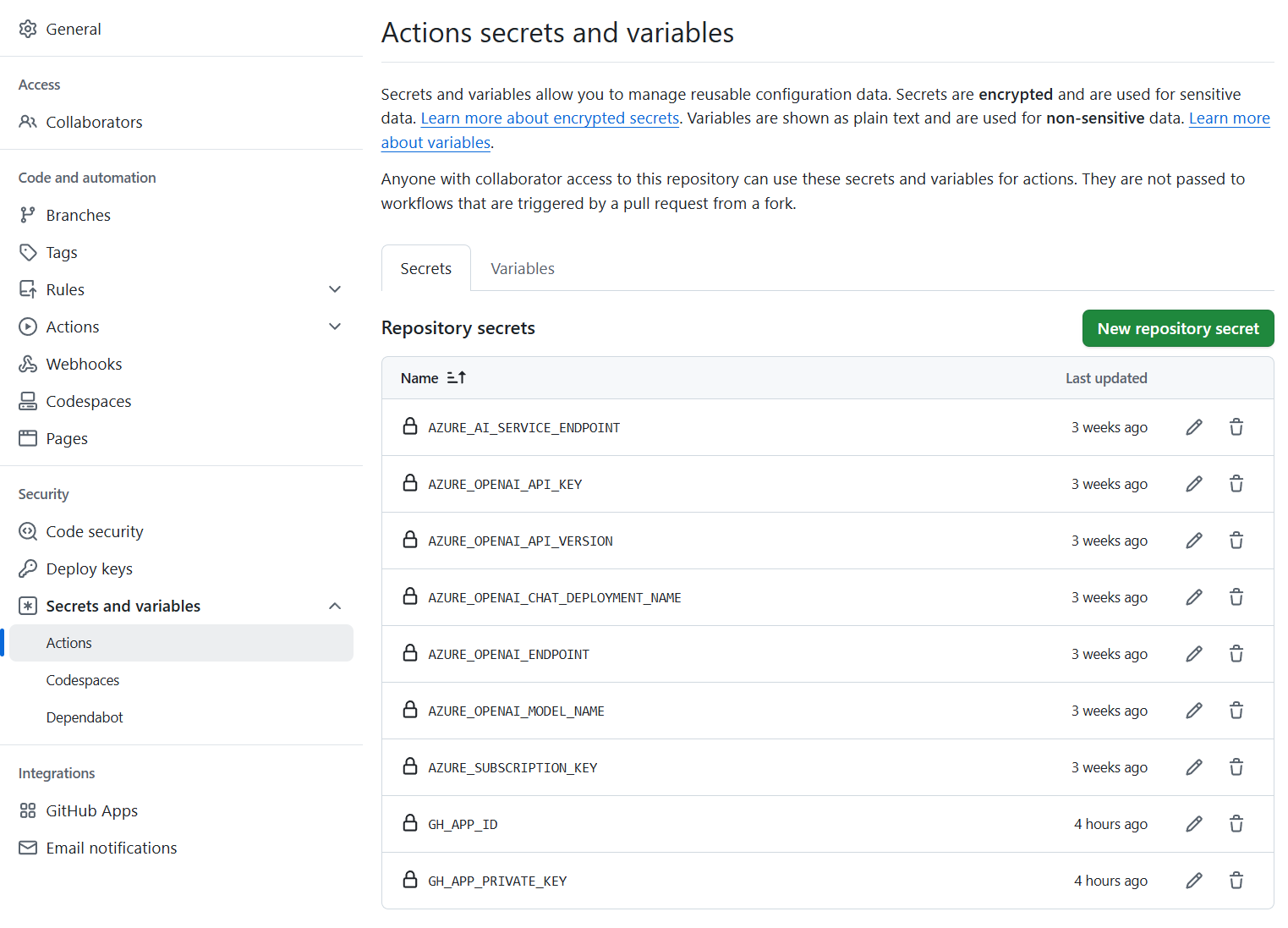
Repository secrets-ൽ, താഴെ പറയുന്ന ഓരോ secret-നും New repository secret ക്ലിക്ക് ചെയ്യുക.
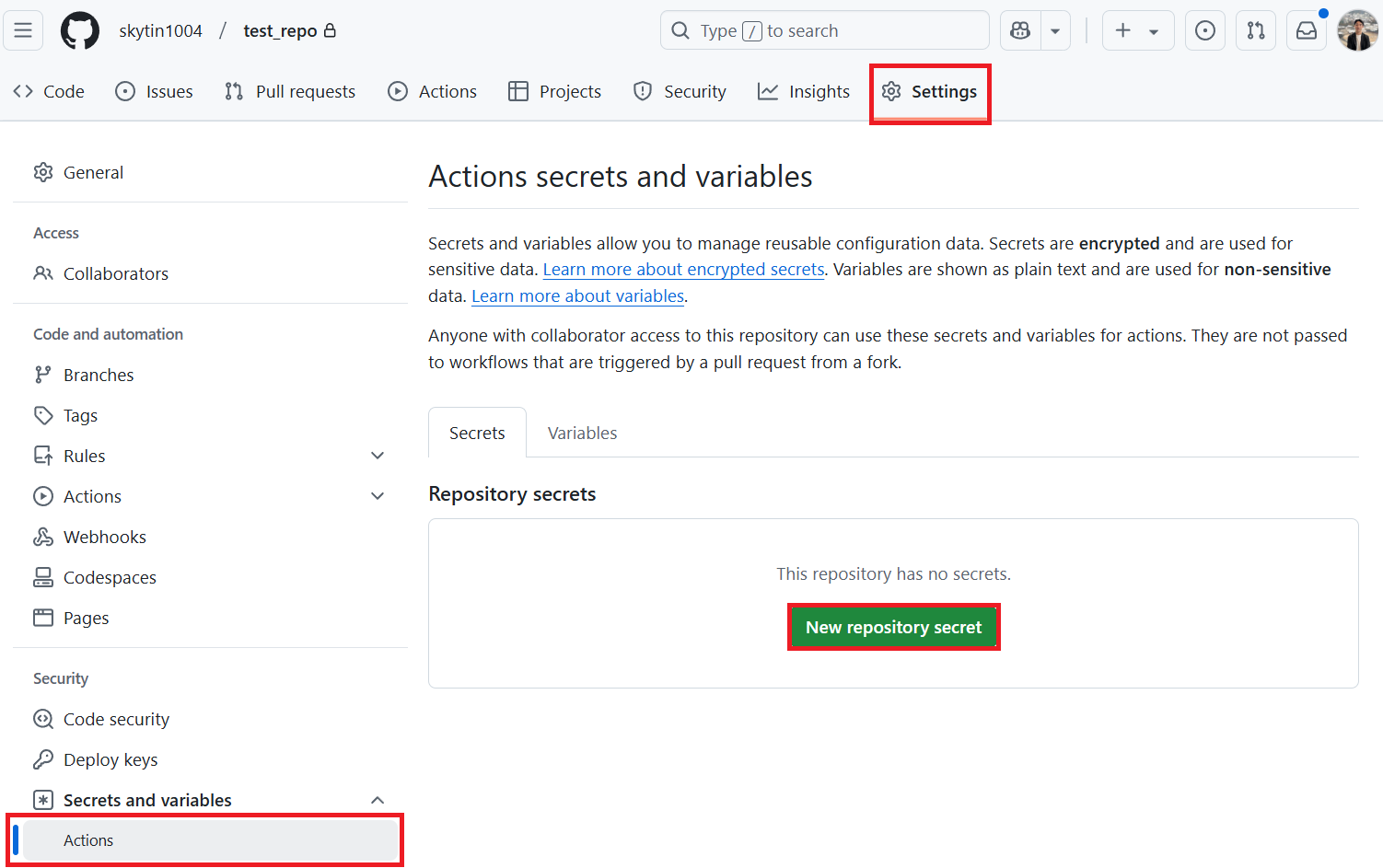
GitHub App Authentication-നുള്ള ആവശ്യമായ Secrets:
| Secret Name | വിവരണം | Value Source |
|---|---|---|
GH_APP_ID |
GitHub App-ന്റെ App ID (ഘട്ടം 1-ൽ നിന്ന്). | GitHub App Settings |
GH_APP_PRIVATE_KEY |
.pem ഫയലിന്റെ മുഴുവൻ ഉള്ളടക്കം. |
.pem ഫയൽ (ഘട്ടം 1-ൽ നിന്ന്) |
AI Service Secrets (മുൻവശങ്ങൾ അടിസ്ഥാനമാക്കി ബാധകമായവ എല്ലാം ചേർക്കുക):
| Secret Name | വിവരണം | Value Source |
|---|---|---|
AZURE_AI_SERVICE_API_KEY |
Azure AI Service (Computer Vision)-ന്റെ Key | Azure AI Foundry |
AZURE_AI_SERVICE_ENDPOINT |
Azure AI Service (Computer Vision)-ന്റെ Endpoint | Azure AI Foundry |
AZURE_OPENAI_API_KEY |
Azure OpenAI Service-ന്റെ Key | Azure AI Foundry |
AZURE_OPENAI_ENDPOINT |
Azure OpenAI Service-ന്റെ Endpoint | Azure AI Foundry |
AZURE_OPENAI_MODEL_NAME |
Azure OpenAI Model Name | Azure AI Foundry |
AZURE_OPENAI_CHAT_DEPLOYMENT_NAME |
Azure OpenAI Deployment Name | Azure AI Foundry |
AZURE_OPENAI_API_VERSION |
Azure OpenAI API Version | Azure AI Foundry |
OPENAI_API_KEY |
OpenAI-ന്റെ API Key | OpenAI Platform |
OPENAI_ORG_ID |
OpenAI Organization ID | OpenAI Platform |
OPENAI_CHAT_MODEL_ID |
OpenAI-ന്റെ പ്രത്യേക Model ID | OpenAI Platform |
OPENAI_BASE_URL |
Custom OpenAI API Base URL | OpenAI Platform |
ഘട്ടം 3: Workflow ഫയൽ സൃഷ്ടിക്കുക
Workflow നിർവചിക്കുന്ന YAML ഫയൽ സൃഷ്ടിക്കുക.
-
നിങ്ങളുടെ repository-യുടെ root directory-യിൽ
.github/workflows/directory ഇല്ലെങ്കിൽ, അത് സൃഷ്ടിക്കുക. -
.github/workflows/-ൽco-op-translator.ymlഎന്ന പേരിൽ ഒരു ഫയൽ സൃഷ്ടിക്കുക. -
co-op-translator.yml-ൽ താഴെ പറയുന്ന ഉള്ളടക്കം paste ചെയ്യുക.
name: Co-op Translator

on:
  push:
    branches:
      - main

jobs:
  co-op-translator:
    runs-on: ubuntu-latest

    permissions:
      contents: write
      pull-requests: write

    steps:
      - name: Checkout repository
        uses: actions/checkout@v4
        with:
          fetch-depth: 0

      - name: Set up Python
        uses: actions/setup-python@v4
        with:
          python-version: '3.10'

      - name: Install Co-op Translator
        run: |
          python -m pip install --upgrade pip
          pip install co-op-translator

      - name: Run Co-op Translator
        env:
          PYTHONIOENCODING: utf-8
          # Azure AI Service Credentials
          AZURE_AI_SERVICE_API_KEY: $
          AZURE_AI_SERVICE_ENDPOINT: $

          # Azure OpenAI Credentials
          AZURE_OPENAI_API_KEY: $
          AZURE_OPENAI_ENDPOINT: $
          AZURE_OPENAI_MODEL_NAME: $
          AZURE_OPENAI_CHAT_DEPLOYMENT_NAME: $
          AZURE_OPENAI_API_VERSION: $

          # OpenAI Credentials
          OPENAI_API_KEY: $
          OPENAI_ORG_ID: $
          OPENAI_CHAT_MODEL_ID: $
          OPENAI_BASE_URL: $
        run: |
          # =====================================================================
          # IMPORTANT: Set your target languages here (REQUIRED CONFIGURATION)
          # =====================================================================
          # Example: Translate to Spanish, French, German. Add -y to auto-confirm.
          translate -l "es fr de" -y  # <--- MODIFY THIS LINE with your desired languages

      - name: Authenticate GitHub App
        id: generate_token
        uses: tibdex/github-app-token@v1
        with:
          app_id: $
          private_key: $

      - name: Create Pull Request with translations
        uses: peter-evans/create-pull-request@v5
        with:
          token: $
          commit-message: "🌐 Update translations via Co-op Translator"
          title: "🌐 Update translations via Co-op Translator"
          body: |
            This PR updates translations for recent changes to the main branch.

            ### 📋 Changes included
            - Translated contents are available in the `translations/` directory
            - Translated images are available in the `translated_images/` directory

            ---
            🌐 Automatically generated by the [Co-op Translator](https://github.com/Azure/co-op-translator) GitHub Action.
          branch: update-translations
          base: main
          labels: translation, automated-pr
          delete-branch: true
          add-paths: |
            translations/
            translated_images/
- Workflow Customize ചെയ്യുക:
- [!IMPORTANT] Target Languages:
Run Co-op Translatorഘട്ടത്തിൽ,translate -l "..." -yകമാൻഡിലെ ഭാഷാ കോഡുകളുടെ പട്ടിക നിങ്ങളുടെ പ്രോജക്റ്റിന്റെ ആവശ്യങ്ങൾക്കനുസരിച്ച് പരിഷ്കരിക്കണം. ഉദാഹരണ പട്ടിക (ar de es...) മാറ്റുകയോ ക്രമീകരിക്കുകയോ ചെയ്യുക. - Trigger (
on:): നിലവിലെ triggermain-ലേക്ക് ഓരോ push-ലും പ്രവർത്തിക്കുന്നു. വലിയ repository-കളിൽ,paths:filter ചേർക്കുക (YAML-ൽ comment ചെയ്ത ഉദാഹരണം കാണുക) workflow പ്രാസംഗിക ഫയലുകൾ (ഉദാ: സോഴ്സ് ഡോക്യുമെന്റേഷൻ) മാറ്റുമ്പോൾ മാത്രം പ്രവർത്തിക്കാൻ, runner minutes സംരക്ഷിക്കാൻ. - PR Details:
Create Pull Requestഘട്ടത്തിൽcommit-message,title,body,branchname,labelsഎന്നിവ ആവശ്യാനുസരിച്ച് customize ചെയ്യുക.
- [!IMPORTANT] Target Languages:
Credential Management and Renewal
- സുരക്ഷ: API keys, private keys പോലുള്ള സങ്കീർണ്ണമായ ക്രെഡൻഷ്യലുകൾ GitHub Actions secrets ആയി സൂക്ഷിക്കുക. Workflow ഫയലിൽ അല്ലെങ്കിൽ repository code-ൽ അവ പ്രദർശിപ്പിക്കരുത്.
- [!IMPORTANT] Key Renewal (Microsoft ഉള്ളിലെ ഉപയോക്താക്കൾ): Microsoft-ൽ ഉപയോഗിക്കുന്ന Azure OpenAI key-യ്ക്ക് നിർബന്ധമായ renewal policy (ഉദാ: 5 മാസത്തിൽ ഒരിക്കൽ) ഉണ്ടായേക്കാം. Workflow പരാജയപ്പെടാതിരിക്കാൻ, GitHub secrets (
AZURE_OPENAI_...keys) അവസാനിക്കുന്നതിന് മുമ്പ് അപ്ഡേറ്റ് ചെയ്യുക.
Workflow പ്രവർത്തിപ്പിക്കൽ
[!WARNING]
GitHub-hosted Runner Time Limit:
GitHub-hosted runners, ഉദാ:ubuntu-latest, 6 മണിക്കൂർ പരമാവധി പ്രവർത്തന സമയ പരിധി ഉണ്ട്.
വലിയ ഡോക്യുമെന്റേഷൻ repository-കളിൽ, വിവർത്തന പ്രക്രിയ 6 മണിക്കൂറിൽ കൂടുതൽ നീണ്ടാൽ, workflow സ്വയം അവസാനിപ്പിക്കും.
ഇത് തടയാൻ, പരിഗണിക്കുക:
- Self-hosted runner ഉപയോഗിക്കുക (സമയ പരിധിയില്ല)
- ഓരോ run-ലും ലക്ഷ്യഭാഷകളുടെ എണ്ണം കുറയ്ക്കുക
co-op-translator.yml ഫയൽ നിങ്ങളുടെ main branch-ലേക്ക് (അല്ലെങ്കിൽ on: trigger-ൽ വ്യക്തമാക്കിയ branch) merge ചെയ്താൽ, workflow ആ branch-ലേക്ക് push ചെയ്തപ്പോൾ (കോണ്ഫിഗർ ചെയ്ത paths filter-നെ match ചെയ്താൽ) സ്വയം പ്രവർത്തിക്കും.
വിവർത്തനങ്ങൾ സൃഷ്ടിക്കുകയോ അപ്ഡേറ്റ് ചെയ്യുകയോ ചെയ്താൽ, പ്രവർത്തനം മാറ്റങ്ങൾ അടങ്ങിയ Pull Request സ്വയം സൃഷ്ടിക്കും, നിങ്ങളുടെ അവലോകനത്തിനും merge ചെയ്യുന്നതിനും തയ്യാറായിരിക്കും.
അറിയിപ്പ്:
ഈ രേഖ AI വിവർത്തന സേവനം Co-op Translator ഉപയോഗിച്ച് വിവർത്തനം ചെയ്തതാണ്. ഞങ്ങൾ കൃത്യതയ്ക്കായി ശ്രമിക്കുന്നുവെങ്കിലും, ഓട്ടോമേറ്റഡ് വിവർത്തനങ്ങളിൽ പിഴവുകൾ അല്ലെങ്കിൽ തെറ്റായ വിവരങ്ങൾ ഉണ്ടാകാൻ സാധ്യതയുണ്ട്. അതിന്റെ സ്വാഭാവിക ഭാഷയിൽ ഉള്ള അസൽ രേഖയാണ് പ്രാമാണികമായ ഉറവിടം എന്ന് പരിഗണിക്കേണ്ടത്. നിർണായകമായ വിവരങ്ങൾക്ക്, പ്രൊഫഷണൽ മനുഷ്യ വിവർത്തനം ശുപാർശ ചെയ്യുന്നു. ഈ വിവർത്തനം ഉപയോഗിച്ച് ഉണ്ടാകുന്ന തെറ്റിദ്ധാരണകൾ അല്ലെങ്കിൽ തെറ്റായ വ്യാഖ്യാനങ്ങൾക്കായി ഞങ്ങൾ ഉത്തരവാദികളല്ല.