co-op-translator
Set Up Azure AI for Co-op Translator (Azure OpneAI & Azure AI Vision)
Dis guide go show you how to set up Azure OpenAI for language translation and Azure Computer Vision for image content analysis (wey you fit use for image-based translation) inside Azure AI Foundry.
Wetin you gats before:
- Azure account wey get active subscription.
- Correct permission to create resources and deployments inside your Azure subscription.
Create Azure AI Project
You go start by creating Azure AI Project, wey go be central place to manage your AI resources.
-
Go https://ai.azure.com and sign in with your Azure account.
-
Select +Create to create new project.
- Do these things:
- Put Project name (example,
CoopTranslator-Project). - Select AI hub (example,
CoopTranslator-Hub) (Create new one if you need am).
- Put Project name (example,
- Click “Review and Create” to set up your project. You go land for your project overview page.
Set up Azure OpenAI for Language Translation
Inside your project, you go deploy Azure OpenAI model wey dey serve as backend for text translation.
Go Your Project
If you never reach, open your new project (example, CoopTranslator-Project) inside Azure AI Foundry.
Deploy OpenAI Model
-
From your project left-hand menu, under “My assets”, select “Models + endpoints”.
-
Select + Deploy model.
-
Select Deploy Base Model.
-
You go see list of models wey dey. Filter or search for beta GPT model. We dey recommend
gpt-4o. -
Select your model and click Confirm.
-
Select Deploy.
Azure OpenAI configuration
When you don deploy, you fit select deployment from “Models + endpoints” page to find REST endpoint URL, Key, Deployment name, Model name and API version. Dem go need these things to join translation model to your app.
[!NOTE]
You fit select API versions from API version deprecation page based on your wahala. Make you sabi say API version no be same wit Model version wey dem show for Models + endpoints page inside Azure AI Foundry.
Set up Azure Computer Vision for Image Translation
To fit translate text wey dey inside pictures, you gots find Azure AI Service API Key and Endpoint.
- Go your Azure AI Project (example,
CoopTranslator-Project). Make sure say you dey for project overview page.
Azure AI Service configuration
Find API Key and Endpoint from Azure AI Service.
-
Go your Azure AI Project (example,
CoopTranslator-Project). Make sure say you dey for project overview page. -
Find API Key and Endpoint for Azure AI Service tab.
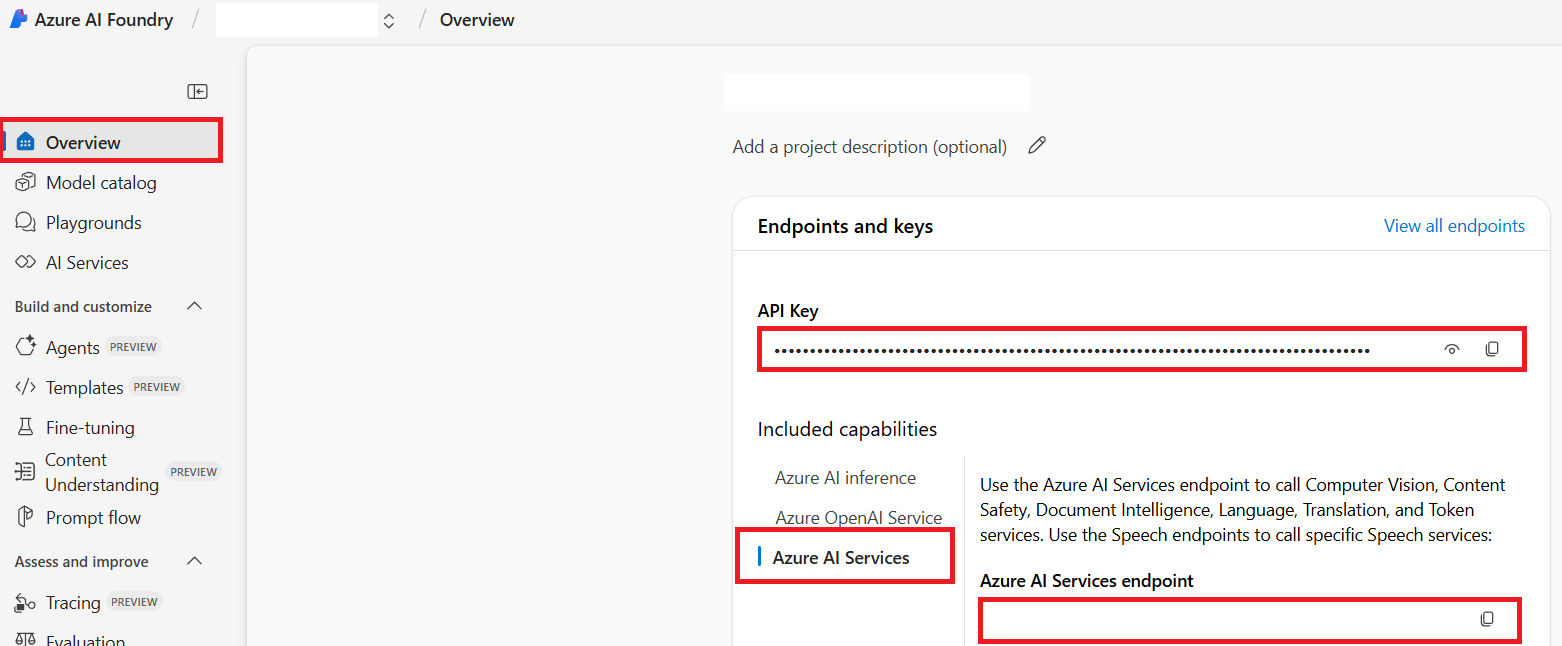
Dis connection dey give your AI Foundry project beta access to linked Azure AI Services resource (including image analysis). Then you fit use dis connection for your notebooks or apps to comot text from images, wey fit later go Azure OpenAI model for translation.
Collect Wetin You Gats
By now, you suppose don collect these:
For Azure OpenAI (Text Translation):
- Azure OpenAI Endpoint
- Azure OpenAI API Key
- Azure OpenAI Model Name (example,
gpt-4o) - Azure OpenAI Deployment Name (example,
cooptranslator-gpt4o) - Azure OpenAI API Version
For Azure AI Services (Image Text Extraction via Vision):
- Azure AI Service Endpoint
- Azure AI Service API Key
Example: Environment Variable Configuration (Preview)
Later, as you dey build your app, you go set am with these credentials. For example, you fit set them as environment variables like this:
# Azure AI Service Credentials (Wetin you go need for image translation)
AZURE_AI_SERVICE_API_KEY="your_azure_ai_service_api_key" # Eksampul, 21xasd...
AZURE_AI_SERVICE_ENDPOINT="https://your_azure_ai_service_endpoint.cognitiveservices.azure.com/"

# Optional fallback sets: copy di variables dem plus _1/_2 for back (all vars get di same index for di set)
AZURE_AI_SERVICE_API_KEY_1="your_azure_ai_service_api_key_1"
AZURE_AI_SERVICE_ENDPOINT_1="https://your_azure_ai_service_endpoint_1.cognitiveservices.azure.com/"

# Azure OpenAI Credentials (Wetin you go need for text translation)
AZURE_OPENAI_API_KEY="your_azure_openai_api_key" # Eksampul, 21xasd...
AZURE_OPENAI_ENDPOINT="https://your_azure_openai_endpoint.openai.azure.com/"
AZURE_OPENAI_MODEL_NAME="your_model_name" # Eksampul, gpt-4o
AZURE_OPENAI_CHAT_DEPLOYMENT_NAME="your_deployment_name" # Eksampul, cooptranslator-gpt4o
AZURE_OPENAI_API_VERSION="your_api_version" # Eksampul, 2024-12-01-preview

# Optional fallback sets: copy all di AZURE_OPENAI_* set with _1/_2 suffix (all vars get di same index)
More Reading
- How to Create project for Azure AI Foundry
- How to Create Azure AI resources
- How to Deploy OpenAI models for Azure AI Foundry
Disclaimer:
Dis dokument don translate wit AI translation service Co-op Translator. Even tho we dey try make am correct, abeg make you sabi say automated translation fit get errors or mistakes. Di original dokument for e correct language na di real correct source. For important information, make person wey sabi translate am well use human translation. We no go responsible if person no understand or misinterpret tins because of dis translation.