Dynamic workflows (experimental v1)
The app-level Copilot opt-in supports the same five management tools,
per-agent policy authorization, Workflow Sub Agent Activities, configured MCP
servers, and approved authored skills in this preview. Each
leaf gets a fresh native session that is deleted after use. Workflow-enabled
direct roles receive the packaged data-driven-workflows skill through the
same native skill-directory path as approved authored skills; the host keeps a
separate concise workflow addendum and does not read SKILL.md into the
prompt. Delegated leaves and Workflow Sub Agent leaves do not inherit that
runtime-only skill. Hosted startup, auth, storage, restart, and overlap
behavior still require live qualification.
[!NOTE] Status: public experimental v1. The API is intentionally small and may change based on early feedback, but the behavior described here is the supported v1 surface. Run the workflow-incident-triage sample for the interactive experience, or the queue-trigger sample for a non-interactive starter. The parallel PR report sample demonstrates workflow Sub Agents. The Engineering Operations Hub demonstrates two non-main workflow-enabled agents with independent policies in one app. Larger features such as sub-orchestrations, large-output offloading, and MCP Tasks integration are tracked as v2 follow-up work.
Dynamic workflows let a markdown agent author and run distributed,
observable, durable plans without writing orchestration code. Flip
workflows.enabled: true in the agent's frontmatter and the agent gains a
small set of built-in tools that author and launch
Azure Durable Functions
orchestrations of workflow-safe tool calls and durable timers.
Who this is for
Dynamic workflows are a fit when an agent needs to:
- process large datasets where only an aggregate or summary should reach the chat (e.g., scan 50 endpoints, summarize anomalies);
- run multi-step plans (3+ dependent tool calls) where each model round-trip would burn tokens and latency;
- fan out independent work across many parallel tool calls;
- wait on durable timers without holding a worker hot;
- survive worker restarts or long pauses (minutes to hours);
- be observed and controlled from outside the agent loop;
They are not the right tool for:
- work that fits comfortably inside a single chat turn — the orchestration overhead would dominate;
- tools that need an immediate user response (the workflow tool returns immediately with an ID; the result is fetched on a later turn);
- hand-authored orchestration DSLs — plans are LLM-authored only, by design, so there is no YAML/markdown workflow template format;
- cross-app coordination. v1 workflows live inside one Functions app; any agent in that app can own workflows and authorize leaf specialists.
Why workflows (token, latency, context)
Dynamic workflows give an agent the same benefits that motivate programmatic tool calling in other LLM platforms — the LLM authors a plan that calls tools rather than calling them one-by-one through chat round-trips — and add durability, observability, and cooperative control on top.
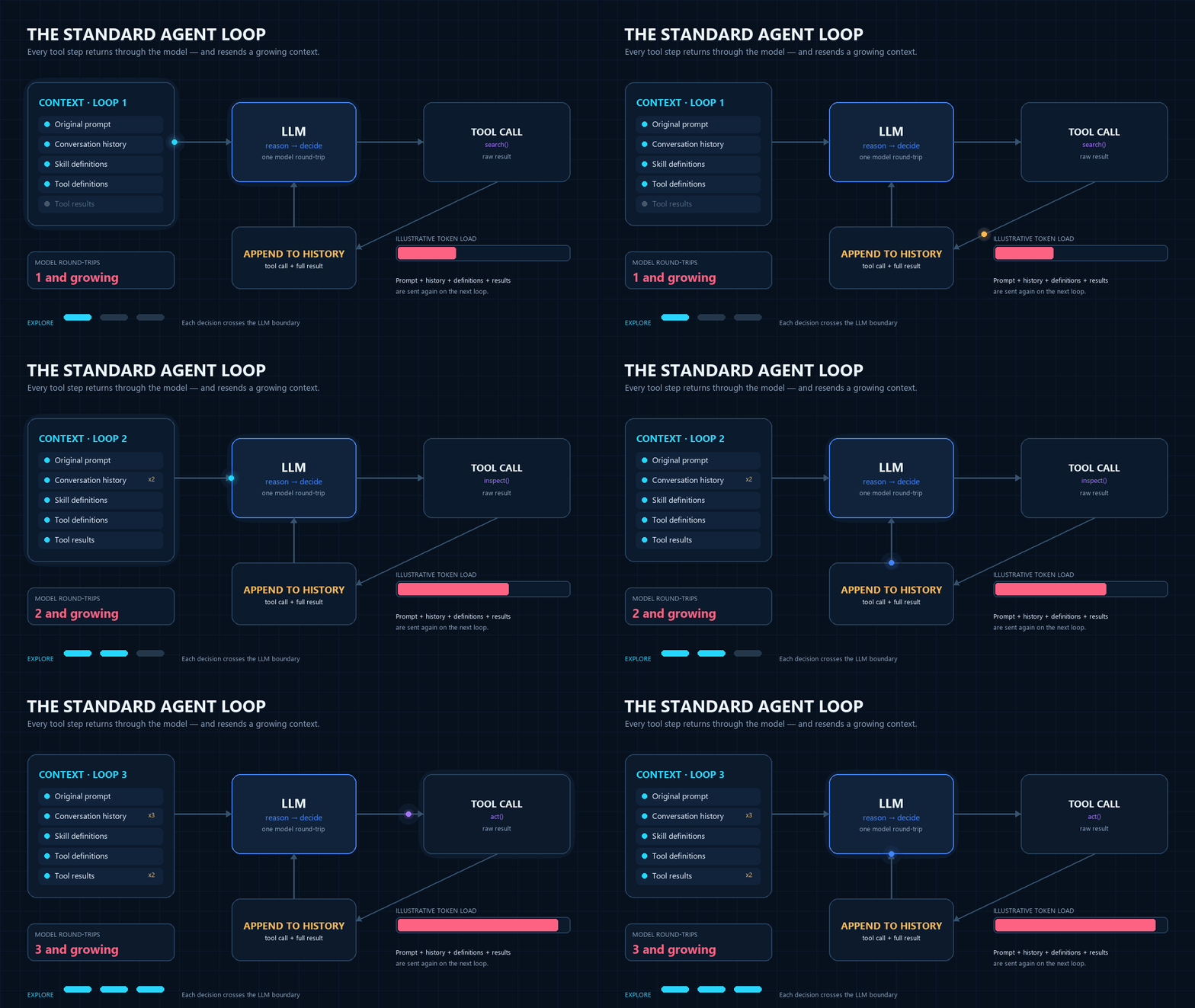
In a standard agent loop, each tool result returns through the model and becomes part of the next loop's context:
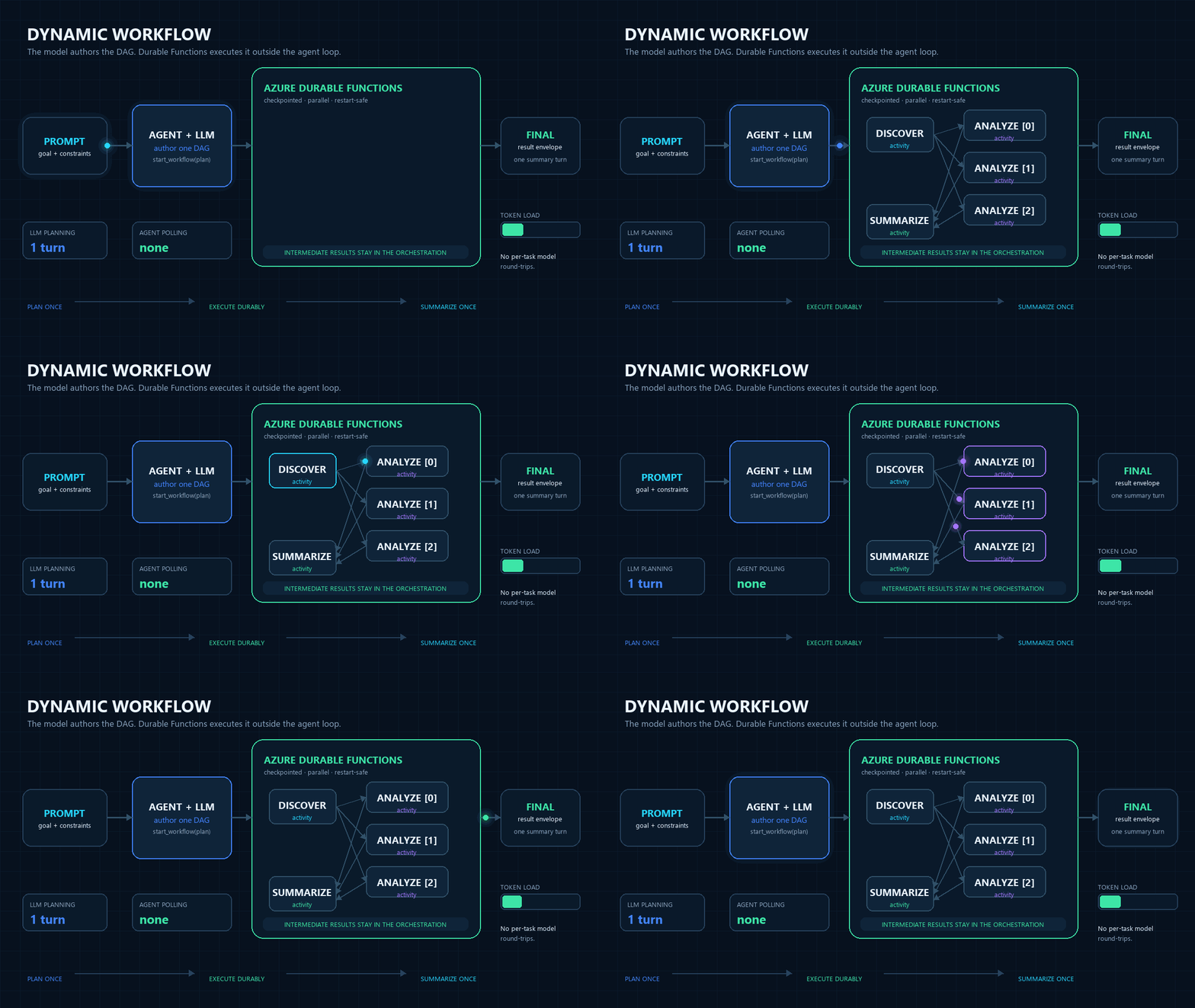
With a Dynamic Workflow, intermediate results stay in the orchestration; the agent plans once and later summarizes the final envelope:
Three concrete wins versus chaining tool calls in conversation:
- Lower token cost. Intermediate task results stay inside the orchestration. The agent sees only the final completion envelope (or a summary task you wired in), not every fan-out result. Anthropic reports roughly a 10× reduction on multi-tool workflows; the shape of the saving is the same here.
- Lower latency. Each direct tool call is a round-trip through the model. A 20-step plan is one model turn to author the workflow, not 20. The orchestrator drives the fan-out and sequencing in pure infrastructure.
- Context-window discipline. Hundreds of kilobytes of intermediate data — log lines, line items, search hits — never reach the model's context. The agent reasons over the summary, which is what it would have produced anyway after seeing the raw data.
…and three more that PTC's container-based model can't offer:
- Survives worker restarts and long sleeps. Workflows that take hours or days are first-class — no client connection has to stay open.
- Operable from outside the agent loop.
fhs_list_workflows,fhs_get_workflow_status,fhs_cancel_workflow, and the optional Durable Task Scheduler portal give operators a way to see and steer in-flight work without going through the chat session.
How it works
- You enable workflows on an agent with a one-line frontmatter flag.
- The agent is given five built-in tools (see Tools).
- When the agent decides the work is workflow-shaped, it calls
fhs_start_workflowwith a DAG of tasks. The DAG is validated and scheduled as a Durable orchestration; the tool returns immediately with aworkflow_id. - The orchestration runs each task as a Durable activity (tool calls) or
a Durable timer (waits), using
task_allto fan out parallel tasks anddepends_onedges for sequencing. fhs_start_workflowis fire-and-forget from the agent's perspective. After receiving theworkflow_id, the agent reports or records it as its invocation channel allows and ends its turn. The agent does not pollfhs_get_workflow_statusto wait for completion.- The chat client (the built-in chat UI, or any external poller) polls
GET /agents/{slug}/workflowson a short interval while the session is visible, renders a live per-task progress card alongside the chat thread, and updates the card with the final result envelope when the workflow terminates. The user sees per-task progress live without the agent doing any work. - When the workflow reaches a terminal state, the built-in chat UI
detects the transition and injects a synthetic user message
containing one or more
<workflow-notification>envelopes into the conversation, prompting the agent to callfhs_get_workflow_statusonce per listed<workflow-id>and produce a short natural-language summary. The user gets a final conversational turn that closes the loop without having to type anything. See Auto-notification below. - If the user later asks the agent about a previously-started
workflow ("what did the incident workflow find?"), the agent calls
fhs_get_workflow_statuson demand and reports back. The on-demand call and the auto-notification turn are the two paths by which workflow output enters the agent's context window.
[!NOTE] Intermediate task results never enter the agent's context window. The agent receives only the
workflow_idfromfhs_start_workflow. Per-task results stay in the workflow store; the chat client renders them next to the conversation. The only output the agent ever ingests is the single final-result envelope it fetches viafhs_get_workflow_status— either when the chat client posts a synthetic<workflow-notification>user message (see Auto-notification) or when the user explicitly asks a follow-up question. This is the same context-window discipline that makes programmatic tool calling cheap.
The design is intentionally aligned with the MCP Tasks SEP-2557 proposal; future direct MCP Tasks support will be a thin protocol shim.
Frontmatter
---
name: Incident Triage Assistant
description: ...
workflows:
  enabled: true
  # Optional deny-list of workflow tools to withhold from this agent.
  # Defaults to every public @workflow_tool discovered from tools/.
  exclude:
    - expensive_diagnostics
  # Optional, independent, deny-by-default specialist grant:
  subagents:
    - agent: log_analyst
      when: Analyze one bounded set of logs
  # Future v2 knob (not honored by v1):
  # max_nodes: 100
  #
  # Note: the Durable execution backend (Azure Storage vs Durable Task
  # Scheduler) and the task hub name are configured in host.json's
  # `extensions.durableTask.storageProvider` block (and matching app
  # settings), NOT here — the library never reads or routes on backend.
---
When workflows.enabled: true, the framework auto-injects the five
workflow tools into the agent's schema and appends a short
behavioral addendum to the agent's system prompt explaining when to
prefer fhs_start_workflow over direct tool calls. The agent author does
not need to document the tools or the heuristics in their markdown — the
agent markdown stays focused on the domain.
Direct workflow-enabled agents also receive the runtime-owned
data-driven-workflows skill. The selected SDK loads it natively from the
packaged skill directory, so the detailed when / for_each grammar stays in
SDK-owned skill loading instead of being copied into the host prompt. This
system skill is independent of project skills filtering (including
skills: false), can coexist with approved authored skills, and is not
exposed when the same agent runs as a delegated or Workflow Sub Agent leaf.
Any agent may enable workflows by setting workflows.enabled: true.
Invocation remains independent: triggers and built-in endpoints determine how
the agent can be reached, and debug_chat_ui automatically enables its backing
chat API.
File placement does not assign these roles. See Agent roles and reachability for how direct, workflow-enabled, and internal specialist agents are identified.
App-wide engine, per-agent policy
The app discovers complete, immutable catalogs of workflow handlers and agents.
If at least one workflow-enabled agent exists, startup creates one DFApp and
registers one Durable orchestrator plus one copy of each Activity for the whole
app. It does not register a separate engine per agent.
An app with no workflow-enabled agents remains a plain FunctionApp.
Each workflow-enabled agent instead gets an immutable policy containing only its allowed
workflow tools (after workflows.exclude) and its deny-by-default
workflows.subagents grants. Prompt guidance, fhs_start_workflow validation, and
Activity dispatch all use that agent's policy. One agent's exclusion never
removes a handler another agent is allowed to use.
Workflow tool authoring
Workflow tasks run later inside Durable Function activities, so they use
an explicit opt-in marker separate from normal MAF tools. Put workflow
handlers in the same tools/ directory as normal tools and decorate each
Durable-activity-safe handler with @workflow_tool:
# tools/incident_tools.py
from typing import Any

from azure_functions_agents import workflow_tool


@workflow_tool(description="Fetch recent log lines for a service.")
def fetch_logs(args: dict[str, Any]) -> dict[str, Any]:
    service = args["service"]
    return {"service": service, "lines": ["..."]}
The Activity runner calls the handler as handler(args). A handler can be
synchronous (def) or asynchronous (async def). It must accept a single
dictionary argument and return a JSON-serializable value. The Activity
awaits async handlers and runs synchronous handlers in a worker thread.
Retry and failure rules are the same for both kinds of handler. A timeout
cancels an async handler, but it cannot stop a synchronous worker thread.
External work can continue in either case.
Reserved workflow-management names and duplicate workflow names are
skipped during startup.
import aiohttp


@workflow_tool(description="Fetch an order from the order service.")
async def fetch_order(args: dict[str, Any]) -> dict[str, Any]:
    async with aiohttp.ClientSession() as session:
        async with session.get(f"https://orders.example/{args['id']}") as response:
            return await response.json()
Only the workflow tool runs as async code. The Durable orchestrator
continues to use yield and does not run tool I/O.
Normal tools may be local public functions or runtime @tool descriptors in
tools/*.py. Use both decorators when one callable should be available both
directly in chat and inside workflows:
from azure_functions_agents import tool, workflow_tool


@tool
@workflow_tool(description="Summarize evidence collected by a workflow.")
def summarize(args: dict[str, object]) -> dict[str, object]:
    return {"summary": "..."}
Both decorator orders are supported. With @tool(schema=Params), the runtime
converts the workflow argument dictionary to the Pydantic model before it calls
the handler. The handler can be synchronous or asynchronous.
Use _-prefixed helper functions for code that should be neither a
normal tool nor a workflow tool.
Tools
Five tools are added to the agent's schema when workflows.enabled: true:
The runtime-owned tools use fhs_ names in both harnesses. Authored tools keep
their own names; no unprefixed internal aliases are injected. See the
name migration guidance when updating existing
agent instructions or tool selectors.
| Tool | Purpose |
|---|---|
fhs_start_workflow(plan) |
Validate a DAG, start an orchestration, return {workflow_id} immediately. |
fhs_get_workflow_status(workflow_id) |
Return the current status envelope (see below). |
fhs_list_workflows() |
List workflows owned by the current session. |
fhs_cancel_workflow(workflow_id, reason?) |
Cooperative cancel — raises an external event the orchestrator handles; the completion activity still runs. |
fhs_terminate_workflow(workflow_id, reason?) |
Hard terminate — stops the instance abruptly; final status is observable but no completion envelope is guaranteed. |
Workflow-management tools are never reachable as workflow-node targets —
a plan that tries to call fhs_start_workflow from inside a workflow fails
validation.
DAG schema (v1)
A workflow plan is a list of tasks with depends_on edges. Task types:
tool— call a discovered@workflow_toolby name with args.wait— durable timer. Acceptsduration(ISO-8601, e.g.PT30S) oruntil(absolute ISO-8601 timestamp).sub_agent— invoke one leaf specialist authorized byworkflows.subagents, usingagentand a self-containedtask.
A tool or sub_agent task may carry an execution policy for retry,
per-attempt timeout, and failure continuation. See
Task execution policy.
{
  "tasks": [
    { "id": "fetch_a", "type": "tool", "tool": "fetch_url", "args": {"url": "..."} },
    { "id": "fetch_b", "type": "tool", "tool": "fetch_url", "args": {"url": "..."} },
    { "id": "cool_down", "type": "wait", "duration": "PT30S",
      "depends_on": ["fetch_a", "fetch_b"] },
    { "id": "summarize", "type": "tool", "tool": "summarize",
      "args": {"sources": ["${fetch_a.result}", "${fetch_b.result}"]},
      "depends_on": ["cool_down"] }
  ]
}
Authored task ids allow letters, numbers, underscore, and hyphen only.
item and index are reserved and rejected as authored task ids because they
always identify for_each iteration locals.
[ and ] are rejected — the runtime reserves the <id>[<index>]
namespace for the materialized for_each instance ids it renders (see
below), so you can neither author them nor reference them.
Data-driven control flow (when / for_each)
Two optional fields let a plan react to data at runtime instead of the model enumerating every task before submission. Plans that omit both keep their exact prior validation, scheduling, result, and status behavior; the fields are dropped from serialized plans when unset.
The packaged skill metadata describes data-driven-workflows as applicable
only when submitted tasks will contain one of these fields. The shared
workflow addendum does not mention it, which avoids drawing fixed-DAG turns
toward an unnecessary load while keeping the full grammar available on demand.
when— a constrained predicate that decides whether a logical task (or one materializedfor_eachinstance) runs. It is available on every task type, includingwaitandsub_agent.for_each— a single full reference to an upstream JSON array. The runtime materializes one instance of the task per element. It is available ontoolandsub_agenttasks only;waittasks may usewhenbut notfor_each.
{
  "tasks": [
    { "id": "discover", "type": "tool", "tool": "list_services" },
    {
      "id": "inspect",
      "type": "tool",
      "tool": "inspect_service",
      "args": {"service": "${item.name}", "position": "${index}"},
      "depends_on": ["discover"],
      "for_each": "${discover.result.services}",
      "when": {"ref": "${item.in_scope}", "operator": "equals", "value": true}
    },
    {
      "id": "summarize",
      "type": "tool",
      "tool": "summarize_scan",
      "args": {"findings": "${inspect.result}"},
      "depends_on": ["inspect"]
    }
  ]
}
when contract. when is {"ref", "operator", "value"}:
refis one full reference — an upstream${node.result...}or, inside afor_eachtask, an iteration local (${item},${item.path},${index}).operatoris exactlyequalsornot_equals.valueis a JSON scalar (null, boolean, number, or string).- Comparison is strict, type-sensitive JSON scalar equality — no coercion, truthiness, ordering, regex, boolean composition, or runtime state access. A missing path, malformed reference, non-scalar resolved value, or unsupported operator is an error; it never silently evaluates to false.
when is evaluated before a task's executable args (or a Sub Agent's
task) template is resolved, so a skipped task never needs valid value
fields. A false predicate marks the task or instance skipped,
schedules no Activity/timer, and produces null for that result position.
Skip does not propagate. A skipped task still satisfies downstream
depends_on edges, and a full ${skipped.result} reference resolves to
null; a descendant that should also be conditional must declare its own
when. Traversing below a skipped result (${skipped.result.field})
fails deterministically because null has no path.
for_each contract. The value must resolve to a JSON array. The task's
target (tool or agent) stays static and is validated against the owner
policy before the workflow starts — collection data can change arguments or
a Sub Agent instruction but never selects a different tool or specialist.
Only value fields may use the iteration locals:
${item}— the current element with its native JSON type.${item.path.to.field}— a field of the element, using the same dotted traversal rules as upstream result templates.${index}— the zero-based integer index.
Iteration locals are rejected outside a for_each task. The names item and
index are reserved and cannot be authored as task ids in any plan. Nested
for_each, aliases, cross-instance references, item-dependent depends_on,
and templated tool/agent names are not supported.
Materialized instance ids are runtime-owned and rendered as
<logical-id>[<index>] (e.g. inspect[0]). They appear in status and
diagnostics but cannot be authored or referenced. Scheduling always orders
by the numeric (logical-id, index) tuple — never by the rendered string —
so inspect[10] never jumps ahead of inspect[2].
Ordered aggregation. A for_each logical node completes only after all
its instances complete or skip. Its result is one array aligned to the
source collection — never to completion order:
[
  {"index": 0, "status": "completed", "result": {"summary": "ready"}},
  {"index": 1, "status": "skipped", "result": null},
  {"index": 2, "status": "completed", "result": {"summary": "degraded"}}
]
A downstream task depends on the logical id ("depends_on": ["inspect"])
and consumes the whole aggregate with ${inspect.result}, or reads a known
position with the dotted/list-index syntax. It cannot depend on or reference
an individual instance id. An empty array is valid: no instances run, the
node becomes aggregated immediately, and its result is []. This is
aggregation of already-completed results, not a reducer language — domain
reduction stays an ordinary tool or Sub Agent task.
Workflow Sub Agents
The workflow-enabled agent grants access in its frontmatter with
workflows.subagents. Each
frontmatter grant contains agent and optional when; it is not a DAG node.
The model then generates a sub_agent DAG node with id, type, agent,
task, optional depends_on, and the optional data-driven when /
for_each fields described above. A sub_agent node does not accept tool,
args, duration, or until.
The runtime validates every specialist slug against the workflow-enabled agent's
immutable grant before any node is scheduled and fails closed if the specialist
is unavailable.
{
  "tasks": [
    {
      "id": "analyze_pr_42",
      "type": "sub_agent",
      "agent": "pr_status_analyst",
      "task": "Review https://github.com/Azure/example/pull/42."
    },
    {
      "id": "analyze_pr_43",
      "type": "sub_agent",
      "agent": "pr_status_analyst",
      "task": "Review https://github.com/Azure/example/pull/43."
    },
    {
      "id": "write_report",
      "type": "sub_agent",
      "agent": "actionable_report_writer",
      "task": "Create an HTML report from PR 42: ${analyze_pr_42.result.text}; PR 43: ${analyze_pr_43.result.text}.",
      "depends_on": ["analyze_pr_42", "analyze_pr_43"]
    }
  ]
}
Each invocation is stateless and receives only its resolved task. The
specialist uses its own model, instructions, normal tools, MCP servers, skills,
web_request configuration, and timeout. It does not receive the parent's
history, sandbox, workflow-management tools, or chat-time delegation tools.
Success returns {"agent": "<slug>", "text": "<answer>"}. A specialist error or
timeout fails the parent workflow. Timeout and missing-specialist failures have
distinct messages. Other failures expose only the stable, non-sensitive
workflow_subagent_execution_failed error code; provider and tool details stay
in runtime logs. Operators can correlate those logs using the Workflow ID, node
ID, and specialist slug.
Sub Agent execution can be delivered more than once after a worker failure. Specialist tools should therefore tolerate re-execution, and terminal publishers should overwrite a stable destination or otherwise be idempotent.
Templating
${node_id.result} and ${node_id.result.path.to.field} are resolved
inside the orchestrator against JSON-normalized prior outputs.
The validator checks that template references are well-formed and point
to upstream tasks. Dotted-path traversal is resolved at orchestration
time; if a key or list index is missing, the workflow fails with a
deterministic template-resolution error that identifies the task and
path segment that could not be resolved.
Inside a for_each task, value fields may additionally use the iteration
locals ${item}, ${item.path.to.field}, and ${index} (see
data-driven control flow). Every
other ${...} shape is rejected, so an unmatched or malformed reference
fails loudly rather than passing through as a literal.
Caps
Enforced during plan validation and at runtime:
| Cap | Default |
|---|---|
max_nodes |
50 |
max_parallelism |
10 |
max_wait_duration |
24h |
max_active_workflows_per_session |
10 |
max_list_workflows_results |
25 |
max_nodes limits authored logical tasks and materialized for_each
instances. Every array element consumes one node — including an element
later skipped by when — so a large collection cannot bypass the limit
through a predicate. Before scheduling any instance, the runtime rejects a
whole expansion atomically if it would exceed max_nodes
(workflow_node_limit_exceeded). An empty expansion consumes no nodes. Keep
iterated arrays bounded upstream. max_parallelism still caps how many ready
instances run concurrently.
Future v2 hardening adds configurable frontmatter caps, storage hygiene, and large-output offloading.
Task execution policy
A workflow tool can declare Durable native retry and an attempt timeout in its decorator:
from azure_functions_agents import (
    WorkflowRetryBackoff,
    WorkflowRetryPolicy,
    workflow_tool,
)


@workflow_tool(
    retry=WorkflowRetryPolicy(
        max_attempts=3,
        backoff=WorkflowRetryBackoff(initial="PT1S", multiplier=2.0, max="PT4S"),
    ),
    timeout="PT30S",
)
def reserve_inventory(args: dict[str, Any]) -> dict[str, Any]:
    ...
A plan can also declare execution.retry, execution.timeout, and
execution.continue_on_error for a tool or Sub Agent task:
{
  "id": "reserve_inventory",
  "type": "tool",
  "tool": "reserve_inventory",
  "args": {"order_id": "ORD-1001"},
  "execution": {
    "timeout": "PT30S",
    "continue_on_error": true,
    "retry": {
      "max_attempts": 3,
      "backoff": {
        "initial": "PT1S",
        "multiplier": 2.0,
        "max": "PT4S"
      }
    }
  }
}
Each field is optional. If retry is absent, the task has one attempt and no
retry delay. If timeout is absent, the runtime does not set an attempt deadline.
If continuation is absent or false, a failure fails the workflow. An empty
execution object is invalid.
For tool tasks, decorator precedence applies to each field. A decorator timeout
replaces only the plan timeout. A decorator retry policy replaces only the plan
retry policy. The runtime freezes the effective policy into orchestration input,
so later deployments cannot change replay behavior. Continuation is plan-only.
@workflow_tool does not accept continue_on_error.
Use retry only when repeating the task is safe. A workflow tool marks a transient application failure by raising the public exception:
from azure_functions_agents import WorkflowRetryableError

raise WorkflowRetryableError(
    "inventory_temporarily_unavailable",
    "Inventory reservation is temporarily unavailable.",
)
| Field | Bounds |
|---|---|
retry.max_attempts |
1–5, and includes the first attempt |
retry.backoff |
required when max_attempts > 1, rejected when it is 1 |
backoff.initial |
ISO-8601, PT0.001S–PT5M |
backoff.multiplier |
1.0–10.0 |
backoff.max |
ISO-8601, up to PT15M, not below initial |
timeout |
ISO-8601, PT1S–PT10M, applied to each attempt |
continue_on_error |
Boolean, plan-only, default false |
For each materialized task instance, retry delays plus
max_attempts * timeout must not exceed one hour. This limit is an admission
rule in the library. It is not an Azure execution guarantee.
The Functions host also applies functionTimeout. Set the task timeout below a
finite host timeout and leave time for Activity setup, cleanup, and result
return. See Azure Functions hosting
limits.
The effective host value can come from host.json or an application setting
such as AzureFunctionsJobHost__functionTimeout.
The runtime uses a closed failure classification:
WorkflowRetryableError— transient. Durable schedules the next attempt.- A Workflow Sub Agent
TimeoutError— transient. Durable schedules the next attempt. - An expired task attempt deadline — transient, with
workflow_task_timeout. Durable schedules the next attempt. WorkflowTerminalError— terminal for retry. It preserves the handler-owned stableerror_code.- Any other tool or Sub Agent exception — terminal for retry. It uses the
runtime-owned
workflow_task_execution_unknowncode. No exception detail reaches Durable history.
error_code must match ^[a-z][a-z0-9_]{0,63}$ and may not start with
workflow_, which is reserved for runtime-generated codes.
When continue_on_error is true, Durable first uses all permitted retry
attempts. The runtime can then continue these failure kinds:
| Failure kind | Continuation |
|---|---|
handler_transient |
Allowed after the last attempt |
handler_terminal |
Allowed |
execution_unknown |
Allowed |
authorization |
Never allowed |
handler_contract |
Never allowed |
An opaque Durable Activity failure also fails the workflow. It has no trusted runtime classification.
A continued task stays in the completed state and commits exactly this
bounded result:
Dependents, when predicates, and for_each aggregation can read this result.
The result does not contain an aggregate copy of prior task results.
Only a wave with at least one persisted continue_on_error: true uses
per-instance failure processing. In that wave, a permitted failure continues
only for the task that enabled continuation. Any other failure stops the
workflow as soon as that instance completes. If cancellation wins after a
continued failure but before the wave finishes, the runtime discards all
uncommitted wave results and restores the pending wave.
Waves without enabled continuation keep the earlier timing. This includes old
histories, timeout-only policies, and explicit continue_on_error: false.
Returned terminal failures are processed after the wave, and cancellation keeps
its earlier order.
A workflow can reach Durable Completed when some or all tasks have continued
failures. Completed means that control flow finished. It does not mean that
every task succeeded. The current status UI does not label this condition as
Completed with errors; inspect task results for the bounded failure object.
Issue #221
tracks a warning state for this condition.
Retries are at-least-once deliveries of the same task, so a handler with
side effects needs a stable key. current_workflow_task_context() returns one
that is identical across every attempt of a task instance and distinct for
every other instance:
from azure_functions_agents import current_workflow_task_context

context = current_workflow_task_context()
if context is not None:
    reserve_once(key=context.idempotency_key)
The attempt number is deliberately not exposed: Durable owns the attempt budget, and a replayed orchestration cannot observe it.
The attempt deadline limits how long the Activity waits. It does not stop all
underlying work. A synchronous tool runs in a worker thread and can continue
after the deadline. An asynchronous tool receives cancellation, but external
work can still finish. A retry can overlap earlier work. Use the stable
idempotency_key to prevent duplicate effects.
A handler-raised TimeoutError is not a runtime attempt deadline. It stays an
execution_unknown failure. A Workflow Sub Agent also keeps its independent
specialist timeout. The first timeout to expire wins. The specialist timeout
uses subagent_timeout; the outer attempt deadline uses
workflow_task_timeout.
If the orchestrator receives an unclassified Activity failure, the runtime logs
guidance about host logs, Application Insights, host.json, and the
AzureFunctionsJobHost__functionTimeout override. It does not guess that a host
timeout occurred. The original failure remains unchanged.
Durable's finite retry_timeout is deliberately unset because the SDK
evaluates it against wall-clock time during replay.
Only tasks whose policy was frozen at submission time are dispatched with
policy-aware execution. The persisted timeout_ms and continue_on_error keys
are optional and are written only when declared. Histories without persisted
execution data keep the legacy Activity call and result envelope.
Determinism contract
The orchestrator holds these invariants:
- Ready tasks are scheduled in a deterministic order. Non-iterated tasks
sort by task id;
for_eachinstances schedule by the numeric(logical-id, index)tuple, never by the rendered instance-id string. - The same persisted inputs and upstream results reproduce identical instance ids, scheduling waves, skip decisions, and ordered aggregates on replay.
- Time-dependent logic uses
context.current_utc_datetimeonly. - Activity results must be JSON-serializable; non-serializable results cause a hard, deterministic failure.
- Templating and
whencomparisons are evaluated over JSON-normalized prior outputs.
Controlled runtime failures
Four control-flow failures are returned by the orchestrator as a stable
flat object rather than raised, so they surface as an ordinary status
envelope. The object has failed: true, a human error message, a stable
error_code, bounded context (node_id, path), and the results
committed before the failure:
{
  "failed": true,
  "error": "Task 'inspect' for_each did not resolve to an array.",
  "error_code": "workflow_iteration_not_array",
  "node_id": "inspect",
  "path": "${discover.result.services}",
  "results": {"discover": {"...": "..."}}
}
error_code |
Meaning |
|---|---|
workflow_task_id_reserved |
A task uses item or index, which are reserved for for_each iteration locals. |
workflow_condition_invalid |
Malformed predicate, unsupported operator, or a resolved predicate value that is not a JSON scalar. |
workflow_reference_unresolved |
Unknown/non-upstream reference, an iteration local outside for_each, a missing key/out-of-range index, or traversal through a scalar/null. |
workflow_iteration_not_array |
A for_each value resolved to a non-array. |
workflow_node_limit_exceeded |
A resolved expansion would exceed max_nodes. |
The shared status adapter maps output.failed is True to
runtime_status: "Failed". Callers key on error_code (messages may
change) and must check output.failed is True before reading output as
this flat schema — other Failed instances keep Durable's native opaque
output. A per-instance failure uses the runtime-owned instance id in
node_id (e.g. inspect[3]); materialization/aggregation failures use the
logical id. Provider, model, and tool failures keep their existing sanitized
behavior and are tracked separately by issue #1278.
Status envelope
Returned by fhs_get_workflow_status and (per-workflow, in an array) by
GET /agents/{slug}/workflows. The same shape is used everywhere a status is
read so external clients (operator dashboards, MCP Tasks bridges) can
consume a single contract:
{
  "workflow_id": "...",
  "runtime_status": "Running|Completed|Failed|Terminated|Canceled|Pending",
  "custom_status": "3/7 tasks done, current=summarize",
  "output": { "...": "..." },
  "created_time": "...",
  "last_updated_time": "..."
}
runtime_status is the canonical value the chat UI cards and any
external poller render against. output is populated only when the
workflow has reached a terminal state and (for cooperative cancel)
includes any partial results gathered before the cancel signal landed.
For a controlled runtime failure, output is the flat failure object
documented under controlled runtime failures
and runtime_status is Failed.
custom_status schema versions
custom_status has two accepted shapes; clients must accept either
during the experimental compatibility window:
- Schema version 1 — a free-form string, as shown above. Static plans
(no
when/for_each) keep returning it. - Schema version 2 — a structured JSON object emitted by dynamically controlled workflows. The status tools and HTTP endpoint pass it through unchanged; the built-in UI renders its states rather than parsing text.
{
  "schema_version": 2,
  "counts": {
    "logical_total": 3,
    "materialized_total": 4,
    "completed": 2,
    "skipped": 1,
    "running": 1
  },
  "nodes": {
    "discover": {"state": "completed"},
    "inspect": {
      "state": "running",
      "expanded_count": 3,
      "instances": {
        "inspect[0]": {"state": "completed"},
        "inspect[1]": {"state": "skipped"},
        "inspect[2]": {"state": "running"}
      }
    }
  }
}
Logical node states are pending, running, skipped, expanded,
aggregated, completed, or failed; instance states omit expanded and
aggregated. A for_each node is expanded after materialization,
running while any instance is in flight, and aggregated once its ordered
result array is committed.
Completion delivery
Completion is channel-specific. Interactive chat uses polling and a synthetic notification turn; declared triggers use an explicit terminal result sink.
Interactive chat completion
Completion delivery is poll-based, by design. There is no push channel from the orchestrator into the agent's chat thread.
- The chat client (the built-in chat UI under
/, or any external poller) callsGET /agents/{slug}/workflowson a 2–5 second cadence while the chat session is visible. It receives an array of status envelopes for the calling session's workflows, renders a per-workflow progress card next to the chat thread, and updates the card when the workflow reaches a terminal state. - The agent itself never receives the completion envelope as a tool
result. After
fhs_start_workflowreturns theworkflow_id, the agent's job is done; it should report the ID and end the turn. When the chat client detects a terminal-state transition it posts a synthetic user message containing one or more<workflow-notification>envelopes (see Auto-notification below); that message — and any user-driven follow-up — are the only paths by which workflow output enters the agent's context window viafhs_get_workflow_status. - The
GET /agents/{slug}/workflowsendpoint is scoped to the calling session via thex-ms-session-idrequest header and the per-workflow isolation scheme described in Agent and session isolation.
The data shape maps directly onto MCP Tasks SEP-2557 (CreateTaskResult,
tasks/get, tasks/cancel); future direct MCP Tasks support is a thin
protocol shim.
Auto-notification
When the built-in chat UI's poll loop observes a workflow transition
to a terminal state (Completed, Failed, Canceled, Terminated),
it injects a synthetic user message into the conversation containing
one <workflow-notification> envelope per finished workflow plus a
single short reminder, of the form:
<workflow-notification>
  <workflow-id>abc-123</workflow-id>
  <status>Completed</status>
  <summary>Workflow abc-123 finished with status Completed.</summary>
</workflow-notification>

Call `fhs_get_workflow_status` to retrieve the final result.
The injected message is deliberately data-only — modeled on the
<task-notification> shape used by Claude Code-style harnesses — and
carries no prescriptive instructions about how the agent should
respond. The agent's system prompt addendum already owns the contract
(call fhs_get_workflow_status once per <workflow-id>, summarize, no
follow-on workflows, race-handling, empty-output handling), so per
turn the model only needs the data plus a single reminder of the
relevant tool. This keeps notification turns lean and lets a future
chat-UI rendering layer parse the wrapper to display a richer
collapsed card without changing the agent contract.
This is a built-in-chat-UI convenience; it is not part of the
runtime contract enforced by the framework. External clients (e.g.
an MCP-Tasks-aware client) are free to adopt the same convention or
to drive completion handling some other way (e.g. a dedicated task
completed UI event with no synthetic prompt). The server-side
mechanics — GET /agents/{slug}/workflows, fhs_get_workflow_status, isolation
scoping — are the actual contract; the synthetic-prompt format is a
client-side detail.
The chat UI persists a per-{baseUrl, sessionId} set of already-
notified workflow ids in sessionStorage, so refreshing the page
after a summary turn has landed does not re-fire the notification.
Same-poll concurrent completions are batched into one notification
turn.
Trigger-started workflows
Any supported Markdown-declared trigger on a workflow-enabled agent can start a Dynamic Workflow:
- The agent receives the trigger payload and authors a workflow plan.
- The runtime schedules the workflow asynchronously.
- The trigger Function returns after the agent's initial turn while the workflow continues independently.
For an HTTP trigger, the caller receives the agent's immediate HTTP response, not the eventual workflow result. Its authored schema/example and response validation are unchanged.
Non-HTTP triggers have no response channel. Applications that need the eventual result should provide a project workflow tool that writes or sends it to an appropriate destination, such as a queue, database, webhook, or notification service. The trigger-specific system guidance directs the agent to use that tool as the workflow's final step. Use Durable Functions or Durable Task Scheduler tooling for operational monitoring and control.
Every trigger invocation uses that agent's slug, policy, and bound Durable client. HTTP triggers use the request session (or the normal generated session). Non-HTTP triggers generate a fresh invocation session and intentionally create no application-level session index or reconnect API. In all cases the starter returns after the initial model turn; orchestration continues asynchronously.
Agent and session isolation
Each workflow is isolated by the workflow-enabled agent's canonical slug and the
invocation session_id. Internally, Durable payloads call this pair
(workflow_agent_slug, session_id); workflow_agent_slug is not a frontmatter field. The instance
ID begins with a 32-hex-character (128-bit) truncated SHA-256 digest over an
unambiguous length-delimited encoding of that pair; neither raw value appears in
the ID. fhs_get_workflow_status,
fhs_list_workflows, fhs_cancel_workflow, and fhs_terminate_workflow filter
on that prefix. A workflow whose agent or session does not match is treated
as nonexistent (404/empty, never 403), so two agents remain isolated even when
callers deliberately reuse the same session ID.
Activities reauthorize immediately before dispatch against the currently deployed agent policy. Removing a workflow-enabled agent while another remains, or tightening a tool/Sub Agent grant, therefore revokes pending capability-bearing nodes; they fail closed rather than continuing under a stale policy snapshot.
Removing the final workflow-enabled agent
Removing the final workflow-enabled agent is a known deployment lifecycle edge
case. An Activity work item may already be queued in the Task Hub but not yet
executed. The resulting plain FunctionApp has no registered orchestrator or
Activity Function to receive that work item, so it cannot reach policy
reauthorization and fail explicitly; it may remain non-terminal in the hub.
There is currently no application environment variable or supported runtime
drain mode for this transition. Before removing the final workflow-enabled
agent, stop new starters and use Durable Functions or DTS Task Hub tooling to
let existing instances finish or terminate them. Confirm that no non-terminal
instances remain, and preserve the Task Hub name, backend connection,
host.json Durable settings, and extension bundle during the transition.
The runtime/Durable ownership and long-term remediation are tracked in the final-agent lifecycle issue.
Migration from legacy workflow IDs
This experimental feature intentionally changes IDs from a session-only 48-bit
prefix to the agent-and-session 128-bit prefix. New agent tools and polling
routes cannot list, inspect, cancel, or terminate pre-upgrade IDs. In addition,
legacy orchestration inputs contain no workflow_agent_slug, so an in-flight legacy
workflow fails closed when it next dispatches a tool or sub_agent Activity;
pure wait nodes do not require agent authorization. Drain or terminate active
workflows before upgrading. Use Durable Functions or DTS tooling to inspect or
control any legacy instances that remain.
Operational scaling notes
Each worker reconstructs the immutable agent-policy and handler catalogs from
the same deployed agent project during app startup. Orchestrators persist
workflow_agent_slug in their input and pass it to Activities, so an Activity may safely
run on a different worker. Do not share a Task Hub between applications or
deployments with different agent definitions. During a rolling deployment,
old and new workers may briefly enforce different policy versions; restrictive
changes can therefore fail pending nodes closed as soon as a new worker handles
them.
Session workflow listing currently calls Durable's task-hub status API and filters by agent/session prefix in the application. Configure backend retention or periodically purge completed orchestration history so polling cost does not grow without bound. The active-workflow limit is per agent and session; non-HTTP trigger invocations generate new session IDs, so that limit is not an agent-wide throttle.
Observability
- Live-progress chat UI — built-in poll loop renders per-node state in the chat session.
- Terminal trigger sink — non-interactive workflows publish their result from a final tool task chosen by the application.
- Durable Task Scheduler portal — when the app's
host.jsonis configured with the DTSstorageProvider, each workflow appears as a queryable instance with per-task state and retry history. The runtime labels each orchestration<agent_name>-orchestration, each tool Activity with its workflow tool name, and each Workflow Sub Agent Activity with its agent slug. DTS retains the shared registered Function name in the item's details. custom_status— the orchestration emits a low-cost polling summary. Static plans return a concise string ("3/7 tasks done, current=summarize"); dynamically controlled plans return the structuredschema_version: 2snapshot (see status envelope) with per-node and per-instance state.
Requirements
azure-functions-durable(installed transitively withazure-functions-agents).- An Azure Storage connection string in
AzureWebJobsStorage(already required for non-HTTP triggers; Azurite works locally). DTS is an optional Durable backend when configured inhost.json. - The default extension bundle (
[4.*, 5.0.0)) already ships the Durable Task extension — nohost.jsonchanges are required.
v1 scope and v2 backlog
v1 includes:
- five built-in workflow tools;
- any agent may enable workflows, with one app-wide engine and immutable per-agent policies;
- DAG execution of
@workflow_toolcalls and wait tasks; - deny-by-default
workflows.subagentsgrants and statelesssub_agenttasks; - fan-out/fan-in via
depends_on; - data-driven control flow: constrained
whenpredicates and boundedfor_eachiteration with ordered{index, status, result}aggregation; - result templating with
${node_id.result}, dotted paths, and the${item}/${item.path}/${index}iteration locals; - structured
schema_version: 2status snapshots alongside legacy stringcustom_status; - cooperative cancel and hard terminate;
- live progress in the built-in chat UI;
- workflow starts from supported Markdown-declared triggers;
- channel-specific chat notification and trigger terminal-sink guidance;
- Azure Storage and Durable Task Scheduler backends selected by
host.json; - fixed v1 guardrails for plan size, parallelism, wait duration, active workflows per session, and status-list result count;
- Durable native retry declared on a tool or Sub Agent plan task.
v2 follow-up work includes sub-orchestrations and bounded nested agents, configurable caps, per-task timeout policies, HMAC-backed workflow identity, blob-offloaded large outputs, an MCP Tasks bridge, richer error taxonomy, and storage hygiene.