Introduction
What is ConfigForge?
ConfigForge is a desktop app for creating, reviewing, and sharing OSConfig security baselines. Start from a Microsoft template or your own settings, compare changes, and export your work before deciding whether to test it on a device.
Experimental and community-maintained. ConfigForge is not an officially supported Microsoft product and is not intended for production use. It is provided as-is for learning and evaluation, at your own risk.
Start here: Install the app → Create your first baseline. You do not need a CLI, administrator access, or an Azure subscription to complete this authoring walkthrough.
What problem does it solve?
Keep desired settings in one editable baseline rather than reconciling separate spreadsheets and handwritten change notes. ConfigForge helps you compare drafts, record why values changed, and share a review report. It does not certify a baseline or prove that a device is compliant.
Three terms to know
- Baseline: your set of desired security settings.
- Manifest: the YAML or JSON document describing a baseline.
- Register: save a baseline in My Baselines. Registration does not deploy settings or create an Azure resource.
See the glossary when you need more terminology.
What does ConfigForge do?
Choose the next task you need; the advanced sections are optional.
| Task | Start here | What to expect |
|---|---|---|
| Create or edit a baseline | Baseline editor | Code/Visual editing, validation, and YAML/JSON/MOF/CSV export |
| Compare drafts | Diff | Pairwise comparison or a matrix of up to ten baselines |
| Review benchmark coverage | Benchmark Mapping | Matches against your own licensed data; no CIS data is bundled |
| Explain changes | Rationale and history | Saved change reasons and snapshots |
| Share review material | Audit Pack | PDF or Markdown from available saved data; not a new device audit |
| Check a local lab device | Authoring vs deploying | Optional CLI-based Audit, Deploy, and Revert in the Full edition |
| Evaluate through Azure Policy | Machine Configuration | Separate packaging, testing, hosting, and policy-assignment workflow |
The sidebar uses Dashboard, My Baselines, Microsoft Baselines, Export Readiness, Diff, Benchmark Mapping, and Settings. Export Readiness concerns baseline validation; it is not a device-compliance result.
Keep the results distinct: benchmark coverage identifies matching rules, not necessarily matching values. Device Audit checks a machine. Audit Pack exports a report and only includes device results when saved results exist. Review their timestamps, scope, and any unread or unavailable settings.
Supported platforms
| Your computer | Edition | Start with |
|---|---|---|
| Windows (x64) | Full | Authoring without extra tools; local device operations need oscfg and elevation |
| Linux (x64) | Full | Authoring; live device operations additionally need a compatible CLI/host and permissions |
| macOS on Apple Silicon (M1 or later) | Author | Authoring, Diff, Benchmark Mapping, history, rationale, and Audit Pack export; no device operations |
The current Windows/Linux release is v0.3.104. The current macOS Author release is mac-v0.3.104-author.1. Both are prereleases and unsigned; macOS is not notarized. Intel Macs and universal binaries are not supported. Read the download and installation guidance first.
Who is this for?
- Baseline authors: begin with Your first baseline.
- Reviewers: compare drafts and inspect an Audit Pack, keeping benchmark coverage separate from device evidence.
- Lab operators: read Authoring vs deploying before using device operations.
- Contributors: the system overview, module map, and contribution guide cover implementation details.
How it fits in the OSConfig ecosystem
The app authors baselines. For optional local operations, the Full edition
calls the native oscfg CLI, which is installed separately. The targeted CLI
is oscfg 1.3.9-preview11; CLI compatibility is separate from package tooling.
For Azure Machine Configuration, export a MOF and move to a packaging machine with PowerShell 7, GuestConfiguration, and the Microsoft.OSConfig PowerShell module 1.4.10 or later. Version 1.4.10 refers to the module, not the PowerShell runtime. Follow the packaging prerequisites; these tools are not required to author in ConfigForge.
Repository
Source and documentation live at
Azure/ConfigForge. The active branches
are main for Windows/Linux Full and mac-author-build for macOS Author.
The documentation site's edit link opens the corresponding Markdown source.
Maintainer
Community-maintained by @ABMFST. Use GitHub Issues for reproducible bugs and feature discussions. Read the support boundaries and report vulnerabilities privately through SECURITY.md.
Install & run
Download the desktop app to start authoring. You do not need Node.js, the OSConfig CLI, PowerShell modules, administrator access, or an Azure subscription to author baselines. Installing software may still require approval on a managed computer.
ConfigForge is experimental, community-maintained, provided as-is, and not intended for production use. It is not an officially supported Microsoft product.
Prerequisites
| Your computer | Edition and download | Capabilities |
|---|---|---|
| Windows/Linux x64 | Full v0.3.104 | Authoring and review; optional CLI-based local device operations |
| macOS, Apple Silicon (M1 or later) | Author mac-v0.3.104-author.1 | Authoring and review, including Audit Pack export; no device operations |
Both are prereleases. macOS is ARM64-only: Intel Macs and universal binaries are not supported.
Download and install
- Open the release for your edition and expand Assets.
- Download the installer or portable archive for your OS and the release's checksum manifest. Do not choose the source-code archive unless you plan to build the app.
- Verify the asset's SHA-256 against the published checksum and follow the platform-specific installation instructions.
- Open ConfigForge normally. Authoring does not require elevation.
Downloads are unsigned; macOS builds are not notarized. Checksum matching does not establish publisher identity or safety. Review warnings, use only approved per-file exceptions, and do not disable SmartScreen or Gatekeeper globally. On managed computers, ask your administrator if blocked. The installation guide explains the risks and platform-specific options.
Verify
- If the Welcome dialog appears, choose Author baselines anywhere.
- Open Microsoft Baselines and confirm the catalog appears.
- Follow Your first baseline to register and export a copy.
In the Full edition, Editor mode, CLI not installed is a valid state—not an installation failure. You can ignore it while authoring. macOS Author intentionally omits CLI-health and device-operation controls.
Optional tools
- Local device Audit/Deploy/Revert: Full edition, a matching Windows/Linux
host, and the separately installed
oscfgCLI. Windows CLI operations require elevation. See Authoring vs deploying. - Azure Machine Configuration packaging: PowerShell 7, GuestConfiguration, and the Microsoft.OSConfig PowerShell module 1.4.10 or later on the packaging machine. Version 1.4.10 is not the PowerShell runtime version. See the complete packaging guide.
- Benchmark Mapping: your own legally licensed benchmark data. See data setup.
Updating
Read the release notes, back up your workspace at
~/.configforge/, and install the new release for the same edition.
Recheck the release checksum and unsigned-download guidance.
The workspace holds baselines, history, rationale, and available audit results.
See privacy and local storage.
Build from source (optional)
For contributors or readers choosing to build reviewed source. These commands are not needed for the downloaded app.
Get the code
Use Node 22.12+ LTS or 24 LTS and Git. .nvmrc and .node-version
select the default Node 22 toolchain.
git clone https://github.com/Azure/ConfigForge.git
cd ConfigForge
Install dependencies
Choose the correct branch before restoring dependencies:
# Windows or Linux Full edition
git checkout main
node --version
npm ci
For Apple Silicon macOS:
git checkout mac-author-build
node --version
npm ci
The version check must report Node 22.12+ or 24.x. Use npm ci for a
lockfile-faithful install. If dependencies were installed under an unsupported
Node release, switch to the supported toolchain, remove node_modules, and
run npm ci again.
Run
Windows/Linux Full:
npm run desktop:dev
Apple Silicon macOS Author:
npm run dev:author -w @configforge/desktop
These commands open Electron with hot reload; there is no browser URL. Launch without elevation for authoring. For contributor setup and validation, see CONTRIBUTING.md.
Build a desktop installer
See desktop packaging for Windows/Linux and macOS Author commands, build-host requirements, and smoke checks. A source build remains unsigned unless you arrange your own signing.
Your first baseline
Goal: save your own baseline in My Baselines and export a YAML copy. Nothing in this walkthrough deploys settings or audits a device. Use either edition of the installed app; no CLI, administrator access, or Azure subscription is required.
A baseline is a set of desired settings. A manifest is the YAML or JSON document describing them. Register means save it in ConfigForge.
Start from a Microsoft baseline
- Open ConfigForge. If the Welcome dialog appears, choose Author baselines anywhere.
- Open Microsoft Baselines in the sidebar.
- Choose a baseline to explore and select Use as Template. This opens an editable copy; you are not changing the bundled template.
- Give the copy a unique name, such as
my-first-baseline. - Review its settings in Visual or Code. You can save the unchanged copy first; you do not need to edit a security setting to complete this step.
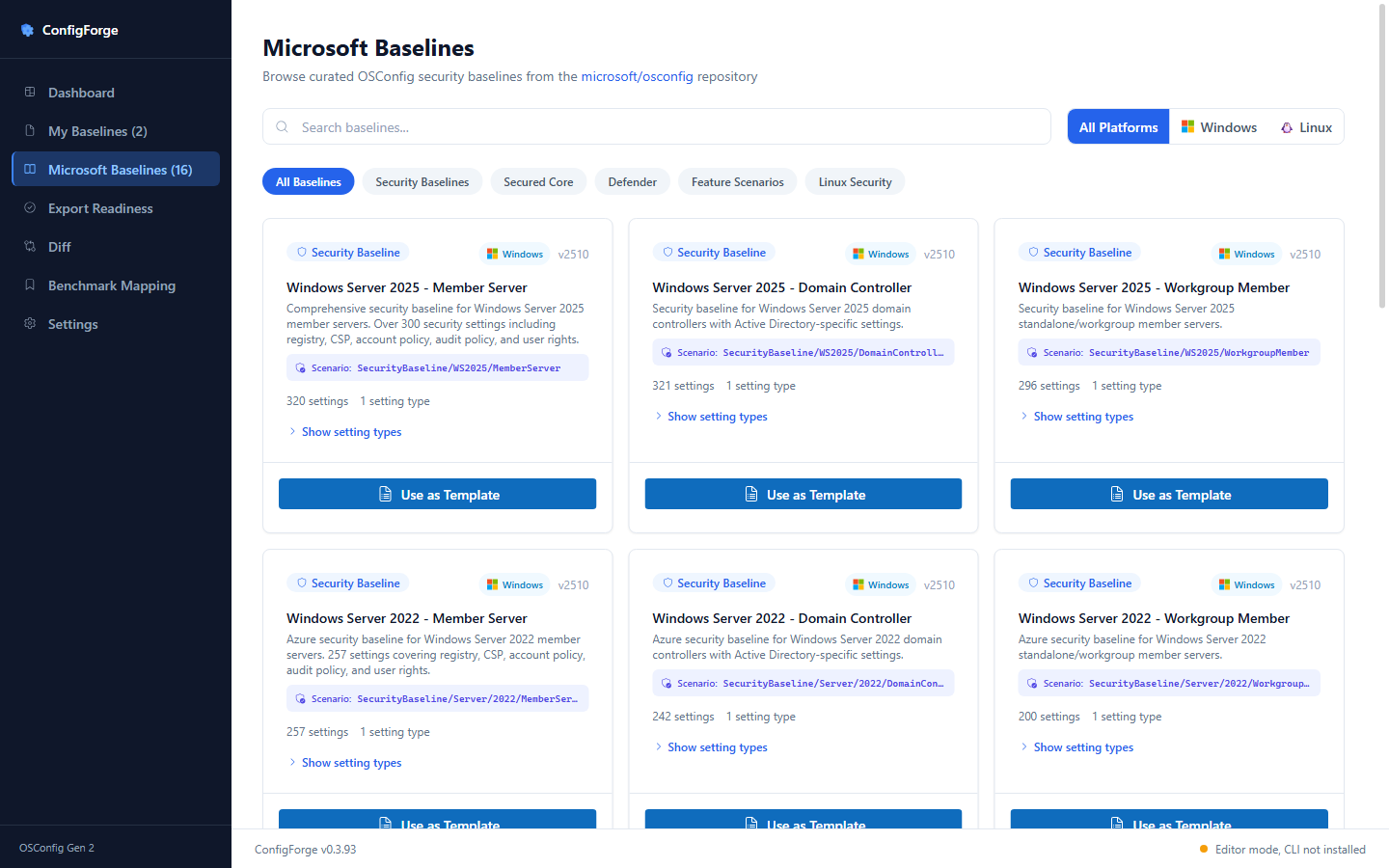
Register
- Select Register Baseline.
- Confirm the success message, then open My Baselines and find your copy.
- Open the baseline and select Export → YAML.
- Save the
.osc.yamlfile. Keep it for review or import into another ConfigForge workspace.
Success: your copy appears in My Baselines and the exported file contains
a resources: list. Registration is local; it does not apply settings or
publish to Azure. Not audited is expected for a new baseline.
If registration reports a schema error, correct it before continuing. A platform-mismatch or unsupported-type warning means the draft needs review before device use—not that the baseline has been tested.
Try one edit
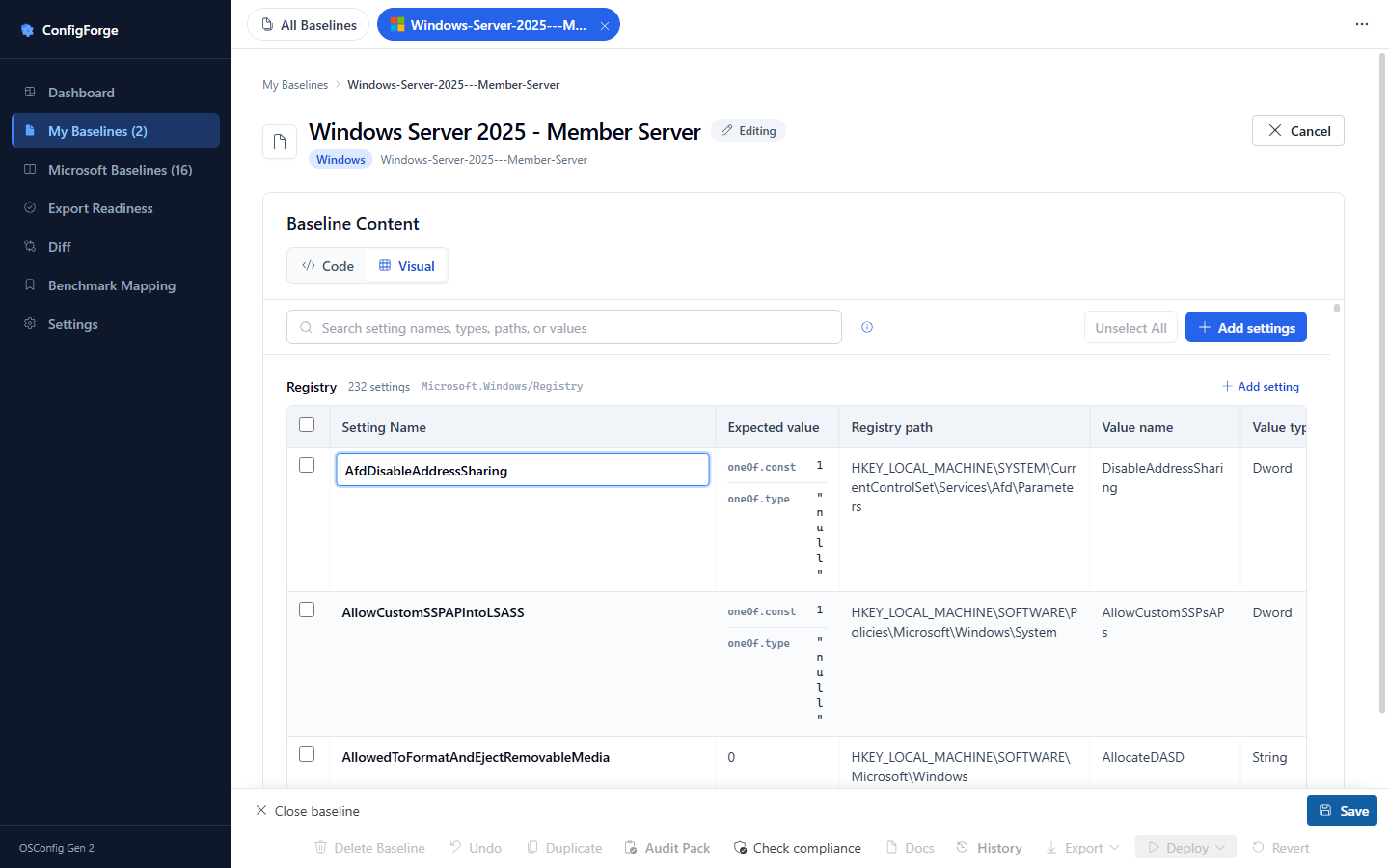
Open your saved copy, select Edit, and use Visual to change a value. Select Save and record a short reason if prompted. Use History to review changes and Export to save the updated baseline. See the editor guide for typed values, keyboard navigation, and Code mode.
Other starting points
In My Baselines, select Create new baseline. The setup page offers a custom Windows/Linux baseline, a library template, a baseline file, a settings spreadsheet, or a public URL. Create baseline opens the editor for review before registration.
Minimal Windows manifest
For a small example instead of a full template, choose Create my own
baseline, select Windows, and select Create baseline. Give it the name
hello, switch to Code/YAML, and replace the starter content with:
resources:
  - name: hello-cfs-registry
    type: Microsoft.Windows/Registry
    properties:
      keyPath: HKLM:\Software\ConfigForge
      valueName: HelloFromCFS
      valueType: REG_SZ
      value: "1"
Register and export it as above. This is an authoring example, not a
recommended security control. Applying it later would change the registry.
YAML uses spaces, not tabs; resources: must be a top-level array.
Minimal Linux manifest
For Linux, choose Create my own baseline → Linux and review the generated starter in Code or Visual. Alternatively, use the bundled Linux Security Baseline through Microsoft Baselines → Use as Template. Treat starter values as examples, not a deployment recommendation. You can author Linux settings on Windows or macOS without a Linux device.
Confirm via CLI (optional)
A registered baseline is saved in ConfigForge, not automatically in an
oscfg namespace. oscfg get namespace is therefore not a check that this
authoring walkthrough succeeded. Confirm the saved baseline in My Baselines
and its exported YAML instead.
For a separate local lab evaluation, follow Authoring vs deploying.
Inspect the on-disk state
For a baseline registered as hello, ConfigForge stores:
~/.configforge/manifests/
├── hello.json              ← registration metadata
└── hello.source.yaml       ← source manifest
Prefer Export → YAML for moving a baseline to another computer, then import it there. Do not copy live registration metadata to simulate a deployment.
Next steps
- Compare baselines without extra tools.
- Add your own licensed data for Benchmark Mapping. Coverage is not proof of device compliance.
- Export an Audit Pack for review. It does not run a device audit.
- Only when you need a lab evaluation, choose local device operations or Azure Machine Configuration packaging.
Authoring vs deploying
Registering or saving a baseline does not apply it. Start with authoring in either edition. Only move to device operations when you deliberately want to evaluate or change a lab machine.
The macOS Author edition includes authoring, Diff, Benchmark Mapping, history, rationale, and Audit Pack export. It has no device Deploy, Audit, Enforce, Revert, elevation, or CLI-health controls.
The split
| Action | What it does | What you need |
|---|---|---|
| Author / Register / Save | Validates structure and saves a baseline in your local workspace; does not apply settings | Either edition; no CLI, admin access, or Azure |
| Diff / Benchmark Mapping | Compares baseline content or maps settings to supplied rules | Either edition; your own licensed data for benchmark mapping |
| Audit Pack | Exports a PDF/Markdown report from available saved data; does not run an Audit | Either edition; no CLI at export time |
| Audit | Checks settings on the local device without intentionally applying desired values | Full edition, matching host, oscfg; admin on Windows, appropriate read permissions on Linux |
| Deploy / Enforce | Applies desired settings to the local device and checks the result | Full edition, matching host, oscfg, admin/root, and a recovery plan |
| Revert | Reapplies an available pre-deploy snapshot, or removes enforcement/registration when no usable snapshot exists | Full edition and CLI/privilege/platform requirements; not a complete machine restore |
Schema validation and benchmark coverage are not proof of device compliance. A device result may also be incomplete: inspect settings marked unread or indeterminate rather than counting them as compliant.
CLI presence is surfaced everywhere
In the Full edition:
- The Welcome dialog offers Author baselines anywhere or Author + deploy on this machine.
- The footer shows Editor mode, CLI not installed when the CLI is absent. This is a normal authoring state; clicking it opens installation guidance.
- Settings → System Health shows detected CLI information. Recheck refreshes it after installation.
The native oscfg CLI is not bundled. Install it only for local device
operations, using INSTALL.md.
This CLI is separate from the Microsoft.OSConfig PowerShell module used for
Machine Configuration packaging.
Why this matters
You can author Windows baselines on a Mac or Linux computer, and Linux baselines on Windows. Authoring does not need a matching target machine. Deploy/Audit require a compatible local Windows/Linux host. A baseline that mixes platform-specific Windows and Linux settings cannot be deployed as one unit.
ConfigForge is experimental and not intended for production use. Before changing a lab device, review every setting, take a machine backup or snapshot, and have a recovery path. Applying security settings can affect access, networking, and workloads.
Soft warnings vs hard errors
- Hard error: malformed content, such as a missing
resources:array or an invalid nested wrapper. Correct it before registering. - Soft warning: registration succeeded, but the target differs from this computer, the baseline mixes platforms, or a type is unknown to the targeted CLI. Review it before any device operation.
A soft warning permits drafting; it does not promise that the remaining settings will apply safely. Developer details remain in registration semantics and platform classification.
Practical example
To draft a Linux baseline on Windows or macOS:
- Select Microsoft Baselines → Linux Security Baseline → Use as Template.
- Review and Register Baseline. A host/target warning does not mean a device has been changed.
- Use Diff, history, rationale, and Audit Pack while reviewing the draft.
- Export YAML and import it into the Full edition on a disposable Linux machine when you are ready for device evaluation.
- Install the CLI there, run Audit first, and inspect unread settings and noncompliance. Only choose Enforce after reviewing the intended changes and recovery plan.
Azure Machine Configuration is a separate path
For Azure Policy evaluation, export MOF and follow Create a Machine Configuration package. Package creation requires PowerShell 7, the GuestConfiguration toolkit, and the Microsoft.OSConfig PowerShell module 1.4.10 or later on the packaging machine. Version 1.4.10 refers to the module, not the runtime.
The guide binds the MOF to an exact installed module version and creates an Audit-first ZIP. Testing, hosting, and policy assignment are optional follow-ups. None of those steps is required for authoring or Audit Pack export.
Manifest editor
Use the baseline editor to review settings, make changes, and export your work. A manifest is the YAML/JSON document behind a baseline. Authoring works in both editions without the OSConfig CLI, administrator access, or Azure.
New here? Complete Your first baseline before exploring packaging or device controls.
Open
- New baseline: My Baselines → Create new baseline, choose a starting point, then Create baseline to review before registering.
- Existing baseline: My Baselines → open a baseline in the list, then Edit.
What it does
- Live syntax checking in Code mode and structural validation in Visual mode. Code and Visual edits round-trip through canonical YAML when the source can be parsed.
- Resource-type pickers populated from
registered-types.ts. Types unknown to the targeted CLI show a warning; this does not prevent drafting but needs investigation before device use. - A CIS rule cross-reference drawer. When CIS data is available
locally (see Benchmark Mapping for how to enable),
the drawer shows the matching rule's ID, severity, and GPO path
next to the resource at the cursor. Matches are resolved from
Azure Policy JSON or XCCDF+OVAL data (not only the legacy
cis-mappings.jsonfile). Fuzzy matches and lower-confidence fallbacks need human review. A match is not proof that values or device state comply. The drawer is hidden entirely when CIS data is not present (theuseCisAvailable()hook short-circuits the render). - The "Why?" rationale modal. See Rationale.
YAML editor
- Two-space indentation. Tabs are rejected by the parser.
- The editor uses Monaco with a YAML language service for inline error
squiggles (missing
name:, missingtype:, malformedproperties:). - Save is
Ctrl+S(orCmd+Son macOS). Save runs the same validation pass that thecfs:manifests:registerIPC handler runs on the main process side.
Code and Visual modes
The editor provides Code and Visual modes. Code mode can view YAML, JSON, or MOF; MOF is read-only. Visual mode is an editable spreadsheet for supported baseline settings, with inline cell editing, Add settings, row selection, delete, and keyboard navigation. Tab saves and moves right. Enter saves and moves down. Shift+Enter remains a newline for structured values.
Each baseline remembers its Code or Visual view. Nested Test/Group settings retain their source structure, values retain their types, and large QWord integers retain precision. Import supported YAML/JSON or CSV/TSV/XLSX settings through Create new baseline, then review the converted content before saving. An arbitrary report spreadsheet is not necessarily an importable baseline.
Resource wrappers
Two resource types are wrappers that nest other resources:
| Wrapper | Behaviour |
|---|---|
Microsoft.OSConfig/Group | A logical group; nested resources are validated recursively. |
Microsoft.OSConfig/Test | An assertion around a single nested resource, with its test expression/schema. |
The platform validator (packages/core/src/platform.ts) walks both
wrappers recursively, so a Linux resource hidden inside a
Windows-only Group is still caught.
Save flow
edit → validate → persist source.yaml + .json → optional snapshot →
  show success banner with any soft warnings
Tip: The save flow does not call
oscfg apply. To deploy, you need to explicitly hit Deploy (admin/root required on the host platform; the CLI must be installed). If OSConfig is missing, Deploy opens the install dialog instead of failing. See Authoring vs deploying.
Export formats
The current renderer Export menu writes the manifest in these formats:
| Format | Extension | Use |
|---|---|---|
| YAML | .osc.yaml | Native OSConfig manifest - the canonical source. |
| JSON | .json | The manifest as JSON. |
| MOF | .mof | DSC Managed Object Format for the Azure Machine Configuration toolchain (see below). Read-only in the editor. |
| CSV | .csv | Flat per-resource rows for spreadsheets / bulk review. |
Use the separate Docs button to download generated Markdown documentation. Azure Policy export exists in the core handler but is not exposed by the current Manifest Editor UI.
Machine Configuration package route
For Azure Policy evaluation, export MOF (.mof) and follow the
complete Machine Configuration workflow.
Packaging, testing, Storage upload, and policy assignment happen outside the
editor.
On the packaging machine, New-GuestConfigurationPackage requires the
Microsoft.OSConfig PowerShell module 1.4.10 or later, alongside the separate
GuestConfiguration toolkit and PowerShell 7 runtime. Version 1.4.10
refers to the module, not PowerShell. The install command is
Install-Module -Name Microsoft.OSConfig -MinimumVersion 1.4.10.
The exported ModuleVersion = "0.0.0" is a portable placeholder. The
version-resolution step
selects an installed version at or above 1.4.10 and fails if none is available
before replacing the placeholder. The MOF must bind to that exact bundled
version. Keep the resulting ZIP immutable after policy generation because the
policy contains its hash.
Start with Audit and validate the exact baseline/module combination. The minimum version is not a blanket assurance that upstream issues are resolved. Do not apply historical 1.4.3 package patches to 1.4.10+.
For a review document instead of a deployable package, use Audit Pack. It needs none of these packaging tools.
What changes don't trigger a save
- Re-typing the exact same content as the last save → de-duplicated by the snapshot store (no new history entry).
- Comments-only changes → still trigger a save (the comment is part of the source YAML and is preserved on export).
Errors you'll see
| Error | Meaning | Fix |
|---|---|---|
resources is required | Top-level YAML doesn't have a resources: array. | Wrap your resources under resources:. |
invalid Group/Test wrapper | A Microsoft.OSConfig/Group or Microsoft.OSConfig/Test has no nested array. | Add resources: (Group) or resource: (Test) inside. |
Unsupported resource type | The type is not in the targeted CLI's registered list. | A soft warning permits authoring, not guaranteed deployment. Review provider support before device use. |
mixed-platform manifest | Your YAML has both Windows and Linux resource types. | Split it. 'mixed' is rejected at deploy time. |
CLI not installed (on Deploy / Audit / Revert) | OSConfig isn't on this machine. | The dialog's Install button opens the OSConfig CLI docs; Recheck auto-dismisses once the resolver finds it. |
Breadcrumbs
Breadcrumb navigation appears on the Editor, History, and Audit Pack pages. The breadcrumb trail shows the current manifest namespace and the active sub-page so you can jump back without the side nav.
Stable-width audit counter
The audit counter badge in the manifest header now uses a fixed-width layout. Previous versions caused layout jitter when the count changed during a deploy because the badge width shifted with the digit count. The counter is now stable regardless of the displayed number.
See also
Diff: Pairwise + CIS + Matrix
Compare baseline content before deciding what to change. Diff works in both editions without the OSConfig CLI, administrator access, or Azure. It does not inspect or modify a device.
ConfigForge's Diff page has three tabs:
- Pairwise - classic A vs B comparison from registered manifests or pasted/uploaded YAML. The Compare button auto-scrolls to the results once the diff renders.
- CIS Diff - benchmark-rule coverage against a selected CIS baseline. It appears when CIS data is loaded and its Compare button auto-scrolls to the score/results.
- Matrix (N-way) - pick 2-10 manifests, see a side-by-side table with each row a setting and each column a baseline.
Coverage is not device compliance. A matching rule does not establish that values meet the benchmark or that a device uses them. See Benchmark Mapping for interpretation and data setup.
Open
- Pairwise - side nav, Diff, then the Pairwise tab. Pick registered manifests on the left/right or switch either side to Paste / Upload.
- CIS Diff - side nav, Diff, then the CIS Diff tab (visible when CIS data is loaded). Pick a manifest and optionally a benchmark.
- Matrix - side nav, Diff, then the Matrix (N-way) tab. Pick the manifests to include with checkboxes (up to 10).
How rows are merged
Technical matching rules and historical fixes
The matrix builder lives in
packages/core/src/diff/matrix.ts.
It keys rows by a stable composite of
(type, valueName | name | keyPath\\valueName), not the raw
name: field, because two baselines for "MaxAuthTries" may use
different display names ("MaxAuthTries-WS2022" vs "MaxAuthTries").
Keying on the resource identity instead of the display name correctly
merges the same setting across baselines.
v0.2.2 fix: the matrix builder now compares
compliance.equals(andcompliance.contains/matches/regexfor non-equality ops) in addition toproperties.value. CSV-imported andcompliance:-block manifests previously reportedstatus: identicalfor two baselines that targeted the same registry path but disagreed on the desired value, because the value lived undercompliance.equals(sibling ofproperties) and the matrix only inspectedproperties.value.v0.2.3 fix (pairwise analyzer):
analyzeDiffnow uses the same semantic-identity contract as matrix-diff (type:keyPath\\valueNamefor Registry; recursive unwrap forMicrosoft.OSConfig/Test;type:rule:ruleIdfor importedMicrosoft.OSConfig/BaselineRuleplaceholders) so the pairwise view no longer reports the same renamed rule as duplicate add+remove across baseline versions.v0.2.4 fix (pairwise analyzer): identity now also covers
Microsoft.Windows/AuditPolicy.subcategory,Microsoft.Windows/UserRightsAssignment.policy, andMicrosoft.Windows/AccountPolicy.policy: schema-canonical fields that are stable across CIS benchmark versions even when the display name drifts. Finally, a name-normalization fallback (lowercase + strip non-alphanumeric) catches generic-type rules that only differ in naming convention (AuditLogon/Audit Logon/audit_logon). The matrix builder is unaffected; its keying already covers these cases.
Row status
Each row gets one of three statuses:
| Status | Meaning |
|---|---|
identical | All baselines that have this setting agree on the value. |
differs | At least two baselines have this setting and disagree. |
partial | Setting is present in some baselines, missing in others. |
Each cell in turn carries identical | differs | missing. The
fromTestWrapper flag is set when the resource is wrapped in a
Microsoft.OSConfig/Test (so a value equal:'no' reads as a
compliance assertion, not a literal).
10-manifest cap
The Matrix tab is hard-capped at 10 selected manifests
(MATRIX_MAX_SELECTION in
useDiffMatrix.ts).
Clicking an 11th checkbox surfaces an inline message:
"Matrix compare is limited to 10 manifests. Deselect one before
adding another." Instead of silently no-op'ing the click
(v0.1.14 fix).
Excel export
Click Export → Excel on the Matrix tab to download an .xlsx
with conditional formatting:
identicalcells stay neutral.differscells highlight red.partialcells highlight amber.- Each baseline gets its own column; one summary sheet ranks settings by how many baselines disagree.
Internally this routes through cfs.diff.matrixXlsxSave() over IPC;
no web endpoints are involved.
Rendering notes
- Matrix computation is pure once the input manifests are loaded.
- The matrix IPC channel accepts up to 10 manifests per request (matches the renderer cap).
- Rendering uses CSS grid; very wide tables become horizontally scrollable rather than wrapping.
Race-guard on rapid clicks
useDiffMatrix carries a matrixLoadTokenRef so a slow fetch from a
previous selection can't overwrite the fresh result. This was a
v0.1.13 regression fix and is locked in by a hook test.
CIS Diff tab
The CIS Diff tab appears on the Diff page when CIS data is loaded (see Benchmark Mapping). It scores coverage as unique CIS rules covered / total benchmark rules, not resources matched / total manifest resources.
How to use it
- Open the Diff page from the side nav.
- Select the CIS Diff tab.
- Pick a manifest from the manifest picker dropdown.
- Optionally pick a CIS benchmark; blank auto-picks by platform.
- Click Compare against CIS. The page scrolls to the results when scoring completes.
Summary bar
After comparison, a summary bar shows:
- X of Y CIS rules covered - how much of the selected benchmark is represented in the manifest.
- Z% - full-baseline coverage percentage.
- A secondary line showing how many manifest resources matched any CIS rule.
Results table
Below the summary bar, a filterable table lists resources and missing benchmark rules. Controls:
- Filter buttons: All resources, Covered in manifest, Missing from CIS.
- Search box: filters by resource/rule name, or by CIS rule title / section in the Missing view.
- Status column sort: cycles unmapped first, mapped first, and natural order.
Each row displays a source badge indicating where the CIS match came from:
| Badge | Meaning |
|---|---|
| Azure Policy | Matched via Azure Policy CIS baseline JSON |
| XCCDF | Matched via XCCDF+OVAL XML data |
| JSON | Matched via legacy pipeline JSON (cis-mappings.json) |
Edge cases
- Same setting, different
name- merged via the composite key. - Same
name, different setting (rare, e.g. a registry value re-used as a CSP value) - kept as separate rows; thetypecolumn disambiguates. - A resource wrapped in
Microsoft.OSConfig/Test- the cell carriesfromTestWrapper: true; the value displayed is theexpressionrather than a literal value.
See also
Benchmark Mapping with CIS data
Benchmark Mapping helps you find which benchmark rules correspond to the settings in your baseline. It is an optional review tool available in both editions; you can author and compare baselines without setting it up.
Bring your own data. ConfigForge does not bundle CIS Benchmark data. Supply a legally licensed copy and follow its redistribution terms.
The editor cross-reference drawer and Diff page CIS Diff tab are hidden until supported CIS data is present. The Benchmark Mapping sidebar page remains visible so users can see the resolved data folder and setup guidance. No OSConfig CLI is required.
Coverage is not device compliance. A rule match does not prove that the configured value meets the benchmark, that a machine has that value, or that the baseline is certified. Review mappings and values, and use device Audit separately when you need a machine-state check.
What this feature does (when enabled)
Two related but distinct features sit on top of CIS Benchmark data:
- Cross-reference - for each resource in your manifest, show the matching CIS rule (ID, severity, GPO path) inline in the editor drawer.
- CIS Diff coverage scoring - score your manifest against a full CIS baseline on the Diff → CIS Diff tab: "Your custom WS2025 baseline covers X% of the CIS WS2025 baseline you supplied."
When CIS data is not present (the default for a fresh clone), the editor cross-reference drawer and the Diff page's CIS tab are hidden. The rest of the authoring experience (editor, history, rationale, Audit Pack, pairwise diff, and matrix diff) works exactly the same. Full-edition device operations are also unaffected.
Ingestion paths
ConfigForge supports three ways to supply CIS data. You only need
one of these paths. The app resolves the correct location at
runtime and shows the active path on the Benchmark Mapping page. In a dev
checkout the folder is public/_baselines/cis/_data; in packaged builds
it resolves under the app's public assets as _baselines/cis/_data.
1. Azure Policy CIS baseline JSON (primary, recommended)
If you already have a supported CIS settings catalog in Azure Policy JSON format, use it directly:
- Confirm the file contains a
settingsReferencearray of benchmark settings for the OS you want to compare. An arbitrary policy definition or assignment JSON is not a benchmark catalog. - Copy the JSON into the exact folder shown on Benchmark Mapping.
- Select Re-check catalog and inspect the detected file/platform status.
This route does not require signing in to Azure. JSON catalogs may represent only a subset of a benchmark; coverage is relative to the data you supply.
2. XCCDF + OVAL XML (alternative)
If you have a CIS Workbench subscription, you can use the raw XCCDF and OVAL files directly.
- Download the XCCDF and OVAL XML files from CIS Workbench.
- Drop the files as-is into
_baselines/cis/_data(or the exact folder shown on the Benchmark Mapping page). - Click Re-check catalog on the Benchmark Mapping page.
The app reads XCCDF structure and OVAL definitions to build the mapping table at startup.
3. Legacy OSConfig pipeline JSON (advanced)
This is the legacy cis-mappings.json format used by earlier
versions of ConfigForge and the OSConfig
mc/CIS
scripts. It remains supported for backward compatibility.
- Generate the mapping artifacts using the upstream OSConfig PowerShell scripts from a CIS XCCDF + OVAL pair you supply.
- Place the resulting JSON files in
_baselines/cis/_data(or the exact folder shown on the Benchmark Mapping page). - Click Re-check catalog on the Benchmark Mapping page.
The expected JSON shapes are documented in the
packages/core/src/cis/data.ts
type definitions (CisGlobalMappings, CisRuleCatalog, etc.).
Tip: You do not need to remember exact file paths. The Benchmark Mapping page in the app displays the resolved data directory for your installation. Place files there and click Re-check catalog.
Cross-reference (Benchmark Mapping + editor drawer)
The Benchmark Mapping sidebar page detects the files in _baselines/cis/_data,
shows their source format, and explains the resolved folder. When data is
available, the manifest editor drawer cross-references each resource and shows:
| Field | Source |
|---|---|
| CIS rule ID | Resolved from whichever ingestion path is active |
| Rule name | The per-OS CIS catalog |
| Severity | The CIS catalog |
| GPO path | The CIS catalog (where applicable) |
| Confidence | High for exact matches; lower for property-mapping fallback |
| Source | Badge showing Azure Policy, XCCDF, or JSON |
Strict match is the default. If myResource.name matches a CIS
rule's name exactly, the match is high-confidence.
Property-mapping fallback (lower confidence): when strict match fails, the engine checks whether the resource is a recognized type:
Microsoft.Windows/AccountPolicy- matchproperties.nameagainst theosconfigPropertyfield, then search the rule catalog for a matching friendly name.Microsoft.Windows/UserRightsAssignment- matchproperties.name(e.g.SeSecurityPrivilege) against theuserRights.*.privilegefield.Microsoft.Windows/AuditPolicy- matchproperties.subcategoryGUID against the audit subcategory mapping.
The drawer marks property-mapping matches with a verification pill so the author knows to review them.
Note: A high-confidence match means the names/identity agree. Neither that match nor the CIS Diff coverage percentage proves that the values agree. Review the desired values and the benchmark's requirements separately.
CIS Diff coverage report
On the Diff page, open the CIS Diff tab, choose a manifest and optionally a benchmark, then click Compare against CIS. You will see:
covered CIS rules        35
missing CIS rules         12
manifest resources matched 42 / 50
coverage                  74.5%
The main score is computed strictly:
covered CIS rules- unique CIS benchmark rules with at least one matching manifest resource.missing CIS rules- benchmark rules with no matching manifest resource.manifest resources matched- secondary diagnostic; multiple resources can map to the same CIS rule.coverage = covered CIS rules / total benchmark rules * 100.
Tip:
coverage == 100means every supplied CIS rule has at least one matching resource. It does not mean the values are correct, that the manifest is identical to the benchmark, or that any device is compliant.
When CIS data is not available
If CIS data is missing, the CIS Diff tab is hidden and the Benchmark Mapping page renders a friendly empty state explaining the license restriction and pointing at the data folder. No broken dropdown, no crash.
Per-rule breakdown
Below the summary, the CIS Diff tab lists mapped resources with source badges and can switch to a Missing-from-CIS view that lists missing benchmark rules. The status column is sortable.
Audit-pack export
Audit Pack export supports both PDF and Markdown. Both formats include manifest metadata and can include compliance, device-audit, history, rationale, and citations when those inputs are available. Open the baseline's Audit Pack and choose Download PDF or Download Markdown. Generating this report does not run a device Audit.
Today analysis provenance is not persisted per manifest, so the citations/provenance section is omitted in normal UI-generated audit packs. Both formats omit the CIS section gracefully when CIS data isn't available. See Audit-pack.
Developer reference: performance and data-dependent controls
Performance (when data is present)
- Strict-match cross-reference: single
Maplookup per resource. - Property-mapping fallback: walks the global mapping table once, then uses exact-word-set fuzzy matching with a raised threshold over the per-OS rule catalog.
- The IPC handler caches per
(manifest, baseline).
How the gating works under the hood
| Surface | Gating signal |
|---|---|
| Editor CIS drawer | useCisAvailable() hook, calls cfs.cis.status() once per page lifetime |
| Diff page CIS Diff tab | Same hook; tab appears only when true |
| Audit-pack PDF "CIS coverage" section | Server-side: skipped when loadCisGlobalMappings() returns null |
cfs.cis.lookup() | Returns { name, match: null } when data absent |
cfs.cis.bulkLookup() | Returns benchmark coverage data for the Diff page's CIS Diff tab; errors clearly when a selected benchmark file is unavailable |
See also
Rationale & change-author capture
Note: The features on this page are forward-compatible. Old
~/.configforge/manifests/snapshots without author or rationale fields still load cleanly.v0.3.48: the rationale prompt + log are local features. No OSConfig CLI required. Capturing why a manifest changed works identically in Editor mode and CLI-installed mode.
The research preceding this sprint surfaced a clear auditor demand: "Who changed this and why?" must be answerable without grepping through chat threads. Two cooperating mechanisms close the gap:
- Author resolution - every history snapshot stamps a
best-effort
{name, email}pair. - Rationale log - a per-manifest append-only JSONL of "I changed X from A to B because Y" entries.
Author resolution
packages/core/src/history/author.ts exposes resolveAuthor(). The
resolution order, first to produce a non-empty name wins:
- The
CONFIGFORGE_AUTHORenv var. FormatName <email>or justName. git config user.name+git config user.email. Best-effort, any failure (no git installed, missing config, non-zero exit) silently falls through to the next strategy.os.userInfo().usernameforname, empty foremail.- Final fallback:
{name: 'unknown', email: ''}.
The result is cached for the process lifetime. Repeated calls don't
re-shell git. The function is documented as never throws (every
strategy is wrapped in a try/catch).
# Override before launching the desktop app:
$env:CONFIGFORGE_AUTHOR = 'Alice Hardener <alice@example.com>'
npm run desktop:dev
Where the author and rationale are stored
The rationale prompt appears when you save changed content in the Manifest editor. The submitted reason is stored alongside that save's History snapshot and appended to the per-manifest rationale log.
Each history snapshot's .meta sidecar
(~/.configforge/history/<ns>/<id>.osc.yaml.meta)
gains optional fields:
{
  "message": "AuditAccountLockout modified",
  "author": "Alice Hardener",
  "authorEmail": "alice@example.com",
  "rationale": "OPM-12345, required by Q1 audit"
}
Old .meta files that predate these fields don't have author / authorEmail
/ rationale; the loader treats those fields as undefined and
moves on. Since v0.3.47, the message field is the real change summary
when the editor can compute one (for example, AuditAccountLockout modified) instead of the older generic Manifest registered label.
The "Why?" modal
When the editor detects a save where any resource value changes relative to the most recent saved version, it pops a single modal with:
- A textarea (1-500 chars) for the rationale.
- A Skip button. Writes a rationale entry with
skipped: true. - A Save & continue button. Submits the rationale alongside the snapshot.
- A Cancel button. Closes the modal without saving (so you can keep editing and decide later).
The modal is intentionally cheap. It doesn't block typing in the editor, just intercepts the save. Skipping is fine; the rationale log will record the skip so an auditor can see the change happened intentionally without an explanation. A double-click guard suppresses duplicate submissions while the save is in flight.
Per-manifest rationale log
Beyond what's stamped on each snapshot, every change appends a line
to ~/.configforge/rationale/<ns>.jsonl:
{"ts":"2026-03-01T14:22:00Z","author":"Alice","resourceName":"MaxAuthTries","oldValue":5,"newValue":3,"reason":"OPM-12345 audit ask"}
The log is append-only. Concurrent writers are safe via a per-file lock; a streaming reader handles logs over 10MB without loading the whole thing into memory.
Rationale surfaces
Rationale entries are captured by the Save-time Why? prompt and are surfaced in two places:
- Baseline Detail bottom drawer. When a baseline is open, the editor's bottom drawer includes a Recent rationale tab showing the three most recent entries, followed by a link through to the full log.
- Standalone Rationale Log route (
/manifests/<baseline>/rationale), which lists the complete per-baseline history.
IPC surface
The renderer talks to the rationale store through the typed preload bridge:
cfs.rationale.list(id)→{ entries: [...] }. Full per-manifest log, oldest-first. The standalone full-log page reverses entries for display.cfs.rationale.append(req). Append a rationale entry. Validates payload size and rejectsreasonover 500 chars. Empty reason is allowed only whenskipped: true.- Manifest delete (
cfs.manifests.delete(name)) callsdeleteRationale(ns)so the JSONL file doesn't outlive its parent manifest.
See API Reference → Rationale for the request / response shapes.
Full log page
Open /manifests/<baseline>/rationale to view the standalone log
page. The full log page lives at
apps/desktop/src/pages/ManifestRationale.tsx
and shows every entry across all resources, with:
- A search filter over resource / author / reason text.
- A Show skipped entries toggle.
- Per-row stat cards (total / captured / skipped).
- A CSV-injection-safe Download CSV button. Cells beginning
with
=,+,-,@,\t, or\rare prefixed with'before serialization (OWASP CSV-injection guard).
How auditors consume this
The PDF audit-pack renders a Version history section with author and rationale columns when present, followed by a dedicated Rationale log section (the latter has been wired up to a real store, not a stub). If the manifest lacks those fields, those columns are simply omitted. No broken layout, no fake data.
See also
History, snapshots, retention
v0.3.48: snapshotting and History Restore do not require the OSConfig CLI. They read and write the local manifest store only. History Restore re-registers the selected snapshot into the local baseline store and creates an auto-snapshot of the previous source first. It does not call
oscfg apply; device rollback is handled by the separate Revert action, which is CLI-gated.
Every save in ConfigForge writes a snapshot, a content-addressable copy of the source YAML plus an optional JSON sidecar. The snapshots collectively form a per-manifest history that underpins diff, restore, audit-pack export, and every other "what-was-it?" surface.
Where snapshots live
~/.configforge/history/<namespace>/
├── 2026-03-01T14-22-00.000Z.a3f8b1c4.osc.yaml      ← payload
├── 2026-03-01T14-22-00.000Z.a3f8b1c4.osc.yaml.meta ← sidecar (JSON)
├── 2026-03-01T14-27-12.000Z.7d3e1942.osc.yaml
└── 2026-03-01T14-27-12.000Z.7d3e1942.osc.yaml.meta
The filename is <ISO-8601-timestamp-with-dashes>.<8-hex-random-suffix>.osc.yaml
and the sidecar appends .meta to the full filename.
Override the home directory with the CONFIGFORGE_HOME env var
(used by tests).
Sidecar shape
{
  "message": "AuditAccountLockout modified",
  "author": "Alice Hardener",
  "authorEmail": "alice@example.com",
  "rationale": "OPM-12345 audit"
}
| Field | Since | Notes |
|---|---|---|
message | v0.3.47 real summaries | Optional line shown in the History panel. Editor saves now use a real change summary when available (for example, AuditAccountLockout modified) instead of always Manifest registered. |
author, authorEmail | Rationale capture | Resolved via resolveAuthor(). |
rationale | Rationale capture | The "Why?" modal text. |
The sidecar is written only when at least one field is non-empty.
Old sidecars that predate these fields just carry message. The loader is
defensive (any field with the wrong type is treated as absent). The
History panel displays message below the timestamp, so v0.3.47+
snapshots show the diff summary rather than the generic registration
label when the editor provided one.
Dedupe
Identical content saved twice in a row results in one history
entry. The second save returns the existing entry rather than
writing a duplicate. The check is content-hash-based (sha256 of
the source YAML) and only compares against the IMMEDIATE PREDECESSOR
so the operation stays O(1) regardless of history size.
Note: Dedupe deliberately preserves the first
message/author/rationale. To truly rewrite metadata, delete the snapshot file and re-save.
Retention
The retention sweep runs after every successful save:
CONFIGFORGE_HISTORY_MAX_COUNT (default 50)
  -1 or 0   → disable pruning
  N > 0     → keep the N newest entries; oldest pruned
The sweep is best-effort. Failure never fails the save.
Settings store (v0.3.1+)
As of v0.3.1, you can configure history retention from the
Settings page instead of relying on the environment variable.
The allowed range is 5 to 1,000 snapshots. The Settings value takes
precedence over CONFIGFORGE_HISTORY_MAX_COUNT when set.
Pre-deploy snapshot rotation
Each deploy now saves a timestamped backup of the manifest source
alongside the latest pointer. The backup filename includes the
ISO-8601 timestamp so you can correlate it with deploy logs. This
means you always have a recoverable copy even if the deploy
overwrites the working file.
Deploy-recovery banner
If a deploy is interrupted (process crash, forced close, power loss), the dashboard shows a recovery banner on the next launch. The banner links to the most recent pre-deploy snapshot so you can review and restore it. The banner dismisses automatically once you acknowledge or restore.
Restore
Restore replays a prior snapshot:
- Pre-restore snapshot - the current YAML is snapshotted before the restore runs. You can always undo a restore by restoring the pre-restore entry.
- The chosen snapshot is re-registered as the baseline source in the local manifest store.
- No device apply is performed. To roll back a deployed device, use the separate Revert action, which is CLI-gated.
The pre-restore snapshot's message is
Auto-snapshot before restore of <id> so it's easy to spot in the history
list.
Snapshot ID format
2026-03-01T14-22-00.000Z.a3f8b1c4
└─────────────┬─────────────┘ └────┬───┘
              │                    └─ 8 hex chars from randomBytes(4)
              └─ ISO-8601 UTC timestamp with `:` replaced by `-`
The format sorts lexicographically. ls returns chronological
order. The 8-hex suffix is a random collision suffix (NOT a content
hash); it disambiguates multiple writes within the same millisecond
without paying a sha256 on the way in. Content-hash dedupe is a
separate, predecessor-only check (see Dedupe above).
Performance & limits
| Constraint | Value |
|---|---|
| Max retained entries (default) | 50 |
| Sweep cost | O(N) per save where N = retained entries |
| Path traversal | Refused at the security boundary |
| Concurrent writes | Per-namespace mutex |
IPC surface
The renderer talks to the history store through the typed preload bridge:
cfs.history.list({ name })- list snapshot summaries (no payloads). Pass{ name, id }to fetch one snapshot's payload + sidecar.cfs.history.save({ name, content, message? })- manual snapshot.cfs.history.delete({ name, id })- delete a snapshot.- Device Revert is separate from History Restore. It uses
cfs.revert.apply/cfs:revert:applyto re-apply a pre-deploy snapshot or remove the namespace.
See API Reference → History / import / export.
See also
- User Guide → Rationale
- User Guide → Audit-pack (consumes history)
Audit-pack (PDF + Markdown)
Use Audit Pack to export a baseline review report as PDF or Markdown. It is available in both Full and macOS Author editions, without the OSConfig CLI, packaging modules, or Azure.
An Audit Pack is not a device Audit. It assembles available saved baseline metadata, review results, history, and rationale. It does not inspect a machine, apply settings, or establish current compliance. If no saved device audit exists, that section is omitted; macOS Author cannot run device audits. Benchmark coverage likewise does not prove device compliance.
Generate
In the UI:
- Open a saved baseline from My Baselines.
- Select Audit Pack to open the report page.
- Choose Download PDF or Download Markdown. A PDF preview renders inline.
Before sharing, check which sections are present, the baseline identity, and any device-result timestamps. Report unavailable or stale evidence explicitly. Export YAML separately if the recipient also needs the baseline source. Review names, rationale, and device details for sensitive information.
What's in it (PDF)
Sections appear only when their input is available:
| # | Section | Source data | Behaviour without source |
|---|---|---|---|
| 1 | Title page | manifest name, OS, last-applied / last-audited timestamps | always present |
| 2a | Device-audit snapshot (v0.1.6) | last persisted auditResults run for this manifest (audit or enforce) | section omitted when no audit has been run |
| 2b | Compliance scorecard | ComplianceReport (only when a local CIS comparison is requested) | section omitted when no comparison is requested |
| 3 | Version history | history snapshots + author/rationale | author/rationale columns render (none) if absent; max 50 rows |
| 4 | Rationale log | ~/.configforge/rationale/<ns>.jsonl (loaded by tryLoadRationale in audit-pack/rationale-loader.ts) | section omitted if log empty; otherwise newest-first with timestamp + author + resource + reason (skipped entries appear with a (rationale skipped) sentinel) |
| 5 | Analysis provenance citations | analysis Provenance bundle | section omitted. See the known-gap note below |
| – | Footer | generation timestamp, page numbers | always present |
Known gap: analysis provenance. Live analysis provenance is not stored per baseline, so normal UI-generated Audit Packs omit the Citations section. Do not describe the report as a complete cited evidence record. A report can also contain a "(section unavailable)" message if a section could not render; review the output, not just whether a file downloaded.
What's in it (Markdown)
The Markdown form includes manifest metadata and can include device-audit, compliance, version-history, rationale, and citations when those inputs are available. It exists primarily so a CI job can produce a diff-able artifact and so air-gapped reviewers without a PDF viewer can still skim the report. The same escape guard runs on Markdown output (CF-SEC-005 / 006).
Implementation notes
These details are for contributors; they are not required to export a report.
- The builder uses
pdfkitfor PDF output. - The artifact handler returns PDF bytes or Markdown text through the
same
cfs:audit-pack:get/cfs:audit-pack:saveIPC surface. - Fonts: built-in Helvetica + Helvetica-Bold to avoid font-bundling.
- PDF and Markdown output escape user-supplied/generated text through
escape.ts. - The handler can accept provenance, but
tryLoadProvenancereturnsundefineduntil a per-baseline provenance store is implemented. See analysis provenance and the API reference.
Customizing
The audit-pack is intentionally opinionated. Two practical knobs:
- Format - use Download PDF or Download Markdown in the
UI, or pass
format: 'pdf' | 'markdown'to the audit-pack IPC request. - Pipe Markdown elsewhere - consumers wanting a custom layout typically pipe the Markdown through a downstream converter (pandoc, etc.).
Verification
A quick "is this really a PDF?" check on a saved file:
[System.IO.File]::ReadAllBytes((Resolve-Path '.\audit-pack.pdf').Path)[0..3] |
  ForEach-Object { '{0:X2}' -f $_ }
# 25 50 44 46   → %PDF
These four bytes spell %PDF. This is only a file-format check, not
validation that the report is complete or that a device is compliant.
See also
- API Reference → Audit-pack
- User Guide > Benchmark Mapping
- User Guide → Rationale
- User Guide → Analysis provenance
Intelligent Diff Insights
v0.3.48: Intelligent Diff Insights is a local renderer/core feature. No OSConfig CLI required and no network required. It works identically in Editor mode (amber footer pill) and CLI-installed mode. ConfigForge does not call an external artificial intelligence (AI) or large language model (LLM) service for this feature.
The Intelligent Diff Insights panel explains a pairwise diff with a locally-computed summary, risk badge, and source/provenance panel. The analysis is a local, deterministic heuristic — there is no LLM or network call. Generated analysis results carry a provenance bundle (a heuristic list of sources with confidence scores), and generated output is labeled with a marker so it can be recognized if it is ever fed back in.
This is a direct response to user research:
"AI primarily hallucinates… smart tool should have checks and balances."
"AI can have circular reasoning… refer to a user's own documents when answering a net-new question."
What the analyzer returns
interface DiffAnalysis {
  // ... the diff explanation ...
  provenance: Provenance;
}

interface Provenance {
  sources: AiSource[];
  /** 0..1 — mean of per-source confidence (a heuristic label, not a
   *  verified-evidence measure); empty sources → 0. */
  citationCoverage: number;
}

interface AiSource {
  kind: 'CIS' | 'NIST' | 'MSDocs' | 'GPO' | 'manifest' | 'user-input';
  label: string;
  url?: string;
  confidence: number;   // 0..1
}
The analyzer populates provenance; local diff analysis attaches the
input manifests themselves as kind: 'manifest' sources with confidence
1.0. If a future analyzer returns sources: [], the UI treats it as
low confidence / advisory only.
Confidence threshold
| Condition | UI behaviour |
|---|---|
sources.length === 0 | Sources panel: "No sources cited. Advisory only." Low-confidence banner shown. |
citationCoverage < 0.5 | Banner: "Low confidence. Verify before relying on this result." |
0.5 ≤ citationCoverage < 0.8 | Sources panel shows citation coverage; user should verify. |
≥ 0.8 | Default UI. |
Source kinds
kind | Meaning | Typical URL |
|---|---|---|
CIS | A CIS Benchmark rule (looked up in user-supplied catalog data. See Benchmark Mapping). | CIS website permalink. |
NIST | A NIST 800-53 / 800-171 control. | NIST CSRC permalink. |
MSDocs | learn.microsoft.com article. | Direct link. |
GPO | Group Policy Object documentation. | learn.microsoft.com permalink. |
manifest | A resource in another registered manifest. | Internal manifest link. |
user-input | The user's prompt, used as ground truth. Lowest confidence, flagged. | n/a |
URL deduplication is normalized (lowercase host, fragment stripped,
utm_* / gclid / fbclid / mc_eid|cid / ocid query params
stripped). Two sources that point at the same article via different
tracking links collapse to one.
Circular-reference guard
The guard lives in
packages/core/src/ai/circular-guard.ts.
We tag every generated comment block with:
# <!-- ai-generated:rev=2 -->
This labels AI output so it can be recognized later. A detection
helper, assertNotAiGenerated(), is available in core (with the
spoof-resistant hash registry below) and would reject marked content
if it were fed back in.
Honest scope: today this is a labeling feature. The
assertNotAiGenerated()check is not currently wired into the diff / changelog ingestion path, so re-fed AI output is not automatically rejected. Treat provenance and citation coverage as heuristic, advisory signals and verify inputs yourself.
Spoof-resistant content-hash registry (CF-SEC-007)
The inline marker is the primary signal, but an attacker can strip it before re-feeding content to the system ("strip-and-launder" attack). v0.2.1 strengthens the guard with a per-process content-hash registry: whenever we tag a string we also record its hash, so a re-presented copy without the marker is still recognised.
Implementation notes:
- NFC-normalised 64-bit FNV-1a hash - two 32-bit FNV-1a passes
with different seeds, concatenated. Browser-safe (no Node
cryptodependency), so it doesn't break the renderer Vite bundle. - FIFO-bounded at 4,096 entries - keeps memory finite in long-running sessions. The eviction is intentionally lossy: an attacker that floods the registry past the cap can evict legitimate entries, but the marker-based check remains the primary signal.
- Process-local - does not persist across launches.
Note: Marker presence implies generated; marker absence is "unknown" (treated as user content). Old manifests without markers are not retroactively flagged as user-written or generated.
"Show your work" toggle
The analysis panel has a Show your work toggle (off by default). When on, the panel reveals:
- an input fingerprint;
- the sources the analysis used;
- citation coverage.
Worked example
You ask the analyzer "Why does my MaxAuthTries setting differ from my reference baseline?". The analyzer returns:
Your manifest sets MaxAuthTries to 5; the reference baseline expects
it to be ≤ 4. Setting the value to 4 reduces password-spray exposure.

Sources:
  • before (input manifest, confidence 1.00)
  • after (input manifest, confidence 1.00)
Coverage: 100%.
If the response had returned with sources: [] you'd see:
[advisory only, no sources cited]
... explanation ...
[Low confidence. Verify before applying.]
See also
- User Guide → Diff: Pairwise + CIS + Matrix
- Architecture → Diagrams (the AI provenance flow)
- API Reference → Diff matrix
Create a Machine Configuration package
Create an Audit-only ZIP from the compiled Managed Object Format (MOF) file exported by ConfigForge. No Azure connection or administrator rights are needed to create the package.
Prerequisites
On the Windows machine creating the package, you need:
- PowerShell 7 (
pwsh), using a currently supported release. - The GuestConfiguration PowerShell module.
- The Microsoft.OSConfig PowerShell module 1.4.10 or later.
Install the two modules once in PowerShell 7:
Install-Module -Name GuestConfiguration -Scope CurrentUser -Repository PSGallery
Install-Module -Name Microsoft.OSConfig -MinimumVersion 1.4.10 -Scope CurrentUser -Repository PSGallery
Review any Gallery trust prompt according to your organization's policy.
1.4.10 is the OSConfig module version, not the PowerShell or oscfg CLI
version. The CLI does not replace this module.
ConfigForge already compiles the MOF. A separate
PSDesiredStateConfiguration module installation is not required for this
Windows packaging path. If you author your own DSC configurations or package
Linux content, follow the applicable
Microsoft Learn authoring guidance.
You can export from macOS Author, then transfer the MOF to the packaging machine.
1. Export the MOF from ConfigForge
Open Baseline Detail > Export > MOF (.mof) and save the file.
Open PowerShell 7 in the folder containing that file. Run steps 2 and 3 in the same session. Change the filename and package name below as needed.
2. Resolve the Microsoft.OSConfig module version
The exported MOF uses ModuleVersion = "0.0.0"; as a portable placeholder.
Replace it with the exact installed version on a copy; keep your original
export unchanged.
$ErrorActionPreference = 'Stop'
$MofPath = (Resolve-Path -LiteralPath '.\Baseline.mof').Path
$PackageName = 'Baseline_1_0_0'
$WorkingDirectory = Split-Path -Parent $MofPath

$InstalledOSConfig = Get-Module -ListAvailable -Name Microsoft.OSConfig |
  Where-Object { $_.Version -ge [version]'1.4.10' } |
  Sort-Object Version -Descending |
  Select-Object -First 1

if (-not $InstalledOSConfig) {
  throw 'Install Microsoft.OSConfig 1.4.10 or later before creating the package.'
}

$MofContent = Get-Content -LiteralPath $MofPath -Raw
if (-not $MofContent.Contains('ModuleVersion = "0.0.0";')) {
  throw 'Expected a fresh ConfigForge MOF export with the 0.0.0 module-version placeholder.'
}

$ResolvedMofPath = Join-Path $WorkingDirectory "$PackageName.resolved.mof"
$MofContent.Replace(
  'ModuleVersion = "0.0.0";',
  "ModuleVersion = `"$($InstalledOSConfig.Version)`";"
) | Set-Content -LiteralPath $ResolvedMofPath -Encoding utf8
3. Create the package
Import-Module -Name GuestConfiguration -ErrorAction Stop

New-GuestConfigurationPackage `
  -Name $PackageName `
  -Configuration $ResolvedMofPath `
  -Type Audit `
  -Path $WorkingDirectory `
  -ErrorAction Stop
Done: the command prints the path to Baseline_1_0_0.zip alongside your
MOF. Creating this package does not apply the baseline.
Use a new package name/version for changed content. The command refuses to
overwrite an existing ZIP unless you explicitly add -Force; do not overwrite
a published package. Do not include secrets in the package.
Optional next steps
- Test before deployment: follow Microsoft Learn's local package test on a disposable machine matching the baseline. Testing requires elevation and installs a test agent; review per-resource errors as well as compliance.
- Publish to Azure: follow host or sign the package, create the policy, and assign it. Azure permissions and tooling are needed here, not for ZIP creation.
After policy generation, keep the ZIP and its URI unchanged. The policy contains the package hash.
Troubleshooting
| Problem | Fix |
|---|---|
| No qualifying OSConfig module is found | Install or update the PowerShell module to 1.4.10+ in the packaging account's PowerShell 7 environment. |
| The MOF file cannot be found | Run from its folder or set $MofPath to its actual full path. |
The runtime requests module version 0.0.0 | Package the resolved copy from step 2, not the original export. |
| The ZIP already exists | Choose a new $PackageName and rerun steps 2-3. |
The repository's old 1.4.3 compatibility patch is historical. Do not apply that old patch to 1.4.10+ packages.
ConfigForge is experimental, community-maintained, not officially supported by Microsoft, and not intended for production use. A successful package build does not prove that every baseline setting is compliant or enforceable.
Troubleshooting
Start with the section matching your symptom. Authoring does not require the CLI, elevation, or Azure.
Download is blocked
Releases are unsigned, and macOS builds are not notarized. Verify the download source and SHA-256 checksum, then follow your organization's approved process. Do not disable operating-system protections globally. See installation and download warnings.
Machine Configuration package creation fails
Use PowerShell 7, GuestConfiguration, and the Microsoft.OSConfig
PowerShell module 1.4.10 or later on the packaging machine. The CLI installed
with winget does not satisfy the module requirement. Resolve the MOF's 0.0.0
placeholder to an exact qualifying installed module version before packaging.
Follow the packaging checks and troubleshooting;
do not apply the historical 1.4.3 patch to 1.4.10+ packages.
"oscfg binary not found"
Symptom: footer pill stays amber (🟠 Editor mode, CLI not
installed) even after install. Settings → System Health reports
oscfg.path: null and Deploy / Audit / Revert open the
<CliRequiredModal /> install dialog.
If you only want to author, compare, or export, this is a normal Full-edition state and needs no fix. macOS Author intentionally has no CLI/device controls.
Causes & fixes:
- No
OSCFG_BIN, nooscfgon$PATH, no install in a well-known location. Follow INSTALL.md for the platform-specific install path (Windows:winget install Microsoft.OSConfig; Linux: the latest release tarball into/usr/local/bin/). Click Recheck in Settings → System Health after installing. - CLI installed but PATH is stale. Restart any open PowerShell
sessions, or set
$env:OSCFG_BINto point at the binary directly. The Windows resolver also has a Get-AppxPackage fallback forMicrosoft.OSConfigMSIX installs, so winget installs usually resolve even with a stale PATH. - (Contributors only) Dropped a dev binary into
resources/oscfg/linux-x64/oscfgbut it's not executable. Runnpm cito firescripts/chmod-oscfg.js, orchmod +x resources/oscfg/linux-x64/oscfgmanually. Theresources/oscfg/drop is a dev-only convenience and is never shipped to users.
"Manifest mixes Windows and Linux resource types"
Symptom: Deploy is rejected with platform: 'mixed'.
Cause: the manifest contains both Microsoft.Windows/* and
Linux-typed resources.
Fix: split the manifest. Author them separately, register
separately, and deploy on the appropriate hosts. The recursive
validator inspects Microsoft.OSConfig/Group and
Microsoft.OSConfig/Test wrappers, so a Windows resource hidden
inside a "neutral" Group still triggers the rule.
"Unsupported resource type" warning
Symptom: Register succeeds, but the result has a warnings[] entry
mentioning "Unsupported resource type: <type>".
Cause: the type appears in the manifest but isn't in the registered
whitelist for the targeted oscfg build. The whitelist lives at
packages/core/src/oscfg/registered-types.ts
keyed by OSCFG_CLI_VERSION.
Fix: registration permits authoring with a warning; it does not guarantee
successful or safe deployment. Check the target CLI's provider support before
using device operations. For contributors, when upstream adds a new type, re-probe with
scripts/probe-types.ps1 and add it to the whitelist + bump
OSCFG_CLI_VERSION. See
Contributing → Adding a new oscfg type.
"Deploy fails - admin required"
Symptom: footer pill flips to 🔴, or the translated error reads "oscfg requires Administrator privileges on Windows (the CLI opens a log file in a protected directory on startup). Restart ConfigForge from an elevated PowerShell / command prompt and try again."
Cause: not admin / root.
Fix: relaunch ConfigForge from an elevated PowerShell on
Windows; use sudo or equivalent on Linux. The translated message
comes from packages/core/src/oscfg/runner.ts → translateKnownErrors
which also recognizes the LSA 0xD0000022 access-denied code on
Microsoft.Windows/UserRightsAssignment.
CSP error 0x82F00009
Cause: the Policy CSP layer rejects the read on devices not managed by an MDM authority for this setting, or the SKU does not support it.
Fix: runner.translateKnownErrors already rewrites this into a
user-actionable hint. For UserRights paths specifically, it
recommends Microsoft.Windows/UserRightsAssignment (which reads the
same data via LSA directly and works on standalone machines). For
other settings, try a dedicated provider (Microsoft.Windows/Registry,
Microsoft.Windows/AccountPolicy, Microsoft.Windows/AuditPolicy).
"Manifest registers but fast list misses it"
Symptom: the My Baselines list doesn't show the namespace immediately after registration.
Cause: an in-flight list cache served stale data.
Fix: this should self-heal - the fast-path list enrichment in
cfs:manifests:list uses a generation token (listTokenRef) that
invalidates on register/delete and on rapid Refresh clicks. If you
see it persist, file a bug.
"Deploy succeeded but the change doesn't show up"
Cause: Group Policy refresh hasn't happened yet (Windows GPO settings can take up to 90 minutes by default).
Fix: gpupdate /force or wait. The audit (mode=audit) reads the
registry directly, so it will reflect the change immediately even
if the live policy hasn't refreshed.
"Snapshot history is too long"
Cause: the default retention is 50 entries.
Fix: bump CONFIGFORGE_HISTORY_MAX_COUNT to a larger number, or
manually prune ~/.configforge/history/<ns>/. Set it to -1 or
0 to disable pruning entirely.
"Audit-pack PDF takes longer than 3s"
Cause: very large manifest (>500 rules) or very long history (>200 entries).
Fix: trim the history (CONFIGFORGE_HISTORY_MAX_COUNT), or use the
Markdown export for a leaner output. The PDF builder is already
streaming; it doesn't buffer the whole document.
"CIS drawer or CIS Diff shows no matches"
Symptom: the CIS cross-reference drawer or Diff → CIS Diff table shows no matched rules.
Cause: CIS data files are not detected, or the current manifest does not overlap the supplied benchmark. The app resolves the CIS data directory at runtime and scans for Azure Policy JSON and XCCDF files.
Fix: open Benchmark Mapping from the sidebar. It shows detected files and the resolved data directory path for the current install. Drop Azure Policy JSON or XCCDF files into that directory and click Re-check catalog. Re-check clears the backend and renderer availability caches, so newly added data should appear without restarting.
"Deploy was interrupted - recovery banner"
Symptom: the Dashboard shows a persistent banner saying a deploy of a namespace may have been interrupted.
Cause: the app writes a <ns>.deploy-in-progress sentinel before applyManifest in enforce mode. If the process was killed or crashed mid-deploy, the sentinel remains on disk and the recovery banner appears on the next app launch.
Fix: click Audit to verify the current device state, then Revert if needed to roll back to the pre-deploy snapshot. Click "I've handled it" to dismiss the banner and clear the sentinel.
See also
Reporting oscfg issues
oscfg is in active preview. ConfigForge currently targets
oscfg 1.3.9-preview11 and can encounter CLI defects.
Report the problem through ConfigForge GitHub Issues. Maintainers will determine whether the failure is in ConfigForge integration or the upstream CLI and route it appropriately.
Issue checklist
- Title - short, imperative, mention the verb that failed.
"
oscfg get resourceopens log file in protected dir on every read". - Repro - minimal manifest, exact CLI invocation, expected vs actual.
- Version - the result of
oscfg --version. ConfigForge currently targetsoscfg 1.3.9-preview11; if you see something different, mention it. - OS + admin status -
Windows 11 Build 22631(admin) /Ubuntu 22.04(root). - Logs - the protected log dir is the upstream bug; copy
%programdata%\OSConfig\logs\(Windows) into the bug. - ConfigForge wrapper output - open Settings → System Health
and copy the resolved binary path + source (
installed/path/env/msix) and admin status so the bug filer knows exactly which install layout reproduced the issue.
Translated errors we already handle
If the CLI returns one of the codes below, ConfigForge rewrites the message to something user-actionable. Don't file it as a CLI bug unless the underlying code is the issue:
| CLI error | Our hint |
|---|---|
Policy CSP 0x82F00009 | "Policy not applicable on this SKU." |
LSA 0xD0000022 | "LSA security policy is locked - run from elevated PowerShell." |
Unsupported resource type | Soft warning at register time; rest of manifest still applies. |
Linux side
The Linux side of the CLI is currently unverified end-to-end by
ConfigForge CI (no Linux runner with oscfg installed). If
you have a Linux environment, smoke-test the flow and capture
evidence under .probe/ (gitignored). Include Linux in the GitHub issue
title or labels.
See also
Glossary
A handful of terms that appear repeatedly. If a term is missing, file a doc bug - adding it is a one-line PR.
Aspirational type (historical)
Earlier docs used "aspirational" for resource types that appeared in
upstream baselines but weren't yet registered in the targeted
oscfg preview build (notably Microsoft.Windows/AccountPolicy,
AuditPolicy, UserRightsAssignment before preview11). Those types
landed in oscfg 1.3.9-preview11 and are now fully supported. The
soft-warning path still exists for any future type that lands in
baselines before the CLI catches up - it just isn't called
"aspirational" anywhere in the code today.
Audit-pack
A PDF or Markdown review report per baseline, built from available saved metadata, comparison results, device results, history, and rationale. Exporting it does not run a device Audit. Missing data is omitted; live analysis provenance is not currently persisted, so its citations are absent from normal UI-generated reports. See User Guide → Audit-pack.
Audit
A local device check through the oscfg CLI in the Full edition. Distinct
from authoring validation, benchmark coverage, and Audit Pack export. Inspect
the result timestamp and unread/indeterminate settings before using it as
evidence.
Baseline
A set of desired configuration settings. ConfigForge stores and edits it as a manifest. A baseline is not a statement that a device currently has those settings.
BYO-CLI
"Bring-your-own-CLI." The v0.2.0 shift: the oscfg binary is no
longer bundled in ConfigForge installers. Users install
OSConfig separately (see
INSTALL.md)
and the resolver in packages/core/src/oscfg/binary.ts finds it via
env override → dev drop → well-known install paths → PATH → MSIX.
Editor / library / diff / audit-pack-PDF features all work without
the CLI; Deploy / Audit / Revert are gated by the
CLI_REQUIRED gate. See the
oscfg CLI contract.
CIS
Center for Internet Security - publishes the CIS Benchmarks. ConfigForge does not redistribute CIS Benchmark content (license restrictions). The cross-reference and compliance features work when a user drops their own legally licensed catalog files into the data directory shown on Benchmark Mapping. The app resolves that directory for your installation. The UI hides the data-dependent CIS drawer and Diff tab when those files are absent. The Benchmark Mapping setup page remains visible. See User Guide → CIS compliance.
Benchmark Mapping
The sidebar page (route /cis) for benchmark-data ingestion and status. It shows which expected CIS data files are present on disk, the resolved data directory path, and provides Re-check / Open folder actions. It replaces the earlier "CIS Mapping" and "CIS Catalog" names. Users drop Azure Policy JSON or XCCDF files into the data directory shown on this page. See User Guide - CIS compliance.
CIS Diff
A tab on the Diff page that compares one baseline with a supplied benchmark. It shows covered/missing benchmark rules and matched settings; it is separate from Matrix (N-way). Requires CIS data (see Benchmark Mapping).
Azure Policy CIS JSON
A supported JSON settings catalog with a settingsReference[] array mapping
policy settings to benchmark rules. It is not an arbitrary Azure Policy
definition or assignment export. ConfigForge reads it alongside XCCDF data
from the Benchmark Mapping folder.
Change summary
The short diff-derived label persisted with a history snapshot when a
manifest is registered from the editor save flow (v0.3.47). It is sent
as RegisterManifestRequest.changeSummary and shown in History instead
of the generic "Manifest registered" message.
Citation coverage
A 0..1 number: the mean of per-source confidence for an analysis result (a heuristic label, not a verified-evidence measure). Below 0.5 the analysis result is labeled as low-confidence advisory content.
Circular-guard
Labels generated output with an inline marker
(<!-- ai-generated:rev=N -->) plus a spoof-resistant per-process
content-hash registry (CF-SEC-007 - see
FNV-1a hash registry below) so
re-fed content is detectable. A detection helper
(assertNotAiGenerated) exists but is not currently wired into the
analyzer's ingestion path, so the marker is advisory (labeling, not
enforcement) today. Implemented in
packages/core/src/ai/circular-guard.ts.
CLI_REQUIRED gate
The typed v0.2.0 gate that fires when a Deploy / Audit / Revert
operation is requested but oscfg cannot be resolved on disk.
runDeploy / revertManifest throw cliRequiredError() from
packages/core/src/handlers/errors.ts - HandlerError with
status: 412, code: 'CLI_REQUIRED'. The IPC envelope forwards
both fields so the renderer can branch in a regular try/catch and
open <CliRequiredModal /> instead of toasting a raw spawn error.
Compliance score
For cfs.compliance.report, round(matched / cisRules * 100) with
strict name-match scoring against the selected local CIS baseline YAML.
extras (your-manifest-only rules) do not lower the score. The
Diff page's CIS Diff tab uses cfs.cis.bulkLookup, where compliance is
unique CIS benchmark rules covered / total benchmark rules, with XCCDF
and Azure Policy CIS matching.
These are baseline-comparison/coverage measures, not device audits or certification. Matching a rule does not by itself prove its value agrees.
Cross-platform manifest
A manifest with no platform-specific resource types - typically
just Microsoft.OSConfig/* types. Deployable on either Windows
or Linux. Distinct from 'mixed' (which has both Windows-only
and Linux-only types and is not deployable).
Dedupe
The history store collapses a snapshot to its prior identical
twin via sha256(content). Two consecutive saves of the same
text produce one history entry, not two.
Flavor
A build of ConfigForge with a different preload surface and feature set, controlled by a git branch. Two flavors today:
main- Windows + Linux full build. Includes Deploy / Audit / Revert / elevation / health / audit-results.mac-author-build- macOS author-only. The preload omits thehealth,deploy,deployRecovery,revert,auditResults, andsystemnamespaces; any renderer code that may run on either flavor must usesafeCfs/hasCfsNamespaceto read them. Elevation methods live undersystem; there is noelevationnamespace. Diff and Audit Pack export remain available.
Cross-merge is forbidden - sync the two via git cherry-pick.
FNV-1a hash registry (CF-SEC-007)
The spoof-resistance layer added to the generated-content
circular-guard. A per-process in-memory registry
of NFC-normalised 64-bit FNV-1a hashes of every chunk of content
ever tagged as generated. Pure JS hash - no Node crypto
import - so the module is safe to pull into the renderer Vite
bundle. FIFO eviction at 4,096 entries. Even if an attacker strips
the inline <!-- ai-generated:rev=N --> marker before re-feeding
content to the system, the hash check catches the spoof.
Hard gate vs soft warning
A hard gate is a refused operation (status 400, 403, 412 - the
IPC envelope carries ok: false). A soft warning is a
successful operation (status 200) with a warnings[] field
populated - e.g. registering a Linux manifest on a Windows host
succeeds but the response includes a "Manifest targets linux, but
this host is windows" warning.
Manifest
The YAML/JSON document describing a baseline's desired settings. Registering the document saves it locally; it does not apply the settings. See Reference → Manifest schema.
Master matrix
The N-way diff - pick 2-10 manifests, see a side-by-side table where each row is a setting and each column is a baseline. See User Guide → Matrix diff.
Mixed-platform
A manifest that mixes Windows and Linux resource types in one document. Always rejected at deploy. See Architecture → Mixed-platform classification.
Namespace
The unique name a manifest registers under. Think ws2025-baseline
or ssh-hardening. The CLI calls this a "namespace"; ConfigForge
uses the same word.
oscfg
The native upstream CLI used by the Full edition for local device operations.
Targeted version: oscfg 1.3.9-preview11. The binary is not bundled (see
BYO-CLI). It is not the PowerShell resource module or the
GuestConfiguration packaging toolkit.
Microsoft.OSConfig PowerShell module
Supplies the OSConfig DSC resource for Azure Machine Configuration packages. Version 1.4.10 or later is required on the packaging machine when creating a package from a ConfigForge-exported MOF. This is a module version, not a PowerShell runtime version. The app itself does not need this module for authoring or its CLI-based local operations.
GuestConfiguration
The separate PowerShell toolkit providing New-GuestConfigurationPackage,
package testing, and policy generation. It runs in the required
PowerShell 7 environment and bundles the exact Microsoft.OSConfig module
version referenced by the resolved MOF. See
Machine Configuration packaging.
Phase A→E page split
The v0.2.1 refactor that split the five lighthouse renderer pages
(ManifestEditor, Manifests, ManifestNew, Library, Diff)
out of single oversized *.tsx files into directories with a
hooks-first, tests-before-visual-extraction shape:
apps/desktop/src/pages/<Page>/
├─ index.tsx          # JSX composition + page-level state
├─ helpers.tsx        # pure render helpers (optional)
├─ state/             # custom hooks + their vitest tests
└─ components/        # React.memo'd visual sub-components
ManifestEditor went from 1,585 lines to 451 (−72%). Race-guards
(fetchToken, deployJobIdRef, listTokenRef, matrixLoadTokenRef)
and timer cleanup are locked in by hook-level regression tests.
Preload bridge
The single file
(apps/desktop/electron/preload.ts)
that uses contextBridge.exposeInMainWorld('cfs', { … }) to expose
the window.cfs.* API to the sandboxed renderer. The only
cross-layer surface - the renderer has no Node access, no direct
IPC, no fetch to main. The preload is also flavor-specific -
the macOS author preload omits the health, deploy,
deployRecovery, revert, auditResults, and system namespaces.
Elevation methods live under cfs.system; there is no cfs.elevation
namespace.
Provenance
The bibliography attached to every analysis result - a list of sources
(CIS, NIST, MSDocs, GPO, manifest, user-input) with
confidence scores 0..1. See
User Guide → Analysis provenance.
Rationale
The free-text "why?" attached to a save. Recorded both on the
history snapshot's .meta sidecar and in the per-manifest
~/.configforge/rationale/<ns>.jsonl log.
Registration
The act of writing a manifest's metadata + source YAML to
~/.configforge/manifests/. Distinct from deployment, which
calls oscfg apply. See
Quick Start → Authoring vs deploying.
Resource
A single entry in the manifest's resources: array. Has a
name, a type, and a properties block.
safeCfs / hasCfsNamespace
CF-SEC-015 helpers in
apps/desktop/src/lib/cfs.ts.
hasCfsNamespace(key) returns true when window.cfs[key] is
present on the current flavor; safeCfs(key) returns
either the namespace object or undefined. Required for any renderer code that touches health, deploy,
deployRecovery, revert, auditResults, or system. The macOS
author preload omits those namespaces, so a bare cfs.deploy.run(...)
crashes there. The plain cfs proxy still
throws when window.cfs itself is undefined (legacy semantics);
new flavor-conditional code should prefer safeCfs.
Snapshot
A timestamped + content-addressed copy of a manifest's source
YAML, stored under ~/.configforge/history/<ns>/. Created on
every save. Pruned by retention.
Visual spreadsheet
The table-based resource editor shared by the manifest editor and new-baseline
flow. It supports inline cell edits, row addition, selection, and deletion.
It projects Microsoft.OSConfig/Test wrappers and
Microsoft.OSConfig/Group children into editable rows while preserving their
original YAML structure.
Soft warning
See hard gate vs soft warning.
See also
Manifest schema
This page describes the current app-side manifest validation surfaces.
The on-disk JSON Schema at
apps/desktop/src/data/osc-manifest-schema.json
drives Monaco/editor validation for the form-supported Windows resource
types. Registration also runs the core shape validator in
packages/core/src/platform.ts. The targeted oscfg version is tracked
separately in packages/core/src/oscfg/registered-types.ts.
Top-level grammar
resources:                       # REQUIRED - top-level ARRAY
  - name: <string>               # required by core registration for top-level resources; optional in the editor JSON Schema
    type: <string>               # REQUIRED, fully-qualified, slash-notation
    properties: { ... }          # required by the editor JSON Schema for modeled resource items; optional at core shape-validation level
Note:
resources:must be an array of objects. A bare object, a string, or a non-existent key all produce a status-400 hard block at register time. Core registration requires each top-level resource to havenameandtype; nested Group resources can inherit identity from the parent.properties, when present, must be an object. The editor JSON Schema requirestypeandpropertiesfor the resource items it models.
Reserved property keys
The following keys are special - interpreted by the CLI rather than passed through to the resource:
| Key | Used by | Purpose |
|---|---|---|
expression | Microsoft.OSConfig/Test | Compliance assertion expression. |
compliance | Microsoft.OSConfig/Test | One of equal, gte, lte, … |
template | Microsoft.OSConfig/Test | Optional message template. |
resource | Microsoft.OSConfig/Test | The resource the test asserts on. |
Resource wrappers
Microsoft.OSConfig/Group and Microsoft.OSConfig/Test are
wrappers - they nest other resources:
resources:
  - name: ssh-hardening
    type: Microsoft.OSConfig/Group
    properties:
      resources:                # ← nested array
        - name: PermitRootLogin
          type: Microsoft.OSConfig/Test
          properties:
            resource:
              type: Microsoft.OSConfig/FileLine
              properties:
                path: /etc/ssh/sshd_config
                line: PermitRootLogin no
            expression: "PermitRootLogin == 'no'"
            compliance: equal
The core validator walks both wrappers recursively. A 'mixed'
platform manifest is detected even when the offending type is
buried inside a wrapper.
Registry resource
The most-used Windows resource. All three of keyPath,
valueName, and valueType are required at the schema level - see
the required: ["keyPath","valueName","valueType"] line in the
shipped JSON Schema's registry definition. The value shape is
constrained by valueType via a oneOf:
resources:
  - name: NTLMOutgoingHardening
    type: Microsoft.Windows/Registry
    properties:
      keyPath: HKLM:\SYSTEM\CurrentControlSet\Control\Lsa\MSV1_0
      valueName: NtlmMinClientSec
      valueType: REG_DWORD
      value: 537395200
Canonical valueType values and matching value shapes
Registry valueType behavior:
- Upstream contract: The current microsoft/osconfig
schema/.document.jsondefines onlyREG_DWORDandREG_QWORDin its integer enum andREG_MULTI_SZin its array enum. - Published examples: Upstream
docs/resources/windows/Registry.md,examples/registry.osc.yaml, and Microsoft Learn set/test/quickstart files useREG_*names. - Compatibility inputs: The editor accepts aliases such as
DwordandStringwhen opening older content. - Execution boundary: ConfigForge normalizes every known alias to
REG_*. - Provider behavior: Observed provider versions can return success for a compatibility alias without applying the registry value.
The canonical pairing rules are:
valueType | value JSON type |
|---|---|
REG_SZ, REG_EXPAND_SZ, REG_BINARY | string |
REG_DWORD, REG_QWORD | integer |
REG_MULTI_SZ | array of string |
ConfigForge maps compatibility aliases before execution:
| Compatibility input | Canonical output |
|---|---|
String | REG_SZ |
ExpandString | REG_EXPAND_SZ |
Binary | REG_BINARY |
Dword, REG_DWORD_LITTLE_ENDIAN | REG_DWORD |
QWord, REG_QWORD_LITTLE_ENDIAN | REG_QWORD |
MultiString | REG_MULTI_SZ |
None | REG_NONE |
REG_DWORD_BIG_ENDIAN is not rewritten because changing its byte order would
change the requested Registry semantics. It remains unchanged so the installed
OSConfig provider can reject it explicitly if unsupported.
A value whose type doesn't match the valueType category will
fail the editor JSON-Schema oneOf constraint. The core register
validator is intentionally lighter and only enforces manifest shape.
The CSV / security-definition import (
packages/core/src/handlers/import.ts) callsinferRegistryValueType(expectedValue)to satisfy thevalueTyperequirement automatically. Integers in the DWORD range becomeREG_DWORD. Larger exact integers becomeREG_QWORD. Other values becomeREG_SZ. New import sources should re-use that helper.
Microsoft.OSConfig/BaselineRule placeholder (v0.2.2+)
Emitted by the importer when the source is an Azure Policy Guest Configuration baseline catalog (a JSON with a settingsReference[] array). Each entry maps to one of these placeholders carrying the rule identity (ruleId, displayName, severity, schemaType, originalSettingName) without the implementation. The OSConfig agent on the target machine is the only thing that knows how to evaluate each rule by its ruleId.
resources:
  - name: 1_1_1_1_Ensure_cramfs_kernel_module_is_not_available
    type: Microsoft.OSConfig/BaselineRule
    properties:
      ruleId: 2b568469-ea61-c184-66ba-db6720414ddd
      displayName: 1.1.1.1 Ensure cramfs kernel module is not available
      severity: Critical
      schemaType: string
This type is intentionally not in the editor's schema validator's oneOf - the validator flags it as an unknown type so users see the constraint immediately. The oscfg CLI also doesn't recognise it, so audit/deploy fails loudly. The Azure Policy export refuses any manifest containing this type (would silently report Compliant for every VM otherwise). Map each placeholder to a concrete resource type (Microsoft.Windows/Registry, Microsoft.OSConfig/FileLine, etc.) with real implementation details before deployment.
CSP resource
resources:
  - name: TelemetryAllowed
    type: Microsoft.Windows/CSP
    properties:
      path: ./Vendor/MSFT/Policy/Config/System/AllowTelemetry
      type: integer
      value: 0
properties.path is either a string or { get, set } object pair
(see the csp definition in the schema). properties.type is one
of string / integer / boolean / array. properties.name is
optional.
Audit policy resource
resources:
  - name: AuditLogonEvents
    type: Microsoft.Windows/AuditPolicy
    properties:
      subcategory: "Logon"
      value: 3        # 0=none, 1=success, 2=failure, 3=success+failure
Microsoft.Windows/AuditPolicy is in the current registered-type
whitelist. Earlier preview builds returned Unsupported resource type
for it; ConfigForge surfaced that as a soft warning at register time.
If you target an older CLI version, that soft-warning path still
triggers - see Reference → Registered types.
Validation
Validation is split across two layers:
| Check | Where | What it does |
|---|---|---|
validateManifestSchema() | packages/core/src/platform.ts | Top-level object, required resources array, resource object/name/type checks, optional properties object check, recursive Group/Test traversal. Hard errors → status 400. |
detectManifestPlatform() | packages/core/src/platform.ts | Classifies into windows / linux / cross-platform / mixed. |
hasMixedPlatformResources() | packages/core/src/platform.ts | Independent mixed-platform detector (catches mixes buried in wrappers). |
isRegisteredType(t, platform) | packages/core/src/oscfg/registered-types.ts | Whitelist lookup. Types missing from the whitelist soft-warn at register time when the manifest targets this host. |
| Editor inline validator | apps/desktop/src/components/manifest-editor.tsx | The tighter Monaco-side validator: enforces e.g. keyPath + valueName + valueType on Registry resources for early UX feedback. |
| Editor JSON-Schema validator | Monaco JSON language service against apps/desktop/src/data/osc-manifest-schema.json | The structural pass for schema-modeled resources. |
Verified bounds
The code currently exposes these verified app-side bounds:
| Bound | Default |
|---|---|
| Max Group/Test traversal depth in core validation | 50 |
| Max IPC manifest/import content payload | 10 MB (MAX_MANIFEST_CONTENT_LEN / MAX_IMPORT_BYTES, CF-SEC-003) |
No separate max-resource-count or per-field string bound is documented here because the current core validator does not expose one.
See also
- Reference → Registered types
- Architecture → Mixed-platform classification
- Quick Start → Your first manifest
Registered types
The whitelist of resource types ConfigForge knows about for the
targeted CLI version. Source of truth:
packages/core/src/oscfg/registered-types.ts,
including the OSCFG_CLI_VERSION constant currently set to
1.3.9-preview11. This page is a documentation copy of that source;
if it disagrees with the source file, the source file wins. The
resources/oscfg/ tree is only a dev convenience drop for optional
local binaries and does not contain a canonical type catalog.
Note: since v0.2.0 the binary is not bundled - "targeted CLI"
means the version the whitelist in source was last probed against,
not what the user happens to have installed. The runtime resolver
discovers whatever oscfg is on the host (see the
oscfg CLI contract for discovery
order).
Registered on Windows (code whitelist for OSCFG_CLI_VERSION)
| Type | Notes |
|---|---|
Microsoft.Windows/CSP | Configuration Service Provider - the OMA-DM-style policy surface. |
Microsoft.Windows/Registry | Registry value - keyPath + valueName + valueType + value. Use the REG_* forms defined by the current upstream schema/.document.json, docs/resources/windows/Registry.md, examples/registry.osc.yaml, and Microsoft Learn set/test/quickstart files. Compatibility aliases are normalized before execution. All three of keyPath, valueName, and valueType are schema-required. |
Microsoft.Windows/AccountPolicy | Password / lockout policies. |
Microsoft.Windows/AuditPolicy | Audit subcategories. |
Microsoft.Windows/UserRightsAssignment | Se*Privilege / Se*Right user rights. |
Microsoft.OSConfig/Test | Compliance assertion wrapper. |
Microsoft.OSConfig/Group | Cross-platform group wrapper. |
Microsoft.OSConfig/File | File content management. |
Microsoft.OSConfig/FileLine | Single-line file edits. |
Microsoft.OSConfig/DeviceInfo | Read-only device info. |
Microsoft.OSConfig/Firmware | Read-only firmware info. |
Registered on Linux (code whitelist for OSCFG_CLI_VERSION)
| Type | Notes |
|---|---|
Microsoft.OSConfig/File | Cross-platform. |
Microsoft.OSConfig/FileLine | Cross-platform. |
Microsoft.OSConfig/Test | Cross-platform - same wrapper as Windows. |
Microsoft.OSConfig/Group | Cross-platform group wrapper. |
Microsoft.OSConfig/DeviceInfo | Read-only. |
Microsoft.OSConfig/Firmware | Read-only. |
Linux/FilePermission | POSIX file mode + ownership. |
Linux/KernelModule | Kernel module load state. |
Linux/User | Local user account state. |
The Linux side is untested end-to-end in CI. The whitelist reflects the CLI's registered types; live deploy/audit on a Linux host is community-validated rather than CI-gated.
"Aspirational" - what that meant
Earlier versions of oscfg returned Unsupported resource type for
Microsoft.Windows/AccountPolicy, AuditPolicy, and
UserRightsAssignment. Manifests using them registered with a soft
warning but the CLI couldn't apply them. Those types landed in
preview11 and are now fully supported.
If you encounter a baseline that still produces Unsupported resource type, it means the type is not supported by your installed CLI or is
missing from ConfigForge's host-platform whitelist - the manifest still
registers but the soft warning surfaces in the response's warnings[]
field, and unaffected resources still apply.
How the whitelist is used
| Caller | What it does with the whitelist |
|---|---|
registerManifest() (packages/core/src/handlers/manifests.ts) | Walks the manifest's resource types. Anything not in REGISTERED_{WINDOWS,LINUX}_TYPES produces a soft warning only when the manifest targets this host's platform (so a Linux manifest registered on Windows doesn't spam Windows-only-type false positives). |
detectManifestPlatform() (packages/core/src/platform.ts) | Looks up each type's platform tag (Microsoft.Windows/* → windows, Linux/* → linux). 'mixed' falls out of seeing both Windows and Linux tags. |
Visual spreadsheet (apps/desktop/src/pages/ManifestEditor/visual-viewer.ts) | Supplies safe blank-row templates and typed inline editing hints. |
CIS cross-reference (packages/core/src/cis/) | Filters which CIS rules can match against which types (only when CIS data is available locally - see the glossary). |
Updating the whitelist
When upstream adds a new type:
- Probe the CLI:
scripts/discovery.ps1orscripts/probe-types.ps1against the new CLI build. - Add the type to
REGISTERED_WINDOWS_TYPES/REGISTERED_LINUX_TYPESinpackages/core/src/oscfg/registered-types.ts. - Bump
OSCFG_CLI_VERSIONto match the targeted CLI. - Update tests in
packages/core/src/oscfg/registered-types.test.ts. - Add a one-liner to the changelog.
See Adding an oscfg type for the full checklist.
See also
System overview
ConfigForge 0.3.102 is an Electron desktop app for authoring, validating, comparing, and deploying/auditing OSConfig manifests (.osc.yaml). The renderer uses Electron 42, React 18, Fluent UI v9, and Vite; shared business logic lives in the platform-neutral @configforge/core package.
There is no HTTP server, database, queue, or microservice layer in the current app. Renderer code calls the Electron preload bridge (window.cfs.*), the main process validates IPC payloads, and pure handlers in packages/core own filesystem and CLI operations.
Top-level layers
| Layer | Where | Purpose |
|---|---|---|
| Renderer | apps/desktop/src/ | React pages, forms, sidebar navigation, manifest editor, diff/matrix/CIS UI. Sandboxed; no Node access. |
| Preload bridge | apps/desktop/electron/preload.ts | Exposes the typed window.cfs.* API and wraps ipcRenderer.invoke. |
| Electron main | apps/desktop/electron/ | BrowserWindow lifecycle, IPC channel registration, per-channel payload validation, navigation lockdown, custom protocol handling. |
| Core handlers | packages/core/src/handlers/ | Pure handler functions used by IPC and tests. They validate requests, read/write app state, and call core helper modules. |
| CLI wrapper | packages/core/src/oscfg/ | Single operational choke point for the upstream Microsoft OSConfig CLI (oscfg). |
Choke points
| Concern | Module |
|---|---|
oscfg operational spawns | packages/core/src/oscfg/runner.ts via runOscfg() |
oscfg binary discovery | packages/core/src/oscfg/binary.ts |
| OS/admin detection | packages/core/src/system/index.ts |
| Manifest schema/platform checks | packages/core/src/platform.ts |
| Registration metadata and source YAML | packages/core/src/oscfg/registry.ts |
| Version-history snapshots | packages/core/src/history/index.ts |
| Settings | packages/core/src/handlers/settings.ts |
| CIS data path resolution | packages/core/src/cis/data.ts via resolvePublicAsset('_baselines/cis/_data') |
State on disk
Runtime state lives under ~/.configforge/ by default. Tests can override this with CONFIGFORGE_HOME.
~/.configforge/
├── manifests/
│   ├── <ns>.json              ← registration metadata
│   └── <ns>.source.yaml       ← lossless source manifest
├── history/<ns>/
│   ├── <snapshot-id>.osc.yaml
│   └── <snapshot-id>.osc.yaml.meta
├── rationale/<ns>.jsonl
├── audit-results/<ns>.json
├── snapshots/
│   ├── <ns>.pre-deploy.json
│   ├── <ns>.pre-deploy-<timestamp>.json
│   └── <ns>.deploy-in-progress
└── settings.json
Renderer-only preferences, such as welcome-dialog dismissal and theme choices, stay in browser storage.
CLI invariants
- Exit-code-driven.
0 = success, non-zero = failure. - Preamble scrubbing: the preview CLI emits a multi-line telemetry banner before real output;
runner.tsstrips it. - Stdout/stderr are captured verbatim.
- Concurrency cap of
MAX_CONCURRENT_SPAWNS = 4. - stdin always closed to prevent Windows child-process hangs.
- BYO-CLI: the binary is not bundled in installers.
See oscfg CLI contract for the full guarantee.
Request lifecycle
A typical "register a manifest" call flows like this:
- Renderer calls
window.cfs.manifests.register({ name, content }). - Preload invokes
ipcRenderer.invoke('cfs:manifests:register', payload). - Main validates the payload with
validateRegisterManifestRequest(). - Main calls
registerManifest()from@configforge/core/handlers. - Core normalizes JSON/YAML input, validates
resources:, and detects platform withdetectManifestPlatform(). saveRegistration()writes<ns>.source.yamland<ns>.jsonthrough temp-file + rename writes under a per-namespace mutex.createSnapshot()writes a best-effort history snapshot.- The handler returns
{ namespace, platform, warnings }through the IPC channel.
Registration does not call oscfg apply.
Sidebar navigation
The sidebar is defined in apps/desktop/src/components/Sidebar.tsx and exposes seven top-level pages:
- Dashboard (
/,HomePage) - My Baselines (
/manifests) - Microsoft Baselines (
/library) - Export Readiness (
/compliance,CompliancePage) - Diff (
/diff) - Benchmark Mapping (
/cis,CisCatalogPage) - Settings (
/settings)
The Diff page has Pairwise, Matrix (N-way), and CIS Diff tabs. The CIS Diff tab is shown when CIS data is available.
CIS cross-reference system
CIS lookup uses user-supplied data from the resolved CIS data directory:
- Dev:
<repo>/public/_baselines/cis/_data/ - Packaged app:
<process.resourcesPath>/public-assets/_baselines/cis/_data/
Lookup uses legacy JSON catalogs, XCCDF + OVAL XML, and Azure Policy CIS JSON. The bulk CIS Diff handler (handlers/cis-bulk-lookup.ts) prefers XCCDF when available. For Azure Policy fallback, Linux benchmarks use linuxFuzzyMatch(buildLinuxResourceTokens(resource)); Windows CSP resources use CSP-prefix stripping plus exact word-overlap at a 0.8 threshold.
Settings and deploy recovery
Settings are persisted in ~/.configforge/settings.json by packages/core/src/handlers/settings.ts.
Before enforce-mode deploy, handlers/deploy.ts writes a pre-deploy snapshot under ~/.configforge/snapshots/ and then writes <ns>.deploy-in-progress before oscfg apply. A surviving sentinel on next launch indicates an interrupted deploy that may need audit/revert follow-up.
What's not in scope
- No HTTP server. No
fetch()between layers, only IPC. - No database. No SQL, no migrations, no ORMs.
- No message bus. Long operations are foreground; the UI shows progress.
- No renderer-side logger wrapper yet.
- No multi-tenant story. State is user-local.
Module map
A conservative map of the current apps/desktop/ and packages/core/ split. It only lists modules that exist on main.
apps/desktop/electron/ -- Main process + preload
| File | Role |
|---|---|
main.ts | BrowserWindow construction, app lifecycle, IPC + protocol registration. |
preload.ts | contextBridge.exposeInMainWorld('cfs', { … }). Single contract source for the renderer-side window.cfs.* shape. Flavor-specific: the macOS author preload omits health, deploy, deployRecovery, revert, auditResults, and system. |
ipc-handlers.ts | Registers every cfs:* IPC channel. Each channel is a thin wrapper around a packages/core/handlers/ export. |
ipc-validators.ts | Typed payload validators per channel (CF-SEC-002). Rejects malformed payloads at the IPC boundary, before they reach handlers. |
navigation-guard.ts | Blocks will-navigate outside the bundled UI + file:// navigation (CF-SEC-001). |
protocol-handler.ts | cfs-blob:// custom protocol for streaming in-process artifacts (PDFs, exports) to the renderer without writing to disk first. |
log.ts | Typed main-process logger (v0.2.1). scoped(name), setLogger(), resetLogger(), redact(). Wraps electron-log; falls back to console in vitest. |
elevate.ts | Process elevation. UAC on Windows, pkexec on Linux. Uses scoped('elevate') for all logging. |
platform-detection.ts | RDP / Wayland / X11 / WSL detection helpers used by elevate + main window creation. |
apps/desktop/src/lib/ -- Renderer infrastructure
| File | Role |
|---|---|
cfs.ts | Renderer-side typed proxy for window.cfs, plus safeCfs() / hasCfsNamespace() capability checks. |
platform.ts | Renderer platform/theme hooks through the preload bridge. |
use-navigation-guard.ts | Unsaved-changes navigation guard for the HashRouter app. |
electron-restore-client.ts | Renderer client for interrupted deploy recovery UI. |
monaco-setup.ts | Monaco setup shared by editor surfaces. |
apps/desktop/src/pages/ -- pages
The five Phase A-E lighthouse pages are directory-based:
<Page>/
├─ index.tsx
├─ state/             # hooks + tests
├─ components/        # optional memoized sub-components
└─ helpers.tsx        # optional pure render helpers
| Page directory | State/hooks | Components |
|---|---|---|
ManifestEditor/ | useManifestEditorState, useDeployFlow (+ tests) | AddSettingsPane, ComplianceTable, DeployResultPanel, ManifestContent, ManifestDetailFooter, ManifestHeader, VisualManifestViewer |
Manifests/ | useManifestList, useFlashMessage, useBulkSelection (+ tests) | none extracted yet |
ManifestNew/ | useNewManifestForm (+ tests) | none extracted yet |
Library/ | useLibraryFilters (+ tests) | none extracted yet |
Diff/ | useDiffMatrix (+ tests) | CisDiffTab; other panels remain in index.tsx |
Other current page files are still flat files: Home.tsx (Dashboard), Compliance.tsx (Export Readiness), CisCatalog.tsx (Benchmark Mapping), Settings.tsx, ManifestAuditPack.tsx, ManifestCompliance.tsx, ManifestHistory.tsx, ManifestRationale.tsx, and NotFound.tsx.
Routes are wired in apps/desktop/src/App.tsx; sidebar labels are wired in apps/desktop/src/components/Sidebar.tsx.
apps/desktop/src/components/ -- Shared sub-components
| File | Role |
|---|---|
manifest-editor.tsx | Monaco-based YAML/JSON editor + inline validator. Validates against data/osc-manifest-schema.json (Monaco JSON mode) AND a custom inline validator that's tighter (e.g. enforces keyPath + valueName + valueType for Registry resources). |
diff-viewer.tsx | Pairwise diff component used by the Diff page. |
ai-analysis-panel.tsx | AI changelog generation panel (Diff page). |
conflict-detector.tsx | local conflict detection across selected manifests. |
HealthIndicator.tsx | Footer pill: 🟢/🟠/🔴/⚪ states. Clickable amber opens CliRequiredModal. |
WelcomeDialog.tsx | First-run two-card welcome. Persists dismissal via localStorage['cfs.welcome.dismissedAt']. |
CliRequiredModal.tsx | Shared install dialog opened by Manifests / ManifestEditor / Layout / WelcomeDialog when oscfg is missing. |
Layout.tsx | Top-level layout: sidebar, header, footer, route outlet. Wires HealthIndicator.onInstallClick → CliRequiredModal. |
ExternalLink.tsx | Anchor wrapper that routes through cfs.shell.openExternal() so external URLs open in the user's default browser. |
AuditProgressCounter.tsx | Stable-width progress counter for audit operations. Uses monospace digit rendering to prevent layout shift as numbers increment. |
pages/ManifestEditor/components/VisualManifestViewer.tsx is shared by
ManifestEditor and ManifestNew. Its pure projection/mutation layer lives in
pages/ManifestEditor/visual-viewer.ts.
| Breadcrumb.tsx | Breadcrumb navigation component. Renders the current page path as clickable segments for quick navigation between parent views. |
packages/core/src/handlers/ -- Pure handler functions
Single source of truth for business logic. Each handler is a pure function called from apps/desktop/electron/ipc-handlers.ts and directly tested by vitest.
| File | Role |
|---|---|
index.ts | Re-exports. |
manifests.ts | List / register / delete manifests. Platform-agnostic register (schema-only); deploy is the platform gate. |
deploy.ts | runDeploy (audit + enforce modes). Preflight checks resolveOscfgBinary(); throws cliRequiredError() if missing. |
revert.ts | revertManifest: restore pre-deploy snapshot or delete the namespace when no usable snapshot exists. It revalidates snapshot YAML before apply and translates CLI-missing apply/delete failures to CLI_REQUIRED. |
health.ts | getHealthStatus + recheckHealth (cache-busting reprobe). |
import.ts | File → manifest converter. CSV/TSV/XLSX and JSON security-definition imports both emit Registry resources with all schema-required props (keyPath + valueName + valueType) via inferRegistryValueType(). Imports capped at MAX_IMPORT_BYTES = 10 MB. |
export.ts | Manifest → YAML/JSON round-trip. |
library.ts | Catalog of bundled baselines. |
history.ts | Snapshot store wrappers. |
audit-pack.ts | PDF + markdown audit-pack builder. Uses escapeMarkdown() for any user-supplied or generated text (CF-SEC-005/006). |
docs.ts, docs-write.ts | Manifest documentation generation/save surfaces. |
baseline-csv.ts | Per-baseline CSV parser. |
downloads.ts | Browser-download surface (filename/MIME negotiation). |
rationale.ts, rationale-write.ts | Per-manifest rationale log read/write surfaces. |
manifests-status.ts | Registered/CLI-visible status lookup. |
diff-matrix.ts, matrix-xlsx.ts | Matrix diff and XLSX export handlers. |
cis-lookup.ts | Per-resource CIS lookup chain. |
cis-bulk-lookup.ts | Bulk CIS coverage for the Diff page's CIS Diff tab. |
cis-status.ts | CIS data discovery, diagnostics, and cache reset support. |
settings.ts | ~/.configforge/settings.json preferences, atomic writes, retention resolution. |
activity.ts | Recent activity feed. |
compliance-report.ts | Compliance report handler. |
system-config.ts | System configuration summaries for manifests. |
drift.ts, scenarios.ts | Retired/unavailable compatibility surfaces. |
errors.ts | HandlerError with code field. cliRequiredError() factory (status 412, code CLI_REQUIRED). isCliMissingMessage() substring detector. |
contract.ts | Shared request/response types. |
packages/core/src/oscfg/ -- Single CLI choke-point
runOscfg() in runner.ts is the operational CLI spawn path. binary.ts uses spawnSync only for discovery/version probes; handlers and renderer code do not spawn oscfg directly.
| File | Role |
|---|---|
index.ts | Re-exports. |
runner.ts | Bounded worker queue (MAX_CONCURRENT_SPAWNS = 4), preamble scrubbing, translated errors, stdin-EOF management. |
binary.ts | Resolves oscfg from OSCFG_BIN env, well-known install paths, PATH, WindowsApps alias, MSIX (Get-AppxPackage), and the dev-only resources/oscfg/<plat>/ drop. |
apply.ts | oscfg apply wrapper. |
get.ts | oscfg get namespace / get resource -n <ns>. |
exec.ts | oscfg exec resource --mode ... wrapper for direct provider reads. |
manage.ts | Namespace/resource deletion helpers. |
registered-types.ts | Whitelist of resource types accepted by the targeted CLI version (OSCFG_CLI_VERSION = '1.3.9-preview11'). Types missing from the list trigger a soft warning at register time; the manifest still registers. |
registry-types.ts | Maps compatibility Registry valueType inputs to the canonical upstream REG_* forms. |
registry.ts | Registry resource specifics. |
compliance.ts | Decides compliant / non-compliant / indeterminate from CLI output. |
naming.ts | isValidNamespace: refuses path-traversal, control chars. |
format.ts | Pretty-prints CLI output for the UI. |
concurrency.ts | Per-namespace mutex. |
packages/core/src/ai/ -- Local analysis and provenance
| File | Role |
|---|---|
analyzer.ts | Local, deterministic diff/changelog analysis (no LLM or network). analyzeDiff, generateChangelog, renderChangelogMarkdown. Output is labeled via tagAsAiGenerated before it leaves the system. |
provenance.ts | AiSource + Provenance types, normalizeUrl (strips utm_*, etc.), dedupeSources, computeCitationCoverage (mean of per-source confidence — a heuristic), decorateWithProvenance. |
circular-guard.ts | tagAsAiGenerated / isAiGenerated / assertNotAiGenerated / stripAiMarker. Spoof-resistant (CF-SEC-007) via an in-process content-hash registry (FNV-1a 64-bit, browser-safe) in addition to the inline <!-- ai-generated:rev=N --> marker. Pure JS hash, no crypto import, so the module is safe to pull into the renderer bundle. assertNotAiGenerated/isAiGenerated detect marked content but are not currently wired into ingestion (advisory labeling, not enforcement). |
packages/core/src/markdown/ -- Output escaping
| File | Role |
|---|---|
escape.ts | escapeMarkdown(text): escapes <, >, &, etc. so user-supplied or generated content rendered as markdown can't inject HTML / script (CF-SEC-005/006). |
packages/core/src/manifest/ -- Registration metadata
| File | Role |
|---|---|
rationale-store.ts | Per-manifest JSONL rationale log. |
audit-results-store.ts | Per-manifest audit-result store. |
packages/core/src/history/ -- Snapshot store
| File | Role |
|---|---|
index.ts | saveSnapshot / createSnapshot, listSnapshots, getSnapshot. Dedupe + retention sweep. |
restore.ts | Pre-restore snapshot + replay. |
author.ts | resolveAuthor(): env → git → OS user → unknown. |
packages/core/src/diff/ -- Pairwise + matrix
| File | Role |
|---|---|
matrix.ts | N-way matrix builder. |
xlsx-builder.ts | Excel export. |
packages/core/src/audit-pack/ -- Auditor deliverable
| File | Role |
|---|---|
index.ts | PDF builder. Streams to a Readable. |
sections.ts | One function per section: header, compliance, history, rationale, citations, footer. |
markdown.ts | Markdown emitter. Uses escapeMarkdown() for user-supplied text. |
rationale-loader.ts | Loads + filters per-manifest rationale entries for the pack. |
packages/core/src/cis/ -- Microsoft/CIS cross-reference
The data files this module reads are not bundled in the repo or installer (license restrictions). Users drop their own legally licensed CIS benchmark files into the data directory at runtime. Loaders return
nullwhen files are absent and the UI hides every CIS surface.
| File | Role |
|---|---|
data.ts | Loads user-supplied JSON catalogs from the CIS data directory. Returns null on ENOENT. |
crossref.ts | Strict-name match + property-mapping fallback. |
compliance.ts | {matched, mismatched, missing, score}. |
xccdf-parser.ts | XCCDF + OVAL XML parser. Supports registry exact lookup, non-registry indices, CSP-aware fuzzy title matching, and Linux fuzzy helpers used by bulk CIS Diff. |
azure-policy-cis.ts | Azure Policy CIS JSON parser. Supplies the Azure Policy fallback catalogs; Windows uses PascalCase/CSP word-overlap, while Linux bulk matching uses linuxFuzzyMatch. |
packages/core/src/system/ -- OS dispatch
| File | Role |
|---|---|
index.ts | getSystemInfo: memoized for the process lifetime. |
windows.ts | PowerShell calls for admin check, server type, OS version. |
linux.ts | Bash calls for the same. |
types.ts | Shared shape. |
packages/core/src/import-export/
| File | Role |
|---|---|
index.ts | YAML / JSON round-trips + parseExcelBaseline for CSV/TSV/XLSX import. |
Registration semantics
ConfigForge separates register from deploy/audit:
- Register validates and stores OSConfig manifest YAML. It does not contact the OSConfig CLI and does not mutate the device.
- Deploy/audit are the CLI-backed operations. They shell out to the upstream Microsoft
oscfgtool throughpackages/core/src/oscfg/.
IPC channels and handlers
Channels are registered in apps/desktop/electron/ipc-handlers.ts. Mutating/privileged channels are guarded by validators in apps/desktop/electron/ipc-validators.ts before they call core handlers.
Channel (cfs:*) | Core handler | Main gates | Side effect |
|---|---|---|---|
cfs:manifests:register | registerManifest | IPC type/length checks; manifest schema errors are hard failures. | Writes <ns>.source.yaml and <ns>.json; creates a best-effort history snapshot. Never calls oscfg apply. |
cfs:manifests:list | listManifests | Optional typed { live, includeResources, lite } payload. | Reads registrations; when live: true, unions CLI-visible namespaces. |
cfs:manifests:status | getManifestStatus | Name payload validation. | Returns registered/CLI-visible status; registered-but-never-deployed is a soft deployed: false state. |
cfs:manifests:delete | deleteManifest | Name validation. | Best-effort CLI namespace deletion, then removes registration, rationale, audit-result cache, and history. |
cfs:deploy:run (mode: 'audit') | runDeploy | CLI present; registered source exists; platform must match host or be cross-platform; mixed is rejected. | Runs oscfg get resource and per-resource oscfg exec resource fallback; stamps lastAuditedAt; writes audit result best-effort. |
cfs:deploy:run (mode: 'enforce') | runDeploy | CLI present; admin/root pre-check; registered source exists; platform must match host or be cross-platform; mixed is rejected. | Writes pre-deploy snapshot, writes deploy-in-progress sentinel, runs oscfg apply, audits, stamps lastAppliedAt/lastAuditedAt. |
cfs:revert:apply | revertManifest | Name validation; snapshot YAML is revalidated before apply; CLI-missing errors are translated to CLI_REQUIRED where detected. | Re-applies <ns>.pre-deploy.json YAML, or deletes the namespace if no usable snapshot exists. |
Hard blocks at register time (status 400)
- Top-level YAML doesn't parse.
- Top-level isn't an object (e.g. it's a string or array).
resources:is missing or isn't an array.- A resource in
resources:is missingnameortype. - A
Microsoft.OSConfig/Grouphas no nested array. - A
Microsoft.OSConfig/Testhas noresource:block. - A nested structure exceeds the recursion or numeric guards.
Soft warnings at register time
The manifest is registered (status 200) and the warnings[]
array on the response is populated. The UI surfaces these as yellow
chips next to the manifest name.
| Trigger | Behavior |
|---|---|
| Namespace collision after sanitization | Warns that the new display name maps to an existing namespace unless force: true is supplied. |
| Manifest mixes Windows and Linux resource types | Warns at register; deploy/audit reject until split into per-platform manifests. |
| Manifest platform differs from host platform | Warns at register; deploy/audit must run on a matching host. |
| Manifest targets this host but contains types outside the targeted CLI allowlist | Warns that deploy may fail until the installed/upstream CLI supports those types. |
Deploy/audit gates
runDeploy() performs CLI and platform checks before it starts device work:
resolveOscfgBinary()must find the upstream OSConfig CLI. If not,cliRequiredError()returns status412and codeCLI_REQUIRED.- The registered source YAML must be readable from the registration store.
detectManifestPlatform()must match the host platform or returncross-platform;mixedis rejected.- Enforce mode additionally checks admin/root before
oscfg apply.
On Windows, the current upstream CLI still requires Administrator privileges for read operations too. Health status exposes adminBlocked, and CLI errors are translated into actionable messages where possible.
Fast-path list enrichment
cfs:manifests:list (→ listManifests) unions:
oscfg get namespace: CLI-visible namespaces (only when called with{ live: true }).listRegistrations(): disk state under~/.configforge/manifests/.
For every registered namespace the handler uses the cached
resourceSummary from the JSON, zero CLI spawns on the hot
list path. Only namespaces visible to the CLI but not registered
(deployed by something else, or before this refactor) fall through
to a CLI fetch.
The handler keeps two TTL-bucketed caches (disk-only vs. CLI-union),
a 60-second TTL, and in-flight dedup keyed by a cacheGeneration
counter so a concurrent register/delete invalidates the in-flight
promise rather than overwriting the cache with stale data.
Atomic writes
Registration metadata writes are serialized per namespace in packages/core/src/oscfg/registry.ts. saveRegistration() writes temp sibling files and renames them into place, with JSON as the commit marker.
Version-history snapshots in packages/core/src/history/index.ts also use temp-file + rename writes for snapshot YAML and metadata sidecars.
Pre-deploy snapshots are written before enforce-mode oscfg apply so revert has the prior YAML if deploy mutates the device. They are serialized by the deploy lock, but the current latest-pointer write uses direct writeFile() in handlers/deploy.ts.
See also
Mixed-platform classification
detectManifestPlatform() (in
packages/core/src/platform.ts)
classifies a manifest into one of four buckets based on the resource
types it contains. The classification drives soft warnings at
register time and hard gates at deploy time.
Registration is platform-agnostic. A Linux manifest registers fine on a Windows host, and vice versa. Platform mismatch only surfaces as a
warnings[]entry. The hard gate fires later, inrunDeploy/revertManifest.
Classification buckets
| Return value | Meaning | Deploy/audit from this host? |
|---|---|---|
windows | At least one known Windows-only type and no known Linux-only types. Current Windows-only types are Microsoft.Windows/AccountPolicy, Microsoft.Windows/AuditPolicy, Microsoft.Windows/CSP, Microsoft.Windows/Registry, and Microsoft.Windows/UserRightsAssignment. | Windows only. |
linux | At least one known Linux-only type and no known Windows-only types. Current Linux-only types are Linux/FilePermission, Linux/KernelModule, and Linux/User. | Linux only. |
cross-platform | No known Windows-only or Linux-only resource types. Includes neutral Microsoft.OSConfig/* wrappers/types such as Test, Group, File, and FileLine. | Windows or Linux, subject to CLI/admin gates. |
mixed | Both known Windows-only and known Linux-only types appear in the same resource tree. | Never; split into per-platform manifests. |
Unknown types do not force a platform classification. They remain forward-compatible registration warnings when they are not in the targeted CLI allowlist.
Recursive walk
The classifier walks nested resources inside Microsoft.OSConfig/Group (properties.resources) and Microsoft.OSConfig/Test (properties.resource). This prevents a manifest from being classified as cross-platform when a platform-specific resource is wrapped by a neutral OSConfig wrapper.
The same resource walk is bounded by a maximum depth guard so malformed deeply nested manifests do not overflow the stack.
Consumer rule: branch on 'mixed'
Every consumer that switches on the platform must have a 'mixed'
branch:
switch (detectManifestPlatform(resources)) {
  case 'windows':         /* Windows path */ break;
  case 'linux':           /* Linux path   */ break;
  case 'cross-platform':  /* either path  */ break;
  case 'mixed':           /* refuse, surface warning */ break;
}
Forgetting the 'mixed' branch is a bug. The TS compiler enforces
exhaustiveness on the discriminated union return type
(ManifestPlatform).
Deploy/audit gate
runDeploy() rejects platform-incompatible manifests before CLI-backed work:
- The OSConfig CLI must resolve through
resolveOscfgBinary(). - The manifest platform must be
cross-platformor match the host (win32→windows, all other supported hosts →linux). mixedis always rejected.- Enforce mode checks Administrator/root privileges before
oscfg apply.
Audit mode also shells out to oscfg; on Windows, read-only audit still requires elevation because the upstream CLI initializes protected logging.
Mac author flavor
The main branch is the Windows/Linux full-build line. Renderer helpers
safeCfs() and hasCfsNamespace() exist because the sibling macOS author
flavor omits health, deploy, deployRecovery, revert, auditResults,
and system. Code shared with that flavor must feature-detect those
namespaces before calling them. Diff and Audit Pack generation remain
available in the author flavor.
See also
oscfg CLI contract
ConfigForge shells out to the upstream Microsoft OSConfig CLI for deploy and audit operations. The upstream CLI documentation lives at https://github.com/microsoft/osconfig/tree/main/docs/cli.
The current targeted upstream CLI version in code is oscfg 1.3.9-preview11 (packages/core/src/oscfg/registered-types.ts).
Bring-your-own CLI
ConfigForge installers do not bundle oscfg. Users install OSConfig separately. Editor, library, validation, diff, CIS mapping, and audit-pack generation can run without the CLI; deploy/audit/revert flows are CLI-gated.
When a CLI-gated handler can determine that the CLI is missing, it throws cliRequiredError() from packages/core/src/handlers/errors.ts with status 412 and code CLI_REQUIRED. The preload bridge preserves those fields on the thrown renderer Error so UI code can open CliRequiredModal.
Discovery order
packages/core/src/oscfg/binary.ts resolves the binary in this order:
OSCFG_BINenvironment override.- Active runtime path strategy resource directory, primarily for dev/test drops under
resources/oscfg/<platform>-x64/. The installer does not ship this directory. - Legacy compiled-layout fallbacks under nearby
resources/oscfg/<platform>-x64/paths. - Well-known installed locations:
- Windows: WindowsApps alias, WinGet Links, per-user OSConfig install, Program Files OSConfig/Microsoft OSConfig locations, and x86 Program Files equivalents.
- Linux:
/usr/local/bin/oscfg,/usr/bin/oscfg,/opt/osconfig/bin/oscfg,/opt/osconfig/oscfg, and$HOME/.local/bin/oscfg.
PATHviawhereorwhich.- Windows MSIX fallback via
Get-AppxPackage Microsoft.OSConfig.
cfs.health.check() reports the resolved binary path and source (env, bundled, installed, path, or msix). In current releases, bundled means a developer/test resource drop was found, not that the installer carried the CLI.
Operational invariants
| Invariant | What it means |
|---|---|
| Exit-code-driven | 0 = success, non-zero = failure. We never parse free-form prose to decide if a CLI call worked. |
| Captured CLI output | stdout and stderr are captured from the CLI. runner.ts strips the preview telemetry/privacy preamble from stdout before parsing or returning it, and known failure modes are translated to actionable messages while preserving enough CLI detail for troubleshooting. |
| Preamble scrubbing | The preview CLI prints a multi-line telemetry banner before real payload. runner.ts strips it before returning, so downstream sees only the body. |
| Single operational spawn path | CLI verbs go through runOscfg() in runner.ts. Handlers and renderer code do not spawn oscfg directly. |
| Bounded concurrency | MAX_CONCURRENT_SPAWNS = 4. Beyond that, callers queue. Avoids the Windows Defender real-time scan + oscfg_event.dll load-contention cliff that produced 60s timeouts during bulk audits. |
| Stdin closed | Every spawn closes stdin immediately. Prevents the Windows-only "child waits for stdin EOF" hang we hit on the old spawn pipeline. |
| Per-namespace mutex | Two concurrent apply operations on the same namespace serialize, never interleave (packages/core/src/oscfg/concurrency.ts). |
| CLI-missing preflight | runDeploy() checks resolveOscfgBinary() before starting deploy/audit work. Revert translates CLI-missing results where detected. |
binary.ts uses spawnSync for discovery/version probes; runner.ts owns long-running operational verbs.
Verbs wrapped by core
| Verb | Module | Notes |
|---|---|---|
oscfg apply -f <file> -n <ns> | apply.ts | File-based path; required for large manifests. |
oscfg apply --content "..." -n <ns> | apply.ts | Inline path; falls back to a temp file when content > a tunable size. |
oscfg get namespace | get.ts | Lists all CLI-known namespaces. |
oscfg get resource -n <ns> | get.ts | Read-only audit. |
oscfg exec resource --mode <mode> ... | exec.ts | Direct provider reads for audit fallback. |
oscfg delete ... | manage.ts | Namespace/resource cleanup helpers. |
If you need a new verb, add it to packages/core/src/oscfg/ as a
named export and re-use runOscfg. Do not shell out from a
handler, and never add a child_process.spawn('oscfg', …)
anywhere else in the tree.
Unsupported-type handling
oscfg returns Unsupported resource type for types the installed
CLI doesn't know about. ConfigForge treats this as a soft warning
(the registration still succeeds and other resources still apply).
The set of types the targeted CLI version knows about lives in
packages/core/src/oscfg/registered-types.ts
keyed by version (OSCFG_CLI_VERSION). Types missing from that
whitelist trigger the soft-warning path at register time, only
when the manifest targets this host's platform, to avoid spamming
Windows-only-type false positives on a Linux machine.
When you bump the targeted CLI version, re-run
scripts/probe-types.ps1 and update the whitelist (see
Reference → Registered types).
Warning: Treating "Unsupported resource type" as a hard failure is explicitly forbidden in
AGENTS.md. Don't regress this behaviour.
Translated CLI errors
Some raw CLI errors are turned into actionable hints in
runner.translateKnownErrors:
| Raw CLI text | What we surface |
|---|---|
oscfg requires Administrator privileges | "Run ConfigForge from an elevated PowerShell session." |
Policy CSP 0x82F00009 | "Policy not applicable on this SKU." |
LSA 0xD0000022 | "LSA security policy is locked; run from elevated PowerShell." |
The original CLI output is still preserved in the response so a power user can see exactly what the binary said.
Windows admin requirement
The preview CLI opens its log file in a protected directory on
every invocation, including get resource reads. So on Windows,
every Deploy / Audit operation requires elevation.
getHealthStatus() reports adminBlocked: true when the current
process can't reach the CLI log directory, and the in-app footer pill
and Settings panel surface this as "admin required." A future CLI
release is expected to make reads admin-free; until then, this page
applies.
See also
Diagrams
Reference diagrams for the current Electron + @configforge/core architecture. They cover request flow, registration/deploy states, analysis provenance, and CIS lookup.
Diagrams render via the mdbook-mermaid preprocessor; both the
preprocessor version and the release tarball SHA256 are pinned in
.github/workflows/docs.yml (CF-SEC-009).
Request flow
A renderer action crosses the preload bridge, enters Electron main IPC, then calls pure core handlers. Deploy/audit handlers use the upstream oscfg CLI through the core wrapper.
flowchart LR
  Renderer["Renderer<br/>(React + FluentUI v9)<br/>apps/desktop/src/"]
  Preload["Preload bridge<br/>window.cfs.*<br/>apps/desktop/electron/preload.ts"]
  Main["Electron main<br/>ipc-handlers.ts<br/>+ ipc-validators.ts"]
  Handlers["Core handlers<br/>packages/core/src/handlers/"]
  OscfgLib["oscfg wrapper<br/>packages/core/src/oscfg/"]
  CLI["oscfg binary<br/>(upstream BYO CLI)"]
  SystemLib["System dispatch<br/>packages/core/src/system/"]
  HistoryLib["History store<br/>packages/core/src/history/"]
  FS["~/.configforge/"]

  Renderer -->|cfs.X.method| Preload
  Preload -->|ipcRenderer.invoke| Main
  Main --> Handlers
  Handlers --> OscfgLib
  OscfgLib --> CLI
  Handlers --> SystemLib
  SystemLib -->|PowerShell / Bash| OS[(OS)]
  Handlers --> HistoryLib
  HistoryLib --> FS
packages/core/src/oscfg/runner.tsis the operational CLI spawn choke point. Renderer code has nochild_processaccess.
Registration state machine
What a manifest can become and how the transitions happen.
Authored is the case where someone runs oscfg apply out-of-band;
ConfigForge picks them up via oscfg get namespace during the list
call when { live: true } is passed.
stateDiagram-v2
  [*] --> Authored: oscfg apply (out-of-band)
  [*] --> Registered: cfs:manifests:register
  Registered --> Registered_Deployed: cfs:deploy:run (mode=enforce)
  Registered_Deployed --> Registered_Audited: cfs:deploy:run (mode=audit)
  Registered_Deployed --> Registered: cfs:revert:apply
  Registered --> Removed: cfs:manifests:delete
  Registered_Deployed --> Removed: cfs:manifests:delete
Note:
Authorednamespaces (CLI-visible but not registered) still appear in the list when called with{ live: true }. They go throughoscfg get resourceon demand rather than the disk-based fast path. Every CLI-gated transition above also has the v0.2.0CLI_REQUIREDpreflight in front of it. Deploy / Audit / Revert open<CliRequiredModal />instead of running whenoscfgis missing.
Analysis provenance + circular-guard
The diff analysis is a local heuristic (no LLM/network). Sources and
citation coverage are displayed in the analysis panel. When sources.length === 0
or citationCoverage < 0.5, the panel shows a low-confidence advisory
banner. Generated output is labeled
with a marker (<!-- ai-generated:rev=N -->) plus a spoof-resistant
per-process FNV-1a 64-bit content-hash registry (CF-SEC-007). Note: the
marker is advisory — the assertNotAiGenerated check is available in core
but is not currently wired into ingestion, so marked content is not
auto-rejected today.
flowchart TD
  Q[User question] --> Retrieval{Retrieve grounding}
  Retrieval -->|CIS / NIST / MSDocs / GPO| Sources[(Sources with confidence)]
  Retrieval -->|Manifest content| Guard{Marker detected?<br/>advisory, not wired}
  Guard -->|yes| Flag[Flagged: re-fed AI<br/>advisory only, not blocked]
  Guard -->|no| Sources
  Flag --> Sources
  Sources --> Coverage{sources.length === 0<br/>or citationCoverage < 0.5?}
  Coverage -->|yes| Advisory[Low-confidence advisory banner]
  Coverage -->|no| Display[Display sources and coverage]
Warning: A response with
sources: []is always advisory. Citation coverage affects the warning banner only.
CIS lookup flow
The Benchmark Mapping page and CIS Diff tab resolve baseline settings against user-supplied CIS data. XCCDF is preferred when available for full-standard coverage; Azure Policy JSON is a supported fallback/source.
flowchart TD
  Input["Manifest resource"] --> T1{JSON catalog match}
  T1 -->|hit| Result["CIS rule metadata"]
  T1 -->|miss| T2{XCCDF registry exact}
  T2 -->|hit| Result
  T2 -->|miss| T3{XCCDF non-registry indices}
  T3 -->|hit| Result
  T3 -->|miss| T4{XCCDF fuzzy title / CSP words}
  T4 -->|hit| Result
  T4 -->|miss| T5{Azure Policy benchmark?}
  T5 -->|linux| T6{linuxFuzzyMatch<br/>buildLinuxResourceTokens}
  T5 -->|windows| T7{PascalCase / CSP word overlap<br/>threshold 0.8}
  T6 -->|hit| Result
  T7 -->|hit| Result
  T6 -->|no match| Unmatched["Unmatched"]
  T7 -->|no match| Unmatched

  subgraph "Runtime CIS data directory"
    JSON["*.json legacy catalogs<br/>packages/core/src/cis/data.ts"]
    XML["*.xml XCCDF+OVAL<br/>packages/core/src/cis/xccdf-parser.ts"]
    Policy["Azure Policy JSON<br/>packages/core/src/cis/azure-policy-cis.ts"]
  end

  T1 -.-> JSON
  T2 -.-> XML
  T3 -.-> XML
  T4 -.-> XML
  T5 -.-> Policy
  T6 -.-> Policy
  T7 -.-> Policy
The resolved CIS data directory is
<repo>/public/_baselines/cis/_data/in dev and<process.resourcesPath>/public-assets/_baselines/cis/_data/in packaged builds.
See also
- Architecture → System overview
- Architecture → Registration semantics
- User Guide → Analysis provenance
cfs.manifests.* - manifest CRUD
Phase 10 transport note. Was
/api/manifests/*in Phase 1–9. The same pure handlers inpackages/core/src/handlers/manifests.tsnow back the IPC channels below. Request/response shapes preserved - only the transport changed (HTTP → IPC). Renderer code callswindow.cfs.manifests.*viaapps/desktop/electron/preload.ts.
Authoring goes here. Deployment is separate
(cfs.deploy.*). Registration is schema-only and
never spawns the CLI - see
Architecture → Registration semantics.
Complete IPC surface
This table is the current renderer preload surface from
apps/desktop/electron/preload.ts. The macOS author build omits the
flavor-conditional namespaces called out in apps/desktop/src/lib/flavor.ts.
Legacy scenario and drift methods still exist only as compatibility stubs and
always return a not-supported 501 envelope.
| Namespace | Method or event | IPC channel | Purpose |
|---|---|---|---|
cfs.activity | recent() | cfs:activity:recent | Read the recent activity feed. |
cfs.auditPack | get(req) | cfs:audit-pack:get | Build an audit-pack artifact in memory. |
cfs.auditPack | save(req) | cfs:audit-pack:save | Save an audit-pack artifact through a native dialog. |
cfs.auditResults | get(id) | cfs:audit-results:get | Read the last cached device-audit result. |
cfs.baselineCsv | fetch(req) | cfs:baseline-csv:fetch | Fetch and parse a baseline CSV source. |
cfs.cis | status() | cfs:cis:status | Report CIS catalog availability and diagnostics. |
cfs.cis | lookup(req) | cfs:cis:lookup | Look up one resource against CIS data. |
cfs.cis | revealDataDir() | cfs:cis:reveal-data-dir | Open the runtime CIS data directory. |
cfs.cis | recheck() | cfs:cis:recheck | Clear CIS caches and re-read data. |
cfs.cis | warmup() | cfs:cis:warmup | Pre-parse discovered CIS catalogs. |
cfs.cis | bulkLookup(namespace, benchmarkFilename?) | cfs:cis:bulk-lookup | Score one manifest against a CIS benchmark. |
cfs.compliance | report(req) | cfs:compliance:report | Build a CIS compliance report. |
cfs.deploy | run(req, onProgress?) | cfs:deploy:run and cfs:deploy:progress | Run deploy or audit with progress events. |
cfs.deploy | cancel(jobId) | cfs:deploy:cancel | Request cancellation for a running deploy job. |
cfs.deployRecovery | listInterrupted() | cfs:deploy:list-interrupted | List orphaned deploy sentinels. |
cfs.deployRecovery | dismiss(namespace) | cfs:deploy:dismiss-interrupted | Dismiss an interrupted-deploy sentinel. |
cfs.diff | matrix(names) | cfs:diff:matrix | Build the N-way manifest matrix. |
cfs.diff | matrixXlsxSave(names) | cfs:diff:matrix-xlsx:save | Save the matrix as an XLSX workbook. |
cfs.docs | get(name) | cfs:docs:get | Read generated docs for a manifest. |
cfs.docs | generate(req) | cfs:docs:generate | Generate docs from manifest content. |
cfs.drift | list() | cfs:drift:list | Retired compatibility stub; always returns 501 not supported. |
cfs.exportChannel | get(req) | cfs:export:get | Return an export artifact. |
cfs.exportChannel | save(req) | cfs:export:save | Save an export artifact through a native dialog. |
cfs.health | check() | cfs:health:check | Probe OSConfig CLI health from cache. |
cfs.health | recheck() | cfs:health:recheck | Clear health cache and reprobe. |
cfs.history | list(req) | cfs:history:list | List snapshots or read one snapshot. |
cfs.history | save(req) | cfs:history:save | Save a manual history snapshot. |
cfs.history | delete(req) | cfs:history:delete | Delete a history snapshot. |
cfs.importChannel | openAndParse() | cfs:import:openAndParse | Open a file picker, read the file, and parse it. |
cfs.importChannel | fromContent(req) | cfs:import:fromContent | Parse renderer-supplied text or bytes. |
cfs.library | list() | cfs:library:list | List bundled baseline library entries. |
cfs.library | get(req) | cfs:library:get | Read one library entry. |
cfs.manifests | list(opts?) | cfs:manifests:list | List registered and optionally live manifests. |
cfs.manifests | get(name, opts?) | cfs:manifests:get | Read one manifest summary. |
cfs.manifests | getSource(name) | cfs:manifests:source | Read registered source YAML. |
cfs.manifests | fetchUri(uri) | cfs:manifests:fetch-uri | Fetch remote manifest text without registration. |
cfs.manifests | register(req) | cfs:manifests:register | Register source YAML and metadata. |
cfs.manifests | restore(req) | cfs:manifests:restore | Restore a just-deleted registration from recovery data. |
cfs.manifests | delete(name, options?) | cfs:manifests:delete | Delete a registration and return recovery metadata. |
cfs.manifests | status(name) | cfs:manifests:status | Probe deployed state for one manifest. |
cfs.platform | info() | cfs:platform:info | Read host platform and theme snapshot. |
cfs.platform | onThemeChanged(cb) | cfs:platform:theme-changed | Subscribe to OS theme changes. |
cfs.rationale | list(id) | cfs:rationale:list | Read rationale entries for a manifest. |
cfs.rationale | append(req) | cfs:rationale:append | Append a rationale entry. |
cfs.revert | apply(req) | cfs:revert:apply | Revert a deployed namespace. |
cfs.scenarios | list() | cfs:scenarios:list | Retired compatibility stub; always returns 501 not supported. |
cfs.settings | get() | cfs:settings:get | Read user settings. |
cfs.settings | set(patch) | cfs:settings:set | Merge and persist user settings. |
cfs.shell | openExternal(url) | cfs:shell:open-external | Open an HTTP or HTTPS URL in the default browser. |
cfs.system | isElevated() | cfs:system:is-elevated | Check current process elevation. |
cfs.system | elevate() | cfs:system:elevate | Relaunch with OS elevation when supported. |
cfs.systemConfig | summary() | cfs:system-config:summary | Summarize host system configuration. |
cfs.systemConfig | forManifest(name) | cfs:system-config:get | Read host configuration for one manifest. |
cfs.update | getStatus() | cfs:update:get-status | Read the current auto-update status. |
cfs.update | onStatus(cb) | cfs:update:status | Subscribe to auto-update status events. |
cfs.update | check() | cfs:update:check | Manually check for updates. |
cfs.update | download() | cfs:update:download | Start update download. |
cfs.update | quitAndInstall() | cfs:update:quit-and-install | Quit and install a downloaded update. |
cfs.manifests.list(opts?) - channel cfs:manifests:list
List all manifests. Disk-only on the hot path: enriches each registered
namespace from ~/.configforge/manifests/<ns>.json without spawning the
CLI. Pass { live: true } to also union in CLI-visible namespaces; those
entries fall through to oscfg get namespace.
Two in-process caches (disk-only vs. live-union), 60s TTL, in-flight
dedup via a generation token. Any register/delete invalidates both.
type ListManifestsOptions = {
  live?: boolean;
  includeResources?: boolean; // default true
  lite?: boolean;             // explicit opt-in to drop Resources[]
  force?: boolean;            // bypass list caches for explicit refresh
};

type ManifestSummary = {
  Name: string;
  DisplayName: string;
  Source: 'oscfg' | 'library';
  RegistrationSource: 'user' | 'library' | 'import' | null;
  RegistrationSourceId: string | null;
  Deployed: boolean;
  LastAppliedAt: string | null;
  LastAuditedAt: string | null;
  Revision: string | null;
  Platform: string | null;
  ResourceCount: number;
  Validation: {
    hasSchema: boolean;
    hasEnforcementValues: boolean;
    hasComplianceCriteria: boolean;
    issues: string[];
  } | null;
  Compliance: {
    auditedAt: string;
    total: number;
    compliant: number;
    nonCompliant: number;
    indeterminate: number;
    errors: number;
  } | null;
  RegisteredAt: string | null;
  LastModifiedAt: string | null;
  Resources?: { name: string; type: string }[]; // omitted when lite=true
};

const { data } = await cfs.manifests.list();
// or
const { data } = await cfs.manifests.list({ live: true, lite: true });
Field casing is intentionally PascalCase for back-compat with the
PowerShell-edition UI. Source is "oscfg" (locally-authored) or
"library" (catalog-sourced). Resources is [] for CLI-only
namespaces; the detail page fetches them via cfs.manifests.get(name).
cfs.manifests.get(name, opts?) - channel cfs:manifests:get
Single-manifest read (perf W2 / C5). Returns { data: null } (does
not throw) for unknown namespaces.
const { data, warning } = await cfs.manifests.get('ws2025-baseline');
// data: ManifestSummary | null
// warning?: string - surfaces e.g. "Registered source YAML missing on disk"
cfs.manifests.getSource(name) - channel cfs:manifests:source
Return the registered source YAML exactly as stored on disk, or
{ data: null } when the namespace is not registered. This is distinct
from status, which reads/reconstructs live state from oscfg.
const { data } = await cfs.manifests.getSource('ws2025-baseline');
// data: string | null
cfs.manifests.fetchUri(uri) - channel cfs:manifests:fetch-uri
Fetch remote YAML for preview/edit without registering it. The same URL
validation and 10 MB / 30 s fetch limits used by register({ uri })
apply; the response is { content: string }.
cfs.manifests.restore(req) - channel cfs:manifests:restore
Restore a just-deleted registration from captured recovery data without overwriting an existing namespace. The restore path validates the YAML content and writes only the registration metadata and source YAML; it does not reconstruct deployment pointers, history, rationale, or audit records.
type RestoreManifestRequest = {
  namespace: string;
  displayName: string;
  content: string;
  source: 'user' | 'library' | 'import';
  sourceId?: string;
};

type RestoreManifestResult = {
  message: string;
  data: {
    namespace: string;
    platform: 'windows' | 'linux' | 'mixed' | 'cross-platform' | 'unknown';
  };
};
Errors: 400 for invalid request, content, or schema; 409 when the
namespace is already registered.
cfs.manifests.register(req) - channel cfs:manifests:register
Register a new manifest. Schema validation only - never calls
oscfg apply. Best-effort auto-snapshot to ~/.configforge/history/<ns>/
runs in the background (failures logged, not surfaced).
type RegisterManifestRequest = {
  name: string;                              // display name - sanitized to namespace
  content?: string;                          // YAML or JSON; content or uri is required. Non-empty content wins over uri; an empty content string falls back to uri.
  uri?: string;                              // http/https URL (10 MB cap, 30 s timeout)
  // path is a rejected legacy field; use importChannel or content instead.
  source?: 'user' | 'library' | 'import';    // default 'user'
  sourceId?: string;
  rationale?: string;                        // persisted on snapshot .meta sidecar
  changeSummary?: string;                    // v0.3.47; max 200 chars at IPC boundary
  force?: boolean;                           // override namespace-collision guard
  author?: string;                           // test affordance - server resolves via resolveAuthor()
};

type RegisterManifestResult = {
  message: string;
  data: { namespace: string; platform: 'windows' | 'linux' | 'mixed' | 'cross-platform' | 'unknown' };
  warnings: string[];
};
changeSummary is the short diff-derived label shown in History instead
of the generic "Manifest registered" message. The renderer computes it
from the save diff; IPC validation caps it at 200 characters.
Hard 400 via HandlerError / IPC validation:
- Missing
name, orsanitizeNamespace(name)empty. - Both
contentanduriabsent or empty (whitespace-only counts as empty). - Legacy
pathis rejected byvalidateRegisterManifestRequest()and by the core handler; useimportChannelor pass already-read YAML viacontent. - Remote
uri> 10 MB →HandlerError(413). - Unsupported URI scheme (only
http:/https:). - Content fails YAML/JSON parse or
validateManifestSchema.
Soft warnings (registration succeeds, populated in warnings[]):
- Manifest targets a different platform than the host.
- Mixed Windows + Linux resource types.
- Resource types not in the host-platform registered-type whitelist.
- Namespace collision: a different display name already maps to the same sanitized namespace (#20). The renderer can pass
force: trueto override.
Cross-platform authoring is supported. Deploy/audit are the gates that enforce platform match.
On macOS, platform-mismatch warnings are suppressed in the UI because the macOS author build has no deploy capability.
cfs.manifests.delete(name) - channel cfs:manifests:delete
Remove a registration. Best-effort CLI cleanup (oscfg delete namespace)
runs in parallel; failures don't block. Also cleans the per-manifest
rationale log and the cached audit-results JSON (v0.1.6).
type DeleteManifestResult = {
  message: string;
  data: {
    namespace: string;
    cliRemoved: boolean;        // false for registered-but-never-deployed - expected, not a failure
    cliError: string | null;
    rationaleLogRemoved: boolean;
    rationaleLogError: string | null;
    recovery: RegistrationRecoveryBackup | null;
  };
};
cfs.manifests.status(name) - channel cfs:manifests:status
Per-manifest deployed-state probe (read-only). 5s cache + in-flight dedup. Returns a soft stub when the manifest is registered but never deployed, instead of an error.
// Deployed namespace
{
  data: '# Reported system configuration for: ws2025-baseline\n...',
  name: 'ws2025-baseline',
  resources: [/* live resources from oscfg get resource */],
  deployed: true,
}

// Registered but never deployed (soft stub, not an error)
{
  data: '# ws2025-baseline is registered but not yet deployed on this host.\n...',
  name: 'ws2025-baseline',
  resources: [],
  deployed: false,
  cliError: 'Namespace not found',
}
Error shape
Handlers throw HandlerError(status, message) (see
packages/core/src/handlers/errors.ts). The IPC layer wraps to
{ ok: false, status, error, code? }; the preload call<T>() helper
re-throws as a regular Error with .status (and .code) attached.
See also
- Architecture - Registration semantics
- Architecture - Module map
- API Reference -
cfs.deploy.*+cfs.health.* AGENTS.md- registration semantics
cfs.deploy.* and cfs.health.*
Phase 10 transport note. Both surfaces were
/api/deployand/api/healthin the Next.js era. The same pure handlers now back the IPC channels below. Contract shape preserved; only the transport changed.
Deploy is the primary live-OS handler in this file. Revert also mutates
live OSConfig state via cfs.revert.apply; health is the read-only probe.
Both deploy and health are flavor-conditional in the renderer (omitted
on the macOS author build per CF-SEC-015 - use safeCfs('deploy') /
safeCfs('health') instead of bare cfs.deploy / cfs.health for
cross-flavor code).
cfs.deploy.run(req, onProgress?) - channel cfs:deploy:run
Run oscfg apply (mode: 'enforce') or read live device state
(mode: 'audit'). Both modes verify host platform = manifest platform
before invoking the CLI; mixed-platform manifests are always rejected.
type DeployRequest = {
  name: string;
  mode?: 'audit' | 'enforce';    // default 'enforce'
  platform?: string;             // informational; server re-validates
  scenarioName?: string;         // legacy; accepted-but-ignored
  jobId?: string;                // correlation id; required for cancel
};

type DeployProgressEvent = {
  phase: 'validate' | 'apply' | 'audit' | 'snapshot' | 'finalize';
  phaseIndex: number;
  phaseCount: number;
  message: string;
  resourcesCompleted?: number;   // audit phase only
  resourcesTotal?: number;
  cancellable: boolean;
  cancelRequested: boolean;
};
Preflight gate - CLI required (v0.2.0)
runDeploy calls resolveOscfgBinary() before the deploy state
machine. If the CLI isn't installed it throws cliRequiredError(...) -
HandlerError(412) with code: 'CLI_REQUIRED'. The IPC envelope
preserves the code; the renderer's useCliPresence() +
<CliRequiredModal /> branch on it. See
AGENTS.md - bring-your-own-CLI contract.
Cancellation contract
Pass jobId and call cfs.deploy.cancel(jobId) to abort. Honored at
safe boundaries only:
| Mode | When cancel() lands… |
|---|---|
audit | Any safe boundary aborts with cancelled: true. |
enforce (pre-apply) | Aborts; nothing applied. |
enforce (post-apply) | cancelRequested: true recorded, deploy completes (commit + audit + snapshot) to keep device + on-disk consistent. Audit phase stops scheduling new spawns; partial results aggregated and AuditIncomplete: true. |
Response shape (success)
type DeployResponse = {
  message: string;
  warning?: string;
  cancelRequested: boolean;
  cancelled: boolean;
  data: {
    Name: string;
    Deployed: boolean;
    DeployError?: string | null;
    Hostname: string;
    Timestamp: string;
    TotalResources: number;
    Compliant: number;
    NonCompliant: number;
    Indeterminate: number;
    Errors: number;
    Resources: { name: string; type: string; status: string; reason: string }[];
    DeployMethod: 'Manifest';
    DeployMode: 'audit' | 'enforce';
    AuditIncomplete: boolean;
    AuditRetries: number;
    FallbackUsed?: number;
  };
};
Pre-deploy snapshots (v0.3.1+)
Before applyManifest in enforce mode, runDeploy writes a dual snapshot:
<ns>.pre-deploy.json- the canonical latest pointer (backward-compatible withrevert.ts).<ns>.pre-deploy-<ISO>.json- a timestamped backup. Retention is configurable (default 5, env overrideCFS_PRE_DEPLOY_SNAPSHOT_RETENTION).
Old single-snapshot users continue to revert exactly the same way; they now keep a deeper trail.
Deploy sentinel (v0.3.1+)
Before applyManifest in enforce mode, deploy writes a <ns>.deploy-in-progress sentinel under the snapshots directory. The sentinel is cleared on success or explicit failure. On app restart, the renderer probes cfs.deployRecovery.listInterrupted() and shows a persistent dashboard banner with Audit / Revert CTAs when an orphaned sentinel is found.
Casing is PascalCase for back-compat. AuditRetries + FallbackUsed
surface the bounded-worker retry stats.
Errors
| Status | When |
|---|---|
| 400 | Missing name, mixed-platform manifest, host platform != manifest platform, schema invalid. |
| 403 | Admin required on Windows (adminBlocked). |
| 404 | Manifest not registered, or no source YAML on disk. |
412 (CLI_REQUIRED) | CLI not installed - preflight gate. Open install modal. |
| 499 | Pre-apply cancellation. |
Post-apply failures surface via the envelope as Deployed: false +
DeployError + a warning rather than throwing.
cfs.deploy.cancel(jobId) - channel cfs:deploy:cancel
const cancelled: boolean = await cfs.deploy.cancel(jobId);
// true -> controller found, abort signal sent; false -> already settled.
cfs.health.check() - channel cfs:health:check
Liveness + binary discovery. No side effects. 60s in-process cache.
type HealthStatus = {
  status: 'healthy' | 'degraded' | 'error';
  installed: boolean;
  version: string;
  binaryPath: string;
  binarySource: string;            // 'env' | 'bundled' | 'installed' | 'msix' | 'path'
  platform: string;                // raw process.platform
  isAdmin: boolean;
  serverType: string;
  osVersion: string;
  requiresAdminForAllOps: boolean;
  adminBlocked: boolean;
  adminMessage: string;
  versionMismatch?: boolean;
  expectedVersion?: string;        // minimum supported version, e.g. "1.3.9"
  error?: string;                  // only when status === 'error'
};
| Field | Notes |
|---|---|
status | "healthy" when the binary resolves, meets the minimum version, and admin is available on Windows; "degraded" otherwise; "error" on probe failure. |
binarySource | 'env' ($OSCFG_BIN override - not OSCFG_BINARY), 'bundled' (resources/oscfg/<plat>/ - dev only, never shipped), 'installed' (well-known install path), 'msix' (winget MSIX alias), 'path' ($PATH). |
requiresAdminForAllOps | true on Windows - the preview CLI initializes a log file in a protected dir on every spawn. |
adminBlocked | true on Windows without admin. Drives <HealthIndicator /> + <CliRequiredModal />. |
versionMismatch | true only when the resolved numeric version is below the minimum supported version. Newer patch, minor, major, and preview builds are accepted. |
expectedVersion | The minimum supported version from OSCFG_MINIMUM_VERSION in packages/core/src/oscfg/registered-types.ts. |
cfs.health.recheck() - channel cfs:health:recheck
Added in v0.2.0. Clears the 60s cache and reprobes. Same response shape as
check(). Pairs with<CliRequiredModal />so the user doesn't need to restart the app after installing OSConfig. Wired throughuseCliPresence().recheck().
cfs.settings.get() / cfs.settings.set(patch) - channels cfs:settings:get / cfs:settings:set
Added in v0.3.1. A userData-side settings store (
<userData>/settings.json) with atomic write and 1-second read cache.
type UserSettings = {
  schemaVersion: 1;
  historyRetention: number;              // 5-1000, default 20
  preDeploySnapshotRetention: number;    // 1-50, default 5
  auditPackPiiWarningDismissed: boolean;
};
cfs.settings.get() returns the full settings object. cfs.settings.set(patch) merges the patch into the store. Env vars CONFIGFORGE_HISTORY_MAX_RETENTION and CFS_PRE_DEPLOY_SNAPSHOT_RETENTION win as power-user overrides. The older CONFIGFORGE_HISTORY_MAX_COUNT path is still honored by the history store fallback.
See also
- Architecture -
oscfgCLI contract - Architecture - Module map
AGENTS.md- CLI contractapps/desktop/CI.md- release & smoke-test pipeline- API Reference -
cfs.manifests.*
cfs.diff.* - N-way matrix diff
Phase 10 transport note. Was
/api/diff/matrix+/api/diff/matrix.xlsx. Same pure handlers, now over IPC. The pairwise diff surface was retired; pairwise diff is rendered client-side fromcfs.exportChannel.get({ name, format: 'yaml' })on both sides.
cfs.diff.matrix(names) - channel cfs:diff:matrix
N-way master matrix. 2–10 manifest names per call, comma-separated
(case-insensitive dedup). Cap exported as MAX_BASELINES = 10 from
packages/core/src/handlers/diff-matrix.ts; exceeding it returns 400.
Missing manifests are surfaced via missing and excluded; if fewer
than 2 are registered, the handler throws 400 with data.missing.
type MatrixCell = {
  value: unknown;
  status: 'identical' | 'differs' | 'missing';
  fromTestWrapper?: boolean;
};

type MatrixRow = {
  key: string;                       // e.g. "Microsoft.Windows/Registry:HKLM\\…\\MaxAuthTries"
  type: string;
  name: string;
  valueName?: string;
  keyPath?: string;
  values: Record<string, MatrixCell>;
  status: 'identical' | 'differs' | 'partial';
};

type DiffMatrixResult = {
  baselines: string[];               // names present, in dedup order
  missing: string[];                 // names requested but not registered
  matrix: MatrixRow[];
  stats: { identical: number; differs: number; partial: number; totalRows: number };
};

const result = await cfs.diff.matrix('ws2025-baseline,defender-prod,ssh-hardened');
Row + cell statuses
Row status | Meaning |
|---|---|
identical | All present cells agree. |
differs | At least two present cells disagree. |
partial | Setting present in some baselines, missing in others. |
Cell status is one of identical, differs, or missing. A cell
may also carry fromTestWrapper: true when the resource is wrapped in
Microsoft.OSConfig/Test - the inner enforcement value is compared,
not the wrapper.
The reference for identical vs differs is the first non-empty cell
in the row, not necessarily the leftmost manifest. keyPath and
valueName are populated when the row's underlying type carries them.
Errors
| Status | When |
|---|---|
| 400 | Fewer than 2 distinct names. |
| 400 | More than 10 names (MAX_BASELINES = 10). |
| 400 | Fewer than 2 of the requested manifests are registered - envelope includes missing: string[]. |
cfs.diff.matrixXlsxSave(names) - channel cfs:diff:matrix-xlsx:save
Same data, written to disk as an Excel workbook with conditional
formatting. The renderer triggers a native save dialog (no HTTP
download). Pure handler: buildMatrixXlsx in
packages/core/src/handlers/matrix-xlsx.ts.
identicalcells: green fill (#C6EFCE).differscells: red fill (#FFC7CE).partial/missingcells: amber fill (#FFEB9C).
Single Matrix sheet, columns
Type | Setting | KeyPath | Status | <baseline-1> | <baseline-2> | ….
Same 10-baseline cap (MATRIX_XLSX_MAX_BASELINES = 10).
See also
cfs.cis.bulkLookup(namespace, benchmarkFilename?) - channel cfs:cis:bulk-lookup
Added in v0.3.x. Powers the CIS Diff tab on the Diff page.
The preload method accepts a manifest namespace and an optional benchmark
filename. It sends { namespace, benchmarkFilename } over IPC, scans the
registered manifest source, auto-picks a platform-matched CIS benchmark
when one is not supplied, and returns both benchmark coverage metrics and
per-resource match details.
type CisBulkLookupResponse = {
  namespace: string;
  manifestResourceTotal: number;
  manifestResourcesWithMatch: number;
  benchmark: {
    filename: string;
    name: string;
    version: string;
    platform: 'windows' | 'linux' | 'unknown';
    totalRules: number;
    source: 'azure-policy' | 'xccdf';
  } | null;
  cisRulesCovered: number;
  cisRulesUnmatched: Array<{
    ruleId: string;
    sectionNumber: string;
    title: string;
    value: string;
  }>;
  compliancePercent: number | null;  // covered benchmark rules / total benchmark rules
  results: Array<{
    resourceName: string;
    resourceType: string;
    innerType: string;
    registryKeyPath: string | null;
    registryValueName: string | null;
    cisMatch: {
      ruleId: string;
      title: string;
      description?: string;
      severity?: string;
      source?: string;
      benchmark?: string;
      fixtext?: string;
      confidence?: string;
    } | null;
  }>;
};
cfs.compliance.report - CIS scoring
Phase 10 transport note. Was
/api/compliance/report.packages/core/src/handlers/compliance-report.tsnow backs thecfs:compliance:reportIPC channel. Contract preserved.
Score a registered manifest against a CIS baseline. Implementation in
packages/core/src/cis/compliance.ts; the handler glues it to the
host-injected baseline catalog.
Note: Requires user-supplied CIS data files under the runtime's resolved public asset root (via
resolvePublicAsset()) AND a matchingcis-benchmarkentry in the host-injectedBASELINE_CATALOG. ConfigForge does not redistribute CIS Benchmark content (license restrictions); catalog entries that previously pointed at bundled CIS YAMLs have been removed. See User Guide → CIS compliance to reintroduce them locally. Usecfs.cis.status()to gate UI; it returns availability, resolved data directory, expected-file diagnostics, discovered XCCDF files, and discovered Azure Policy CIS JSON files.
cfs.compliance.report({ manifest, against }) - channel cfs:compliance:report
against accepts any id from BASELINE_CATALOG whose category is
cis-benchmark and whose source is 'local' with a populated
manifestUrl. Out of the box no such entries exist -
populating them is part of the user-side enable step.
type ComplianceResponse = {
  manifest: string;
  against: string;
  baselineName: string;
  generatedAt: string;
  report: {
    matched: number;
    mismatched: number;
    missing: number;
    score: number;          // round(matched / total * 100)
    total: number;          // CIS baseline rule count (not matched+mismatched+missing)
    severityBreakdown: Record<string,
      { matched: number; mismatched: number; missing: number }>;
    perRule: Array<{
      ruleName: string;
      type?: string;
      status: 'matched' | 'mismatched' | 'missing';
      myValue?: unknown;
      expected?: unknown;
      severity: string;       // e.g. "High" or "Unknown", depending on local CIS data
      gpoPath?: string | null;
      ruleId?: string;
    }>;
    extras: Array<{ ruleName: string; type?: string }>;  // informational - does NOT lower score
  };
};
extras[] are settings present in the user manifest but not in the CIS
baseline - informational only.
Caching
createCachedDedup (packages/core/src/handlers/cache.ts) - 5-minute
TTL keyed by ${namespace}::${baselineId} with in-flight dedup.
Re-registering the manifest invalidates downstream.
Errors
| Status | When |
|---|---|
| 400 | Missing manifest / against; catalog entry not cis-benchmark; no local manifestUrl; resolved path escapes the public asset root. |
| 404 | Manifest not registered, or against id not in BASELINE_CATALOG. |
| 422 | User manifest YAML failed to parse. |
| 500 | Could not read baseline file, or CIS YAML parse failed. |
Call cfs.cis.status() first to gate UI.
type CisStatus = {
  available: boolean;
  dataDir?: string;
  files?: Array<{ name: string; present: boolean; description: string; required: boolean }>;
  unexpectedFiles?: Array<{ name: string; didYouMean: string | null }>;
  schemaError?: string | null;
  source?: 'json' | 'xccdf' | 'both';
  legacyMappingsLoaded?: boolean;
  legacyRuleCatalogCount?: number;
  xccdfFiles?: Array<{
    filename: string;
    platform: 'windows' | 'linux' | 'unknown';
    product: string;
    version: string;
    title: string;
    hasOval: boolean;
  }>;
  azurePolicyCisFiles?: Array<{
    filename: string;
    platform: 'windows' | 'linux' | 'unknown';
    benchmarkName: string;
    benchmarkVersion: string;
    ruleCount: number;
  }>;
};
The Library (Microsoft Baselines) and ManifestEditor pages already gate off this signal.
See also
cfs.cis.recheck() - channel cfs:cis:recheck
Added in v0.3.2. Force-refreshes all CIS data caches (status + global mappings) without an app restart. Pairs with the Benchmark Mapping page's Re-check catalog button.
cfs.cis.revealDataDir() - channel cfs:cis:reveal-data-dir
Added in v0.3.2. Creates the CIS data directory if missing, opens it in the system file manager (Explorer / Finder), and invalidates the status cache.
cfs.cis.bulkLookup(namespace, benchmarkFilename?) - channel cfs:cis:bulk-lookup
Added in v0.3.x. Batch CIS rule lookup for the Diff page's CIS Diff tab. See
cfs.diff.*for the full contract.
cfs.history.*, cfs.revert.*, cfs.importChannel.*, cfs.exportChannel.*
Phase 10 transport note. These surfaces were
/api/history,/api/revert,/api/import, and/api/exportin the Next.js era. The pure handlers inpackages/core/src/handlers/{history,history-write,revert,import,export}.tsnow back the IPC channels below. MultipartformData()upload is gone — Electron has direct disk access, so import is split intocfs:import:openAndParse(file picker → read → parse) andcfs:import:fromContent(renderer-supplied content). Contract shapes preserved.
cfs.history.list({ name, id? }) — channel cfs:history:list
List snapshot summaries (no payload) when id is omitted; fetch one
snapshot's full payload + sidecar when id is supplied. Newest first.
// Without id — list summaries
const { data } = await cfs.history.list({ name: 'ws2025-baseline' });
// data: Array<{
//   id: string;                  // <ISO-8601-with-dashes>.<8-hex>
//   manifestName: string;
//   timestamp: string;
//   message?: string;            // auto-register uses changeSummary when provided
//   author?: string;             // only when sidecar carries it
//   authorEmail?: string;
//   rationale?: string;
//   size: number;
// }>

// With id — full payload
const { data } = await cfs.history.list({
  name: 'ws2025-baseline',
  id: '2026-03-01T14-22-00.000Z.a3f8b1c4',
});
// data: same shape + content: string (the YAML body)
The snapshot id format is
<ISO-8601-with-dashes>.<8-hex-random-suffix> (the 8-hex from
randomBytes(4) disambiguates writes within the same millisecond).
On disk: .osc.yaml appended.
Errors:
| Status | When |
|---|---|
| 400 | Missing name, malformed namespace, path-traversal-blocked id. |
| 404 | Snapshot id not found (only when id is supplied). |
cfs.history.save({ name, content, message? }) — channel cfs:history:save
Create a snapshot manually (the editor save flow does this automatically; this channel is for tooling).
type SaveSnapshotRequest = { name: string; content: string; message?: string };
Note: This channel takes only
{ name, content, message? }. It does not acceptauthor/authorEmail/rationale— those are only recorded by the auto-snapshot path insidecfs.manifests.register, which calls the structuredcreateSnapshot()form internally and resolves the author server-side.
If content is byte-identical to the immediate predecessor snapshot, dedup returns the existing entry (metadata preserved).
cfs.history.delete({ name, id }) — channel cfs:history:delete
Delete a snapshot. Idempotent — deleting a non-existent id returns
{ message: "Snapshot '<id>' deleted" }, not 404. Validates against
path-traversal.
cfs.revert.apply({ name }) — channel cfs:revert:apply
Roll the manifest back to the pre-deploy state.
type RevertResult = {
  message: string;
  data: {
    Reverted: true;
    Method: 'reapply-manifest' | 'delete-namespace';
    preDeployTimestamp?: string;
  };
};
The handler reads <userDataDir>/snapshots/<ns>.pre-deploy.json
(written by the last successful deploy). If a usable manifestYaml
exists, the snapshot is re-validated (H6 — schema, mixed-platform
rejection, host-platform match) before being re-applied via
oscfg apply (Method: 'reapply-manifest'). Otherwise the namespace
is deleted via oscfg delete namespace (Method: 'delete-namespace').
Note:
cfs.revert.applydoes not accept a snapshot id — it always reverts to the snapshot the deploy channel stamped. To reapply a specific historical snapshot, fetch it viacfs.history.list({ name, id })and re-register the content throughcfs.manifests.register({ name, content }).
Preflight gate — CLI required
Like runDeploy, the revert handler maps CLI-missing failures to
cliRequiredError(...) (status 412, code CLI_REQUIRED) via
isCliMissingMessage(result.error) so the renderer's
<CliRequiredModal /> opens instead of a toast.
cfs.importChannel.openAndParse() — channel cfs:import:openAndParse
Open the native OS file picker, read the file, parse. Returns the same
shape as fromContent (or an IpcErrorEnvelope on user-cancel).
cfs.importChannel.fromContent({ filename, content? | bytes? }) — channel cfs:import:fromContent
Parse renderer-supplied text or binary content. Exactly one of
content: string or bytes: Uint8Array is required; the 10 MB cap
(MAX_IMPORT_BYTES) applies to either. Larger payloads return 413;
empty text content returns 400.
type ImportResult = {
  type: 'manifest' | 'security-definition' | 'baseline-spreadsheet';
  filename: string;
  data: Record<string, unknown>;
  yaml: string;                // canonical YAML for downstream tools
};
File-type detection (detectFileType):
| Extension | Recognised shape | Output type |
|---|---|---|
.osc.yaml / .osc.yml / .yaml / .yml | parseOscYaml | 'manifest' |
.json with non-empty resources[] | manifest-JSON | 'manifest' |
.json with a source: "<yaml>" field containing an embedded manifest | embedded-source unwrap → parseOscYaml | 'manifest' |
.json with settingsReference[] (Azure Policy Guest Configuration baseline catalog) | parseSecurityDefinition (origin: settingsReference) | 'security-definition' |
.json with Settings[] / settings[] / desiredConfiguration[] | parseSecurityDefinition (origin: settings) | 'security-definition' |
.csv / .tsv / .xlsx | parseExcelBaseline | 'baseline-spreadsheet' |
Friendly errors (added v0.2.2) for known-but-unimportable JSON shapes — the importer detects them and surfaces an actionable message with the file's identifying metadata instead of the generic "Unrecognized JSON shape":
| Detected shape | What it is | Error message |
|---|---|---|
{ properties.policyRule } | Azure Policy Definition wrapper — references a Guest Configuration package by name but doesn't carry the settings. | Names the policyRule.then.details.name + metadata.guestConfiguration.{name,version} and tells the user to import the baseline JSON inside the GC package instead. |
{ id, version, rules[] } with ruleId on each rule | Rule-metadata reference file (descriptions / remediation steps, pairs with a baseline by ruleId). | Names the rule count + the baseline id and tells the user to import the matching baseline JSON (with settingsReference[]) instead. |
{ resources: [] } with no other content | Empty manifest with no source field. | Surfaces explicitly instead of silently importing as a 0-resource manifest. |
Every successful shape is normalized into canonical YAML in the yaml field so the editor sees one format.
settingsReference[] mapping (Azure Policy GC baseline imports, v0.2.2)
The settingsReference shape carries only the rule identity (ruleId, displayName, severity, schema.type, defaultValue) — not the implementation (no registry path, no file path, no command line). The OSConfig agent on the target machine is the only thing that knows how to evaluate each rule by its ruleId.
The importer maps each entry to a Microsoft.OSConfig/BaselineRule placeholder resource (not a synthetic Microsoft.Windows/Registry). The placeholder is honest about being unimplemented:
- The editor's schema validator flags
Microsoft.OSConfig/BaselineRuleas an unknown type — exactly the signal needed: "map this to a concrete type before deployment." - The oscfg CLI doesn't recognise the type, so audit/deploy fails loudly instead of silently faking compliance.
- The imported manifest opens with a leading banner comment explaining the constraint and what to do next.
- Matrix diff, search, library browse, and rename all still work — the manifest is editable, just not deployable as-is.
This is deliberate: synthetic Registry placeholders with HKLM:\AzurePolicy\<name> keyPaths would let users build a fake audit/deploy manifest that silently reports "compliant" by checking registry keys that don't exist. False compliance is worse than no compliance.
v0.2.1 — Registry schema fix
CSV / TSV / XLSX and JSON security-definition imports now emit
Microsoft.Windows/Registry resources with all three schema-required
properties (keyPath, valueName, valueType). Previously the CSV
import omitted valueType (and the JSON path also omitted valueName),
so the editor's inline validator flagged every imported row as invalid.
valueType is inferred from expectedValue via
inferRegistryValueType() (exported from import.ts) emits canonical
upstream Registry types. Integer-shaped values in the DWORD range get
REG_DWORD. Larger exact integers get REG_QWORD. Other values get
REG_SZ. Users can override after import. New import sources should re-use
the same helper.
cfs.exportChannel.get({ name, format?, effect?, osType? }) — channel cfs:export:get
Download the manifest. Defaults to yaml.
type ExportFormat = 'yaml' | 'json' | 'mof' | 'excel' | 'azurepolicy';

type ExportRequest = {
  name: string;
  format?: ExportFormat;
  effect?: 'AuditIfNotExists' | 'DeployIfNotExists'; // azurepolicy only
  osType?: 'Windows' | 'Linux';                      // azurepolicy override
};

type ExportArtifact = {
  filename: string;
  contentType: string;
  body: string;
  cacheable: boolean;     // true for yaml/json/mof when source YAML is on disk
};
| Format | Content-Type | Notes |
|---|---|---|
yaml | application/x-yaml | Lossless source manifest (preserves comments). Falls back to resourcesToYaml(namespace, liveResources) when no on-disk source. |
json | application/json | Canonical manifest JSON. Round-trips through cfs.importChannel.*. |
mof | text/plain | DSC-compatible MOF text. |
excel | text/csv | Flattened CSV. Matches the legacy PowerShell-edition CSV shape. |
azurepolicy | application/json | Azure Policy Guest Configuration definition. See Azure Policy export shape below. effect: 'AuditIfNotExists' (default) or 'DeployIfNotExists'. Optional osType: 'Windows' | 'Linux' overrides auto-detection. |
azurepolicy export shape (v0.2.3+)
The export was a structurally-incomplete stub through v0.2.2; v0.2.3 rewrote it to match a real Microsoft-shipped Guest Configuration policy. The emitted JSON now carries every field Azure Policy actually needs to deploy or audit settings:
metadata.requiredProviders: ["Microsoft.GuestConfiguration"]metadata.guestConfiguration.{ contentType, contentUri, contentHash, configurationParameter }—configurationParameterhere is an object mapping ARM-parameter name → MOF-parameter name (the OSConfig agent reads this to wire policy values into resource configs)- One ARM parameter per manifest setting, with the manifest's current value as
defaultValue IncludeArcMachinestoggle (defaults to"false"— Azure-VM-only by default; operators opt in to Arc per assignment)existenceConditionwith bothcomplianceStatusANDparameterHashso ARM parameter changes propagate via reassignment (without this, parameter changes silently never apply)- Dual deployment-template resources: one for
Microsoft.Compute/virtualMachines/.../guestConfigurationAssignmentsand one forMicrosoft.HybridCompute/machines/.../guestConfigurationAssignments, each gated by aconditionon thetypeparameter guestConfiguration.configurationParameterinside the deployment template is an array of{ name, value }per setting (different shape than the metadata object map)versions: ["<version>"]array- Assignment name uses
uniqueString()so multiple policy assignments coexist
Mapping convention: ARM parameter name = sanitized resource name (alphanumeric + underscore); MOF parameter name = <resource.name>;Value (matches what exportToMof writes). Test wrappers unwrap to the inner resource for keyPath/valueName extraction. compliance.equals wins over properties.value when both are present.
Workflow: generate the MOF via format: 'mof', zip it with the package metadata, upload to Azure Storage, then replace the REPLACE_WITH_YOUR_MOF_PACKAGE_URI / REPLACE_WITH_SHA256_OF_PACKAGE_ZIP placeholders in the policy JSON with the storage URI and SHA256 hash.
Safety guards in the export handler:
- Refuses to export when the manifest contains
Microsoft.OSConfig/BaselineRuleplaceholders (the imported-baseline shape). Those carry no implementation — the OSConfig agent would skip every resource without flagging an error, and Azure would report every VM as Compliant. Error message names the affected placeholders. - Rejects manifests that somehow mix Windows and Linux resources (a GC package is single-OS by definition).
- Auto-detects OS family from resource type prefixes (
Microsoft.Windows/*→ Windows;Microsoft.OSConfig/FileLine|Sshd|Package|Firewall|...andMicrosoft.Linux/*→ Linux). Default falls to Windows for ambiguous / empty manifests.
cfs.exportChannel.save(req) — channel cfs:export:save
Same handler, but main pops a native save dialog and writes the bytes
to the chosen path. Returns { ok: true, path } or IpcErrorEnvelope
on user-cancel.
See also
- User Guide → History & snapshots
- User Guide → Rationale
- Architecture → Module map
- API Reference →
cfs.manifests.*— auto-snapshot on register - API Reference →
cfs.deploy.*— pre-deploy snapshot stamping
cfs.auditPack.* — audit-pack generation
Phase 10 transport note. Was
/api/manifests/[id]/audit-pack.buildAuditPackArtifactinpackages/core/src/handlers/audit-pack.tsnow backs two IPC channels:cfs:audit-pack:get(returns bytes in-process — used by the iframe preview viacfs-blob://) andcfs:audit-pack:save(native save dialog). Contract preserved. Supports PDF and markdown output, with RFC 6266 filenames.
cfs.auditPack.get(req) — channel cfs:audit-pack:get
Generate a self-contained audit-pack and return the bytes in-process. Used by the renderer for the iframe preview pane.
type AuditPackRequest = {
  id: string;                              // manifest namespace
  format?: 'pdf' | 'markdown';             // default 'pdf'
  against?: string | null;                 // BASELINE_CATALOG id for compliance section
  disposition?: 'inline' | 'attachment';   // default 'attachment'
};

type AuditPackArtifact = {
  filename: string;                        // <sanitized-ns>-audit-pack-YYYYMMDD.{pdf|md}
  contentType: string;
  bytes: Uint8Array;                       // PDF binary or UTF-8 markdown
};
cfs.auditPack.save(req) — channel cfs:audit-pack:save
Same handler, but main pops a native save dialog and writes bytes
directly. Returns { ok: true, path, filename } on success or
IpcErrorEnvelope on user-cancel. The pure artifact also carries a
contentDisposition field (ASCII + RFC 5987 filename*=UTF-8''…) for
non-IPC hosts.
Sections (PDF)
Builder: packages/core/src/audit-pack/. Section order: header →
device audit (when present) → compliance → version history → rationale
log → citations → footer.
| Section | Source | Without source |
|---|---|---|
| Header | registration metadata | always present |
| Device audit | ~/.configforge/audit-results/<ns>.json (v0.1.6) | omitted |
| Compliance | ComplianceReport (when against is set AND CIS data present) | "not available" line |
| Version history | history snapshots + author/rationale | columns render —; max 50 rows |
| Rationale log | ~/.configforge/rationale/<ns>.jsonl | omitted; max 30 entries |
| Citations | analysis Provenance records | omitted (no on-disk provenance store yet) |
| Footer | timestamp + page numbers | always present |
Each section is no-throw best-effort. A failing section emits a single "(section unavailable)" line; one bad input doesn't poison the whole PDF.
HTML escaping (CF-SEC-005 / 006)
Markdown (packages/core/src/audit-pack/markdown.ts) and PDF text both
escape user values via packages/core/src/markdown/escape.ts before
embedding. <script> in a rationale reason renders as literal text in
both formats.
Performance
| Input | Wall-clock | Byte size |
|---|---|---|
| 50 rules, 5 history entries | < 0.5 s | — |
| 350 rules, 50 history entries | < 3 s | < 2 MB |
pdfkit returns a Readable; the handler concatenates to a Buffer
and returns new Uint8Array. Streaming-large packs go through the
cfs-blob://audit-pack/<id> protocol instead. Built-in Helvetica fonts;
non-WinAnsi chars → ?.
Errors
| Status | When |
|---|---|
| 400 | Missing manifest id, or format not pdf / markdown. |
| 404 | Manifest not registered. |
| 500 | Unexpected error (e.g. pdfkit crash). |
See also
- User Guide → Audit-pack
- API Reference →
cfs.compliance.report - API Reference →
cfs.rationale.* - Architecture → Module map
cfs.rationale.* — per-manifest change log
Phase 10 transport note. This lived at
/api/manifests/[id]/rationale(GET + POST) in the Next.js era. The pure handlers inpackages/core/src/handlers/rationale.tsandrationale-write.tsnow back thecfs:rationale:listandcfs:rationale:appendIPC channels. The contract shape is preserved; Next.js-era CSRF guards (src/lib/origin.ts) are no longer needed — renderer → main IPC isn't subject to CSRF.Provides inline rationale + change-author capture, with cleanup on manifest delete.
Per-manifest append-only "why?" log. Each entry captures a single change with author, timestamp, old/new values, and a free-text reason (1–500 chars).
cfs.rationale.list(id) — channel cfs:rationale:list
Return the full log wrapped in { entries }. Server returns
oldest-first; the editor sidebar and the
full rationale log page reverse the list
at render time. Empty array ({ entries: [] }) when no log exists —
never throws on "log not found".
type RationaleEntry = {
  ts: string;
  author: string;
  resourceName: string;
  oldValue?: unknown;     // preserved as-is from the source manifest
  newValue?: unknown;
  reason: string;
  skipped?: true;         // present only when the user clicked Skip in the modal
};

const { entries } = await cfs.rationale.list('ws2025-baseline');
id is decodeURIComponent-tolerant and validated with isValidNamespace
(allowed: A–Z, a–z, 0–9, ., _, -, 1–96 chars). Invalid id → 400.
cfs.rationale.append(req) — channel cfs:rationale:append
Append a rationale entry. Author is resolved server-side via
resolveAuthor() (CONFIGFORGE_AUTHOR → git config → OS user →
'unknown'); the client cannot spoof it.
type AppendRationaleRequest = {
  id: string;
  resourceName: string;     // non-empty, max 1024 chars
  oldValue?: unknown;
  newValue?: unknown;
  reason?: string;          // 1–500 chars; empty allowed only when skipped: true
  skipped?: boolean;
};

const { ok, entry } = await cfs.rationale.append({
  id: 'ws2025-baseline',
  resourceName: 'MaxAuthTries',
  oldValue: 5,
  newValue: 3,
  reason: 'OPM-12345 — required by Q1 audit.',
});
The IPC payload is shape-validated by
validateAppendRationaleRequest() in
apps/desktop/electron/ipc-validators.ts (CF-SEC-002) before reaching
the handler.
Errors
HandlerError codes:
| Status | When |
|---|---|
| 400 | Manifest id fails isValidNamespace, body isn't a JSON object, resourceName empty or > 1024 chars, reason empty without skipped: true, or reason over 500 chars. |
| 500 | Append lock could not be acquired within ~2 s, or filesystem error. |
There is no 404 path — the JSONL file is created on first append. There's also no soft 413 cap; the rationale log can grow indefinitely (the in-process retention sweep covers history snapshots, not rationale).
Cleanup on manifest delete
cfs.manifests.delete() calls deleteRationale(ns) so a deleted
manifest doesn't leave an orphaned <ns>.jsonl on disk. The cleanup is
best-effort; any error surfaces in the delete response's
data.rationaleLogError field but never blocks the manifest delete.
On-disk format
The log lives at ~/.configforge/rationale/<ns>.jsonl — one JSON
object per line, append-only. Concurrent writers are serialized via a
per-file <ns>.jsonl.lock sentinel created with O_EXCL (atomic).
Reads stream line-by-line so multi-megabyte logs don't load into
memory.
Override the home directory with the CONFIGFORGE_HOME env var (used
by tests).
See also
AGENTS.md (canonical guide)
Note: This page is a summary of the guide for human readers. The authoritative file is
AGENTS.mdat the repo root. AI agents (Copilot, Claude, Cursor, etc.) load that file directly - keep it primary; this page can drift slightly behind.
AGENTS.md is the rules-of-engagement for the repository. If
you're a human contributor reading this, you've already chosen the
slow path; you should still skim AGENTS.md once.
Why we have it
The same conventions apply to humans and AI agents. AGENTS.md is
the comprehensive canonical guide that agents load before work. This
page is only a human-readable summary and should not be treated as
complete.
What it covers
- The project in one paragraph, including the Full edition on
main(Windows/Linux) and the Author edition onmac-author-build(macOS). - Branch + remote setup, the parallel-worktree pattern, and the cherry-pick-only rule between flavor branches.
- How to run anything (
npm ci,npm run desktop:dev, etc.) plus the npm bug #4828 lockfile caveat on Windows. - The directory map - what to touch, what not to touch, and which
surfaces are retired (the Next.js
src/app/api/andsrc/lib/oscfg/trees were deleted in Phase 10). - The page-split convention (
pages/<Page>/index.tsx+state/use<X>.ts+components/) used by the lighthouse pages. - The bring-your-own-CLI (BYO-CLI) contract:
useCliPresence(),<CliRequiredModal />, and theCLI_REQUIREDIPC envelope. - The
oscfgCLI contract thatrunOscfgguarantees. - Registration semantics (schema-only validation; deploy/audit are the platform gates).
- Manifest schema for the current upstream CLI version (
oscfg 1.3.9-preview11). - CIS data integration, CIS Diff behavior, renderer-safe matrix diff helpers, Linux fuzzy matching (v0.3.50+), and the v0.3.51 CIS Diff two-code-path fallback.
- Spreadsheet visual editing, including lossless typed values and Test wrapper / Group source-path handling.
- Unsigned release builds — no code signing in CI (artifacts are unsigned by design).
- Security-audit closure: CF-SEC-001 through CF-SEC-015 are all closed; don't regress any of them.
- The typed main-process logger
(
apps/desktop/electron/log.ts- usescoped('module').info(...)instead ofconsole.*). - Flavor-conditional capability helpers -
safeCfs(key)andhasCfsNamespace(key)fromapps/desktop/src/lib/cfs.ts(CF-SEC-015) for namespaces the macOS author flavor omits (health,deploy,deployRecovery,revert,auditResults,system). Elevation methods live undersystem; there is noelevationnamespace. - Filing upstream bugs (the real tracker in the Microsoft ADO
OSproject, not the public GitHub mirror with issues disabled). - Testing + validation expectations and the CI minute budget guidance.
- Coding conventions.
- Things to never do.
Things that bear repeating
The "things to never do" list deserves a second look:
- Do not reintroduce the
Microsoft.OSConfigPowerShell module. - Do not re-bundle the
oscfgbinary into installers (removed in v0.2.0 Phase A; users install it separately perINSTALL.md). - Do not invoke
oscfgdirectly from a handler - go throughpackages/core/src/oscfg/. - Do not re-add
/api/driftor make/api/scenariosfunctional. - Do not commit
oscfgbinaries, manifest snapshots, or anything from~/.configforge/or.probe/. - Do not treat "Unsupported resource type" as a hard failure - it's a warning; the rest of the manifest should still apply.
- Do not treat a
CLI_REQUIREDenvelope as a generic error - it should route through<CliRequiredModal />. - Do not regenerate
package-lock.jsonon Windows without--include=optional- npm bug #4828 will silently drop the Linux rollup binary and break CI onubuntu-latest. - Do not bypass
safeCfs()for flavor-conditional namespaces (health,deploy,deployRecovery,revert,auditResults,system) - direct calls crash when the namespace is absent. - Do not import Node-only modules (
crypto,fs,path) intopackages/core/src/files that aren't gated behind a Node-only entry point - they break the renderer Vite bundle.
Where AI agents fit
When working as an AI agent, include this trailer on every commit:
Co-authored-by: Copilot <223556219+Copilot@users.noreply.github.com>
See also
Coding conventions
The repository uses TypeScript strict mode, ESLint, Prettier (added v0.2.1), and Vitest. The conventions are short.
TypeScript
- Strict mode is on. Avoid new
anyusage unless the boundary is genuinely dynamic and the reason is clear. The desktop ESLint config does not blockany, so reviewers enforce this convention. - Discriminated unions over enums when the values carry meaning
(e.g.
'windows' | 'linux' | 'cross-platform' | 'mixed'). - Prefer
async/awaitfor multi-step async logic. Short.then(...)chains still exist in hooks and one-shot dynamic imports; keep them localized and readable. - Re-export through
packages/core/src/<module>/index.ts- consumers import from the index, not from internal files. (Tests are an exception; they import the file under test directly.)
File layout
- One concern per file. Big files get split before they cross
~600 lines (the desktop ESLint config flags anything over 600 with
a
warn-levelmax-linesrule). - Filenames are kebab-case (
registry-types.ts,circular-guard.ts). - Tests sit next to the source:
foo.ts↔foo.test.ts. - Lighthouse renderer pages live in directories with
index.tsx+state/+components/+ optionalhelpers.tsxwhen the page is large enough to need the split. See the module map for the convention.
Naming
- Functions:
camelCase, verb-first. - Types:
PascalCase. - Constants:
UPPER_SNAKEonly for true constants. - Test files:
<file>.test.ts(vitest discovery). - React hooks:
use<X>instate/use<X>.ts.
Logging
- Main process: use the typed logger at
apps/desktop/electron/log.ts.scoped('module').info/warn/error/debuginstead ofconsole.*. The wrapper redacts common secret-key patterns (CSC_KEY_PASSWORD,GH_TOKEN, Azure credentials, bearer tokens, etc.) before they hit disk. - Renderer:
console.*for now - no renderer-side wrapper yet. - Core / shared: prefer letting the caller log; if a core module must log, use
console.*(the package is shared between main + renderer so the main-processlog.tsisn't importable here). - Prefer
warnfor soft failures,errorfor hard ones,infofor one-shot bookkeeping (deploy start/end, etc.),debugfor verbose tracing.
IPC envelopes / handler errors
- HTML in IPC responses is escaped - the UI renders warnings and errors as plain text.
warnings[]is the right vehicle for soft issues.errorplus a status-style code on the envelope is for hard failures.- Typed
HandlerError.codecarries machine-readable failure discriminators (e.g.CLI_REQUIRED). The renderer branches oncodefrom a regulartry/catch.
Formatting (Prettier - v0.2.1+)
npm run format- write changesnpm run format:check- verify without writing- Not gated in CI (no
format:checkstep inpr-check.ymlyet). Adopt incrementally on files you touch; mass-format runs are discouraged because they buy nothing and bury the review signal.
Dependencies
- No new dependencies without a line in the PR description explaining the need.
- Pin version ranges:
electron,electron-builder: tilde (~x.y.z) - minor-version updates should be intentional (CF-SEC-014).- Security tooling (
@cyclonedx/cyclonedx-npm,prettier,eslint-config-prettier): exact (x.y.zvia--save-exact). - Other runtime + dev deps: caret (
^x.y.z) is the default.
- Production deps must pass
npm audit --omit=dev --audit-level=high; this is enforced in PR check and release workflows.
Renderer-safe primitives in @configforge/core
The core package is pulled into the renderer Vite bundle. Node-only imports (crypto, fs, path) will break npm run build:renderer. If you need a hash in core, use the FNV-1a pattern from circular-guard.ts. If you genuinely need a Node-only helper, expose it from an explicit Node-only entry point (e.g. packages/core/src/node-only/index.ts) and don't import it from the shared barrel.
Commits
Short imperative subject lines. Examples from git log:
fix(import): emit valueName + valueType on Registry resources so editor validation passeschore(security): close CF-SEC-008/011/012/014 supply-chain residualsrefactor(ManifestNew): extract useNewManifestForm hook (Phase E.2)
Trailers (only when an AI agent is the author):
Co-authored-by: Copilot <223556219+Copilot@users.noreply.github.com>
Localization (i18n)
The desktop app uses react-i18next. English is the source language;
FR, DE, and ES are machine-translated and pending human linguistic
review. When adding user-visible strings:
- Use an approved namespace such as
common,sidebar,settings,home,manifests,manifest-editor,diff,history,compliance,cis-catalog,audit-pack,welcome, ordialogs. - Add the key and English value to
apps/desktop/src/locales/en/<namespace>.json. Prefer nested objects and lowercase-with-hyphens for multi-word keys. - Consume strings through
useTranslation(...)andt(...). Use i18next interpolation and_one/_otherplural forms rather than string concatenation. - Format dates and numbers through
apps/desktop/src/lib/format.tshooks instead oftoLocaleString(). - Do not hand-edit FR, DE, or ES catalogs for routine string additions.
Run the translation workflow and then
node scripts/review-locales.mjsto verify placeholders, glossary terms, and plurals.
Copy guidelines
- No em dashes in user-facing copy. Use a regular dash (-) or rewrite the sentence. Em dashes render inconsistently across terminals and narrow UI panels.
Import style in main process
- Use static imports in the main process. Lazy
await import(...)breaks in the esbuild bundle that electron-builder produces. If you need conditional loading, gate with a runtime check around a statically imported module, not a dynamic import.
See also
Testing expectations
Minimum bar before opening a PR:
node scripts/verify-public-package-assets.mjsandnode --test scripts/verify-public-package-assets.node-test.mjspass.- Run the smallest focused Vitest selection that covers the change.
npm test(=vitest run) passes clean. Test counts change as features land; use the command's current summary rather than copying an old count. Historical PRs may cite exact counts in their own validation notes, but this page should not copy those numbers.npm run lintpasses clean (0 errors;warn-levelmax-lines/complexityis tracked-but-not-blocking).npm run desktop:buildpasses clean. This step catches Node-only imports leaking into the renderer Vite bundle -vitestalone misses them because Vitest runs in Node and acceptscrypto/fs/pathhappily.npm audit --omit=dev --audit-level=highreturns 0 high or critical production vulnerabilities (CF-SEC-014).- If you changed anything under
packages/core/src/oscfg/or the elevation / health code, exercise an actualoscfgoperation in an elevated shell on Windows (smoke-testing notes below). - If you added a registered type, add it to
packages/core/src/oscfg/registered-types.tsand make sure the type-allowlist tests still pass.
What we test
- Pure functions - schema validators, matrix builders, compliance scorers, provenance helpers, the
inferRegistryValueType()import helper, the FNV-1a hash incircular-guard.ts. Hermetic, fast, exhaustive. - CLI wrapper -
runner.tsis mocked via spawn injection; we assert the contract (preamble scrubbing, exit-code routing, stdin-EOF management, concurrency cap) rather than spawning a real binary. - Handler functions (
packages/core/src/handlers/) - happy path + every error branch. Each<area>.test.tscovers the IPC contract. - Lighthouse-page hooks (
apps/desktop/src/pages/<Page>/state/use<X>.test.ts) - every regression-prone hook from the Phase A→E refactor. Race-guards (fetchToken,deployJobIdRef,listTokenRef,matrixLoadTokenRef), timer cleanup (docsCopiedTimerRef, flash-message timer Set), selection invariants (removeFromSelectionghost-selection fix), and format-sync round-trips are all under test. Adding a new hook in apages/<Page>/state/directory? Add the corresponding.test.tsfile in the same commit. - History/snapshot store - round-trip + dedupe + retention + per-namespace mutex.
- Author resolution (
history/author.ts) - env → git → OS user → unknown, plus the never-throws contract. - Security-audit invariants -
circular-guard.test.tscovers CF-SEC-007 spoof-resistance (launder-attempt detection, NFC normalisation);cfs.test.tscovers CF-SEC-015 flavor capability checks (safeCfsreturns undefined on missing namespaces);log.test.tscovers the secret-redaction patterns.
CI gates
The PR check workflow runs automatically on pull requests and pushes
to both main and mac-author-build; workflow_dispatch remains
available for manual re-runs. It has three jobs:
| Job | What it runs |
|---|---|
Lint | Public packaging guard, Node --test packaging guard, npm run lint. |
Vitest (core + desktop projects) | npm audit --omit=dev --audit-level=high, npm run core:build, npm test, Linux npm run desktop:build, and desktop artifact smoke checks. |
Playwright Electron smoke | Windows Electron smoke through npx playwright test --config apps/desktop/playwright.config.ts. |
What we don't test (in CI)
- The actual
oscfgbinary. CI doesn't have it. End-to-end CLI tests run during local Windows smoke (see Smoke testing). - The Linux CLI side with a live
oscfginstall. CI verifies Linux builds, but not live deploy/audit operations. - The local analyzer's content quality. We test that
provenanceis populated andcitationCoverageis honest; we don't grade the prose. - Visual regression. Playwright traces are available but a pixel-diff workflow is out of scope.
Vitest layout
Each test file sits next to the source it tests (foo.ts ↔ foo.test.ts). Vitest discovers them automatically.
Run a single file:
npx vitest run path/to/file.test.ts
Run all hook tests for a page:
npx vitest run apps/desktop/src/pages/Manifests/state/
Run a single test by name:
npx vitest run -t "listTokenRef" apps/desktop/src/pages/Manifests/
For tests that mock OS-level APIs (child_process, fs, os.userInfo), use vi.mock factories at the top of the file and reset them in beforeEach. The history/author.test.ts file is a good template. For tests that mock node:fs/promises and call into modules that use rename, ensure rename is in the mock factory - leaving it out produces a noisy stderr stream that's easy to ignore but indicates the mock is incomplete.
Test data
- Manifest fixtures live next to the test that uses them as inline string literals when small, or under a
__fixtures__folder when large. - CIS data files are not bundled in the repo (license restrictions). The CIS test suites mock the data layer (
vi.mock) with synthetic fixtures so they pass on a fresh clone without any CIS files on disk. - CIS fuzzy matching smoke -
scripts/smoke-azure-policy-fuzzy.mjsreplays the Azure Policy exact-word matcher against synthetic rule titles. Runnpm run core:buildfirst because the script imports frompackages/core/dist.
Performance bounds
A handful of tests assert performance. Don't loosen these without justification:
| Test | Bound |
|---|---|
| Matrix diff: 5 baselines × 350 settings | < 300ms |
| Compliance report: 350-rule manifest | < 1s |
| Audit-pack PDF: 350-rule + 50 history | < 3s |
cfs-blob:// export fuzz spec | < 15s slow-probe threshold in CI (300s total timeout) - bumped in aa7552f to absorb Windows runner variance |
Branch-parity note
When you add a test on main, the cherry-pick port to mac-author-build usually applies cleanly. Two gotchas:
- Tests that import from
apps/desktop/src/pages/Manifests/index.tsxshould use the hook directly (apps/desktop/src/pages/Manifests/state/useManifestList.ts) when possible - page-level tests that import the full page may pull in flavor-specific code paths that diverge between branches. - Mocking
window.cfsin a renderer test should set up a partial preload shape; on mac, expecthealth,deploy,deployRecovery,revert,auditResults, andsystemto be absent. Seeapps/desktop/src/lib/cfs.test.tsfor the pattern.
See also
Adding a new oscfg resource type
When the upstream CLI grows support for a new type, follow this checklist to surface it in ConfigForge.
1. Probe the live CLI
Run scripts/probe-types.ps1 from an elevated PowerShell on a
machine with the user-installed oscfg CLI on PATH (ConfigForge
no longer bundles the binary - see INSTALL.md).
The script walks every supported verb and captures the schema
evidence under .probe/ (gitignored). Diff .probe/ against the
prior run to see what's new.
2. Update the registered-types whitelist
Add the type to
packages/core/src/oscfg/registered-types.ts.
The whitelist is two as const arrays - one for Windows, one for
Linux. Add the new type to the appropriate array:
export const REGISTERED_WINDOWS_TYPES = [
  'Microsoft.Windows/CSP',
  'Microsoft.Windows/Registry',
  // ... existing types ...
  'Microsoft.Windows/YourNewType',  // <- add it here
] as const;
Bump OSCFG_CLI_VERSION (also exported from this file - currently
'1.3.9-preview11') to match the CLI build you probed against.
If the CLI returns Unsupported resource type for the new type,
don't add it to the whitelist yet - the soft-warning path
already handles unknown types correctly (cfs:manifests:register
resolves with warnings[] populated and the manifest still
persisted).
3. Update the platform classifier
If the new type is platform-specific, make sure
detectManifestPlatform() in
packages/core/src/platform.ts
correctly classifies it. The classifier walks
Microsoft.OSConfig/Group and Microsoft.OSConfig/Test wrappers
recursively - your test should include both wrapped and bare cases.
4. Update the schema validator
Two places need to agree on the new type's properties shape:
- Handler-side validator.
validateManifestSchema()inpackages/core/src/platform.ts(and any per-type validators it delegates to) must accept the new shape. - Renderer-side JSON schema.
apps/desktop/src/data/osc-manifest-schema.jsonis loaded by Monaco's JSON-mode validator so the editor surfaces inline errors as the user types. Add aoneOf/propertiesentry for the new type so the editor matches the handler.
The Microsoft.Windows/Registry entry is the reference example -
it ties valueType to the allowed shape of value via oneOf.
5. Add tests
A registered-types test asserting the type is in the whitelist:
it('whitelists Microsoft.Windows/YourNewType', () => {
  expect(isRegisteredType('Microsoft.Windows/YourNewType', 'win32')).toBe(true);
});
A schema test with a minimal manifest using the new type:
it('accepts a manifest with the new type', () => {
  const yaml = `resources:\n  - name: x\n    type: Microsoft.Windows/AccountPolicy\n    properties:\n      ...`;
  const result = validateManifestSchema(yaml);
  expect(result.errors).toEqual([]);
});
A platform classifier test:
it('classifies AccountPolicy as windows', () => {
  expect(detectManifestPlatform(parseYaml(yaml))).toBe('windows');
});
6. Update the Visual row template (optional)
Inline editing works automatically for any existing resource. To offer the
type in Add setting, add a VisualResourceTemplate entry to
apps/desktop/src/pages/ManifestEditor/visual-viewer.ts with safe initial
property values and a platform tag. Add pure-helper and component coverage
for typed values. Complex container/wrapper types such as Group and Test
should remain Code-only unless they can be represented as one safe flat row.
7. Update the changelog
Add a concise one-liner under the newest semver section in
docs/src/changelog.md. The next docs deploy will pick it up.
Heads-up on import paths. The Next.js-era
src/lib/oscfg/tree was deleted in Phase 10 - all CLI / type-registry logic now lives underpackages/core/src/oscfg/and is consumed by both the Electron IPC handlers and the renderer (browser-safe code only). Don't recreate the old paths.
See also
CI and release operations
ConfigForge uses GitHub Actions from .github/workflows/. The product is an Electron desktop app, not a web service, so CI builds the Electron renderer/main bundles and installer artifacts rather than server routes.
Workflows
| Workflow | File | Trigger | Output |
|---|---|---|---|
| PR check | pr-check.yml | Pull requests to and pushes on main or mac-author-build; manual workflow_dispatch | Public-asset guard and tests, lint, Vitest, Linux desktop build verification, and Windows Playwright Electron smoke |
| Release | release.yml | Clean tag push matching vX.Y.Z with no hyphen suffix; manual dispatch for rebuilds | Windows + Linux installers, per-platform SHA256SUMS, SBOMs, draft GitHub Release upload |
| Release (macOS author) | release-mac.yml | Manual workflow_dispatch of the protected main definition with an existing mac-vX.Y.Z-author.N tag | Checkout and verify the supplied tag; build and upload exactly five unsigned macOS Author assets to the existing draft release |
| Docs | docs.yml | Pushes to main touching docs/**, .github/workflows/docs.yml, or README.md; PRs touching docs/** or .github/workflows/docs.yml; manual dispatch | mdBook build, markdownlint, gh-pages deploy on push to main |
The Win/Linux Release workflow intentionally ignores hyphen-suffix tags
(!v*-*). macOS Author releases use separate tags such as
mac-v0.3.104-author.1; dispatch the protected main workflow definition
manually and let its checkout step select the immutable macOS tag.
What pr-check.yml runs
Three jobs run in parallel:
- Lint (
ubuntu-latest) - run the dependency-free public-asset and package-lock registry guard with its Node tests, thennpm ciandnpm run lint. - Vitest + build (
ubuntu-latest) -npm ci,npm audit --omit=dev --audit-level=high,npm run core:build,npm test,npm run desktop:build, then smoke-checks the built renderer/main/preload files. - Playwright Electron smoke (
windows-latest) - installs, builds the desktop app, generates icons, then runsnpx playwright test --config apps/desktop/playwright.config.ts.
Test counts change as features land. Use the current npm test summary as the
authority. For reference, macOS parity PR #75 passed 1,584 Vitest tests in 117
files; main PR #76 then passed its full suite plus 32 focused nested-navigation
tests. Mac port PR #77 passed 79 focused tests and two isolated Playwright
scenarios. Historical 0.3.93-author.1 and 0.3.93-author.2 validation
records are superseded; their tags and releases no longer exist. The current
macOS Author release is mac-v0.3.104-author.1, published as a prerelease.
Use its current GitHub checks and release metadata as the
authority rather than pinning a workflow run in this document.
Caching covers npm, Electron binaries, electron-builder, and Playwright browser downloads. Concurrency cancels stale PR runs on the same branch.
What release.yml runs
The Release workflow builds Full edition artifacts from main on Windows and Linux. A clean vX.Y.Z tag push is the normal release path.
Each platform job:
- Runs
node scripts/verify-public-package-assets.mjs. - Installs with
npm ci. - Runs
npm audit --omit=dev --audit-level=high. - Generates icons.
- Builds
@configforge/coreand the desktop renderer/main bundles. - Builds platform installers with locked
electron-builder(npx --no-install). - Generates a CycloneDX SBOM.
- Generates
SHA256SUMS-windows.txtorSHA256SUMS-linux.txt. - Uploads installers, checksums, and SBOMs to a draft GitHub Release.
- Stashes the same artifacts on the workflow run for short-term recovery.
Release artifacts are unsigned by design; macOS builds are not notarized. There is no code signing in CI. Follow the download-verification and per-app warning guidance, not a blanket security bypass. Building from reviewed source is an alternative, not a safety guarantee; the optional local self-sign helper is described in the packaging guide.
What release-mac.yml runs
The macOS Author workflow is opt-in because macOS runners are expensive and the Author edition has a different product identity/build config.
Run the protected workflow definition from main; the job itself checks out
the immutable macOS tag:
gh workflow run "Release (macOS author)" \
  --repo Azure/ConfigForge \
  --ref main \
  -f release_tag=mac-v0.3.104-author.1
The target draft release and tag must already exist. The workflow loads its
definition from main, checks out release_tag, verifies that
HEAD resolves to the tag, checks that tagged tree with the dependency-free
public-asset guard from protected main, then builds with
electron-builder.author.yml.
The mac-v0.3.104-author.1 release contract expects exactly these assets:
ConfigForge-Author-0.3.104-author.1-mac-arm64.dmgConfigForge-Author-0.3.104-author.1-mac-arm64.dmg.blockmaplatest-mac.ymlsbom-macos-author.cdx.jsonSHA256SUMS-macos-author.txt
The workflow refuses a published release and never publishes automatically.
For mac-v0.3.104-author.1, use the current GitHub checks and published
prerelease as the authority for actual build and asset status.
Linux runner notes
- Uses
ubuntu-latest. - The
oscfgCLI is not bundled or installed in CI. End-to-end CLI operations are covered by local smoke testing. - Keep optional Rollup Linux binaries in
package-lock.json; regenerating the lockfile on Windows without optional dependencies can break Vitest startup on Linux.
Windows runner notes
- Uses
windows-latest. - The CI smoke launches Electron, not a browser-hosted service.
- CLI deploy/audit smokes still require an elevated local Windows shell with
oscfginstalled.
Docs workflow
docs.yml builds the mdBook under docs/, runs markdownlint, and deploys to
gh-pages only on pushes to main. The workflow runs for pushes to main
touching docs/**, .github/workflows/docs.yml, or README.md; pull
requests touching docs/** or .github/workflows/docs.yml; and manual
dispatch. GitHub Pages must be configured to serve from the gh-pages branch.
CI minute budget
PR checks run three parallel jobs. Batch related commits before pushing, especially when porting between main and mac-author-build, so one logical change burns one CI run.
See also
Smoke testing on Windows
CI doesn't have an oscfg binary, so end-to-end CLI smokes are
only valid in an elevated PowerShell on Windows. This page
documents the manual smoke pass that goes alongside a release.
Pre-conditions
- OSConfig CLI installed per INSTALL.md
(winget recommended).
oscfg --versionshould report1.3.9-preview11(or whatever ConfigForge currently targets). - PowerShell launched as administrator.
- The app built from source -
npm ci && npm run desktop:build- and launched from the same elevated PowerShell, either by running the builtapps/desktop/release/win-unpacked/configforge.exeor bynpm run desktop:dev(hot-reload Vite + Electron).
The seven-step UI smoke
There is no HTTP API - every step is driven through the Electron UI.
| Step | Where | What to check |
|---|---|---|
| 1. Health pill | Footer | 🟢 OSConfig CLI v1.3.9-preview11. Click → opens Settings → System Health. Confirm admin status true and binary source is one of installed / path / env / msix. |
| 2. Microsoft Baselines | Sidebar → Microsoft Baselines | Catalog renders, Use as Template button works on at least one baseline (e.g. Windows Server 2025 Member). |
| 3. New Baseline | My Baselines → Register New | Paste the first-manifest example. Register succeeds with warnings: []. The fast My Baselines list shows it without a CLI spawn - toggle Refresh repeatedly to exercise listTokenRef. |
| 4. Baseline editor | My Baselines → click your new namespace | YAML / JSON / Visual tabs all render the same content. Edit a property, save, history snapshot appears. |
| 5. Audit (read-only) | ManifestEditor → Deploy → Audit | Returns 200 with compliance populated. On Windows still requires admin (preview-CLI log-file bug). |
| 6. Enforce | ManifestEditor → Deploy → Enforce | Returns 200 with result: 'applied'. Cross-check with oscfg get resource -n smoke-registry from a separate elevated shell. |
| 7. Diff | Sidebar → Diff | Pick two registered baselines (e.g. your new one + a Microsoft Baseline). Pairwise diff and the master matrix both render; column filters work. |
Tear-down: open My Baselines, multi-select your smoke namespaces, click Delete.
Tip: Run the renderer with the Chromium DevTools (View → Toggle Developer Tools, or
Ctrl+Shift+I) for the duration of the smoke so you can capture network/IPC traffic and console errors.
What success looks like
- Step 1: green pill, admin true, no
CLI_REQUIREDenvelopes in the IPC log. - Step 3: register response has
warnings: []on a Windows host registering a Windows manifest. Soft warnings only appear for platform mismatches or unknown types. - Step 5: audit completes in <3s for a small manifest.
- Step 6: enforce returns
'applied'; the registry value is visible fromreg query HKLM\Software\ConfigForge. - Step 7: matrix renders without race-guard regressions (rapid tab
switches don't show stale data - that's
matrixLoadTokenRef).
What failure looks like
| Symptom | Cause | Fix |
|---|---|---|
Footer pill says isAdmin: false | PowerShell not elevated. | Restart as Administrator. |
<CliRequiredModal /> opens when clicking Deploy | CLI missing or not resolved. | Follow INSTALL.md, then click Recheck in Settings → System Health. |
| Register returns a hard error | YAML escape problem, missing valueName/valueType, or non-array resources:. | Re-paste; keep two-space indentation. |
| Enforce returns 403 / admin-required | Not admin, or oscfg rejected the policy. | Elevate. Check the translated CLI error - runner.translateKnownErrors rewrites the common ones. |
Enforce returns Policy CSP 0x82F00009 | Policy not applicable on this SKU. | Skip the policy on this machine, or use the dedicated provider per the translated hint. |
The translated CLI errors cover the common ones; the raw CLI output is always preserved in the IPC response for debugging.
Benchmark Mapping and CIS Diff smoke
CIS features are gated on user-supplied CIS data files. To exercise them:
- Drop Azure Policy JSON or XCCDF files into the CIS data directory.
In dev mode the path is
public/_baselines/cis/_data/(gitignored - they're not redistributable from this repo); in a packaged install it resolves to a path under the app's resources directory. The Benchmark Mapping page in the app shows the resolved path. See Benchmark Mapping for the expected layout. - Click Re-check catalog on the Benchmark Mapping page. The renderer cache is invalidated, so a full app restart should not be required.
- Open Diff → CIS Diff, pick a registered manifest, and click Compare. The table should show mapped/unmapped rows and a full-baseline coverage score.
- Open a manifest in the editor and confirm the CIS drawer shows matches for resources covered by the supplied data.
Without CIS files, CIS-specific tabs and drawers hide or show no mapping; the rest of the smoke is unaffected.
Targeted fuzzy-matcher smoke
After changing CIS fuzzy matching, build core and run the targeted smoke script:
npm run core:build
node scripts/smoke-azure-policy-fuzzy.mjs
The script uses synthetic Azure Policy rule titles, so it does not require licensed CIS data on disk.
See also
Changelog
A concise release history for ConfigForge. Newer entries use their release tags and state publication status explicitly; older entries summarize the foundational work by theme.
Unreleased
- Simpler packaging: State the two module prerequisites and provide three steps to create an Audit ZIP. No separate DSC-module installation is needed for the Windows precompiled-MOF path. Testing and Azure deployment are linked as optional follow-ups.
v0.3.104 - 2026-10-28
- Security maintenance: Ship the merged dependency updates, including Electron 42.11.18, DOMPurify 3.4.17, and js-yaml 4.3.2. Resolve the new sanitizer and Electron certificate advisories before publishing.
- Simpler onboarding: Start with the correct download and a first saved baseline. Advanced deployment, benchmark, and packaging workflows remain optional; distinguish coverage, device Audit, and Audit Pack reports.
- Machine Configuration packages: Use the Microsoft.OSConfig PowerShell module 1.4.10+ on the packaging machine, separately from PowerShell 7. Keep exact-version binding and Audit-first validation.
- Release scope: Windows/Linux Full and Apple Silicon macOS Author remain separate experimental, unsigned prereleases. The Author edition does not perform device operations.
v0.3.103 - 2026-08-09
- Windows baseline enforcement compatibility: Windows Server 2016 and 2019 account-policy controls now use safe Test wrappers, controls without an authoritative value are informational, Windows Server 2022 domain firewall defaults accept the effective unset state, and role-managed Windows Server 2025 NTP state is informational.
- Full Azure validation: All 12 Windows Server role baselines pass native Azure Machine Configuration Audit and ApplyAndAutoCorrect with exact resource counts, zero unread entries, and zero remaining noncompliance on Microsoft.OSConfig 1.4.3.
v0.3.102 - 2026-08-08
- OSConfig 1.4.3 audit compatibility: Pre-deploy Audit now unwraps the CLI's single-resource array response so CSP, Registry, Test, and User Rights resources produce real compliance results instead of false "could not read" outcomes.
v0.3.101 — 2026-08-07
- Dependency security: Update DOMPurify, fast-uri, ip-address, React Router, and both build-only Undici lines to their patched releases. The hosted production audit, tests, build, Electron smoke, lint, Node 24, and CodeQL gates pass with no open GitHub security alerts.
v0.3.100 — 2026-08-07
- YAML parser security: Upgrade js-yaml to 4.3.1 to resolve
GHSA-5p4m-2wfm-xmqj, a high-severity quadratic CPU denial-of-service issue in!!omapparsing.
v0.3.99 — 2026-08-06
- Trustworthy Enforce results: Canonical Registry types and hive paths now reach OSConfig, every apply is audited afterward, and remaining noncompliance or unread settings are surfaced instead of being reported as success.
- Exact 64-bit values: QWord integers remain exact across import, editing, Diff, compliance, export, and Machine Configuration MOFs.
- Safe recovery: Revert remains available after verified deployments and after partial applies that created a pre-deploy snapshot.
- Machine Configuration remediation: A fail-closed package helper patches the packaged Microsoft.OSConfig 1.4.3 Set boundary to send compressed JSON.
- Stable authoring history: Concurrent rationale writes and retention cleanup no longer race.
- Windows Server 2022 standalone baselines: Convert every
Policy/ResultCSP rule in the three WS2022 role baselines to dedicated Audit Policy, User Rights, and Account Policy providers, normalize registry addressing and value types, and replace ambiguous compliance schemas with explicit CEL expressions. Standalone servers no longer report those settings as unread. Resource counts are now 259 (Member Server), 244 (Domain Controller), and 202 (Workgroup Member). User rights that must be granted to nobody keep a real assertion (value == null || value.size() == 0) instead of being downgraded to informational, so no assertion downgrades remain. WS2022 remains best-effort — OSConfig security baseline support is officially Windows Server 2025 only, and the one live smoke run was executed on a Windows Server 2025 host, not a WS2022 host.
v0.3.98 — 2026-07-28
v0.3.98 is the prior Windows/Linux release.
- Machine Configuration documentation: Add a standalone README workflow and a complete mdBook guide for MOF resolution, packaging, testing, Storage, Azure Policy, assignment, verification, and troubleshooting.
- Public documentation cleanup: Remove nonexistent Apply-button guidance, internal tracker details, obsolete private-repository wording, and unused AI-analysis terminology.
v0.3.97 — 2026-07-28
v0.3.97 is the prior Windows/Linux tagged source. Its matching GitHub release
was an unpublished draft.
- Detailed compliance reasons: ConfigForge now preserves the reason
returned by
oscfgfor expression-backed Test resources. All WS2025 wrappers include templates that explain the actual value and requirement.
v0.3.96 — 2026-07-28
v0.3.96 is the prior Windows/Linux tagged source. Its matching GitHub release
was an unpublished draft.
- Windows Server 2025 baselines: Rebuilt the full Member Server (320), Domain Controller (321), and Workgroup Member (296) profiles without losing controls or changing their order. Registry resources use canonical contracts, writable CSP paths replace read-only paths, and existing schema semantics are represented as CEL expressions.
- Machine Configuration MOF export: Exported resources use a portable
Microsoft.OSConfig0.0.0placeholder that is resolved at package time, plus the correlation and typed value fields required by the DSC resource.
v0.3.95 — 2026-07-27
v0.3.95 is the prior Windows/Linux tagged source. Its matching GitHub release
was an unpublished draft; this entry does not indicate publication.
- Fixed: Replace unreliable native HTML hover titles with FluentUI tooltips on the My Baselines name, platform, validation, compliance/Not Audited, and modified-date cells, preserving multiline validation details. Tooltip triggers are keyboard accessible and expose non-interactive details through stable ARIA without adding excessive tab stops. (#100)
- Documentation: Correct architecture, CI, and release-state drift across the GitHub-facing documentation set. (#97)
v0.3.94 — 2026-07-26
v0.3.94 is a prior Windows/Linux tagged source. Its matching GitHub release
was an unpublished draft; this entry does not indicate publication.
- Public packaging: Exclude CIS benchmark source data from public installers while keeping Benchmark Mapping and CIS Diff available for user-supplied benchmark files. (#88)
- Privacy: Clarify that ConfigForge sends no product telemetry, update
checks contact GitHub Releases, and separately installed
oscfgmay send required diagnostics under its own policy. (#88) - Project policy: Publish canonical MIT licensing, community ownership, contribution, best-effort support, and private security-reporting guidance with structured issue and pull-request templates. (#88, #91)
- Documentation: Refresh nine README screenshots with reviewed synthetic Industry Benchmark content while adding no licensed CIS benchmark data or screenshot tooling. (#89)
- Security: Update dev-only
brace-expansion5.x to 5.0.8 for GHSA-mh99-v99m-4gvg / CVE-2026-14257, resolving Dependabot alert #53; this dependency is not bundled with the desktop app. (#86)
macOS Author mac-v0.3.94-author.1 — 2026-07-26 (draft, unpublished)
mac-v0.3.94-author.1is a prior macOS Author tagged source. Its matching GitHub release was an unpublished draft. The author-only capability boundary is unchanged.
Changed
- Align public licensing, privacy, security, support, contribution, packaging, and ownership guidance while preserving the author-only capability boundary. (#90, #92, #93)
- Refresh the same nine synthetic-content documentation screenshots used by the Full edition without adding CIS data or screenshot tooling. (#94)
Security
- Update dev-only
brace-expansion5.x to 5.0.8 with the reviewed public npm registry URL and integrity metadata. The dependency is not bundled with the macOS Author application. (#86)
Unchanged
- Device deployment, audit, enforcement, revert, elevation, health, and audit-results storage remain excluded from the macOS Author edition.
v0.3.93 — 2026-07-25
- Add nested multi-value keyboard navigation: Enter saves and moves down, final Enter appends and focuses a value, Tab saves and moves right, empty arrays become focusable, invalid drafts retain focus, and Shift+Enter keeps its newline behavior. (#76)
- Preserve nested edits and Undo state through focus changes and item appends, while keeping terminal Tab focus inside the editor. (#76)
- Fix the three standalone Windows Server 2025 audit baselines by replacing failing array-valued Policy CSP resources with dedicated providers; the catalog now reports 320, 321, and 296 resources. (#82)
- Fix CIS mapping for Increase scheduling priority, password complexity, and guest account status, and keep schema-valid UserRightsAssignment and AccountPolicy settings distinct in Matrix Diff and conflict detection. (#82)
- Remove upstream Source links from the corrected Windows Server 2025 baselines because the bundled manifests no longer match those files. (#82)
macOS Author mac-v0.3.93-author.2 — 2026-07-25 (draft, unpublished)
Annotated tag mac-v0.3.93-author.2 resolved to the then-current
mac-author-build head at c4ce196574f1d3fdf878d4c5856f64539f6dec7a. The matching GitHub
release contains five verified assets but remains a draft and is unpublished.
Workflow run
#30186678580
completed successfully.
- Fix the standalone Windows Server 2025 Member Server, Domain Controller, and Workgroup Member audits by porting the reviewed provider corrections in PR #83. Resource counts are 320, 321, and 296.
- Remove Source links from the corrected WS2025 baselines because the local manifests now differ materially from their upstream files.
- Resolve Increase scheduling priority, password complexity, and guest account status in Benchmark Mapping without bundling licensed CIS data.
- Keep User Rights Assignment and Account Policy settings distinct in analysis
and Matrix Diff by using
properties.name, with legacyproperties.policysupport.
macOS Author mac-v0.3.93-author.1 — 2026-07-25 (draft, unpublished)
Annotated tag mac-v0.3.93-author.1 resolved to the then-current
mac-author-build head,
099be065e895a2bb3fb62b2ab345cb6a46ba43a9. The matching GitHub release
exists with five verified assets but remains a draft and has not been
published. At the time of that draft, package metadata on main remained at
0.3.92.
- PR #75 at
3086ef0restores macOS parity for the five-source New Baseline setup, binary XLSX import, localized My Baselines dates, selection-aware Pairwise/Matrix Diff, unsaved-close guards, per-baseline Code/Visual preferences, read-only Code guidance, and current Benchmark Mapping headings. - PR #76 at
278dad6completes nested Enter/Tab navigation onmain: Enter moves down, final Enter appends and focuses, Tab moves right, empty arrays become focusable, and invalid drafts retain focus. - PR #77 at
aec0775ports the complete five-commit PR #76 series tomac-author-buildwithout a package-version or public-baseline change. - The macOS flavor remains author-only. Diff and Audit Pack PDF/Markdown export are included; device deploy, audit, enforce, revert, elevation, health, and audit-results storage are not.
- Thirty-one mirror-specific lockfile URLs are normalized to
registry.npmjs.orgwithout package-version or integrity changes so public restores do not depend on the optional Microsoft mirror. - PR #79 at
3778319refreshes the current documentation, pins the macOS build to the supplied immutable tag, and uses checksum commands available on macOS runners. - PR #80 merged at
099be06, and annotated tagmac-v0.3.93-author.1targets that merge. Tag-pinned workflow run #30176765724 passed and verified the five expected assets without publishing the release.
v0.3.92 — 2026-07-24
- Patched the desktop update, packaging, CSS, and archive toolchains. The release closes the updater redirect, AppImage search-path, PostCSS source-map traversal, and
tarrecursion advisories.
v0.3.91 — 2026-07-24
- Made Visual schema rules explicit and enforceable. Expected value cells now show stacked Test constraints, governed edits honor supported enum/range/type rules, malformed Registry/CSP values are repaired to their declared types, and unsupported regex patterns are clearly labeled reference-only.
v0.3.90 — 2026-07-23
- Fixed Baseline Detail layout collisions. The sticky footer reflows before labeled actions overlap, and long multi-value Visual rows remain inside their Expected and Applied columns in both view and edit modes.
v0.3.89 — 2026-07-23
- Completed the Baseline Detail authoring follow-up. Visual editing now has searchable batch setting selection, spreadsheet keyboard navigation, edit-session Undo, filtered-category search, nested multi-value rows, duplicate protection, and accessible modal focus.
- Hardened history and typed editing edge cases. Same-millisecond snapshots dedupe deterministically, filtered additions remain visible, toolbar keyboard input is isolated from cell navigation, and new array entries preserve their scalar or structured type.
- Resolved all current Dependabot alerts with DOMPurify 3.4.12, fast-uri 3.1.4, React Router 7.18.0, and an exact sharp 0.35.0 pin.
v0.3.88 — 2026-07-22
- Completed the July Loop revision batch. Baseline tabs now use the specified pill states; My Baselines has reliable cell-wide status tooltips, fully left-aligned content, and three-state sorting; and Baseline Detail adds recovery-safe one-click Undo between Delete and Duplicate.
v0.3.87 — 2026-07-21
- Removed the local Server 2025
ImpersonateClientmanifest override. The three bundled baselines are restored to their source representation while the separate oscfg 1.3.9-or-newer status handling remains.
v0.3.86 — 2026-07-21
- Fixed the Server 2025
ImpersonateClientCSP rule to use the current upstream string-backed UserRights representation and explicit SID schema. - Made oscfg 1.3.9 a minimum version. Newer CLI releases are accepted; the footer shows concise installed/admin-required states and keeps the exact version in its tooltip.
v0.3.85 — 2026-07-20
- Fixed My Baselines sticky-header layering. Scrolled baseline rows no longer appear in the gap above the column header or paint through it.
v0.3.84 — 2026-07-20
- Simplified exports to YAML, JSON, MOF, and CSV. Azure Policy definition JSON is no longer offered in Baseline Detail or Export Readiness.
- Cleared the remaining high-severity development dependency advisories by updating
concurrentlyto 9.2.4,shell-quoteto 1.9.0, and each activebrace-expansionmajor line to its patched release. This release contains no runtime feature changes.
v0.3.83 — 2026-07-20
- Patched development dependency advisories by updating
tarto 7.5.20 andaxiosto 1.18.1. This release contains no runtime feature changes.
v0.3.82 — 2026-07-20
- Refined Baseline Detail document identity and view-only feedback. The title uses a document icon, and clicking a Visual table cell while viewing explains that editing requires Edit mode.
- Improved Visual authoring reach. Add setting actions now appear above and below each table.
- Added Matrix baseline search so large baseline lists can be filtered before selection.
- Patched
js-yamlto 4.3.0 across direct and transitive dependencies to resolve a high-severity CPU-consumption advisory.
v0.3.81 — 2026-07-19
- Corrected responsive Baseline Detail actions. Every footer action keeps its icon and label. Wide windows use one row; scaled and narrow Electron windows use balanced compact rows instead of icon-only controls, clipping, or horizontal scrolling.
v0.3.80 — 2026-07-19
- Fixed official OSConfig CSV imports. LAPS, Defender Antivirus, and Windows Server baseline files now retain typed Registry/CSP resources, role-specific values, and Test compliance criteria; report-only CSVs receive a clear reconstruction error.
- Made the Baseline Detail footer responsive without hiding actions. Controls compact to icons as space tightens instead of clipping or scrolling horizontally.
- Fixed Save → Skip navigation. A consumed compliance deep link no longer reopens the report after saving an edited baseline.
v0.3.79 — 2026-07-19
- Added compliance report search, filtering, and status sorting. Search covers setting names, types, and reasons; status filters isolate Compliant, Non-compliant, or Could not read entries; and the Status header cycles ascending, descending, and original ordering.
v0.3.78 — 2026-07-19
- Corrected Create New Baseline, read-only editor, and compliance visuals. The custom baseline selector now uses ConfigForge's four-color Windows SVG and renders a single Linux penguin. The inline Monaco read-only warning again receives its explicit detached-host colors and opaque background. Baseline Detail now restores the last persisted audit across navigation/restarts and presents it in one large centered dialog instead of a bottom section plus side drawer.
v0.3.77 — 2026-07-17
- Completed the Loop design pass. Register New Baseline now offers file, URL, Excel, Microsoft template, and custom-authoring methods before opening the shared editor; My Baselines shows Date Modified; each baseline remembers Code/Visual mode; edited baselines use Save/Discard/Cancel close protection; and real
.xlsxworkbooks import without a new runtime dependency.
v0.3.76 — 2026-07-17
- Cognitive Walkthrough polish. Two selected baselines open Pairwise Diff; Code and Visual share visible read-only guidance and Undo; compliance opens in a drawer while remaining in-page; final-cell Enter appends a spreadsheet row; platform/status presentation is corrected; OSConfig recheck skips missing-path probes; stacked onboarding dialogs and redundant step prefixes are removed.
v0.3.75 — 2026-07-17
- Fixed My Baselines search. Search now matches baseline namespace and display name only, so shared hidden setting names and
Microsoft.Windows/*resource types cannot make short prefixes appear unresponsive.
v0.3.74 — 2026-07-16
- Fixed overlapping Visual table columns. Large CIS baselines now use proportional fit-first columns with opaque alternating rows and controlled wrapping. Horizontal scrolling remains available on narrow windows without sticky cells painting over other values.
- Clearer table vocabulary. Registry path, Value name, Value type, Expected value, and Applied value replace raw property keys.
v0.3.73 — 2026-07-16
- Visual editing is now a spreadsheet. The old tile/form builder is gone. Baseline Detail and Register New Baseline share grouped tables with inline cell editing, direct row addition, selection, and deletion while preserving Test/Group structure, typed values, unknown fields, and exact QWord integers.
- Editor actions stay anchored. Edit changes to Save in the persistent bottom footer; Cancel remains in the header.
- Opened baseline tabs show their platform. Windows and Linux marks now appear beside persisted tab names.
- Benchmark Mapping recognizes complete SCAP bundles. Valid CPE OVAL, CPE dictionary, and OCIL sidecars tied to a detected XCCDF no longer appear under Unrecognized files.
v0.3.72 — 2026-06-19
- Security: completed the
undicidependency update. A follow-up to v0.3.71 that also patches a deeper, build-time-only copy ofundiciused by the native-module build tooling.npm auditnow reports zero vulnerabilities. As with v0.3.71, these are build/test dependencies only — none of them ship inside the installed app.
v0.3.71 — 2026-06-19
- Security: patched the
undicianddompurifybuild dependencies. Updatedundicito 7.28.0 anddompurifyto 3.4.11 to clear reported advisories. Both are development/build-time dependencies and are not bundled into the installed app.
v0.3.70 — 2026-06-18
- Benchmark Mapping: the "Back to My Baselines" button now has a back arrow, matching the other back buttons throughout the app.
v0.3.69 — 2026-06-18
- Refreshed navigation and vocabulary. The left rail now reads Dashboard, My Baselines, Microsoft Baselines, Export Readiness, Diff, Benchmark Mapping, Settings (formerly Manifests / Library / Validation / CIS Mapping), with Microsoft Baselines sitting directly under My Baselines. A baseline's items are now called settings rather than resources throughout the app, and the baseline-card action is Open (was "View").
- Microsoft Windows logo. A four-color Windows logo replaces the previous window emoji / icon on baseline cards, the Microsoft Baselines catalog, the setting picker, and the editor header; Linux uses the penguin consistently.
- Editor and Benchmark Mapping polish. The editor's format strip now puts the Editor / Visual Builder toggle on the left and the YAML / JSON / MOF tabs on the right; Benchmark Mapping's folder field is labeled Benchmark data folder; the redundant "Source" line and a duplicate "Docs" button were removed; and the Audit Pack PDF section headings are left-aligned.
- Localization refresh. The French / German / Spanish catalogs were re-translated for the new terminology via Azure Translator (still pending native-speaker review).
v0.3.68 — 2026-06-10
- Release builds are now unsigned. Ahead of the open-source migration, all code signing was removed from CI. The Windows/Linux/macOS installers are still built and published as drafts (with SBOM + SHA256SUMS) — just unsigned. Build from source for trust, or self-sign your own local build. Windows SmartScreen / macOS Gatekeeper will warn on unsigned builds.
- Continuous dependency audit. The production-dependency security audit (
npm audit, high/critical) now runs on every pull request, not only at release.
v0.3.67 — 2026-06-10
- Fixed: exporting a baseline to MOF now produces a package the Azure Machine Configuration cmdlets accept. Previously the exported MOF referenced the wrong module identity, so
New-GuestConfigurationPackagefailed to build a package. The MOF now targets theMicrosoft.OSConfigmodule (any version 1.2.0 or later), so the Export → MOF → package → Azure Policy flow works end-to-end. See the manifest editor guide for the one-timeInstall-Moduleprerequisites.
v0.3.66 — 2026-06-10
- Cleaner app description. The installer and executable now describe the app simply as "ConfigForge — OSConfig Baseline Editing tool".
- Tidier manifest card stats. The "Could not read" label on each manifest card now wraps cleanly instead of squeezing into three cramped lines.
v0.3.65 — 2026-06-10
- Fixed: the Diff "Select manifest" dropdown could stop responding until restart. After rapid navigation between pages that open the YAML editor, an invisible leftover editor pop-up could settle over the dropdown and swallow clicks. The editor's pop-up widgets are now cleaned up reliably when you leave a page, so the dropdown stays responsive. (Completes the v0.3.53 mitigation with a root-cause fix.)
v0.3.64 — 2026-06-09
- Fixed: the Manifests list card now shows a "Could not read" stat. Indeterminate / unreadable resources (provider not supported, transport error, or unsupported path) were left out of the card, so Compliant + Issues didn't add up to the resource total the way they do in the manifest detail view. The card now shows the amber Could not read bucket alongside Resources / Compliant / Issues.
- Fixed: the welcome screen no longer shows a stale version number ("ConfigForge v0.2.0 works in two modes…" → "ConfigForge works in two modes…").
v0.3.63 — 2026-06-08
- UI label "OSConfig vNext" → "OSConfig Gen 2". Renamed the product/version label shown in the sidebar footer, the Home page description, and the Settings docs-link + section description, across all four languages.
v0.3.62 — 2026-06-08
- Rebrand: "ConfigForge Spark" → "ConfigForge". Dropped the "Spark" suffix across the app, build configuration, and documentation — new application id, executable name, installer artifact names, and macOS bundle identity. No functional change; existing manifests, history, and settings are unaffected.
v0.3.54 through v0.3.61 - Full-UI localization (English / Français / Deutsch / Español)
Full user-interface localization via react-i18next: the app auto-detects the OS locale, with a Settings → Language override (System / English / Français / Deutsch / Español). 13 translation namespaces cover the sidebar, settings, editor, diff, history, compliance, audit-pack, and dialogs, and Intl-based formatters localize dates and numbers. English is the source language; French / German / Spanish catalogs are machine-translated and pending native-speaker review. Technical content — manifest YAML, OSConfig CLI output, CIS rule titles, baseline filenames, and audit-pack PDF exports — intentionally stays English so artifacts remain greppable and bug-filable.
v0.3.53 — 2026-05-26
- Fixed: the Diff "Select manifest" dropdown could become unresponsive. Removed a stuck-loading guard on the Pairwise selects, added a 10-second timeout on the manifest-list IPC (a recoverable banner now replaces the silent hang), and tightened Monaco editor widget cleanup so a disposed editor can no longer intercept clicks elsewhere in the UI.
v0.3.52 — 2026-05-26
- Removed Windows Secure Shell (SSH) baseline from the library. The bundled
ssh.osc.yamlmanifest has been retired.
v0.3.51 — 2026-05-26
- CIS Diff per-row "CIS Rule" column now displays Linux matches. v0.3.50 wired the new Linux matcher into the compliance counter, but the per-resource display still used the legacy lookup. Rows now show the matched rule when the benchmark matcher succeeds.
- Installer filenames now carry the correct version.
apps/desktop/package.jsonwas stale at 0.3.36, causing all prior installer artifacts to embed the wrong version.
v0.3.50 — 2026-05-26
- Linux CIS Diff matcher rewrite. New Linux-aware fuzzy matcher (
linuxFuzzyMatch) replaces the PascalCase token matcher when matching Linux resources against Linux Azure Policy or Linux XCCDF benchmarks. Handles nestedLinux/KernelModulechildren, path-boundary-aware overlap (/etc/cron.d≠/etc/cron.hourly), Linux-specific stopwords, polarity guard (disablevsenable), light stemming (users→user), and best-vs-runner-up margin. Coverage on the bundled SFF Linux Baseline jumped from 7.36% → 12.71% unique catalog coverage (81% of the theoretical 15.7% ceiling for 47 resources against a 299-rule catalog), with 39/47 = 82.98% of baseline resources finding a CIS match. Windows matchers untouched — Member-Server 2022/2025 still at 75.10%–77.51% unique coverage.
v0.3.48 — 2026-05-26
- CIS Mapping page subtitle now mentions that a CIS tab is available in Diff for full-baseline coverage scoring.
v0.3.47 — 2026-05-26
- History panel records the actual diff summary instead of a generic "Manifest registered" label.
- Compare buttons in CIS Diff and manifest-vs-manifest comparisons auto-scroll to results.
v0.3.46 — 2026-05-26
- CIS fuzzy matching now uses exact-word overlap with a higher threshold to reduce over-matching in CIS Diff.
- CIS-licensed rule titles were removed from test fixtures and comments.
- Added
scripts/smoke-azure-policy-fuzzy.mjsfor targeted Azure Policy fuzzy-matcher smoke checks.
v0.3.45 — 2026-05-22
- Visual Builder expands
Microsoft.OSConfig/Groupresources inline so Linux baselines can be edited without the YAML fallback.
v0.3.44 — 2026-05-22
- Visual Builder Edit dialog no longer hits a temporal-dead-zone
ReferenceErrorwhen opening YAML fallback paths.
v0.3.43 — 2026-05-22
- Azure Trusted Signing is wired into the Windows release workflow alongside the legacy
.pfxsigning path. - CIS Azure Policy matching is CSP-aware, improving matches for CSP-keyed Windows resources.
v0.3.42 — 2026-05-22
- Visual Builder Edit handles
Microsoft.OSConfig/Testwrappers and preserves wrapper schema on save. - Diff value canonicalization treats common Windows path variants as equivalent.
- README screenshots were refreshed for CIS Diff, CIS Mapping, Visual Builder, and Compare.
v0.3.41 — 2026-05-22
- Visual Builder Edit now uses the same form-based UI as Add Resource and merges edits into the original resource.
- CIS Diff source badges no longer wrap onto multiple lines.
v0.3.40 — 2026-05-22
- Cross-manifest conflict lists are fixed-height, scrollable, and show a total count badge.
v0.3.39 — 2026-05-22
- Visual Builder can edit existing resources from resource cards.
- Rationale prompts now fire for visual-builder-only Add, Edit, and Remove changes.
v0.3.38 — 2026-05-22
- CIS Diff Status column is user-sortable and no longer auto-sorts by default.
v0.3.37 — 2026-05-22
- CIS Diff shows unmapped rows with a red filled X, mapped rows with a green check, and sorts unmapped rows first.
v0.3.36 — 2026-05-22
- Matrix diff canonicalizes boolean,
0/1, quoted numeric, and empty-array variants to reduce false-positive changes.
v0.3.35 — 2026-05-22
- CIS Re-check invalidates the renderer availability cache so newly added CIS data appears without restarting the app.
v0.3.34 — 2026-05-22
- Expanding Resource Changes sections no longer scrolls the Diff page back to the top.
v0.3.33 — 2026-05-22
- Intelligent Diff Insights summary uses matrix-derived resource counts so it matches the Resource Changes panel.
v0.3.32 — 2026-05-22
- Diff page cleanup added empty-value equivalence and improved History rationale display.
v0.3.31 — 2026-05-22
- Diff page shows resource lists grouped by status instead of only aggregate counts.
v0.3.30 — 2026-05-22
- Diff page stats use
buildMatrixresource-level comparisons instead of raw YAML line counts.
v0.3.29 — 2026-05-22
matrix.tskeepssplitPascalCaselocal to avoid pulling Node-only CIS parser dependencies into the renderer bundle.
v0.3.28 — 2026-05-22
- Baseline-to-baseline matrix diff uses CIS-matcher lessons for better cross-version row merging, including hive and CSP naming drift.
v0.3.27 — 2026-05-22
- CIS XCCDF/OVAL warmup is deferred by 3 seconds so manifest open is not blocked by XML parsing.
v0.3.4 through v0.3.14
Releases v0.3.4 through v0.3.14 continued hardening the CIS pipeline, added the CIS Diff tab to the Diff page (cfs:cis:bulk-lookup IPC), improved macOS author-build parity, and shipped incremental reliability and UX fixes. See CHANGELOG.md at the repo root for per-release detail.
v0.3.3 - Stable-width audit counter + CIS Mapping file checklist
Audit counter layout jitter fixed with AuditProgressCounter (tabular-nums + fixed width). CIS Mapping page gained a per-file checklist with present/missing indicators. cfs:cis:recheck cache bug fixed (all CIS caches now cleared). 1172 unit tests.
v0.3.2 - CIS Mapping: resolved path + Open folder
CIS Mapping page shows the resolved runtime data directory path with Copy, Open folder, and Re-check actions. New IPC endpoints: cfs:cis:reveal-data-dir and cfs:cis:recheck.
v0.3.1 - Settings store + snapshot rotation + deploy recovery
userData settings store (cfs:settings:get/:set), pre-deploy snapshot rotation (dual write: latest + timestamped), mid-deploy interruption sentinel with dashboard recovery banner, breadcrumbs on nested manifest pages. 1167 unit + 59 e2e tests.
v0.3.0 - Private-preview readiness (Phases 1 + 2)
17 audit-tracked features: main-process enforce confirmation gate (CF-SEC-019), runtime secret log redaction (CF-SEC-020), CLI version-mismatch banner (CF-SEC-021), namespace-collision warning on register (#20), audit-pack PII warning, uncaughtException handlers, stale rationale lock sweep, Dashboard first-run card, compare quick action, format-tab unsaved notice, revert-button disable, CIS Mapping sidebar page (#11), resource picker search, URL import error classification. 1167 unit + 59 e2e tests.
v0.2.21 - Private-preview audit fixes
3-track safety/reliability/UX audit: SSRF blocked on fetch-uri (CF-SEC-016/017/018), path field removed from register, atomic history snapshots, deleteManifest cleans history directory, useCliPresence mac-flavor fix, format-tab race-guard, computed verdicts for LAPS/SSH rows, revert confirm copy accuracy, Monaco find-widget fix.
v0.2.20 - Empty-value equivalence + AI copy fix
Empty-value equivalence ("", [], null, absent) in conflict detection. String-array values compare order-independently. Diff insights panel copy fixed (removed contradictory "AI-Assisted" + "Deterministic" pair).
v0.2.15 through v0.2.19 - Cross-manifest conflict detection
Cross-manifest conflict detection shipped across five releases: source-YAML reading (not live state), normalized-name bridging for cross-OS-version drift (WS2019/2022/2025), differs wins over partial classification, Playwright e2e coverage of official Microsoft baseline trios.
v0.2.10 through v0.2.14 - Editor layout + readable diffs
Editor layout reworked: bottom drawer for CIS + Rationale, bigger working canvas, less-invasive drawer behavior, suppressed false-positive JSON schema warnings. Diff viewer switched to GitHub-style readable text rendering. Validation page fixes, URL import flow improvements, and compliance table density tuning.
v0.2.9 - Deploy risk-ack + UX polish + MS legal alignment
Deploy risk-acknowledgment dialog, UX polish pass, and Microsoft legal alignment updates.
v0.2.5 through v0.2.8 - Diff cross-type matching + edge case hardening
Diff gained two-pass cross-type matching so rules wrapped differently (bare CSP vs Test-wrapped CSP) compare correctly. Matrix-diff edge cases around cross-type merge, empty-value equivalence, and quiet-mode filtering hardened. See CHANGELOG.md at the repo root for per-release detail.
v0.2.4 - Diff name-normalization + schema-canonical identity
- Diff: same rule under different naming conventions now matches. v0.2.3 covered Registry; v0.2.4 closes the remaining gaps:
AuditPolicy.subcategory,UserRightsAssignment.policy,AccountPolicy.policymatched by their enum-constrained schema fields; display-name normalization fallback (lowercase + strip non-alphanumeric) soAuditLogon/Audit Logon/Audit-Logon/audit_logonall collapse to the same rule. Negative controls preserve genuine add/remove cases (AuditLogonvsAuditLogonEvents; same name, different type).
See CHANGELOG.md at the repo root for the full v0.2.2 / 0.2.3 / 0.2.4 detail.
v0.2.3 - Azure Policy structural rewrite + diff semantic identity
- Diff: rules renamed across baseline versions no longer appear as duplicate add+remove.
analyzeDiffwas keying by display name; switched to semantic identity (type:keyPath\\valueNamefor Registry; mirrors matrix-diff). Test-wrapper boundary changes (wrapped vs unwrapped) andMicrosoft.OSConfig/BaselineRuleplaceholders (matched by stableruleId) also handled. - Azure Policy export: structurally complete. Previous export was a stub Azure could ingest but couldn't deploy any settings. Compared against a real Microsoft-shipped GC baseline, 13 required fields were missing. Now produces a 25 KB LAPS-aligned policy from the manifest's resources: per-setting ARM parameters (one per resource, manifest's current value as default),
configurationParametermap in metadata, parameter-hash existence-condition for drift detection, dual VM+Arc deployment-template resources,IncludeArcMachinestoggle,versions[], assignment name usesuniqueString().
v0.2.2 - Azure Policy import shapes + matrix-diff correctness
- Import: Azure Policy Guest Configuration JSON shapes. Drop in the catalogs Microsoft publishes (Ubuntu CIS, Linux Azure Security Baseline, Windows GC) - the
settingsReference[]shape now imports asMicrosoft.OSConfig/BaselineRuleplaceholders that preserveruleId,displayName,severity, and the original setting name. Plus: embedded YAML in a top-levelsourcefield (e.g.Microsoft-Defender-Antivirus.json); friendly errors for Azure Policy Definition wrappers and rule-metadata reference files (each error names what the file actually is and what to import instead). - Matrix diff: now compares
compliance.equals, not justproperties. Two manifests targeting the same registry path with different desired compliance values (CSV-imported style:equals: 10vsequals: 20) used to reportstatus: identical. Same root cause as the v0.2.1 analyzer fix, but in the matrix-builder code path. - Azure Policy export safety: drop image-publisher allowlist (silently excluded gold images / custom VHDs / smaller-publisher marketplace images), add Arc-server targeting, refuse to export placeholder-baseline manifests (would silently report Compliant for every VM), auto-detect Windows vs Linux from manifest resources.
- CI workflow: signing gate eased to
continue-on-error: true+::warning::so canonicalvX.Y.Ztags can ship unsigned binaries until a Microsoft-managed signing pipeline is in place. Installer upload glob usesfind -maxdepth 3to pick up electron-builder's version-named output subdirectory.
v0.2.1 - Page-split refactor + security audit closure (current dev line)
Largest maintainer-facing release since the Electron migration:
- Phase A→E renderer-page split. Five lighthouse pages refactored from monolithic
.tsxfiles into<Page>/{index.tsx,helpers.tsx,state/,components/}directories with custom hooks + per-hook vitest coverage.ManifestEditorwent from 1,585 to 451 lines (−72%); aggregate across all five pages: 4,933 → 3,374 (−32%). New hooks lock in regression coverage for race-guards (fetchToken,deployJobIdRef,listTokenRef,matrixLoadTokenRef), timer cleanup (docsCopiedTimerRef, flash-message Set), ghost-selection fix, and format sync. - CSV-import schema-validation fix (user-visible): CSV/TSV/XLSX imports and JSON security-definition imports now emit
valueName+ an inferredvalueTypeso the editor's schema validator stops flagging every imported row. - All 15 security audit findings closed (CF-SEC-001 through CF-SEC-015): file:// navigation lockdown, typed IPC payload validators, import size cap, markdown HTML escape, AI-content spoof-resistant per-process hash registry (CF-SEC-007), production signing gate + SHA256SUMS,
npx --no-installelectron-builder pin, CycloneDX SBOM in the release pipeline,npm audit --omit=dev --audit-level=highrelease gate, electron + electron-builder tilde-pinned,safeCfs(key)/hasCfsNamespace(key)capability helpers for the mac-author flavor. - Typed main-process logger at
apps/desktop/electron/log.ts(electron-log-backed, redacts common secret-key patterns). First migration:elevate.ts. Remaining ~30 console.* sites migrate incrementally. - Prettier added (config + scripts; not gated in CI).
- Test count 882 → 1,093 on
main/ → 1,028 onmac-author-build.
See CHANGELOG.md at the repo root for the full v0.2.1 detail.
v0.2.0 - Bring-your-own-CLI + OSS readiness
The biggest change since the Electron migration:
- OSConfig CLI is no longer bundled. Users install OSConfig separately; the editor / library / diff / compare / audit-pack PDF features keep working without it, and Deploy / Audit / Revert degrade gracefully via a new typed
CLI_REQUIREDIPC error envelope (status 412) instead of failing on a raw spawn error. - First-run Welcome dialog, CliRequiredModal, Editor-mode hero card, footer health pill rewrite, dedicated OSConfig section on the Settings page.
- Binary resolver now probes well-known install locations on Windows (App Execution Alias, winget Links shim, Program Files) and Linux (
/usr/bin,/usr/local/bin,/opt/osconfig,~/.local/bin), plus Windows MSIX fallback viaGet-AppxPackage. - Legal/OSS scaffolding:
LICENSE,NOTICE,THIRDPARTYNOTICES.md,SECURITY.md,CONTRIBUTING.md. Test count 832 → 882.
See CHANGELOG.md at the repo root for the full v0.2.0 detail.
Wire audit-pack rationale-log loader
The audit-pack PDF + Markdown's Rationale log section now
actually renders. Previously tryLoadRationale was a stub
returning undefined - even though the rationale data sat at
~/.configforge/rationale/<ns>.jsonl and was already reachable
via GET /api/manifests/[id]/rationale. The adapter now maps
the on-disk shape (ts / author / resourceName / oldValue / newValue / reason / skipped?) onto the audit-pack render shape
and the renderers gained a resourceName annotation so an
auditor can see which resource each rationale entry is
about. Skipped entries (skipped:true) are kept with a
(rationale skipped) sentinel so the explicit no-rationale
events remain audit-visible.
The analysis provenance / Citations section is still gated and omitted - that needs a per-manifest provenance store, which was intentionally not built. Documented as a known gap.
Docs hardening + factual audit + identity scrub
Comprehensive audit of every doc page against actual source.
Every API page had at least one wrong request/response shape
(biggest: /api/health is flat, not nested; /api/diff doesn't
exist, only /api/diff/matrix; /api/audit doesn't exist, audit
is /api/deploy?mode=audit). Snapshot ID format corrected
(it's a randomBytes(4) collision tiebreaker, not a sha256
prefix). OSCFG_BINARY corrected to OSCFG_BIN everywhere.
Last L1 Level reference and cis-ws2025-ms worked-example
baseline ID removed. Personal owner email + name scrubbed from
public-facing surfaces; replaced with "Community-maintained" and
GitHub Issues link. Changelog backfilled with the preceding entries.
Gate CIS UX surfaces on data availability
Adds GET /api/cis/status and a useCisAvailable() React hook.
When CIS data is absent, the editor sidebar, the compliance
dropdown, and the audit-pack tip are hidden rather than
rendering empty results. The rest of the app - editor, deploy,
audit, history, rationale, audit-pack PDF, local analyzer, diff
matrix - works exactly the same.
Remove bundled CIS benchmark data
License-compliance cleanup. Removes every CIS-derived YAML/JSON
artifact from public/_baselines/cis/ and the cis-benchmark
catalog entries from
src/data/baseline-catalog.ts.
The CIS Benchmarks ship under terms incompatible with redistributing
derived artifacts in a public repo; the user supplies their own
legally licensed copies into public/_baselines/cis/_data/. Loaders
return null on ENOENT; downstream features hide gracefully.
Not-Microsoft / not-for-prod disclaimer
Adds the prominent "independent open-source project, not
officially supported by Microsoft, not intended for production
use" banner to README.md and the introduction page of this
docs site. Sets reader expectation up-front.
Edge-case fixes from rubber-duck audit
A grab-bag of fixes from a careful re-read of the codebase. Highlights:
DELETE /api/manifestsnow also drops the per-manifest rationale log viadeleteRationale()so a deleted namespace doesn't leave an orphaned<ns>.jsonlthat would mix with a re-registered manifest of the same name.GET /api/manifests/[id]/audit-packnow emits an RFC 6266-compliantContent-Dispositionheader (ASCII fallback +filename*=UTF-8''…) so non-ASCII manifest names download with the right name across modern and legacy browsers.- A handful of smaller fixes flushed during the audit (author
coercion to
-when both git config and OS user are unavailable, defensive author cell in the rationale CSV export, etc.).
Full rationale log page
/manifests/[id]/rationale became a real page instead of a 404 in the retired
web app. Its current Electron implementation is
apps/desktop/src/pages/ManifestRationale.tsx.
It shows every rationale entry across all resources,
with a search filter, a skipped-vs-captured toggle, per-row stats,
and a CSV-injection-safe download button. The editor sidebar's
"View all →" link finally goes somewhere.
CIS cross-reference sidebar on /manifests/new
The CIS rule sidebar that already lit up on /manifests/[id] is now
also wired into the new-manifest page, so the cross-reference is
visible while authoring (not just while editing an existing
namespace). Hidden when CIS data is not present locally.
Clearer YAML parse errors
YAML parse failures in the editor and POST /api/manifests now
include the offending line/column when the parser surfaces them,
and a single de-duplicated issue text replaces the old "issue
appears twice" UI.
Download changelog as Markdown
Adds a "Download as Markdown" button on the in-app changelog page that streams the markdown source directly. Removes the redundant in-page rendered changelog so this docs site is the single canonical copy.
Documentation site
This site. mdBook-built, deployed via GitHub Actions to gh-pages on
every push to main. Replaces the ad-hoc README-and-AGENTS.md
sprawl. README is slimmed; AGENTS.md stays unchanged at the repo
root for AI-agent tool discovery.
Audit-pack PDF generator
src/lib/audit-pack/ builds a single self-contained PDF per
manifest: header → compliance scorecard → version history with
author/rationale (works without) → analysis provenance citations.
New endpoint GET /api/manifests/[id]/audit-pack?format=pdf|markdown.
Inline rationale + change-author capture
HistoryEntry extended with optional author, authorEmail,
rationale. src/lib/history/author.ts resolves the change author
from CONFIGFORGE_AUTHOR → git config user.{name,email} → OS user
→ 'unknown'. Per-manifest rationale log at
~/.configforge/rationale/<ns>.jsonl. Editor-side modal prompts
once per save with a 1-500 char "Why?" textarea.
CIS cross-reference fuzzy fallback
When a strict-name match returns nothing, the editor sidebar falls
back to a fuzzy-match suggestion list (Levenshtein-bound) so the UX
gap closes. Strict matches stay marked
high confidence; fuzzy ones get low confidence.
Analysis provenance + bibliography + circular-reference guard
Every analysis result now carries a provenance field listing sources
(CIS, NIST, MSDocs, GPO, manifest, user-input) with
confidence scores. The circular-guard labels content tagged
<!-- ai-generated -->; low citation coverage is displayed as advisory
provenance metadata.
Microsoft↔CIS cross-reference + compliance % report
src/lib/cis/crossref.ts plus src/lib/cis/compliance.ts. Given a
user manifest and a CIS baseline, score it: {matched, mismatched, missing, score} plus per-rule breakdown. New
/api/compliance/report endpoint and /manifests/[id]/compliance
view. Markdown audit-pack export.
Master-matrix N-way diff + AI delta explanation
/api/diff/matrix plus the /diff/matrix UI page. Pick 2-10
registered manifests; see a master-matrix table where each row is a
setting and each column is a baseline, with identical / differs /
partial colour-coding. Local semantic explanations of why
values differ. Excel export with conditional formatting.
CIS Windows benchmarks
CIS Windows Server 2016/2019/2022/2025 (Domain Controller and Member
Server roles) benchmarks ingested as compact JSON catalogs at
public/_baselines/cis/, plus rule-id mappings. Sets the foundation
for the compliance scoring and UI cross-reference that follow.
Inputs, atomicity, perf
- Input hardening + recursion + numeric overflow guards
- Atomic registration writes (temp + rename) + per-namespace mutex
- Registry
valueTypefix:REG_DWORD/REG_SZ/... →Dword/String/... - Regenerate
ssh.osc.yaml- was using a non-existent resource type - Status endpoint perf: cache + dedup + concurrency gate + stdin fix
Reliability and security
- Compliance audit fidelity: null-tolerant Defender enums + indeterminate state
- Memoize
getSystemInfofor the process lifetime - Bounded worker queue + retries with backoff for transient CLI errors
- Translate Policy CSP
0x82F00009+ LSA0xD0000022to actionable hints - Pre-deploy snapshot saves PRIOR yaml;
lastAuditedAton enforce oscfg apply --contentfalls back to temp file for large manifests- CSRF guard on all state-mutating routes; binary cache source typo fix
Foundation hardening
- Use
fs/promiseseverywhere; remove sync I/O from history - History security: refuse path traversal, restrict to user dir
- CI matrix on Linux + Windows; bump CI Node + Vitest versions
- ESLint cleanup; strict-mode TypeScript
- Snapshot dedupe + retention sweep (default 50, env-tunable)
- Restore safety: re-apply pre-restore snapshot before changes
- Analyzer correctness - fix
isCriticalSettingheuristics - Use server-side validation summary from source YAML in compliance