Bicep foundation overview
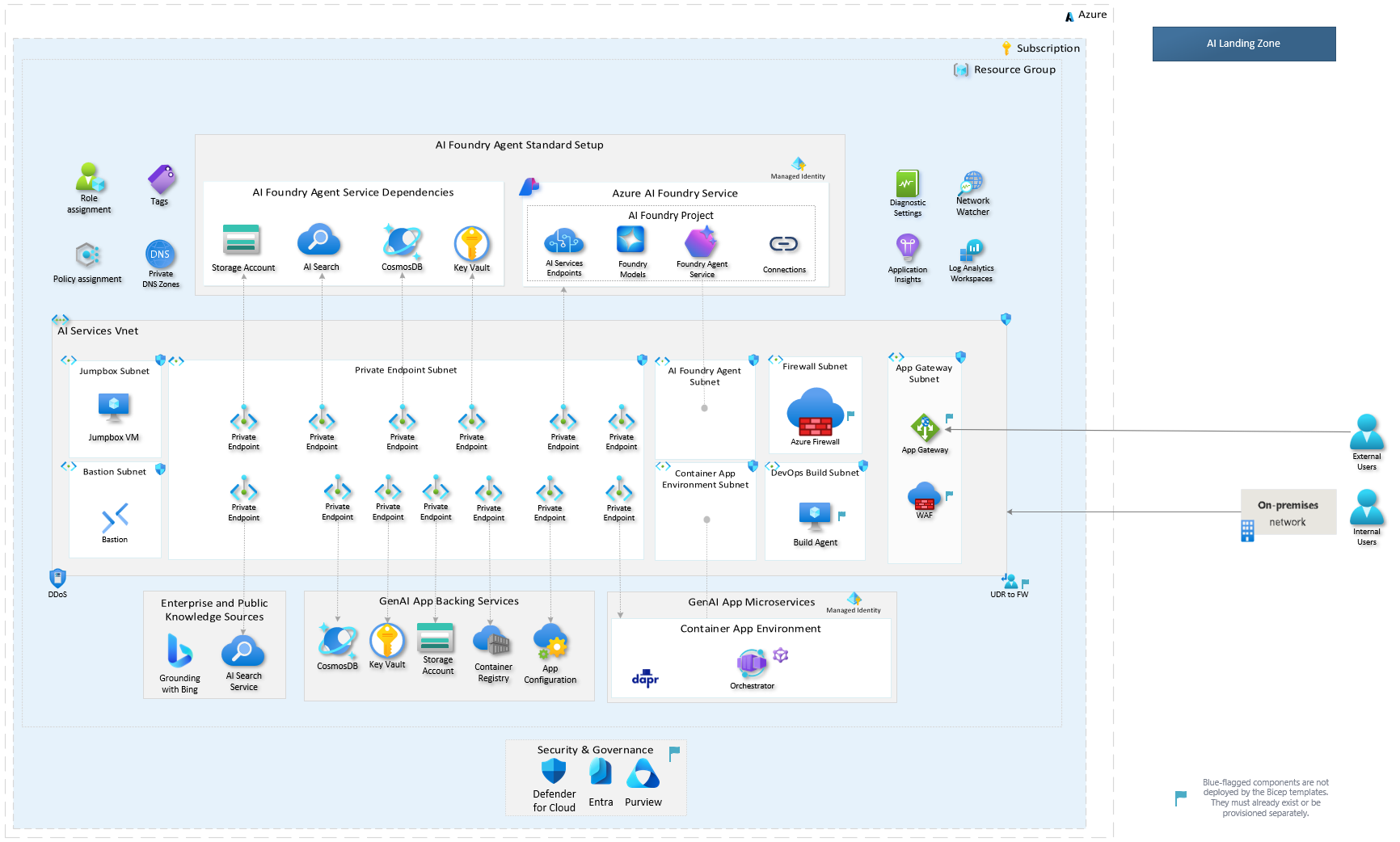
The AI Landing Zone Bicep implementation provides an Azure foundation for AI
workloads. Its source is maintained in
Azure/bicep-ptn-aiml-landing-zone.
Agent Landing Zone incorporates foundation source under its own infra/ tree
and adds application composition, service configuration and deployment hooks.
Deployment modes
The network design is distinct from the Agent application's orchestrator topology.
deploymentMode records intent; explicit flags and resource IDs determine the
actual resources, routing and reuse.
| Foundation shape | Intent | Reference |
|---|---|---|
| Self-contained | standalone; public service endpoints or an explicitly isolated local network |
Standalone network |
| Existing hub integration | ailz-integrated; explicit private networking, hub routing, peering, DNS and shared-service inputs |
Hub-and-spoke network |
The hub test fixture is not a third production topology. Neither preset automatically supplies an operational hub, DNS resolver or connected deployment host.
What gets deployed
Enabled parameters select Foundry/model services, workload data services, container runtimes, configuration/secrets, observability, network resources and optional add-ons. Service-specific conditions and existing-resource inputs determine which are created, reused or omitted.
The independent foundation's default Container App is a hello-world placeholder. It is not the Agent application. Foundry Agent Service backing resources are also distinct from workload data stores. Review the resource inventory and cost scenarios for foundation scope and the parameter reference for supported inputs. Do not infer the Agent application footprint from the upstream defaults.
Access and validation
Managed identities and scoped role assignments provide service-to-service access; Permissions describes the foundation's default assignments. Effective application grants depend on the selected definition, capabilities and topology.
The preprovision hook checks inputs, BYO resource references, network constraints and regional readiness. A passing check is not proof of regional capacity, private DNS resolution, data-plane authorization or application readiness. Resolve findings instead of skipping the checks.
Use the canonical runbooks
- Deploy infrastructure only — choose independent Bicep foundation or Agent foundation.
- Deploy the full stack — deploy the Agent foundation and selected application.
For implementation details, see Bicep deployment considerations, parameterization and Application Gateway ingress.