Copilot Studio and Azure Labs — To show in a simple way different Azure OpenAI features and services.
This delivery guide will guide you through some of the most common scenarios and uses cases when using Azure OpenAI.
This is the multi-page printable view of this section. Click here to print.
Copilot Studio and Azure Labs — To show in a simple way different Azure OpenAI features and services.
This delivery guide will guide you through some of the most common scenarios and uses cases when using Azure OpenAI.
⚠️ Work in Progress
This documentation is currently under development and may contain incomplete or placeholder content. Information provided here is subject to change without notice. Please check back regularly for updates.
Copilot Studio and Azure Labs solution is a new offering that has different delivery modes. You can use it as a presales activity to demonstrate to customer the various Azure Open AI features that are accessible with minimal coding effort or you can deliver it as a Non-technical Hands on. This is intended for executives or other non-technical leads. The goal is to show different solutions where customers can test and proceed with further steps such as VBD engagements or new AOAI opportunities.
To use this solution, you will need the following:
By the end of this delivery, you will be able to:
The following diagram shows the high-level architecture of the Copilot Studio and Azure Labs solution:
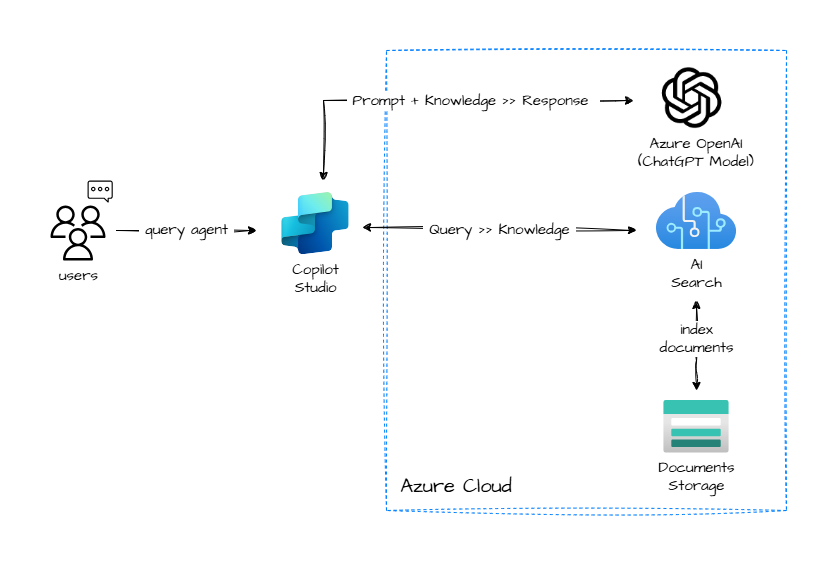
This delivery involves the the following steps:
By the end of the Copilot Studio and Azure Labs delivery, stakeholders will have a strong and innovative perspective of some AOAI services which can be used separately or together to improve their document retrieval efficiency, enhance their user experience, increase their productivity, share their knowledge, gain data insights and analytics, and comply with security standards.
⚠️ Work in Progress
This documentation is currently under development and may contain incomplete or placeholder content. Information provided here is subject to change without notice. Please check back regularly for updates.
Learn more about Copilot Studio: What is Copilot Studio?
Azure OpenAI Service provides REST API access to OpenAI’s powerful language models including the GPT-4, GPT-35-Turbo, and Embeddings model series. In addition, the new GPT-4 and gpt-35-turbo model series have now reached general availability. These models can be easily adapted to your specific task including but not limited to content generation, summarization, semantic search, and natural language to code translation. Users can access the service through REST APIs, Python SDK, or our web-based interface in the Azure OpenAI Studio.
Important concepts about Azure OpenAI:
Models available
Take into account that not all models are available in all Azure Regions, for Regional availability check the documentation: Model summary table and region availability
Deployment: once you instantiate a specific model, it will be available as deployment. You can create and delete deployments of available models as you wish. This is managed through the AOAI Studio.
Quotas: the quotas available in Azure are allocated per model and per region, within a subscription. Learn more about quotas. In the documentation you can find best practices to manage your quota.
Copilot Studio and Azure Labs uses Azure OpenAI Embeddings model to vectorize the content and ChatGPT model to conversate with that content.
More information at the official documentation: What is Azure OpenAI
Azure AI Search (formerly known as “Azure Search”) is a cloud search service that gives developers infrastructure, APIs, and tools for building a rich search experience over private, heterogeneous content in web, mobile, and enterprise applications.
Search is foundational to any app that surfaces text to users, where common scenarios include catalog or document search, online retail apps, or data exploration over proprietary content. When you create a search service, you’ll work with the following capabilities:

Copilot Studio and Azure Labs uses Azure AI Search to serve an index of vectorized content, that will be used by our LLM (ChatGPT) to respond to user’s query.
Learn more at the official documentation: What is Azure AI Search?.
Learning Path:Implement knowledge mining with Azure AI Search
Azure Blob Storage is Microsoft’s object storage solution for the cloud. Blob Storage is optimized for storing massive amounts of unstructured data. Unstructured data is data that doesn’t adhere to a particular data model or definition, such as text or binary data.
Blob Storage is designed for:
Copilot Studio and Azure Labs uses Blob Storage to store the documents (PDFs) that will be then vectorized, indexed or analyzed.
Learn more about Azure Blob Storage: What is Azure Blob Storage?
This project welcomes contributions and suggestions. Most contributions require you to agree to a Contributor License Agreement (CLA) declaring that you have the right to, and actually do, grant us the rights to use your contribution. For details, visit https://cla.microsoft.com.
When you submit a pull request, a CLA-bot will automatically determine whether you need to provide a CLA and decorate the PR appropriately (e.g., label, comment). Simply follow the instructions provided by the bot. You will only need to do this once across all repositories using our CLA.
This project has adopted the Microsoft Open Source Code of Conduct. For more information see the Code of Conduct FAQ or contact opencode@microsoft.com with any additional questions or comments.