If you cannot find guidance for what you need, please let us know via GitHub Issues 👍
Subsections of Contributing
AI-Assisted Module Development
For Module Owners
This section covers module development and maintenance scenarios and is primarily relevant for AVM module owners. If you are an end user looking to leverage AVM to develop complex solutions using AI, see AI-Assisted IaC Solution Development.
Overview
AVM module owners and members of the AVM core team can leverage GitHub Copilot and related AI capabilities to accelerate the development, maintenance, and validation of AVM Bicep modules. By embedding AVM-specific knowledge directly into the development environment, we reduce manual effort, improve consistency, and help ensure compliance with AVM specifications from the start.
The AVM core team is building a set of AI-powered assets that GitHub Copilot can use to provide AVM-aware assistance. These assets fall into several categories:
Custom Instructions: Markdown files that automatically guide GitHub Copilot’s behavior whenever it generates or reviews code, providing persistent context about the project’s baseline, such as coding standards and compliance requirements.
Custom Agents: Specialized AI personas that focus on a specific workflow (e.g., planning, implementing, or validating module changes), each with a defined scope, tools, and the ability to hand off work to other agents.
Prompt Files: Reusable, parameterized task templates that define a specific analysis or action for Copilot to perform, targeting specific modules or files.
Skills: Detailed, step-by-step workflow definitions that encode domain-specific expertise. Skill descriptions are included in the system prompt on every chat turn, but their full content is loaded into context on demand — only when the model determines relevance to the user’s request or the user explicitly invokes the skill.
The actual implementations of these assets may vary between Bicep and Terraform, and they will evolve over time as best practices emerge and capabilities mature. The AVM core team will continue adding documentation and examples as we make progress - both developing new assets from scratch and refining existing ones.
Coming Soon
Content for AI-assisted AVM Terraform module development is currently being developed and will be available soon. Stay tuned for updates!
Subsections of AI-Assisted Module Dev
AVM Bicep AI Assets
This page provides a catalog of all AI-assisted development assets available in the Bicep Registry Modules (BRM) repository. Each asset is linked to its source file for full details.
Custom Instructions
Custom instructions provide persistent, repository-wide context that shapes how GitHub Copilot generates and reviews code. They are automatically loaded by Copilot when working in the repository.
Global Instructions
Global instructions provide GitHub Copilot with an overview of the AVM Bicep repository structure, critical compliance requirements (including mandatory AVM specification adherence), tool usage guidance, module discovery methods (AVM module index, MCR, Azure Resource Reference), and schema/API version lookup procedures. This is the primary instruction file that ensures all AI-generated code aligns with AVM standards.
Skills encode complex, multi-step domain workflows into structured instructions that GitHub Copilot can follow precisely. They define prerequisites, rules, phases, and expected outputs. When the IDE starts, skill descriptions are indexed so that Copilot is aware of their existence and purpose. The full content of a skill is only loaded into the context when the user’s prompt references a topic that aligns with the skill’s described purpose.
Child Module Publishing
Source: .github/skills/avm-child-module-publishing/SKILL.md Description: Guides the end-to-end workflow for publishing a Bicep child module to the AVM public registry. Covers prerequisite verification, allowed-list registration, telemetry instrumentation, version file creation, changelog updates, parent module updates, and final validation. This skill implements the official Child Module Publishing workflow.
Note: in some cases, VS Code is not identifying the correct skill based on the above prompt. If this happens, you can try to use the follow prompt that explicitly triggers the correct skill:
Analyzes AVM Bicep modules for technical debt, including inconsistencies, documentation gaps, spelling mistakes, conflicting information, and quality issues across module files and examples. This is a read-only analysis — it does not modify any files.
Analyzes AVM Bicep modules to identify resources with outdated ARM API versions, compares them against the latest stable versions, and generates detailed implementation plans for required updates. This is a planning-only task — it does not modify any files.
/AVM-Update-module-to-latest-API-versions
AVM Terraform AI Assets
Coming Soon
Content for AI-assisted AVM Terraform module development is currently being developed and will be available soon. Stay tuned for updates!
Bicep Contribution Guide
Important
While this page describes and summarizes important aspects of contributing to AVM, it may not reference All of the shared and language specific requirements.
Therefore, this contribution guide MUST be used in conjunction with the Bicep specifications. ALL AVM modules (Resource and Pattern modules) MUST meet the respective requirements described in these specifications!
Summary
This section lists AVM’s Bicep-specific contribution guidance.
While this page describes and summarizes important aspects of the composition of AVM modules, it may not reference All of the shared and language specific requirements.
Therefore, this guide MUST be used in conjunction with the Bicep specifications. ALL AVM modules (Resource and Pattern modules) MUST meet the respective requirements described in these specifications!
Important
Before jumping on implementing your contribution, please review the AVM Module specifications, in particular the Bicep specification page, to make sure your contribution complies with the AVM module’s design and principles.
For new modules, the files can be created automatically, once the parent folder exists. This example shows how to create a res module res/compute/virtual-machine.
Modules enable you to reuse code from a Bicep file in other Bicep files. As such, for resource modules they’re normally leveraged for deploying child resources (e.g., file services in a storage account), cross referenced resources (e.g., network interface in a virtual machine) or extension resources (e.g., role assignments in a key vault). Pattern modules, normally reuse resource modules combined together.
Make sure to review all specifications covering module properties and usage.
Tip
See examples in specifications BCPFR1 for resource modules and PMNFR2 for pattern modules.
Outputs
Make sure to review all specifications of Category: Inputs/Outputs within the Bicep specific pages.
This section is only relevant for contributions to resource modules.
To meet RMFR4 and RMFR5 AVM resource modules must leverage consistent interfaces for all the optional features/extension resources supported by the AVM module primary resource.
Please refer to the Bicep Interfaces page. If the primary resource of the AVM resource module you are developing supports any of the listed features/extension resources, please follow the corresponding provided Bicep schema to develop them.
Deprecation
Breaking changes are sometimes not avoidable. The impact should be kept as low as possible. A recommendation is to deprecate parameters, instead of completely removing them for a couple of versions. The Semantic Versioning sections offers information about versioning AVM modules.
In case you need to deprecate an input parameter, this sample shows you how this can be achieved.
Note
Since all modules are versioned, nothing will change for existing deployments, as the parameter usage does not change for any existing versions.
Example-Scenario
An AVM module is modified, and the parameters will change, which breaks backward compatibility.
parameters are changing to a custom type
the parameter structure is changing
backward compatibility will be maintained
Existing input parameters used to be defined as follows (reducing the examples to the minimum):
Before you begin to modify anything, it is recommended to create a new test case (e.g. deprecated), in addition to the already existing tests, to make sure that the changes are not breaking backward compatibility until you decide to finally remove the deprecated parameters (see BCPRMNFR1 - Category: Testing - Expected Test Directories for more details about the requirements).
The test should include all previously used parameters to make sure they are covered before any changes to the new parameter layout are done.
Code Changes
The new parameter structure requires a change to the used parameters and moves them to a different location and looks like:
// main.bicep:param item itemType?
type itemtype: {
name: string // the name parameter did not change properties ={
osType: 'Linux' | 'Windows'? // the new place for the osType variant: {
size: string? // the new place for the variant size }?
}
// keep these for backward compatibility in the new type @description('Optional. Note: This is a deprecated property, please use the corresponding `properties.osType` instead.')
osType: string? // the old parameter location @description('Optional. Note: This is a deprecated property, please use the corresponding `properties.variant.size` instead.')
variant: string? // the old parameter location}
The original parameter item is of type object and does not give the user any clue of what the syntax is and what is expected to be added to it. The tests could bring light into the darkness, but this is not ideal. In order to retain backward compatibility, the previously used parameters need to be added to the new type, as they would be invalid otherwise. Now that the new type is in place, some logic needs to be implemented to make sure the module can handle the different sources of data (new and old parameters).
resource<modulename>'Microsoft.xy/yz@2024-01-01' = {
name: name
properties: {
osType: item.?properties.?osType ?? item.?osType ??'Linux'// add a default here, if needed variant: {
size: item.?properties.?variant.?size ?? item.?variant
}
}
}
By choosing this order for the Coalesce operator, the new format takes precedence over the old syntax. Also note the safe-dereference ensures that no null reference exception will occure if the property has optional parameters.
The tests can now be changed to adapt the new parameter structure for the new version of the module. They will not cover the old parameter structure anymore.
Changes to modules (resource or pattern) can bei implemented in two ways.
Implement changes with backward compatibility
In this scenario, you need to make sure that the code does not break backward compatibility by:
adding new parameters
marking other parameters as deprecated
create a test case for the old usage syntax
increase the minor version number of the module (0.x)
Introduce breaking changes
The easier way to introduce a new major version requires fewer steps:
adding new parameters
create a test case for the usage
increase the major version number of the module (x.0.0)
Note
Be aware that currently no module has been released as 1.0.0 (or beyond), which lets you implement breaking changes without increasing the major version.
---
config:
  nodeSpacing: 20
  rankSpacing: 20
  diagramPadding: 50
  padding: 5
  flowchart:
    wrappingWidth: 300
    padding: 5
  layout: elk
  elk:
    mergeEdges: true
    nodePlacementStrategy: LINEAR_SEGMENTS
---

flowchart TD
  A("1 - Fork the module source repository")
    click A "/Azure-Verified-Modules/contributing/bicep/bicep-contribution-flow/#1-fork-the-module-source-repository"
  B(2 - Configure a deployment identity in Azure)
    click B "/Azure-Verified-Modules/contributing/bicep/bicep-contribution-flow/#2-configure-a-deployment-identity-in-azure"
  C("3 - Configure CI environment for module tests")
    click C "/Azure-Verified-Modules/contributing/bicep/bicep-contribution-flow/#3-configure-your-ci-environment"
  D("4 - Implementing your contribution<br>(Refer to Gitflow Diagram below)")
    click D "/Azure-Verified-Modules/contributing/bicep/bicep-contribution-flow/#4-implement-your-contribution"
  E(5 - Workflow test completed successfully?)
    click E "/Azure-Verified-Modules/contributing/bicep/bicep-contribution-flow/#5-createupdate-and-run-tests"
  F(6 - Create a pull request to the upstream repository)
    click F "/Azure-Verified-Modules/contributing/bicep/bicep-contribution-flow/#6-create-a-pull-request-to-the-public-bicep-registry"
  G(7 - Get your pull request approved)
    click G "/Azure-Verified-Modules/contributing/bicep/bicep-contribution-flow/#7-get-your-pull-request-approved"
  A --> B
  B --> C
  C --> D
  D --> E
  E -->|yes|F
  E -->|no|D
  F --> G
GitFlow for contributors
The GitFlow process outlined here introduces a central anchor branch. This branch should be treated as if it were a protected branch. It serves to synchronize the forked repository with the original upstream repository. The use of the anchor branch is designed to give contributors the flexibility to work on several modules simultaneous.
When implementing the GitFlow process as described, it is advisable to configure the local clone with a remote for the upstream repository. This will enable the Git CLI and local IDE to merge changes directly from the upstream repository. Using GitHub Desktop, this is configured automatically when cloning the forked repository via the application.
PowerShell Helper Script To Setup Fork & CI Test Environment
Now defaults to OIDC setup
The PowerShell Helper Script has recently added support for the OIDC setup and configuration as documented in detail on this page. This is now the default for the script.
The easiest way to get yourself set back up, is to delete your fork repository, including the local clone of it that you have and start over with the script. This will ensure you have the correct setup for the OIDC authentication method for the AVM CI.
Important
To simplify the setup of the fork, clone and configuration of the required GitHub Environments, Secrets, User-Assigned Managed Identity (UAMI), Federated Credentials and RBAC assignments in your Azure environment for the CI framework to function correctly in your fork, we have created a PowerShell script that you can use to do steps 1, 2 & 3 below.
The script performs the following steps:
Forks the Azure/bicep-registry-modules to your GitHub Account.
Clones the repo locally to your machine, based on the location you specify in the parameter: -GitHubRepositoryPathForCloneOfForkedRepository.
Prompts you and takes you directly to the place where you can enable GitHub Actions Workflows on your forked repo.
Creates an User-Assigned Managed Identity (UAMI) and federated credentials for OIDC with your forked GitHub repo and grants it the RBAC roles of Owner at Management Group level, if specified in the -GitHubSecret_ARM_MGMTGROUP_ID parameter, and at Azure Subscription level if you provide it via the -GitHubSecret_ARM_SUBSCRIPTION_ID parameter.
Creates the required GitHub Environments & required Secrets in your forked repo as per step 3, based on the input provided in parameters and the values from resources the script creates and configures for OIDC. Also set the workflow permissions to Read and write permissions as per step 3.3.
Pre-requisites
You must have the Azure PowerShell Modules installed and you need to be logged with the context set to the desired Tenant. You must have permissions to create an SPN and grant RBAC over the specified Subscription and Management Group, if provided.
You must have the GitHub CLI installed and need to be authenticated with the GitHub user account you wish to use to fork, clone and work with on AVM.
The New-AVMBicepBRMForkSetup.ps1 can be downloaded from here.
Once downloaded, you can run the script by running the below - Please change all the parameter values in the below script usage example to your own values (see the parameter documentation in the script itself)!:
.\<PATH-TO-SCRIPT-DOWNLOAD-LOCATION>\New-AVMBicepBRMForkSetup.ps1 -GitHubRepositoryPathForCloneOfForkedRepository "<pathToCreateForkedRepoIn>" -GitHubSecret_ARM_MGMTGROUP_ID "<managementGroupId>" -GitHubSecret_ARM_SUBSCRIPTION_ID "<subscriptionId>" -GitHubSecret_ARM_TENANT_ID "<tenantId>" -GitHubSecret_TOKEN_NAMEPREFIX "<unique3to5AlphanumericStringForAVMDeploymentNames>" -UAMIRsgLocation "<Azure Region/Location of your choice such as 'uksouth'>"
For more examples, see the below script’s parameters section.
[Diagnostics.CodeAnalysis.SuppressMessageAttribute("PSAvoidUsingWriteHost", "", Justification = "Coloured output required in this script")]
#Requires-PSEdition Core#Requires-Modules @{ ModuleName="Az.Accounts"; ModuleVersion="2.19.0" }#Requires-Modules @{ ModuleName="Az.Resources"; ModuleVersion="6.16.2" }<#
.SYNOPSISThis function creates and sets up everything a contributor to the AVM Bicep project should need to get started with their contribution to a AVM Bicep Module.
.DESCRIPTIONThis function creates and sets up everything a contributor to the AVM Bicep project should need to get started with their contribution to a AVM Bicep Module. This includes:
- Forking and cloning the `Azure/bicep-registry-modules` repository
- Creating a new SPN and granting it the necessary permissions for the CI tests and configuring the forked repositories secrets, as per: https://azure.github.io/Azure-Verified-Modules/contributing/bicep/bicep-contribution-flow/#2-configure-a-deployment-identity-in-azure
- Enabling GitHub Actions on the forked repository
- Disabling all the module workflows by default, as per: https://azure.github.io/Azure-Verified-Modules/contributing/bicep/bicep-contribution-flow/enable-or-disable-workflows/
Effectively simplifying this process to a single command, https://azure.github.io/Azure-Verified-Modules/contributing/bicep/bicep-contribution-flow/
.PARAMETER GitHubRepositoryPathForCloneOfForkedRepository
Mandatory. The path to the GitHub repository to fork and clone. Directory will be created if does not already exist. Can use either relative paths or full literal paths.
.PARAMETER GitHubSecret_ARM_MGMTGROUP_ID
Optional. The group ID of the management group to test-deploy modules in. Is needed for resources that are deployed to the management group scope. If not provided CI tests on Management Group scoped modules will not work and you will need to manually configure the RBAC role assignments for the SPN and associated repository secret later.
.PARAMETER GitHubSecret_ARM_SUBSCRIPTION_ID
Mandatory. The ID of the subscription to test-deploy modules in. Is needed for resources that are deployed to the subscription scope.
.PARAMETER GitHubSecret_ARM_TENANT_ID
Mandatory. The tenant ID of the Azure Active Directory tenant to test-deploy modules in. Is needed for resources that are deployed to the tenant scope.
.PARAMETER GitHubSecret_TOKEN_NAMEPREFIX
Mandatory. Required. A short (3-5 character length), unique string that should be included in any deployment to Azure. Usually, AVM Bicep test cases require this value to ensure no two contributors deploy resources with the same name - which is especially important for resources that require a globally unique name (e.g., Key Vault). These characters will be used as part of each resource’s name during deployment.
.PARAMETER SPNName
Optional. The name of the SPN (Service Principal) to create. If not provided, a default name of `spn-avm-bicep-brm-fork-ci-<GitHub Organization>` will be used.
.PARAMETER UAMIName
Optional. The name of the UAMI (User Assigned Managed Identity) to create. If not provided, a default name of `id-avm-bicep-brm-fork-ci-<GitHub Organization>` will be used.
.PARAMETER UAMIRsgName
Optional. The name of the Resource Group to create for the UAMI (User Assigned Managed Identity) to create. If not provided, a default name of `rsg-avm-bicep-brm-fork-ci-<GitHub Organization>-oidc` will be used.
.PARAMETER UAMIRsgLocation
Optional. The location of the Resource Group to create for the UAMI (User Assigned Managed Identity) to create. Also UAMI will be created in this location. This is required for OIDC deployments.
.PARAMETER UseOIDC
Optional. Default is `$true`. If set to `$true`, the script will use the OIDC (OpenID Connect) authentication method for the SPN instead of secrets as per https://azure.github.io/Azure-Verified-Modules/contributing/bicep/bicep-contribution-flow/#31-set-up-secrets. If set to `$false`, the script will use the Client Secret authentication method for the SPN and not OIDC.
.EXAMPLE.\<PATH-TO-SCRIPT-DOWNLOAD-LOCATION>\New-AVMBicepBRMForkSetup.ps1 -GitHubRepositoryPathForCloneOfForkedRepository "D:\GitRepos\" -GitHubSecret_ARM_MGMTGROUP_ID "alz" -GitHubSecret_ARM_SUBSCRIPTION_ID "1b60f82b-d28e-4640-8cfa-e02d2ddb421a" -GitHubSecret_ARM_TENANT_ID "c3df6353-a410-40a1-b962-e91e45e14e4b" -GitHubSecret_TOKEN_NAMEPREFIX "ex123" -UAMIRsgLocation "uksouth"
Example Subscription & Management Group scoped deployments enabled via OIDC with default generated UAMI Resource Group name of `rsg-avm-bicep-brm-fork-ci-<GitHub Organization>-oidc` and UAMI name of `id-avm-bicep-brm-fork-ci-<GitHub Organization>`.
.EXAMPLE.\<PATH-TO-SCRIPT-DOWNLOAD-LOCATION>\New-AVMBicepBRMForkSetup.ps1 -GitHubRepositoryPathForCloneOfForkedRepository "D:\GitRepos\" -GitHubSecret_ARM_MGMTGROUP_ID "alz" -GitHubSecret_ARM_SUBSCRIPTION_ID "1b60f82b-d28e-4640-8cfa-e02d2ddb421a" -GitHubSecret_ARM_TENANT_ID "c3df6353-a410-40a1-b962-e91e45e14e4b" -GitHubSecret_TOKEN_NAMEPREFIX "ex123" -UAMIRsgLocation "uksouth" -UAMIName "my-uami-name" -UAMIRsgName "my-uami-rsg-name"
Example with provided UAMI Name & UAMI Resource Group Name.
.EXAMPLE.\<PATH-TO-SCRIPT-DOWNLOAD-LOCATION>\New-AVMBicepBRMForkSetup.ps1 -GitHubRepositoryPathForCloneOfForkedRepository "D:\GitRepos\" -GitHubSecret_ARM_SUBSCRIPTION_ID "1b60f82b-d28e-4640-8cfa-e02d2ddb421a" -GitHubSecret_ARM_TENANT_ID "c3df6353-a410-40a1-b962-e91e45e14e4b" -GitHubSecret_TOKEN_NAMEPREFIX "ex123" -UseOIDC $false
DEPRECATED - USE OIDC INSTEAD.
Example Subscription scoped deployments enabled only with default generated SPN name of `spn-avm-bicep-brm-fork-ci-<GitHub Organization>`.
.EXAMPLE.\<PATH-TO-SCRIPT-DOWNLOAD-LOCATION>\New-AVMBicepBRMForkSetup.ps1 -GitHubRepositoryPathForCloneOfForkedRepository "D:\GitRepos\" -GitHubSecret_ARM_MGMTGROUP_ID "alz" -GitHubSecret_ARM_SUBSCRIPTION_ID "1b60f82b-d28e-4640-8cfa-e02d2ddb421a" -GitHubSecret_ARM_TENANT_ID "c3df6353-a410-40a1-b962-e91e45e14e4b" -GitHubSecret_TOKEN_NAMEPREFIX "ex123" -SPNName "my-spn-name" -UseOIDC $false
DEPRECATED - USE OIDC INSTEAD.
Example with provided SPN name.
#>[CmdletBinding(SupportsShouldProcess = $false)]
param (
[Parameter(Mandatory = $true)]
[string] $GitHubRepositoryPathForCloneOfForkedRepository,
[Parameter(Mandatory = $false)]
[string] $GitHubSecret_ARM_MGMTGROUP_ID,
[Parameter(Mandatory = $true)]
[string] $GitHubSecret_ARM_SUBSCRIPTION_ID,
[Parameter(Mandatory = $true)]
[string] $GitHubSecret_ARM_TENANT_ID,
[Parameter(Mandatory = $true)]
[string] $GitHubSecret_TOKEN_NAMEPREFIX,
[Parameter(Mandatory = $false)]
[string] $SPNName,
[Parameter(Mandatory = $false)]
[string] $UAMIName,
[Parameter(Mandatory = $false)]
[string] $UAMIRsgName = "rsg-avm-bicep-brm-fork-ci-oidc",
[Parameter(Mandatory = $false)]
[string] $UAMIRsgLocation,
[Parameter(Mandatory = $false)]
[bool] $UseOIDC = $true
)
# Check if the GitHub CLI is installed$GitHubCliInstalled = Get-Command gh -ErrorAction SilentlyContinue
if ($null -eq $GitHubCliInstalled) {
throw'The GitHub CLI is not installed. Please install the GitHub CLI and try again. Install link for GitHub CLI: https://github.com/cli/cli#installation'}
Write-Host 'The GitHub CLI is installed...' -ForegroundColor Green
# Check if GitHub CLI is authenticated$GitHubCliAuthenticated = gh auth status
if ($LASTEXITCODE -ne0) {
Write-Host $GitHubCliAuthenticated -ForegroundColor Red
throw"Not authenticated to GitHub. Please authenticate to GitHub using the GitHub CLI command of 'gh auth login', and try again."}
Write-Host 'Authenticated to GitHub with following details...' -ForegroundColor Cyan
Write-Host ''gh auth status
Write-Host ''# Ask the user to confirm if it's the correct GitHub accountdo {
Write-Host "Is the above GitHub account correct to coninue with the fork setup of the 'Azure/bicep-registry-modules' repository? Please enter 'y' or 'n'." -ForegroundColor Yellow
$userInput = Read-Host
$userInput = $userInput.ToLower()
switch ($userInput) {
'y' {
Write-Host '' Write-Host 'User Confirmed. Proceeding with the GitHub account listed above...' -ForegroundColor Green
Write-Host ''break }
'n' {
Write-Host ''throw"User stated incorrect GitHub account. Please switch to the correct GitHub account. You can do this in the GitHub CLI (gh) by logging out by running 'gh auth logout' and then logging back in with 'gh auth login'" }
default {
Write-Host '' Write-Host "Invalid input. Please enter 'y' or 'n'." -ForegroundColor Red
Write-Host '' }
}
} while ($userInput -ne'y'-and $userInput -ne'n')
# Fork and clone repository locallyWrite-Host "Changing to directory $GitHubRepositoryPathForCloneOfForkedRepository ..." -ForegroundColor Magenta
if (-not (Test-Path -Path $GitHubRepositoryPathForCloneOfForkedRepository)) {
Write-Host "Directory does not exist. Creating directory $GitHubRepositoryPathForCloneOfForkedRepository ..." -ForegroundColor Yellow
New-Item -Path $GitHubRepositoryPathForCloneOfForkedRepository -ItemType Directory -ErrorAction Stop
Write-Host ''}
Set-Location -Path $GitHubRepositoryPathForCloneOfForkedRepository -ErrorAction stop
$CreatedDirectoryLocation = Get-Location
Write-Host "Forking and cloning 'Azure/bicep-registry-modules' repository..." -ForegroundColor Magenta
gh repo fork 'Azure/bicep-registry-modules' --default-branch-only --clone=true
if ($LASTEXITCODE -ne0) {
throw"Failed to fork and clone the 'Azure/bicep-registry-modules' repository. Please check the error message above, resolve any issues, and try again."}
$ClonedRepoDirectoryLocation = Join-Path $CreatedDirectoryLocation 'bicep-registry-modules'Write-Host ''Write-Host "Fork of 'Azure/bicep-registry-modules' created successfully directory in $CreatedDirectoryLocation ..." -ForegroundColor Green
Write-Host ''Write-Host "Changing into cloned repository directory $ClonedRepoDirectoryLocation ..." -ForegroundColor Magenta
Set-Location $ClonedRepoDirectoryLocation -ErrorAction stop
# Check is user is logged in to Azure$UserLoggedIntoAzure = Get-AzContext -ErrorAction SilentlyContinue
if ($null -eq $UserLoggedIntoAzure) {
throw'You are not logged into Azure. Please log into Azure using the Azure PowerShell module using the command of `Connect-AzAccount` to the correct tenant and try again.'}
$UserLoggedIntoAzureJson = $UserLoggedIntoAzure | ConvertTo-Json -Depth 10 | ConvertFrom-Json
Write-Host "You are logged into Azure as '$($UserLoggedIntoAzureJson.Account.Id)' ..." -ForegroundColor Green
# Check user has access to desired subscription$UserCanAccessSubscription = Get-AzSubscription -SubscriptionId $GitHubSecret_ARM_SUBSCRIPTION_ID -ErrorAction SilentlyContinue
if ($null -eq $UserCanAccessSubscription) {
throw"You do not have access to the subscription with the ID of '$($GitHubSecret_ARM_SUBSCRIPTION_ID)'. Please ensure you have access to the subscription and try again."}
Write-Host "You have access to the subscription with the ID of '$($GitHubSecret_ARM_SUBSCRIPTION_ID)' ..." -ForegroundColor Green
Write-Host ''# Get GitHub Login/Org Name$GitHubUserRaw = gh api user
$GitHubUserConvertedToJson = $GitHubUserRaw | ConvertFrom-Json -Depth 10$GitHubOrgName = $GitHubUserConvertedToJson.login
$GitHubOrgAndRepoNameCombined = "$($GitHubOrgName)/bicep-registry-modules"# Create SPN if not using OIDCif ($UseOIDC -eq $false) {
if ($SPNName -eq'') {
Write-Host "No value provided for the SPN Name. Defaulting to 'spn-avm-bicep-brm-fork-ci-<GitHub Organization>' ..." -ForegroundColor Yellow
$SPNName = "spn-avm-bicep-brm-fork-ci-$($GitHubOrgName)" }
$newSpn = New-AzADServicePrincipal -DisplayName $SPNName -Description "Service Principal Name (SPN) for the AVM Bicep CI Tests in the $($GitHubOrgName) fork. See: https://azure.github.io/Azure-Verified-Modules/contributing/bicep/bicep-contribution-flow/#2-configure-a-deployment-identity-in-azure" -ErrorAction Stop
Write-Host "New SPN created with a Display Name of '$($newSpn.DisplayName)' and an Object ID of '$($newSpn.Id)'." -ForegroundColor Green
Write-Host ''# Create RBAC Role Assignments for SPN Write-Host 'Starting 120 second sleep to allow the SPN to be created and available for RBAC Role Assignments (eventual consistency) ...' -ForegroundColor Yellow
Start-Sleep -Seconds 120 Write-Host "Creating RBAC Role Assignments of 'Owner' for the Service Principal Name (SPN) '$($newSpn.DisplayName)' on the Subscription with the ID of '$($GitHubSecret_ARM_SUBSCRIPTION_ID)' ..." -ForegroundColor Magenta
New-AzRoleAssignment -ApplicationId $newSpn.AppId -RoleDefinitionName 'Owner' -Scope "/subscriptions/$($GitHubSecret_ARM_SUBSCRIPTION_ID)" -ErrorAction Stop
Write-Host "RBAC Role Assignments of 'Owner' for the Service Principal Name (SPN) '$($newSpn.DisplayName)' created successfully on the Subscription with the ID of '$($GitHubSecret_ARM_SUBSCRIPTION_ID)'." -ForegroundColor Green
Write-Host ''if ($GitHubSecret_ARM_MGMTGROUP_ID -eq'') {
Write-Host "No Management Group ID provided as input parameter to '-GitHubSecret_ARM_MGMTGROUP_ID', skipping RBAC Role Assignments upon Management Groups" -ForegroundColor Yellow
Write-Host '' }
if ($GitHubSecret_ARM_MGMTGROUP_ID -ne'') {
Write-Host "Creating RBAC Role Assignments of 'Owner' for the Service Principal Name (SPN) '$($newSpn.DisplayName)' on the Management Group with the ID of '$($GitHubSecret_ARM_MGMTGROUP_ID)' ..." -ForegroundColor Magenta
New-AzRoleAssignment -ApplicationId $newSpn.AppId -RoleDefinitionName 'Owner' -Scope "/providers/Microsoft.Management/managementGroups/$($GitHubSecret_ARM_MGMTGROUP_ID)" -ErrorAction Stop
Write-Host "RBAC Role Assignments of 'Owner' for the Service Principal Name (SPN) '$($newSpn.DisplayName)' created successfully on the Management Group with the ID of '$($GitHubSecret_ARM_MGMTGROUP_ID)'." -ForegroundColor Green
Write-Host '' }
}
# Create UAMI if using OIDCif ($UseOIDC) {
if ($UAMIName -eq'') {
Write-Host "No value provided for the UAMI Name. Defaulting to 'id-avm-bicep-brm-fork-ci-<GitHub Organization>' ..." -ForegroundColor Yellow
$UAMIName = "id-avm-bicep-brm-fork-ci-$($GitHubOrgName)" }
if ($UAMIRsgName -eq'') {
Write-Host "No value provided for the UAMI Resource Group Name. Defaulting to 'rsg-avm-bicep-brm-fork-ci-<GitHub Organization>-oidc' ..." -ForegroundColor Yellow
$UAMIRsgName = "rsg-avm-bicep-brm-fork-ci-$($GitHubOrgName)-oidc" }
Write-Host "Selecting the subscription with the ID of '$($GitHubSecret_ARM_SUBSCRIPTION_ID)' to create Resource Group & UAMI in for OIDC ..." -ForegroundColor Magenta
Select-AzSubscription -Subscription $GitHubSecret_ARM_SUBSCRIPTION_ID
Write-Host ''if ($UAMIRsgLocation -eq'') {
Write-Host "No value provided for the UAMI Location ..." -ForegroundColor Yellow
$UAMIRsgLocation = Read-Host -Prompt "Please enter the location for the UAMI and the Resource Group to be created in for OIDC deployments. e.g. 'uksouth' or 'eastus', etc..." $UAMIRsgLocation = $UAMIRsgLocation.ToLower()
$availableLocations = Get-AzLocation | Where-Object {$_.RegionType -eq'Physical'} | Select-Object -ExpandProperty Location
if ($availableLocations -notcontains $UAMIRsgLocation) {
Write-Host "Invalid location provided. Please provide a valid location from the list below ..." -ForegroundColor Yellow
Write-Host '' Write-Host "Available Locations: $($availableLocations -join ', ')" -ForegroundColor Yellow
do {
$UAMIRsgLocation = Read-Host -Prompt "Please enter the location for the UAMI and the Resource Group to be created in for OIDC deployments. e.g. 'uksouth' or 'eastus', etc..." } until (
$availableLocations -icontains $UAMIRsgLocation
)
}
}
Write-Host "Creating Resource Group for UAMI with the name of '$($UAMIRsgName)' and location of '$($UAMIRsgLocation)'..." -ForegroundColor Magenta
$newUAMIRsg = New-AzResourceGroup -Name $UAMIRsgName -Location $UAMIRsgLocation -ErrorAction Stop
Write-Host "New Resource Group created with a Name of '$($newUAMIRsg.ResourceGroupName)' and a Location of '$($newUAMIRsg.Location)'." -ForegroundColor Green
Write-Host '' Write-Host "Creating UAMI with the name of '$($UAMIName)' and location of '$($UAMIRsgLocation)' in the Resource Group with the name of '$($UAMIRsgName)..." -ForegroundColor Magenta
$newUAMI = New-AzUserAssignedIdentity -ResourceGroupName $newUAMIRsg.ResourceGroupName -Name $UAMIName -Location $newUAMIRsg.Location -ErrorAction Stop
Write-Host "New UAMI created with a Name of '$($newUAMI.Name)' and an Object ID of '$($newUAMI.PrincipalId)'." -ForegroundColor Green
Write-Host '' Write-Host 'Starting 120 second sleep to allow the UAMI to be created and available for Federated Credential creation and RBAC Role Assignments (eventual consistency) ...' -ForegroundColor Yellow
Start-Sleep -Seconds 120# Create Federated Credentials for UAMI for OIDC Write-Host "Creating Federated Credentials for the User-Assigned Managed Identity Name (UAMI) for OIDC ... '$($newUAMI.Name)' for OIDC ..." -ForegroundColor Magenta
New-AzFederatedIdentityCredentials -ResourceGroupName $newUAMIRsg.ResourceGroupName -IdentityName $newUAMI.Name -Name 'avm-gh-env-validation' -Issuer "https://token.actions.githubusercontent.com" -Subject "repo:$($GitHubOrgAndRepoNameCombined):environment:avm-validation" -ErrorAction Stop
Write-Host ''# Create RBAC Role Assignments for UAMI Write-Host "Creating RBAC Role Assignments of 'Owner' for the User-Assigned Managed Identity Name (UAMI) '$($newUAMI.Name)' on the Subscription with the ID of '$($GitHubSecret_ARM_SUBSCRIPTION_ID)' ..." -ForegroundColor Magenta
New-AzRoleAssignment -ObjectId $newUAMI.PrincipalId -RoleDefinitionName 'Owner' -Scope "/subscriptions/$($GitHubSecret_ARM_SUBSCRIPTION_ID)" -ErrorAction Stop
Write-Host "RBAC Role Assignments of 'Owner' for the User-Assigned Managed Identity Name (UAMI) '$($newUAMI.Name)' created successfully on the Subscription with the ID of '$($GitHubSecret_ARM_SUBSCRIPTION_ID)'." -ForegroundColor Green
Write-Host ''if ($GitHubSecret_ARM_MGMTGROUP_ID -eq'') {
Write-Host "No Management Group ID provided as input parameter to '-GitHubSecret_ARM_MGMTGROUP_ID', skipping RBAC Role Assignments upon Management Groups" -ForegroundColor Yellow
Write-Host '' }
if ($GitHubSecret_ARM_MGMTGROUP_ID -ne'') {
Write-Host "Creating RBAC Role Assignments of 'Owner' for the User-Assigned Managed Identity Name (UAMI) '$($newSpn.DisplayName)' on the Management Group with the ID of '$($GitHubSecret_ARM_MGMTGROUP_ID)' ..." -ForegroundColor Magenta
New-AzRoleAssignment -ObjectId $newUAMI.PrincipalId -RoleDefinitionName 'Owner' -Scope "/providers/Microsoft.Management/managementGroups/$($GitHubSecret_ARM_MGMTGROUP_ID)" -ErrorAction Stop
Write-Host "RBAC Role Assignments of 'Owner' for the User-Assigned Managed Identity Name (UAMI) '$($newUAMI.Name)' created successfully on the Management Group with the ID of '$($GitHubSecret_ARM_MGMTGROUP_ID)'." -ForegroundColor Green
Write-Host '' }
}
# Set GitHub Repo Secrets (non-OIDC)if ($UseOIDC -eq $false) {
Write-Host "Setting GitHub Secrets on forked repository (non-OIDC) '$($GitHubOrgAndRepoNameCombined)' ..." -ForegroundColor Magenta
Write-Host 'Creating and formatting secret `AZURE_CREDENTIALS` with details from SPN creation process (non-OIDC) and other parameter inputs ...' -ForegroundColor Cyan
$FormattedAzureCredentialsSecret = "{ 'clientId': '$($newSpn.AppId)', 'clientSecret': '$($newSpn.PasswordCredentials.SecretText)', 'subscriptionId': '$($GitHubSecret_ARM_SUBSCRIPTION_ID)', 'tenantId': '$($GitHubSecret_ARM_TENANT_ID)' }" $FormattedAzureCredentialsSecretJsonCompressed = $FormattedAzureCredentialsSecret | ConvertFrom-Json | ConvertTo-Json -Compress
if ($GitHubSecret_ARM_MGMTGROUP_ID -ne'') {
gh secret set ARM_MGMTGROUP_ID --body $GitHubSecret_ARM_MGMTGROUP_ID -R $GitHubOrgAndRepoNameCombined
}
gh secret set ARM_SUBSCRIPTION_ID --body $GitHubSecret_ARM_SUBSCRIPTION_ID -R $GitHubOrgAndRepoNameCombined
gh secret set ARM_TENANT_ID --body $GitHubSecret_ARM_TENANT_ID -R $GitHubOrgAndRepoNameCombined
gh secret set AZURE_CREDENTIALS --body $FormattedAzureCredentialsSecretJsonCompressed -R $GitHubOrgAndRepoNameCombined
gh secret set TOKEN_NAMEPREFIX --body $GitHubSecret_TOKEN_NAMEPREFIX -R $GitHubOrgAndRepoNameCombined
Write-Host '' Write-Host "Successfully created and set GitHub Secrets (non-OIDC) on forked repository '$($GitHubOrgAndRepoNameCombined)' ..." -ForegroundColor Green
Write-Host ''}
# Set GitHub Repo Secrets & Environment (OIDC)if ($UseOIDC) {
Write-Host "Setting GitHub Environment (avm-validation) and required Secrets on forked repository (OIDC) '$($GitHubOrgAndRepoNameCombined)' ..." -ForegroundColor Magenta
Write-Host "Creating 'avm-validation' environment on forked repository' ..." -ForegroundColor Cyan
$GitHubEnvironment = gh api --method PUT -H "Accept: application/vnd.github+json""repos/$($GitHubOrgAndRepoNameCombined)/environments/avm-validation" $GitHubEnvironmentConvertedToJson = $GitHubEnvironment | ConvertFrom-Json -Depth 10if ($GitHubEnvironmentConvertedToJson.name -ne'avm-validation') {
throw"Failed to create 'avm-validation' environment on forked repository. Please check the error message above, resolve any issues, and try again." }
Write-Host "Successfully created 'avm-validation' environment on forked repository' ..." -ForegroundColor Green
Write-Host '' Write-Host "Creating and formatting secrets for 'avm-validation' environment with details from UAMI creation process (OIDC) and other parameter inputs ..." -ForegroundColor Cyan
gh secret set VALIDATE_CLIENT_ID --body $newUAMI.ClientId -R $GitHubOrgAndRepoNameCombined -e 'avm-validation' gh secret set VALIDATE_SUBSCRIPTION_ID --body $GitHubSecret_ARM_SUBSCRIPTION_ID -R $GitHubOrgAndRepoNameCombined -e 'avm-validation' gh secret set VALIDATE_TENANT_ID --body $GitHubSecret_ARM_TENANT_ID -R $GitHubOrgAndRepoNameCombined -e 'avm-validation' Write-Host "Creating and formatting secrets for repo with details from UAMI creation process (OIDC) and other parameter inputs ..." -ForegroundColor Cyan
if ($GitHubSecret_ARM_MGMTGROUP_ID -ne'') {
gh secret set ARM_MGMTGROUP_ID --body $GitHubSecret_ARM_MGMTGROUP_ID -R $GitHubOrgAndRepoNameCombined
}
gh secret set ARM_SUBSCRIPTION_ID --body $GitHubSecret_ARM_SUBSCRIPTION_ID -R $GitHubOrgAndRepoNameCombined
gh secret set ARM_TENANT_ID --body $GitHubSecret_ARM_TENANT_ID -R $GitHubOrgAndRepoNameCombined
gh secret set TOKEN_NAMEPREFIX --body $GitHubSecret_TOKEN_NAMEPREFIX -R $GitHubOrgAndRepoNameCombined
Write-Host '' Write-Host "Successfully created and set GitHub Secrets in 'avm-validation' environment and repo (OIDC) on forked repository '$($GitHubOrgAndRepoNameCombined)' ..." -ForegroundColor Green
Write-Host ''}
Write-Host "Opening browser so you can enable GitHub Actions on newly forked repository '$($GitHubOrgAndRepoNameCombined)' ..." -ForegroundColor Magenta
Write-Host "Please select click on the green button stating 'I understand my workflows, go ahead and enable them' to enable actions/workflows on your forked repository via the website that has appeared in your browser window and then return to this terminal session to continue ..." -ForegroundColor Yellow
Start-Process "https://github.com/$($GitHubOrgAndRepoNameCombined)/actions" -ErrorAction Stop
Write-Host ''$GitHubWorkflowPlatformToggleWorkflows = '.Platform - Toggle AVM workflows'$GitHubWorkflowPlatformToggleWorkflowsFileName = 'platform.toggle-avm-workflows.yml'do {
Write-Host "Did you successfully enable the GitHub Actions/Workflows on your forked repository '$($GitHubOrgAndRepoNameCombined)'? Please enter 'y' or 'n'." -ForegroundColor Yellow
$userInput = Read-Host
$userInput = $userInput.ToLower()
switch ($userInput) {
'y' {
Write-Host '' Write-Host "User Confirmed. Proceeding to trigger workflow of '$($GitHubWorkflowPlatformToggleWorkflows)' to disable all workflows as per: https://azure.github.io/Azure-Verified-Modules/contributing/bicep/bicep-contribution-flow/enable-or-disable-workflows/..." -ForegroundColor Green
Write-Host ''break }
'n' {
Write-Host '' Write-Host 'User stated no. Ending script here. Please review and complete any of the steps you have not completed, likely just enabling GitHub Actions/Workflows on your forked repository and then disabling all workflows as per: https://azure.github.io/Azure-Verified-Modules/contributing/bicep/bicep-contribution-flow/enable-or-disable-workflows/' -ForegroundColor Yellow
exit
}
default {
Write-Host '' Write-Host "Invalid input. Please enter 'y' or 'n'." -ForegroundColor Red
Write-Host '' }
}
} while ($userInput -ne'y'-and $userInput -ne'n')
Write-Host "Setting Read/Write Workflow permissions on forked repository '$($GitHubOrgAndRepoNameCombined)' ..." -ForegroundColor Magenta
gh api --method PUT -H "Accept: application/vnd.github+json" -H "X-GitHub-Api-Version: 2022-11-28""/repos/$($GitHubOrgAndRepoNameCombined)/actions/permissions/workflow"-f"default_workflow_permissions=write"Write-Host ''Write-Host "Triggering '$($GitHubWorkflowPlatformToggleWorkflows) on '$($GitHubOrgAndRepoNameCombined)' ..." -ForegroundColor Magenta
Write-Host ''gh workflow run $GitHubWorkflowPlatformToggleWorkflows -R $GitHubOrgAndRepoNameCombined
Write-Host ''Write-Host 'Starting 120 second sleep to allow the workflow run to complete ...' -ForegroundColor Yellow
Start-Sleep -Seconds 120Write-Host ''Write-Host "Workflow '$($GitHubWorkflowPlatformToggleWorkflows) on '$($GitHubOrgAndRepoNameCombined)' should have now completed, opening workflow in browser so you can check ..." -ForegroundColor Magenta
Start-Process "https://github.com/$($GitHubOrgAndRepoNameCombined)/actions/workflows/$($GitHubWorkflowPlatformToggleWorkflowsFileName)" -ErrorAction Stop
Write-Host ''Write-Host "Script execution complete. Fork of '$($GitHubOrgAndRepoNameCombined)' created and configured and cloned to '$($ClonedRepoDirectoryLocation)' as per Bicep contribution guide: https://azure.github.io/Azure-Verified-Modules/contributing/bicep/bicep-contribution-flow/ you are now ready to proceed from step 4. Opening the Bicep Contribution Guide for you to review and continue..." -ForegroundColor Green
Start-Process 'https://azure.github.io/Azure-Verified-Modules/contributing/bicep/bicep-contribution-flow/'
Each time in the following sections we refer to ‘your xyz’, it is an indicator that you have to change something in your own environment.
Bicep AVM Modules (Resource, Pattern and Utility modules) are located in the /avm directory of the Azure/bicep-registry-modules repository, as per SNFR19.
Module owners are expected to fork the Azure/bicep-registry-modules repository and work on a branch from within their fork, before creating a Pull Request (PR) back into the Azure/bicep-registry-modules repository’s upstream main branch.
To do so, simply navigate to the Public Bicep Registry repository, select the 'Fork' button to the top right of the UI, select where the fork should be created (i.e., the owning organization) and finally click ‘Create fork’.
1.1 Create a GitHub environment
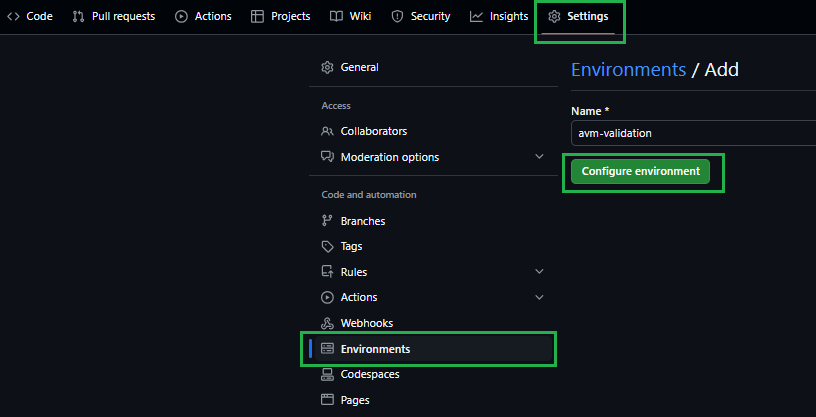
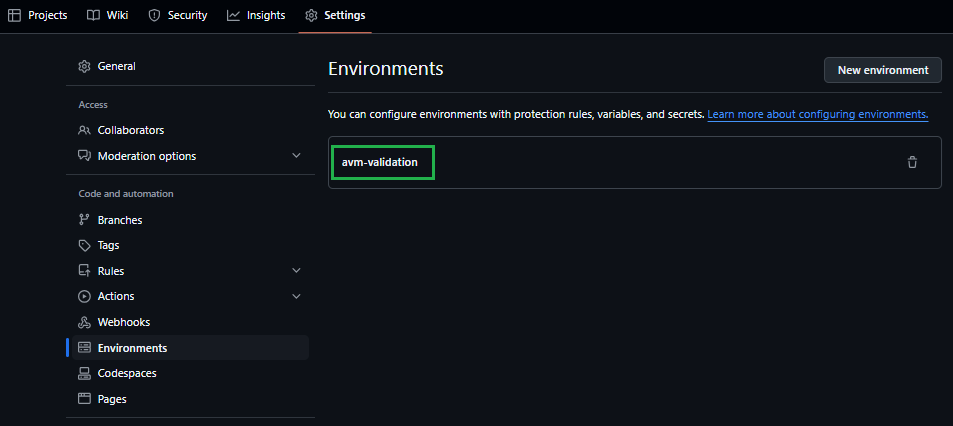
Create the avm-validation environment in your fork.
➕ How to: Create an environment in GitHub
Navigate to the repository’s Settings.
In the list of settings, expand Environments. You can create a new environment by selecting New environment on the top right.
In the opening view, provide avm-validation for the environment Name. Click on the Configure environment button.
Make sure to use a Managed Identity for OIDC as instructed below, not a Service Principal. Azure access token issued by Managed Identities is expected to have an expiration of 24 hours by default. With Service Principal, instead, it would be only 1 hour - which is not sufficient for many deployment pipelines.
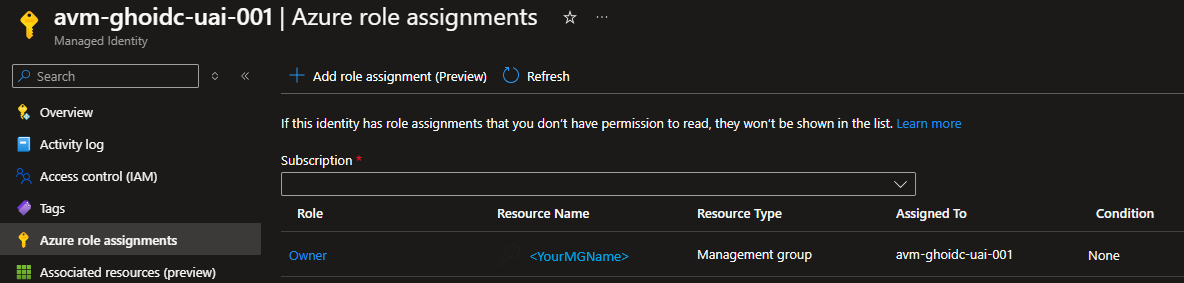
Create a new or leverage an existing user-assigned managed identity with at least Contributor & User Access Administrator permissions on the Management-Group/Subscription you want to test the modules in. You may find creating an Owner role assignment is more efficient and avoids some validation failures for some modules. You might find the following links useful:
Some Azure resources may require additional roles to be assigned to the deployment identity. An example is the avm/res/aad/domain-service module, which requires the deployment identity to have the Domain Services Contributor Azure role to create the required Domain Services resources.
In those cases, for the first PR adding such modules to the public registry, we recommend the author to reach out to AVM maintainers or, alternatively, to create a CI environment GitHub issue in BRM, specifying the additional prerequisites. This ensures that the required additional roles get assigned in the upstream CI environment before the corresponding PR gets merged.
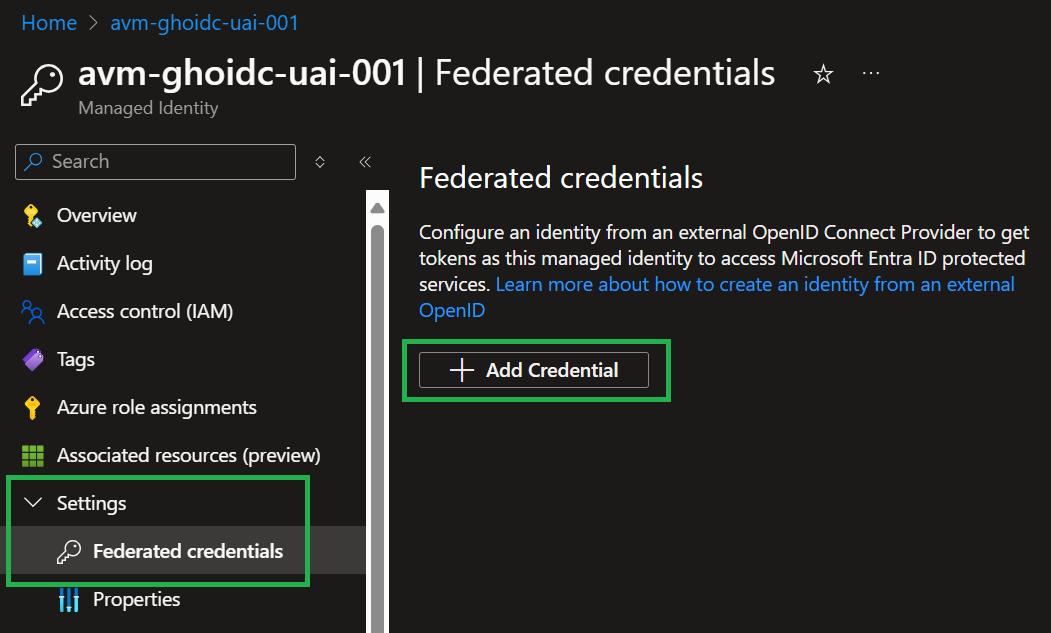
Configure a federated identity credential on a user-assigned managed identity to trust tokens issued by GitHub Actions to your GitHub repository.
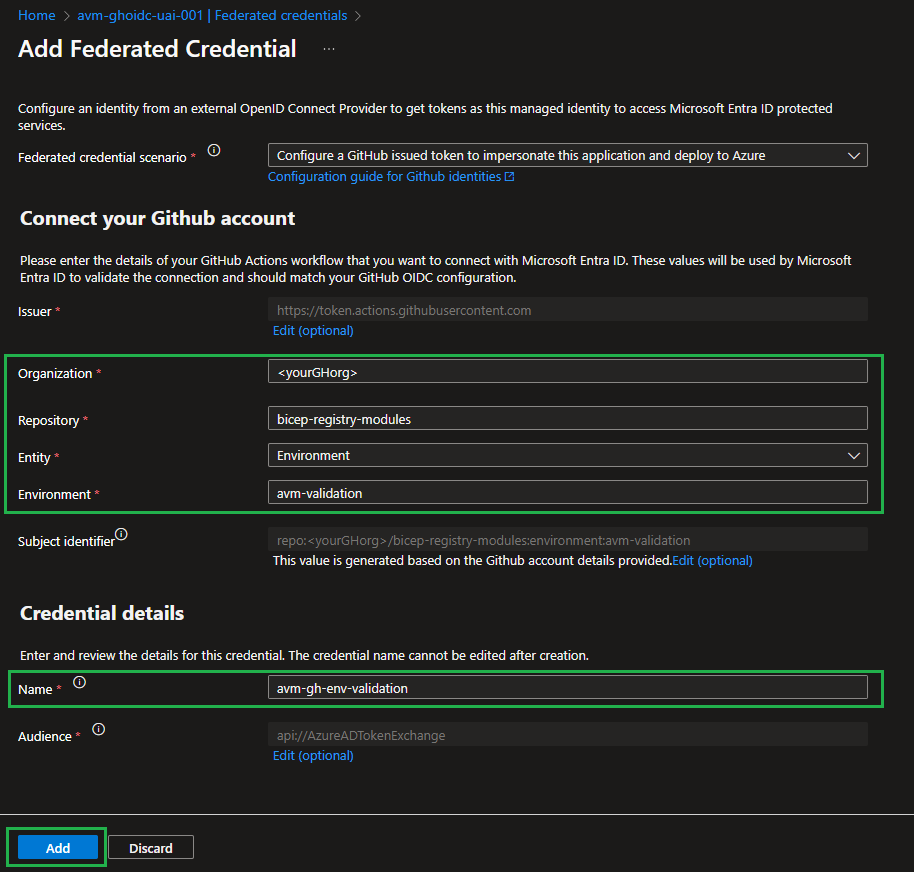
In the Microsoft Entra admin center, navigate to the user-assigned managed identity you created. Under Settings in the left nav bar, select Federated credentials and then Add Credential.
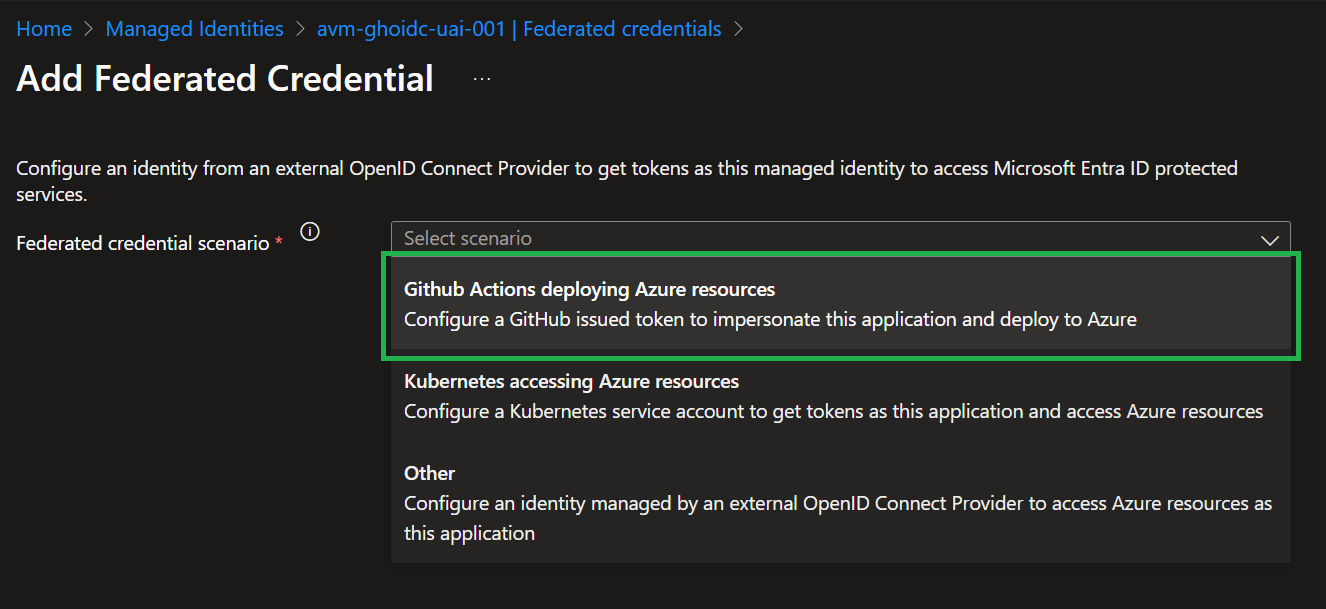
In the Federated credential scenario dropdown box, select GitHub Actions deploying Azure resources
For the Organization, specify your GitHub organization name, for the Repository the value bicep-registry-modules.
For the Entity type, select Environment and specify the value avm-validation.
Add a Name for the federated credential, for example, avm-gh-env-validation.
The Issuer, Audiences, and Subject identifier fields auto-populate based on the values you entered.
Select Add to configure the federated credential.
You might find the following links & information useful:
If configuring the federated credential via API (e.g. Bicep, PowerShell etc.), you will need the following information points that are configured automatically for you via the portal experience:
➕ Option 2 [Deprecated]: Configure Service Principal + Secret
Create a new or leverage an existing Service Principal with at least Contributor & User Access Administrator permissions on the Management-Group/Subscription you want to test the modules in. You may find creating an Owner role assignment is more efficient and avoids some validation failures for some modules. You might find the following links useful:
To use the Continuous Integration environment’s workflows you should set up the following repository secrets:
Secret Name
Example
Description
ARM_MGMTGROUP_ID
11111111-1111-1111-1111-111111111111
The group ID of the management group to test-deploy modules in. Is needed for resources that are deployed to the management group scope.
ARM_SUBSCRIPTION_ID
22222222-2222-2222-2222-222222222222
The ID of the subscription to test-deploy modules in. Is needed for resources that are deployed to the subscription scope. Note: This repository secret will be deprecated in favor of the VALIDATE_SUBSCRIPTION_ID environment secret required by the OIDC authentication.
ARM_TENANT_ID
33333333-3333-3333-3333-333333333333
The tenant ID of the Azure Active Directory tenant to test-deploy modules in. Is needed for resources that are deployed to the tenant scope. Note: This repository secret will be deprecated in favor of the VALIDATE_TENANT_ID environment secret required by the OIDC authentication.
TOKEN_NAMEPREFIX
cntso
Required. A short (3-5 character length), unique string that should be included in any deployment to Azure. Usually, AVM Bicep test cases require this value to ensure no two contributors deploy resources with the same name - which is especially important for resources that require a globally unique name (e.g., Key Vault). These characters will be used as part of each resource’s name during deployment. For more information, see the [Special case: TOKEN_NAMEPREFIX] note below.
Special case: TOKEN_NAMEPREFIX
To lower the barrier to entry and allow users to easily define their own naming conventions, we introduced a default ’name prefix’ for all deployed resources.
This prefix is only used by the CI environment you validate your modules in, and doesn’t affect the naming of any resources you deploy as part of any solutions (applications/workloads) based on the modules.
Each workflow in AVM deploying resources uses a logic that automatically replaces “tokens” (i.e., placeholders) in any module test file. These tokens are, for example, included in the resources names (e.g. 'name: kvlt-${namePrefix}'). Tokens are stored as repository secrets to facilitate maintenance.
➕ How to: Add a repository secret to GitHub
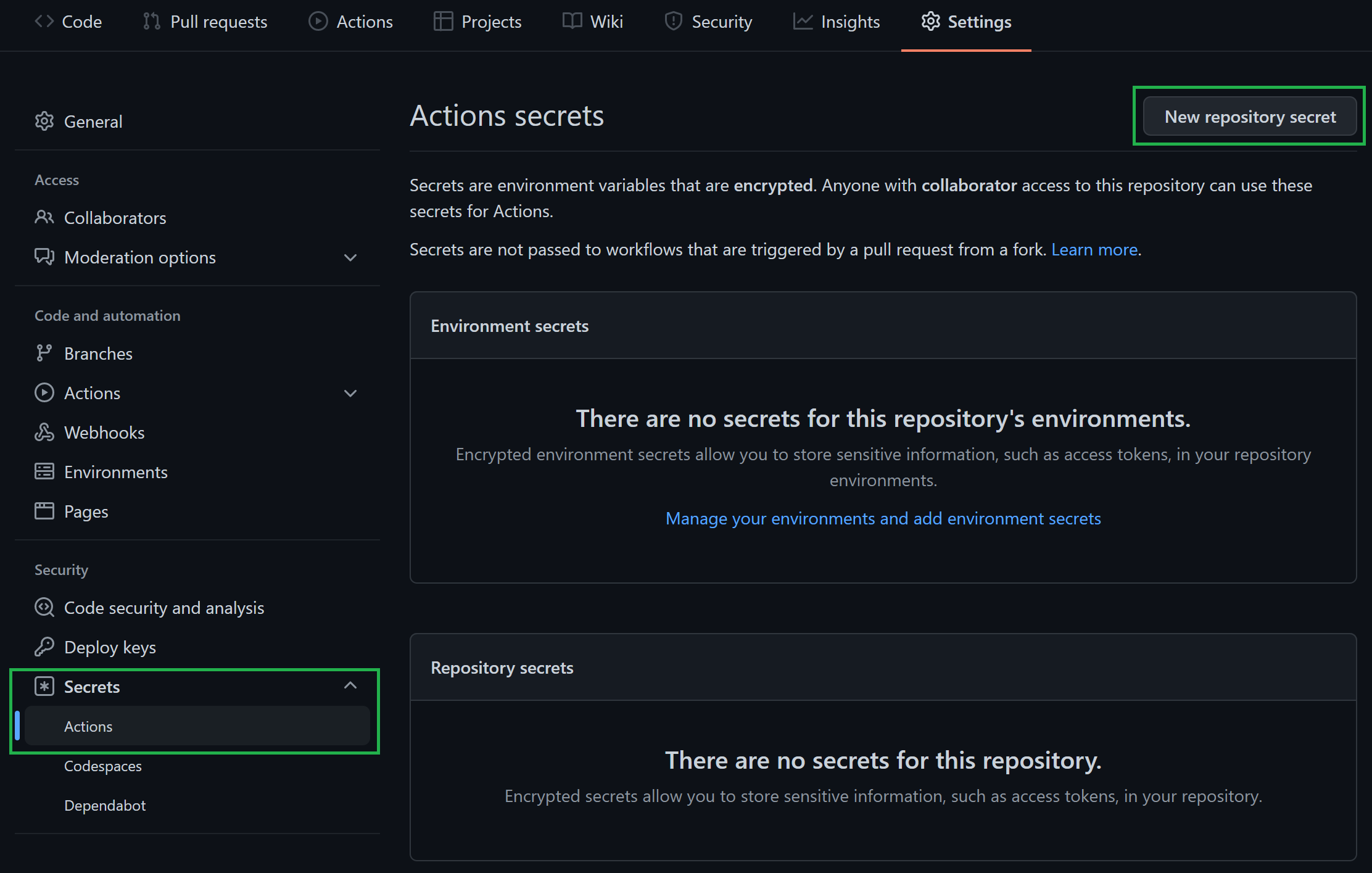
Navigate to the repository’s Settings.
In the list of settings, expand Secrets and select Actions. You can create a new repository secret by selecting New repository secret on the top right.
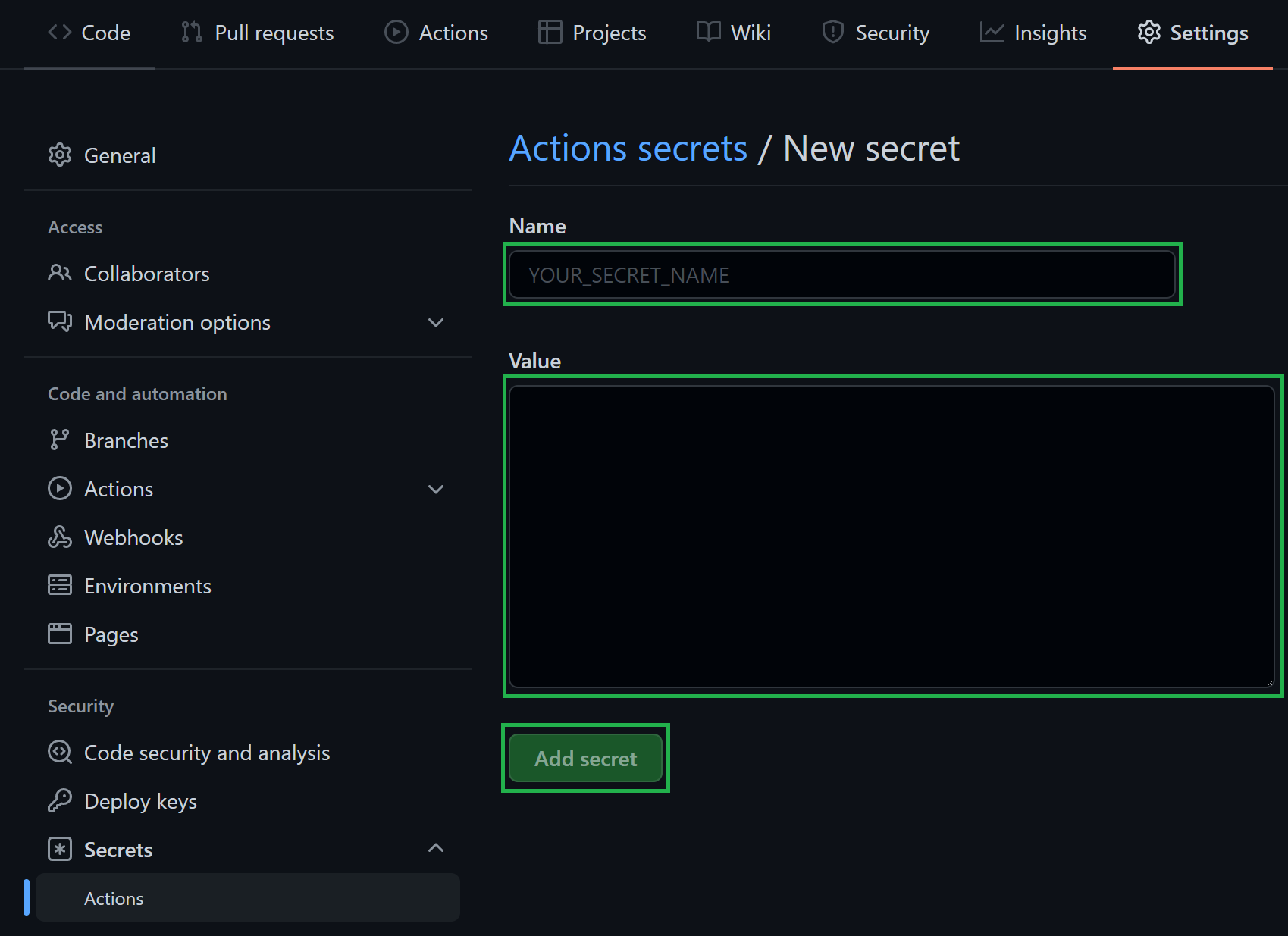
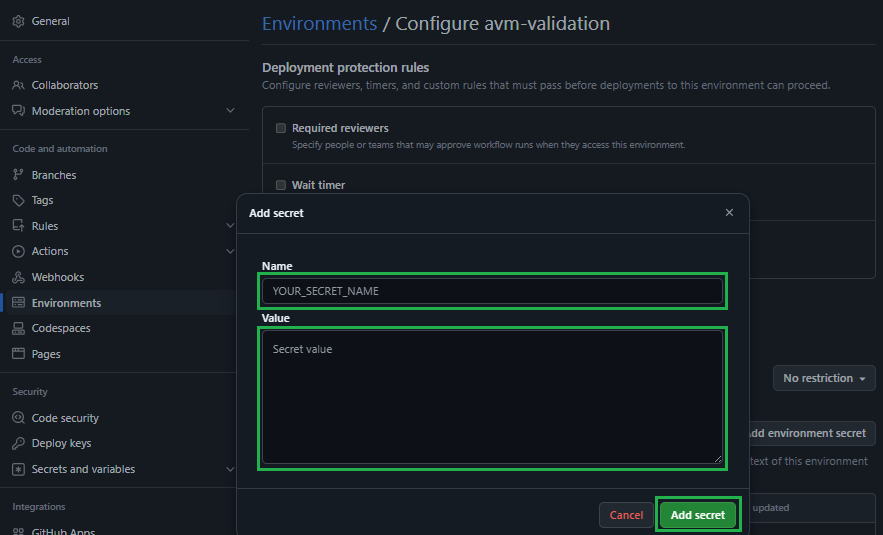
In the opening view, you can create a secret by providing a secret Name, a secret Value, followed by a click on the Add secret button.
3.1.2 Authentication secrets
In addition to shared repository secrets detailed above, additional GitHub secrets are required to allow the deploying identity to authenticate to Azure.
Expand and follow the option corresponding to the deployment identity setup chosen at Step 2 and use the information you gathered during that step.
➕ Option 1 [Recommended]: Authenticate via OIDC
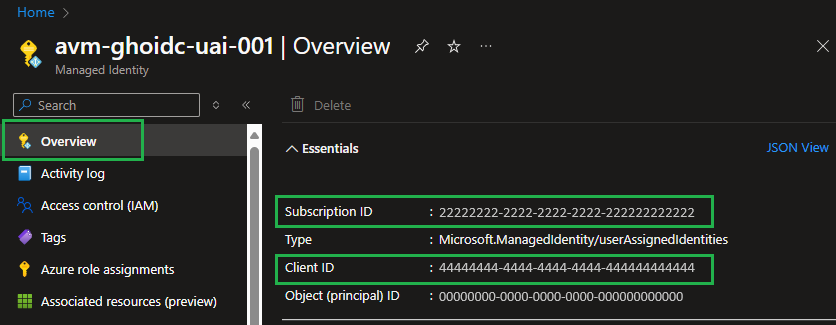
Create the following environment secrets in the avm-validation GitHub environment created at Step 1
Secret Name
Example
Description
VALIDATE_CLIENT_ID
44444444-4444-4444-4444-444444444444
The login credentials of the deployment principal used to log into the target Azure environment to test in. See the deployment credentials format.
VALIDATE_SUBSCRIPTION_ID
22222222-2222-2222-2222-222222222222
Same as the ARM_SUBSCRIPTION_ID repository secret set up above. The ID of the subscription to test-deploy modules in. Is needed for resources that are deployed to the subscription scope.
VALIDATE_TENANT_ID
33333333-3333-3333-3333-333333333333
Same as the ARM_TENANT_ID repository secret set up above. The tenant ID of the Azure Active Directory tenant to test-deploy modules in. Is needed for resources that are deployed to the tenant scope.
➕ How to: Add an environment secret to GitHub
Navigate to the repository’s Settings.
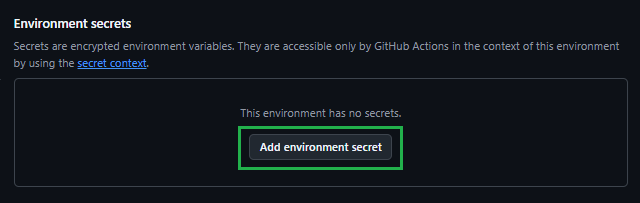
In the list of settings, select Environments. Click on the previously created avm-validation environment.
In the Environment secrets Section click on the Add environment secret button.
In the opening view, you can create a secret by providing a secret Name, a secret Value, followed by a click on the Add secret button.
➕ Option 2 [Deprecated]: Authenticate via Service Principal + Secret
Create the following environment repository secret:
The login credentials of the deployment principal used to log into the target Azure environment to test in. See the deployment credentials format. For more information, see the [Special case: AZURE_CREDENTIALS] note below.
Special case: AZURE_CREDENTIALS
This secret represent the service connection to Azure, and its value is a compressed JSON object that must match the following format:
Make sure you create this object as one continuous string as shown above - using the information you collected during Step 2. Failing to format the secret as above, causes GitHub to consider each line of the JSON object as a separate secret string. See the deployment credentials format for more information.
3.1.3 Custom CI parameters
For test-specific template inputs, create GitHub Actions secrets or variables at repository scope or in the avm-validation environment. Prefer readable CI_ names such as CI_MY_SECRET for mySecret; underscores after the prefix are ignored. Use CI__ to preserve literal underscores in parameter names. Use secrets for private values and variables only for clearly non-sensitive configuration. These inputs are separate from the OIDC authentication secrets above.
See Custom CI parameters for parameter naming, secure handling, precedence, and migration from the deprecated CI_KEY_VAULT_NAME Key Vault fallback.
3.2. Enable actions
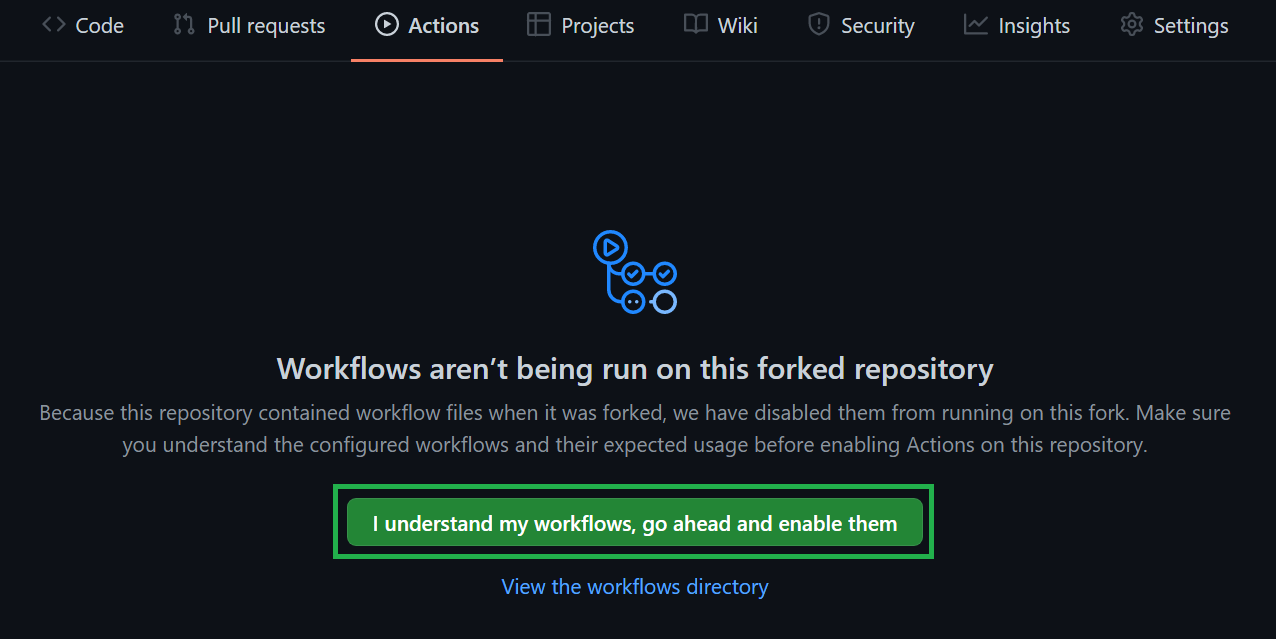
Finally, ‘GitHub Actions’ are disabled by default and hence, must be enabled first.
To do so, perform the following steps:
Navigate to the Actions tab on the top of the repository page.
Next, select ‘I understand my workflows, go ahead and enable them’.
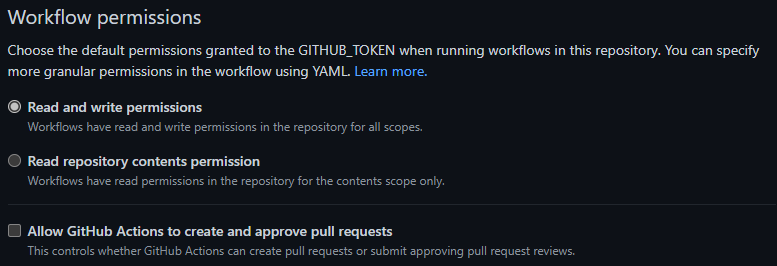
3.3. Set Read/Write Workflow permissions
To let the workflow engine publish their results into your repository, you have to enable the read / write access for the GitHub actions.
Navigate to the Settings tab on the top of your repository page.
Within the section Code and automation click on Actions and General
Make sure to enable Read and write permissions
Tip
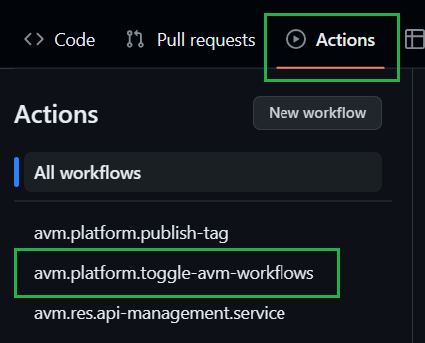
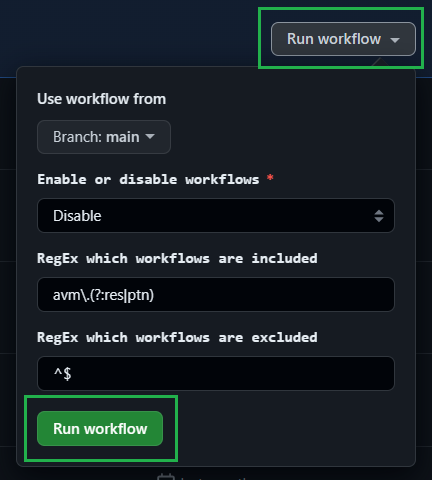
Once you enabled the GitHub actions, your workflows will behave as they do in the upstream repository. This includes a scheduled trigger to continuously check that all modules are working and compliant with the latest tests. However, testing all modules can incur substantial costs with the target subscription. Therefore, we recommend disabling all workflows of modules you are not working on. To make this as easy as possible, we created a workflow that disables/enables workflows based on a selected toggle & naming pattern. For more information on how to use this workflow, please refer to the corresponding documentation.
4. Implement your contribution
To implement your contribution, we kindly ask you to first review the Bicep specifications and composition guidelines in particular to make sure your contribution complies with the repository’s design and principles.
If you’re working on a new module, we’d also ask you to create its corresponding workflow file. Each module has its own file, but only differs in very few details, such as its triggers and pipeline variables. As a result, you can either copy & update any other module workflow file (starting with 'avm.[res|ptn|utl].') or leverage the following template:
➕ Module workflow template
# >>> UPDATE to for example "avm.res.key-vault.vault" and remove this commentname: "avm.[res|ptn|utl].[provider-namespace].[resource-type]"on:
workflow_dispatch:
inputs:
staticValidation:
type: booleandescription: "Execute static validation"required: falsedefault: truedeploymentValidation:
type: booleandescription: "Execute deployment validation"required: falsedefault: trueremoveDeployment:
type: booleandescription: "Remove deployed module"required: falsedefault: truecustomLocation:
type: stringdescription: "Default location overwrite (e.g., eastus)"required: falsepush:
branches:
- mainpaths:
# >>> UPDATE to for example ".github/workflows/avm.res.key-vault.vault.yml" and remove this comment - ".github/workflows/avm.[res|ptn|utl].[provider-namespace].[resource-type].yml"# >>> UPDATE to for example "avm/res/key-vault/vault/**" and remove this comment - "avm/[res|ptn|utl]/[provider-namespace]/[resource-type]/**" - "!*/**/README.md" - "!avm/**/metadata.json"env:
# >>> UPDATE to for example "avm/res/key-vault/vault" and remove this commentmodulePath: "avm/[res|ptn|utl]/[provider-namespace]/[resource-type]"# >>> Update to for example ".github/workflows/avm.res.key-vault.vault.yml" and remove this commentworkflowPath: ".github/workflows/avm.[res|ptn|utl].[provider-namespace].[resource-type].yml"concurrency:
group: ${{ github.workflow }}jobs:
############################ Initialize pipeline ############################job_initialize_pipeline:
runs-on: ubuntu-latestname: "Initialize pipeline"if: ${{ !cancelled() && !(github.repository != 'Azure/bicep-registry-modules' && github.event_name != 'workflow_dispatch') }}steps:
- name: "Checkout"uses: actions/checkout@fbc6f3992d24b796d5a048ff273f7fcc4a7b6c09# v5.1.0with:
fetch-depth: 0 - name: "Set input parameters to output variables"id: get-workflow-paramuses: ./.github/actions/templates/avm-getWorkflowInputwith:
workflowPath: "${{ env.workflowPath}}" - name: "Get module test file paths"id: get-module-test-file-pathsuses: ./.github/actions/templates/avm-getModuleTestFileswith:
modulePath: "${{ env.modulePath }}"outputs:
workflowInput: ${{ steps.get-workflow-param.outputs.workflowInput }}moduleTestFilePaths: ${{ steps.get-module-test-file-paths.outputs.moduleTestFilePaths }}psRuleModuleTestFilePaths: ${{ steps.get-module-test-file-paths.outputs.psRuleModuleTestFilePaths }}modulePath: "${{ env.modulePath }}"############################### Call reusable workflow ###############################call-workflow-passing-data:
name: "Run"permissions:
id-token: write# For OIDCcontents: write# For release tagsneeds:
- job_initialize_pipelineuses: ./.github/workflows/avm.template.module.ymlwith:
workflowInput: "${{ needs.job_initialize_pipeline.outputs.workflowInput }}"moduleTestFilePaths: "${{ needs.job_initialize_pipeline.outputs.moduleTestFilePaths }}"psRuleModuleTestFilePaths: "${{ needs.job_initialize_pipeline.outputs.psRuleModuleTestFilePaths }}"modulePath: "${{ needs.job_initialize_pipeline.outputs.modulePath}}"secrets: inherit
Note
The workflow is configured to be triggered by changes in the main branch of Upstream (i.e., Azure/bicep-registry-modules) that could affect the module or its validation. Changes limited to README.md or metadata.json files, including child-module metadata, do not trigger the workflow or a release. To publish a metadata change, including a telemetryIdPrefix change, include it with a normal source or version release change.
In a fork, the workflow is stopped immediately after being triggered due to the condition:
# Only run if not canceled and not in a fork, unless triggered by a workflow_dispatch eventif: ${{ !cancelled() && !(github.repository != 'Azure/bicep-registry-modules' && github.event_name != 'workflow_dispatch') }}
This condition prevents accidentally triggering a large amount of module workflows, e.g., when merging upstream changes into your fork.
In forks, workflow validation remains possible through explicit runs (that is, by using the workflow_dispatch event).
Tip
After any change to a module and before running tests, we highly recommend running the Set-AVMModule utility to update all module files that are auto-generated (e.g., the main.json & readme.md files).
5. Create/Update and run tests
Before opening a Pull Request to the Bicep Public Registry, ensure your module is ready for publishing, by validating that it meets all the Testing Specifications as per SNFR1, SNFR2, SNFR3, SNFR4, SNFR5, SNFR6, SNFR7.
For example, to meet SNFR2, ensure the updated module is deployable against a testing Azure subscription and compliant with the intended configuration.
Depending on the type of contribution you implemented (for example, a new resource module feature) we would kindly ask you to also update the e2e test run by the pipeline. For a new parameter this could mean to either add its usage to an existing test file, or to add an entirely new test as per BCPRMNFR1.
Once the contribution is implemented and the changes are pushed to your forked repository, we kindly ask you to validate your updates in your own cloud environment before requesting to merge them to the main repo. Test your code leveraging the forked AVM CI environment you configured before
Tip
In case your contribution involves changes to a module, you can also optionally leverage the Validate module locally utility to validate the updated module from your local host before validating it through its pipeline.
Creating end-to-end tests
As per BCPRMNFR1, a resource module must contain a minimum set of deployment test cases, while for pattern modules there is no restriction on the naming each deployment test must have. In either case, you’re free to implement any additional, meaningful test that you see fit. Each test is implemented in its own test folder, containing at least a main.test.bicep and optionally any amount of extra deployment files that you may require (e.g., to deploy dependencies using a dependencies.bicep that you reference in the test template file).
To get started implementing your test in the main.test.bicep file, we recommend the following guidelines:
As per BCPNFR13, each main.test.bicep file should implement metadata to render the test more meaningful in the documentation
The main.test.bicep file should deploy any immediate dependencies (e.g., a resource group, if required) and invoke the module’s main template while providing all parameters for a given test scenario.
Parameters
Each file should define a parameter serviceShort. This parameter should be unique to this file (i.e, no two test files should share the same) as it is injected into all resource deployments, making them unique too and account for corresponding requirements.
As a reference you can create a identifier by combining a substring of the resource type and test scenario (e.g., in case of a Linux Virtual Machine Deployment: vmlin).
For the substring, we recommend to take the first character and subsequent ‘first’ character from the resource type identifier and combine them into one string. Following you can find a few examples for reference:
db-for-postgre-sql/flexible-server with a test folder default could be: dfpsfsdef
storage/storage-account with a test folder waf-aligned could be: ssawaf
💡 If the combination of the servicesShort with the rest of a resource name becomes too long, it may be necessary to bend the above recommendations and shorten the name. This can especially happen when deploying resources such as Virtual Machines or Storage Accounts that only allow comparatively short names.
If the module deploys a resource-group-level resource, the template should further have a resourceGroupName parameter and subsequent resource deployment. As a reference for the default name you can use dep-<namePrefix><providerNamespace>.<resourceType>-${serviceShort}-rg.
Each file should also provide a location parameter that may default to the deployments default location
It is recommended to define all major resource names in the main.test.bicep file as it makes later maintenance easier. To implement this, make sure to pass all resource names to any referenced module (including any resource deployed in the dependencies.bicep).
Further, for any test file (including the dependencies.bicep file), the usage of variables should be reduced to the absolute minimum. In other words: You should only use variables if you must use them in more than one place. The idea is to keep the test files as simple as possible
References to dependencies should be implemented using resource references in combination with outputs. In other words: You should not hardcode any references into the module template’s deployment. Instead use references such as nestedDependencies.outputs.managedIdentityPrincipalId
Important
As per BCPNFR12 you must use the header module testDeployment '../.*main.bicep' = when invoking the module’s template.
The dependencies.bicep should optionally be used if any additional dependencies must be deployed into a nested scope (e.g. into a deployed Resource Group).
Note that you can reuse many of the assets implemented in other modules. For example, there are many recurring implementations for Managed Identities, Key Vaults, Virtual Network deployments, etc.
A special case to point out is the implementation of Key Vaults that require purge protection (for example, for Customer Managed Keys). As this implies that we cannot fully clean up a test deployment, it is recommended to generate a new name for this resource upon each pipeline run using the output of the utcNow() function at the time.
📜 If your test case requires environment-specific inputs (e.g., tenant-specific object IDs or secrets), use Custom CI parameters to supply them from GitHub Actions secrets or variables. The CI passes matching values as deployment parameters; it does not substitute them into the test source.
Reusable assets
The e2e template assets provide additional scripts and utilities that may be of use to module owners/contributors. These contain both scripts and Bicep templates that you can re-use in your test files (e.g., to deploy standadized dependencies, or to generate keys using deployment scripts).
Example: Certificate creation script
If you need a Deployment Script to set additional non-template resources up (for example certificates/files, etc.), we recommend to store it as a file in the shared utilities/e2e-template-assets/scripts folder and load it using the template function loadTextContent() (for example: scriptContent: loadTextContent('../../../../../../utilities/e2e-template-assets/scripts/New-SSHKey.ps1')). This approach makes it easier to test & validate the logic and further allows reusing the same logic across multiple test cases.
Example: Diagnostic Settings dependencies
To test the numerous diagnostic settings targets (Log Analytics Workspace, Storage Account, Event Hub, etc.) the AVM core team have provided a dependencies .bicep file to help create all these pre-requisite targets that will be needed during test runs.
➕ Diagnostic Settings Dependencies - Bicep File
// ========== //// Parameters //// ========== //@description('Required. The name of the storage account to create.')
@maxLength(24)
param storageAccountName string
@description('Required. The name of the log analytics workspace to create.')
param logAnalyticsWorkspaceName string
@description('Required. The name of the event hub namespace to create.')
param eventHubNamespaceName string
@description('Required. The name of the event hub to create inside the event hub namespace.')
param eventHubNamespaceEventHubName string
@description('Optional. The location to deploy resources to.')
param location string = resourceGroup().location
// ============ //// Dependencies //// ============ //resource storageAccount 'Microsoft.Storage/storageAccounts@2021-08-01' = {
name: storageAccountName
location: location
kind: 'StorageV2' sku: {
name: 'Standard_LRS' }
properties: {
allowBlobPublicAccess: false }
}
resource logAnalyticsWorkspace 'Microsoft.OperationalInsights/workspaces@2021-12-01-preview' = {
name: logAnalyticsWorkspaceName
location: location
}
resource eventHubNamespace 'Microsoft.EventHub/namespaces@2021-11-01' = {
name: eventHubNamespaceName
location: location
resource eventHub 'eventhubs@2021-11-01' = {
name: eventHubNamespaceEventHubName
}
resource authorizationRule 'authorizationRules@2021-06-01-preview' = {
name: 'RootManageSharedAccessKey' properties: {
rights: [
'Listen''Manage''Send' ]
}
}
}
// ======= //// Outputs //// ======= //@description('The resource ID of the created Storage Account.')
output storageAccountResourceId string = storageAccount.id
@description('The resource ID of the created Log Analytics Workspace.')
output logAnalyticsWorkspaceResourceId string = logAnalyticsWorkspace.id
@description('The resource ID of the created Event Hub Namespace.')
output eventHubNamespaceResourceId string = eventHubNamespace.id
@description('The resource ID of the created Event Hub Namespace Authorization Rule.')
output eventHubAuthorizationRuleId string = eventHubNamespace::authorizationRule.id
@description('The name of the created Event Hub Namespace Event Hub.')
output eventHubNamespaceEventHubName string = eventHubNamespace::eventHub.name
6. Create a Pull Request to the Public Bicep Registry
Finally, once you are satisfied with your contribution and validated it, open a pull request for review. Make sure you:
Provide a meaningful title in the form of feat: <module name> to align with the Semantic PR Check.
Provide a meaningful description.
Follow instructions you find in the PR template.
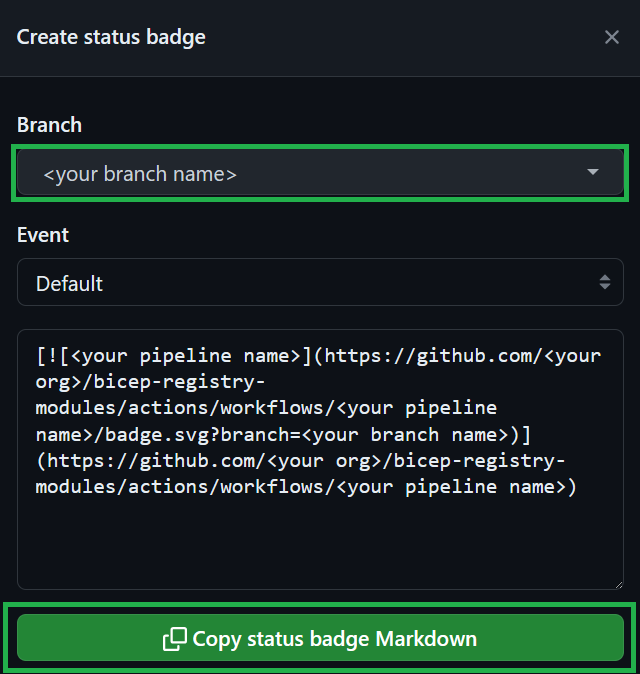
If applicable (i.e., a module is created/updated), please reference the badge status of your pipeline run. This badge will show the reviewer that the code changes were successfully validated & tested in your environment. To create a badge, first select the three dots (...) at the top right of the pipeline, and then chose the Create status badge option.
In the opening pop-up, you first need to select your branch and then click on the Copy status badge Markdown
Note
If you receive any comments for your pull request, please adhere to the following practices
If it is a ‘suggestion’ that you agree with, you can directly commit it into your branch by selecting the ‘Apply suggestion’ button, auto-resolving the comment
If it’s a regular comment that you agree with, please address its ask and leave a comment indicating the same. Do not resolve it yourself as this renders a re-review a lot harder for the reviewer.
7. Get your pull request approved
To publish a new module or a new version of an existing module, each Pull Request (PR) MUST be reviewed and approved before being merged and published in the Public Bicep Registry. A contributor (the submitter of the PR) cannot approve their own PR.
The reviewer-routing workflow requests module owners from root metadata.json and applies triage labels when active. Reviewer requests do not set approval requirements.
Important
As part of the PR review process, the submitter (contributor) MUST address any comments raised by the reviewers and request a new review - and repeat this process until the PR is approved. Once the PR is merged, the module owner MUST ensure that the related GitHub Actions workflow has successfully published the new version of the module.
7.1. Publishing a new module
When publishing a net new module for the first time ever, the PR MUST be reviewed and approved by a member of the core team.
7.2. Publishing a new version of an existing module
For ordinary code changes in an existing Bicep module, any eligible BRM repository team member may approve and merge under repository rules; a module owner’s approval is not mandatory. If you are the sole owner and author, request another eligible reviewer. Changes to metadata.json still require metadata code-owner review. Other protected paths follow their applicable CODEOWNERS rules.
Subsections of Contribution Flow
Child Module Publishing
Child resources are resources that exist only within the scope of another resource. For example, a virtual network subnet cannot exist without a virtual network. The subnet is a child resource of the virtual network.
In the context of AVM, particularly AVM Bicep resource modules, child modules are modules deploying child resources. They are implemented within the scope of their corresponding parent resource modules. For example, the module avm/res/network/virtual-network/subnet deploys a virtual network subnet and is a child module of its parent virtual network module avm/res/network/virtual-network.
By default, child modules are not published to the public bicep registry independently from their parents. They need to be explicitly enabled for publishing to be directly referenced from the registry.
This page covers step-by-step guidelines to publish a bicep child module.
Important
The child module publishing process is currently in a pilot/preview phase. This means it may not be as smooth as the general module publishing.
The core team is currently working on additional automation, with the goal of improving efficiency in addressing child module publishing requests.
Note
Child module publishing currently only applies to resource modules.
Supporting child module publishing for other module categories, such as pattern and utility modules, is not planned at this time.
Quick guide
Use this section for a fast overview on how to publish a child module. For a step-by-step explanation with detailed instructions, refer to the following sections.
Child module template: Ensure the child’s metadata.json contains its assigned telemetry prefix alongside main.bicep, then add the enableTelemetry parameter and avmTelemetry deployment.
Parent module template: In the main.bicep template of the child module direct parent, add a enableReferencedModulesTelemetry variable with a value of false, and pass it as the enableTelemetry value down to the child module deployment.
Version: Add the version.json file to the child module folder and set version to 0.1.
Changelog: Add a new CHANGELOG.md file to the child module folder and update the changelog of all its versioned parents with a new patch version, up to the top-level parent.
Set-AVMModule: Run the Set-AVMModule utility explicitly on the affected bicep modules, i.e., the child module(s) and all their parent modules up to the top-level module, test your changes and raise a PR.
Prerequisites
Before jumping into the implementation, make sure the following prerequisites are in place:
Please understand the difference between publishing an existing child module and extending a parent module with a not yet implemented child module functionality.
The Bicep Child Module Proposal issue primarily intends to cover the former, i.e. to publish a child module already existing in the BRM (Bicep Registry Modules) repository source code. However, the same issue allows also to request the development of the child module functionality, although the best way to address new functionality is to raise a feature request via the the AVM Module issue.
Telemetry ID prefix assigned
Follow the below steps to check the child module telemetry ID prefix.
Note
If the Bicep Child Module Proposal issue was just created, please allow a few days for the telemetry ID prefix to be assigned before reaching out.
Check telemetryIdPrefix in the child’s own metadata.json and keep it consistent with the child module source. Record only the assigned identifier through metadata review. Ownership is inherited from the root.
You can also look up the assigned prefix in the published index:
Search for the child module name in the ModuleName field.
Verify if the corresponding value exists in the TelemetryIdPrefix field. Note down the value as you will need it in the implementation phase.
If not found, please reach out to the core team, mentioning the @Azure/azure-verified-modules-tooling-contributors via the Bicep Child Module Proposal issue.
If the identifier is missing or conflicts with the index, ask the core team to resolve it. Do not invent an identifier or copy the parent’s prefix.
Module registered in the MAR-file
Ensure that the child module is registered in the MAR file. If not, please reach out to the core team, mentioning the @Azure/azure-verified-modules-tooling-contributors via the Bicep Child Module Proposal issue.
Metadata approval does not replace MAR registration or approval to publish the child module.
Note
The MAR-file can only be accessed by Microsoft FTEs. If you are missing access, please reach out to the parent module owner for help.
Implementation
The quickest way to get the child module published is to enable it yourself, contributing via a pull request to the BRM repository.
Note
Publishing a child module does not change the folder hierarchy of the parent and child modules. The child module remains in its existing location within the parent module’s folder structure. No files or folders need to be moved or reorganized.
Please follow the steps below:
Make sure the child module name is listed in the publishing allowed list child-module-publish-allowed-list.json. If not, add it to the file, keeping an alphabetical order. This step is relevant until the process is in a pilot phase.
Update the child module main.bicep template to support telemetry, as per SFR4, SFR3 and BCPFR4
Add the enableTelemetry parameter with a default value of true. Place it as the last param declaration, immediately before the first var declaration.
Add the avmTelemetry deployment, referencing the template below. Ensure the child’s metadata.json exists alongside main.bicep before compiling and contains its assigned telemetryIdPrefix. Load only that property instead of hardcoding the prefix.
Update the main.bicep template of the child module direct parent, as per BCPFR7.
Add the enableReferencedModulesTelemetry variable with a default value of false. Place it as the last var declaration, immediately before the first resource declaration.
var enableReferencedModulesTelemetry = false
Pass the enableReferencedModulesTelemetry variable as the enableTelemetry value down to the child module deployment.
enableTelemetry: enableReferencedModulesTelemetry
Add the version.json file to the child module folder and set version to 0.1.
Add a new CHANGELOG.md file to the child module folder, with the following sample content. Make sure to replace the <avm/res/path/to/child-module> placeholder with the name of the child module.
# Changelog

The latest version of the changelog can be found [here](https://github.com/Azure/bicep-registry-modules/blob/main/<avm/res/path/to/child-module>/CHANGELOG.md).

## 0.1.0

### Changes

- Initial version

### Breaking Changes

- None
Check the list of affected modules. Update the changelog of all the affected modules with a version.json. Add a new patch version for each. Refer below for an example content section:
Run the Set-AVMModule utility, calling it explicitly on all affected modules.
foreach ($modulePath in $affectedModulePaths) {
  Set-AVMModule -ModuleFolderPath $modulePath
}
Test your changes via the top-level module pipeline, raise a PR and attach a status badge proving successful validation.
Note
Existing tests for the parent module do not need to be updated when publishing a child module. The changes required for child module publishing (telemetry support, version file, and changelogs) do not affect the module’s test cases.
Tip
Reference This pull request as an example for proposing a child module for publishing.
Custom CI Parameters
Use GitHub Actions secrets or variables to supply environment-specific inputs to your main.test.bicep end-to-end tests, such as tenant-specific object IDs or credentials. This avoids hardcoding values that differ between your fork and the upstream AVM test environment. Never commit private values to test files.
These are additional template inputs, not Azure login credentials. Continue using OIDC with the avm-validation environment and its VALIDATE_CLIENT_ID, VALIDATE_TENANT_ID, and VALIDATE_SUBSCRIPTION_ID secrets, as described in Authentication secrets.
Forks and upstream validation
Configure values separately in your fork: upstream repository and environment secrets are not inherited. This feature does not bypass GitHub’s restrictions on secret availability for workflows triggered by contributions from forks.
When adding a required input, ask the maintainers to configure the corresponding GitHub secret or variable in the upstream environment before merging your contribution. Share the parameter name and purpose, never its private value.
Setup
Declare the parameters in your main.test.bicep file and reference them as normal Bicep parameters. Keep an empty default for these string inputs so PSRule scans have a value for every parameter.
For example:
@description('Required. Credential supplied by the CI_MY_SECRET GitHub Actions secret.')
@secure()
param mySecret string = ''@description('Optional. Non-sensitive label used by this test.')
param deploymentLabel string = ''
Add the corresponding values under Settings > Secrets and variables > Actions in your repository, or under Settings > Environments > avm-validation for environment-scoped values:
GitHub Actions name
Store as
Template parameter
Value
CI_MY_SECRET
Secret
mySecret
Set privately; do not put the value in source control or logs.
CI_DEPLOYMENT_LABEL
Variable
deploymentLabel
For example, the non-sensitive label avm-ci.
GitHub secret and variable names cannot contain hyphens. Prefer readable CI_ names for usual camelCase parameters; reserve CI__ for literal parameter names, including underscores.
With CI_, the CI strips the single prefix and removes all suffix underscores before matching. With CI__, it strips the double prefix and preserves suffix underscores. Both modes match actual declared test parameters case-insensitively and pass their canonical Bicep spelling. Only matching parameters are supplied.
These are alternative spellings; choose one name for each input:
GitHub Actions name
Matching template parameter
CI_ADMIN_MEMBERS_SECRET
adminMembersSecret
CI_ADMINMEMBERSSECRET
adminMembersSecret
CI__ADMIN_MEMBERS_SECRET
admin_members_secret, not adminMembersSecret
CI__ADMINMEMBERSSECRET
adminMembersSecret
CI___NAME
_name
Reserved name:CI_KEY_VAULT_NAME remains the existing vault selector and is excluded from template input mapping. To supply a test parameter named keyVaultName, use CI__KEYVAULTNAME.
String inputs, including secure strings, are used as supplied. For Boolean, integer, array, and object parameters (including secure objects), supply valid JSON matching the compiled template parameter type.
Protect sensitive inputs
Use GitHub secrets for private values, and variables only for clearly non-sensitive configuration. Keep @secure() on sensitive Bicep parameters. The CI converts secure strings to PowerShell SecureString values and parses secure objects into dictionaries, preserving the template’s ARM secureObject declaration. This also applies to inputs from GitHub variables. Neither @secure() nor these conversions make a GitHub variable’s stored value private.
How it works
Workflows use the resolved GitHub secrets and vars contexts. Both repository-scoped and environment-scoped values are supported; GitHub applies its own scope precedence within each context. Use the same GitHub spelling across scopes when overriding an input so GitHub can apply that scope precedence to the override.
After name resolution, values for the same template parameter are selected in this order:
Source priority comes first: a CI__ secret still beats a CI_ variable. Within one source category (secrets or variables), CI_ wins over CI__ when both resolve to the same parameter; for example, secret CI_FOO beats secret CI__FOO for foo.
Multiple aliases for the same parameter within a source category’s winning prefix remain ambiguous and fail. For example, secrets CI_ADMIN_MEMBERS_SECRET and CI_ADMINMEMBERSSECRET both resolve to adminMembersSecret through CI_; neither has priority over the other.
Names resolving to different declared parameters remain independent: CI_ADMIN_MEMBERS_SECRET supplies adminMembersSecret, while CI__ADMIN_MEMBERS_SECRET supplies admin_members_secret.
A configured empty winning value, including a CI_ value, still wins and does not trigger fallback to a lower-priority prefix or source.
The CI passes the resolved values through the PowerShell AdditionalParameters object to the applicable Test-Az*Deployment and New-Az*Deployment cmdlets. This is runtime deployment parameter injection, not source token substitution or a .bicepparam file mechanism.
Legacy Key Vault fallback
CI Key Vault support is deprecated
vars.CI_KEY_VAULT_NAME remains an optional fallback for existing setups. Using it emits a visible GitHub Actions deprecation warning, and support may be removed in a future release. Use GitHub Actions secrets or variables for new setups.
Existing setups can retain the CI_KEY_VAULT_NAME repository variable, the vault, and its CI--prefixed secrets. The legacy CI- suffix is matched literally and case-insensitively, unchanged by the GitHub naming rules. The CI identity still needs permission to list and read secrets, for example through the Key Vault Secrets User role. Matching Key Vault secrets are used only when no GitHub secret or variable supplies that parameter; keep the corresponding Bicep parameters secure.
Migrate existing inputs
Inventory the CI- secrets used by your test parameters and identify every workflow that depends on the vault. Prefer the preview-only migration helper for this inventory.
Map each source name to a readable GitHub CI_ name, or a CI__ name for literal underscores or a reserved-name conflict. For example, Key Vault secret CI-mySecret becomes GitHub secret CI_MY_SECRET, supplying mySecret.
Copy each value privately to the intended repository or environment scope. Default to a GitHub secret; choose a variable only after confirming the value is non-sensitive. Coordinate corresponding upstream inputs with the maintainers.
Confirm that all dependent workflows use the migrated inputs before removing CI_KEY_VAULT_NAME. Do not delete the vault or its secrets as part of this change without checking for other consumers.
Preview with the migration helper
Support is not released yet
The GitHub CI parameter support and migration helper are part of Azure/bicep-registry-modules#7339. Wait until the implementation is available in your checkout and dependent workflows before applying a migration.
The Copy-CIKeyVaultSecretsToGitHub helper requires PowerShell 7.2 or later, an authenticated Az.KeyVault session, and the GitHub CLI authenticated to github.com. From a bicep-registry-modules checkout containing the helper, replace the placeholders and preview selected inputs:
For new entries, the helper generates readable names from camelCase and acronyms: CI-mySecret becomes CI_MY_SECRET, CI-deploymentLabel becomes CI_DEPLOYMENT_LABEL, and CI-managedHSMResourceId becomes CI_MANAGED_HSM_RESOURCE_ID. Literal underscores or reserved-name conflicts use CI__ spelling.
Without -Apply, the helper lists names and metadata only: it does not read secret values or change GitHub settings. -SecretName is a literal, case-insensitive allowlist of source CI- names; omitting it selects all CI- entries. -VariableName accepts either CI_ or CI__ aliases that resolve to selected source parameters explicitly confirmed as non-sensitive; all other values remain secrets. Prefer the planned readable output names, as in the example. Omit -Environment to target repository scope.
Review the preview and obtain explicit operator approval before adding -Apply to copy values. When selecting an existing destination entry of the same kind for a parameter, the helper also prefers CI_ over CI__. It skips the winning entry by default and reuses and overwrites only that entry when -Overwrite is explicitly specified. Any losing CI__ alias is left unchanged, not deleted. Ambiguity within the winning prefix and opposite-kind matches for the same parameter are blocked.
The helper never deletes entries and sends version-pinned values through standard input, not command arguments or files. Complete the workflow confirmation above before removing CI_KEY_VAULT_NAME.
Enable or Disable Workflows
When forking the BRM repository, all workflows from the CI environment are also part of your fork. In an earlier step it was explained, how to set them up correctly, to verify your module development.
Due to the trigger mechanism of the workflows, eventually all of them run at some point in time, creating and deleting resources on Azure in your environment. That will also happen for modules, you are not working on. This will create costs in your own subscription and it can also create a queue for workflow runs, due to the lack of enough free agents.
To limit those workflow runs, you can manually disable each pipeline you do not want to run. As this is a time consuming task, there is script in the BRM repository, to disable (or enable) pipelines in a batch process, that can also be run via a workflow. You can also use RegEx to specify which pipelines should be included and which should be excluded.
Browse to Actions and select the workflow from the list
Run the workflow platform.toggle-avm-workflows and set the following settings:
Enable or disable workflows to enable or disable workflows
RegEx which workflows are included include a specific set of workflows, using a RegEx.
RegEx which workflows are excluded exclude a specific set of workflows, using a RegEx.
Typical use cases
Disable all but one workflow
Enable or disable workflows to Disable
RegEx which workflows are included to avm\.(?:res|ptn|utl) (this is the default setting)
RegEx which workflows are excluded to avm.res.compute.virtual-machine (use the name of your own workflow. This example uses the workflow for virtual machine)
Disable all but multiple workflows
Enable or disable workflows to Disable
RegEx which workflows are included to avm\.(?:res|ptn|utl) (this is the default setting)
RegEx which workflows are excluded to (?:avm.res.compute.virtual-machine|avm.res.compute.image|avm.res.compute.disk) (use the names of your own workflows. This example uses the workflows for virtual machine, image, and disk)
Enable all workflows
Enable or disable workflows to Enable
RegEx which workflows are included to avm\.(?:res|ptn|utl) (this is the default setting)
RegEx which workflows are excluded to ^$ (this is the default setting)
Limitations
Please keep in mind, that the workflow run disables all workflows that match the RegEx at that point in time. If you sync your fork with the original repository and new workflows are there, they will be synced to your repository and will be enabled by default. So you will need to run the workflow to disable the new ones again after the sync.
Important
The workflow can only be triggered in forks.
Owner Contribution Flow
This section describes the contribution flow for module owners who are responsible for creating and maintaining Bicep Modules.
Important
This contribution flow is for Module Owners only.
As a Bicep Module Owner you need to be aware of the AVM Contribution Process Overview, Bicep specifications (including Bicep Interfaces) as these need to be followed during pull request reviews for the modules you own. The purpose of this Owner Contribution Flow is to simplify and list the most important activities of an owner and to help you understand your responsibilities as an owner.
Note
Additional internal content for ongoing module maintenance available for Microsoft FTEs, here.
Access is managed through the shared @Azure/azure-verified-modules-module-contributors team.
Maintain every approved handle in the owners array in your module’s root metadata.json. Coordinate changes with the AVM Core Team and follow the metadata review process. The reviewer-routing workflow uses these handles to request reviews; it does not generate per-module CODEOWNERS entries.
Ensure your module has been tested before raising a PR. You can do this your own or in another module contributor’s environment - if any. Also, once a PR is raised, a GitHub workflow pipeline is required to be run successfully before the PR can be merged. This is to ensure that the module is working as expected and is compliant with the AVM specifications.
Note
For ordinary Bicep code changes, any eligible BRM repository team member may approve and merge under repository rules. If you are the sole owner and author, request another eligible reviewer; you cannot approve your own pull request. Changes to metadata.json still require metadata code-owner review.
Ensure that the module(s) you own are compliant with the AVM Bicep specifications and are working as expected.
Watch Pull Request (PR) activity for your module(s) in the BRM repository (Bicep Registry Modules repository - where all Bicep AVM modules are published) and ensure that PRs are reviewed and merged in a timely manner as outlined in SNFR11.
Watch AVM module issue and AVM question/feedback activity for your module(s) in the BRM repository.
2. Module Handover Activities
Under certain circumstances, you may find yourself unable to continue as the module owner. In such cases, it is advisable to designate a new module owner. The following steps outline this transition:
Follow the hot-swapping module owners process. Transfer ownership in one root metadata change and wait for approval from either metadata code-owner team and merge before finalizing the handover.
Do not remove shared AVM access solely because one module changes owners; it may still be needed for other modules.
If a new module owner cannot be identified then the module will need to be “Orphaned”. Please follow the step outlined when-a-module-becomes-orphaned.
3. Adopting an Orphaned Module
Follow the adoption process. Add approved owners to the root metadata.json through metadata code-owner review and complete the eligibility, consent, and access approval steps.
4. GitHub Notification Settings
As a module owner, it’s important that you receive notifications when any of your AVM modules experience activity or when you or any groups you belong to are explicitly mentioned (using the @ operator). This document describes how to configure your GitHub and Email settings to ensure you receive email notifications for these types of scenarios within GitHub.
Ensure your Default Notifications Email address is set to the email address you intend to use.
(Optional) If you would like to automatically watch repositories that you are active in, ensure Automatically watch repositories is set to “On.”
(Required) If you would like to automatically subscribe to team-level notifications whenever you join a new team, ensure Automatically watch teams is set to “On.”
(Required) To receive notifications whenever a change is made to a repository or conversation that you are Watching, ensure the Notify Me setting has at least Email enabled.
(Required)To receive notifications whenever you or a group you belong to are @mentioned, ensure the Notify Me setting has at least Email enabled.
Watch a Repository
Optionally, you may consider “watching” (following most or all activities in) an entire repository. The primary repository that owners should watch is the Bicep-Registry-Modules (BRM) repository. Notifications from this repository will notify you of issues concerning your module and any direct or team @mentions. It is important that you read and react to these messages.
To watch the BRM repository, visit Bicep-Registry-Modules, click the Watch button in the top-right of the page, then select Participating and @mentions. Optionally, if you would like to be notified for all activity within the repository, you can select All Activity.
Note
Enabling All Activity will result in a lot of notifications! If you choose to go this route, you should set up filters within your email client. See Configure Email Inbox Notification Filters.
Configure Email Inbox Notification Filters
GitHub uses a unique email address sender for each type of notification it sends. This allows us to set up filters within our email client to sort our inboxes depending on the type of notifications that was sent. The table below lists all of the relevant email addresses that may be useful for filtering notifications from GitHub.
Info
GitHub will use the following email addresses to Cc you if you’re subscribed to a conversation. The second Cc email address matches the notification reason.
This checklist can be used in the development of AVM Bicep Modules.
Before beginning any work a new module a valid Issue: New AVM Module Proposal needs to be created. Instructions for creating the module proposal are outlined in the issue template. Pay particular attention to the questions and associated links to fill out the proposal accurately. Please do not start work on your proposed module until you receive a notification that your proposal has been accepted.
Fork the bicep-registry-modules BRM repository. If you use an existing fork, ensure it’s up to date with origin/BRM.
Ensure all workflows are disabled by default once you forked the BRM repo, to prevent any accidental deployments into your Azure test environment resulted by an automated deployment.
Create a new branch from your forked repository to develop your module.
If you’re working on a new module you have to create its corresponding workflow file (see here).
In order to run your e2e tests in your fork, this workflow file has to be put into the main branch first, so it can be run against your feature branch (GitHub Workflows can only be run on feature branches when they are already present in the main branch).
Since all workflows are disabled by default you have to enable your module’s specific GitHub workflow to run your e2e tests.
In addition to testing your module via GitHub pipeline, you can also test-locally. The following helper script facilitates local testing.
➕ Local Test Helper Script
# Start pwsh if not started yetpwsh
# Set default directory$folder = "<your directory>/bicep-registry-modules"# Dot source functions. $folder/utilities/tools/Set-AVMModule.ps1
. $folder/utilities/tools/Test-ModuleLocally.ps1
# Variables$modules = @(
# "service-fabric/cluster", # Replace with your module"network/private-endpoint"# Replace with your module)
# Generate Readmeforeach ($module in $modules) {
Write-Output "Generating ReadMe for module $module" Set-AVMModule -ModuleFolderPath "$folder/avm/res/$module" -Recurse
# Set up test settings $testcases = "waf-aligned", "max", "defaults" $TestModuleLocallyInput = @{
TemplateFilePath = "$folder/avm/res/$module/main.bicep" ModuleTestFilePath = "$folder/avm/res/$module/tests/e2e/max/main.test.bicep" PesterTest = $true
ValidationTest = $false
DeploymentTest = $false
ValidateOrDeployParameters = @{
Location = '<your location>' SubscriptionId = '<your subscriptionId>' RemoveDeployment = $true
}
AdditionalTokens = @{
namePrefix = '<your prefix>' TenantId = '<your tenantId>' }
}
# Run testsforeach ($testcase in $testcases) {
Write-Output "Running test case $testcase on module $module" $TestModuleLocallyInput.ModuleTestFilePath = "$folder/avm/res/$module/tests/e2e/$testcase/main.test.bicep" Test-ModuleLocally @TestModuleLocallyInput
}
}
Create a PR and reference the status badge of your pipeline run - see here.
After a pull request has been created, it is important to update the AVM module proposal issue associated with your module, with a link to the pull request you created in BRM and mention the person who helped triage your module or the @Azure/azure-verified-modules-tooling-contributors team.
Once your BRM pull request has been approved and merged into main update the AVM module proposal issue associated with your module, with a Merged comment and mention the person who helped triage your module, or the @Azure/azure-verified-modules-tooling-contributors team.
Generate Bicep Module Files
As per the module design structure (BCPNFR23), every module in the AVM library requires
a up-to-date ReadMe markdown (readme.md) file documenting the set of deployable resource types, input and output parameters and a set of relevant template references from the official Azure Resource Reference documentation
an up-to-date compiled template (main.json) file
The Set-AVMModule utility aims to simplify contributing to the AVM library, as it supports
idempotently generating the AVM folder structure for a module (including any child resource)
generating the module’s ReadMe file from scratch or updating it
compiling/building the module template
To ease maintenance, you can run the utility with a Recurse flag from the root of your folder to update all files automatically.
To do so, it searches for any required folder path / file missing and adds them. For several files, it will also provide some default content to get you started. The sources files for this action can be found here
compiles its bicep template
updates the readme (recursively, specified)
If the intended readMe file does not yet exist in the expected path, it is generated with a skeleton (with e.g., a generated header name)
The script then goes through all sections defined as SectionsToRefresh (by default all) and refreshes the sections’ content (for example, for the Parameters) based on the values in the ARM/JSON Template. It detects sections by their header and always regenerates the full section.
Once all are refreshed, the current ReadMe file is overwritten. Note: The script can be invoked combining the WhatIf and Verbose switches to just receive an console-output of the updated content.
How to use it
For details on how to use the function, please refer to the script’s local documentation.
Note
The script must be loaded (’dot-sourced’) before the function can be invoked.
. 'C:/dev/Set-AVMModule.ps1'Set-AVMModule (...)
Tip
For modules that require the generation of files on multiple-levels (for example, a module with child modules such as the ‘Key Vault’ module with its ‘Secret’ child module) it is highly recommended to make use of the -Recurse parameter.
This parameter will ensure that the script not only generates the files for the provided module folder path, but also all its nested module folder paths.
Tip
While readme files are always generated from scratch, you can add custom content is specific places that the script will preserve:
The module’s description in the main.bicep file’s metadata
The description of parameters & outputs
A section with the header ## Notes
If the utility finds a section with the heading ## Notes, it temporarily saves this content when it regenerates the readme file and then re-inserts (i.e. appends) the section toward the end of the readme file. This section may contain images, which must be stored in a subfolder /src in the root directory of the module.
Both for the text & images, please make sure to only add what provides tangible value as the content must be manually maintained and should not run stale. Further, for images, please make sure to only store them with an appropriate resolution & size to keep their impact on the repository’s size manageable.
Validate Module Locally
Use this script to test a module from your PC locally, without a CI environment. You can use it to run only the static validation (Pester tests), a deployment validation (dryRun) or an actual deployment to Azure. In the latter cases the script also takes care to replace placeholder tokens in the used module test & template files for you.
If the switch for Pester tests (-PesterTest) is provided the script will
Invoke the module test for the provided template file path and run all tests for it.
If the switch for either the validation test (-ValidationTest) or deployment test (-DeploymentTest) is provided alongside a HashTable for the token replacement (-ValidateOrDeployParameters), the script will
Either fetch all module test files of the module’s tests folder (default) or you can specify a single module test file by leveraging the -ModuleTestFilePath parameter instead.
Create a dictionary to replace all tokens in these module test files with actual values. This dictionary will consist
of the subscriptionID & managementGroupID of the provided ValidateOrDeployParameters object,
add all key-value pairs of the -AdditionalTokens object to it,
and optionally also add all key-value pairs specified in the settings.yml, under the ’local tokens settings'.
If the -ValidationTest parameter was set, it runs a deployment validation using the Test-TemplateDeployment script.
If the -DeploymentTest parameter was set, it runs a deployment using the New-TemplateDeployment script (with no retries).
As a final step, it rolls the module test files back to their original state if either the -ValidationTest or -DeploymentTest parameters were provided.
How to use it
For details on how to use the function, please refer to the script’s local documentation.
Note
The script must be loaded (’dot-sourced’) before the function can be invoked.
Important: As the script emulates the testing logic of the CI environment, also tokens such as #_namePrefix_# are replaced by the script. However, in addition to the CI environment, it also reverses the token replacement to recover the files’ original state. As such, ensure that you use a namePrefix value that is unlikely to overlap with any string value in module folder you want to test.
For example, do not use avm, as the reverse token replacement would incorrectly replace the deployment name avmTelemetry found in each module to #_namePrefix_#Telemetry.
Bicep Contribution Prerequisites
GitHub Account Link and Access
You need to have a personal GitHub account which is linked to your Microsoft corporate identity. Once the link step is complete you must join the Azure organization.
Recommended Learning
Before you start contributing to the AVM, it is highly recommended that you complete the following Microsoft Learn paths, modules & courses:
To enhance streamlined integration during interactions with upstream repositories, GitHub Desktop will automatically configure your local git repository to use the upstream repository as a remote.
Contribution Q&A
Tip
Check out the FAQ for more answers to common questions about the AVM initiative in general.
Proposing a module
Who can propose a new module and where can I submit a new module proposal / request?
Everyone can propose a module
To propose a new module, simply create an issue/complete the form here.
Can I just propose / create any module?
For example, can I propose one for managed disks or NICs or diagnostic settings? What about patterns?
No, you cannot propose or create just any module. You can only propose modules that are aligned with requirements documented in the module specifications section.
Below, we provide some guidance on what modules you can / cannot propose.
Resource modules: resource modules have bring extra value to the end user (can’t just be simple wrappers) and MUST mapped 1:1 to RPs (resource providers) and top level resources. You MUST follow the module specifications and your modules SHOULD be WAF aligned.
Good examples:
Virtual machine: the VM module is highly complex and therefore, it brings extra value to the end user by providing a wide variety of features (e.g., diagnostics, RBAC, domain join, disk encryption, backup and more).
Storage account: even though, this module is mainly built around one RP, it brings extra value by providing easy access to its child resources, such as file/table/queue services, as well as additional standard interfaces (e.g., diagnostics, RBAC, encryption, firewall, etc.).
Bad examples:
NIC or Public IP (PIP) module: these would be simple wrappers around the NIC/PIP resource and wouldn’t bring any extra value. NICs and PIPs SHOULD be surfaced as part of the VM module (or any other primary resources that require them).
Diagnostic settings: these are too low-level “sub resources”, and highly dependent on their “primary resource’s” RP defined as “interfaces” and therefore MUST be used as part of a resource module holding a primary resource - see Diagnostic Settings documentation about the correct implementation.
Pattern modules: In case of pattern modules, ideally you should start from architectural patterns, published in the Azure Architecture Center, and build your pattern module by leveraging resource modules that are required to implement the pattern. AVM does not provide architectural guidance on how you should design your pattern, but you MUST follow the module specifications and your modules SHOULD be WAF aligned.
Good examples:
Landing zone accelerators for N-tier web application; AKS cluster; SAP: there are numerous examples for these architectures in Azure Architecture Center that already have baked in guidance / smart defaults that are WAF Aligned, therefore these are good candidates for pattern modules. Module owners MAY leverage resource modules to implement the pattern.
Hub and spoke topology: it’s a common pattern that is used by many customers and there are great examples available through Azure Architecture Center, as well as Azure Landing Zones. Also a good candidate for a pattern module.
Bad examples:
A pair of Virtual machines: being a simple wrapper, this solution wouldn’t bring any extra value as it doesn’t provide a complete solution.
Key Vault that deploys automatically generated secrets: this is aligned with the definition of a resource modules, therefore it should be categorized as such.
Where do I need to go to make sure the module I’d like to propose is not already in the works?
The AVM core team maintains the list of Bicep and Terraform modules and tracks the status of each module. Based on this list, you can check if the module you’d like to build is already in the works (e.g., it’s being worked on in a feature branch but hasn’t been published yet).
To see the formatted lists with additional information, please visit the AVM Module Indexes page.
I need a new module but I cannot own/author it for various reasons, what should I do?
You sign up to be a module owner (and optionally, you can find additional contributors to help you).
You find / request someone else to be the module owner (and optionally, you can be a contributor).
You propose a module and wait until the AVM core team finds a module owner for you (who then can optionally leverage the help of additional contributors).
As these options are increasingly more time consuming, we recommend you to start with considering option 1 and only if you cannot own the module, should you move to option 2 and then 3.
How long will it take for someone to respond and a module to be created/updated and published?
AVM does not provide fixed response or delivery targets for existing modules or new module proposals. The AVM Core Team improves the automation that module owners use to create and publish modules.
Beside of providing program level governance, the AVM core team is mainly responsible for defining the module specifications, providing tooling (such as test frameworks and pipelines), guidance and support to module owners, as well as facilitating the creation of new modules by maintaining the module catalog and identifying volunteers for owning the modules. However, modules will be created and maintained by a broader community of module owners.
How do I let the AVM team know I really need an AVM module to unblock me / my project / my company?
If you’re an external user, you can propose a module here and provide as much context as possible under the “Module Details” section (e.g., why do you need the module, what’s the business impact of not having it, etc.).
If you’re a Microsoft employee and have already proposed a module here, you can reach out to the AVM core team directly via Teams to provide more details internally.
The AVM core team will then triage the request and get back to you with next steps. You can accelerate the process of creating the module by volunteering to be a module owner.
How will the AVM module index (catalog) be updated?
Submit module details and ownership changes to the module repository’s metadata.json through the metadata review process. Ownership is maintained in the root file and requires approval from either metadata code-owner team.
A catalog sync then regenerates the indexes and publishes them automatically every four hours, so a merged metadata change normally appears in the published index within about four hours.
For deprecation, follow the retirement process. The catalog derives Deprecated from Bicep’s DEPRECATED.md or Terraform’s repository archived flag.
Developing a module
Who is developing a modules?
Every module has an owner that is responsible for module development and maintenance. One owner can own one or multiple modules. An owner can develop modules alone or lead a team that will develop a module. If you want to join a team and to contribute on specific module, please contact module owner.
At this moment, only Microsoft FTEs can be module owners.
What do I need so I can start developing a module?
Feel free to reach out to the AVM Core team in case that additional help is needed.
What do I do about existing modules that are available doing a similar thing to my module that I am proposing to develop and release?
As part of the Module Proposal process, the AVM core team will work with you to triage your proposal. We also want to make sure that no similar existing modules from known Microsoft projects are already on their way to be migrated to AVM.
If there aren’t any, then you can proceed with developing your module from scratch once given approval to proceed by the AVM core team.
However, if there are existing modules from Microsoft projects we would invite you to help us complete the migration to AVM of this module; this may also entail working with the existing module owner/team.
For existing modules that may not be directly owned and developed by Microsoft or their employees you should first review the license applied to the GitHub repository hosting the module and understand its terms and conditions. More information on GitHub repositories and licenses can be found here in Licensing a repository Most modules will use a license that will allow you to take inspiration and copy all or parts from the module source code. However, to confirm, you should always check the license and any conditions you may have to meet by doing this.
What are the mandatory labels that needs to be used while managing issues, pull requests and discussions on GitHub repositories where module are held?
Where module will live? Do I need to create separate repo or to place it in specific folder?
Bicep
For Bicep, both Resource and Pattern, AVM Modules will be homed in the Azure/bicep-registry-modules repository and live within an avm directory that will be located at the root of the repository.
If you are module owner, it is expected that you will fork the Azure/bicep-registry-modules repository and work on a branch from within their fork, before then creating a Pull Request (PR) back into the Azure/bicep-registry-modules repositories main branch. In Bice contribution guide, you can discover Directory and File structure that will be used and examples.
Terraform
Each Terraform AVM module will have its own GitHub Repository in the Azure GitHub Organization. This repo will be created by the Module Owners and the AVM Core team collaboratively, including the configuration of permissions. To read more about how to start, navigate to Terraform AVM contribution guide.
I get the error ‘The repository ********** already exists on this account’ when I try to create a new repository, what should I do?
If you get this error, it means that the repository already exists in the Azure GitHub Organization. This can happen if someone has already created a repository with the same name in the past and then archived it.
To determine if this is the case you’ll need to navigate to the Microsoft Open Source Management Portal, then search for the repository name you are trying to create. Click on the repository and you will find the owner. Reach out the owner to ask them to transfer the repo to you or delete it. You’ll want them to delete it if it was not created from the template.
Where can I test my module during development?
During initial module development module owners/developers need to use your own environment (Azure subscriptions) to test module. In later phase, during publishing process, we will conduct automated test that will use AVM dedicated environment.
Updating and managing a module
I’m already using a module today, but its missing a feature, what should I do?
You should use GitHub issues to propose changes or improvements for specific module. Issue request will be routed to module owner that MUST respond to logged issues as per the defined support statement. In case that module currently don’t have owner, AVM Core Team will handle request.
I am using module without owner. What will happened if I need update?
AVM core team will work to assign owner for every module, but it can happen during a time that there are modules without owner. To volunteer, comment on the module’s orphaned module issue and follow the adoption process. At this moment, only Microsoft FTEs can be module owners. Add approved owners through a pull request to the root metadata file and complete access approval separately.
How is module support triage automated?
The GitHub Policy Service tracks issues created in module repositories. It applies triage and escalation workflows that support the Module Support statement.
Module Metadata
Maintain a module’s details and ownership in metadata.json in its source repository. Submit changes through the review process below.
Find the correct file
Language
Root module metadata
Bicep
avm/{res,ptn,utl}/{group}/{module}/metadata.json in Azure/bicep-registry-modules. Use the existing module’s actual path.
Terraform
metadata.json at the root of the module’s own repository. Find that repository through the module indexes.
Child modules have reduced metadata.json files in their own folders. They inherit ownership from the root module, including when nested more than one level deep. Change owners only in the root file; child files must not contain owners.
Use the existing file as your starting point and preserve unrelated values. If metadata or an assigned value is missing, ask the AVM core team to confirm the required values.
Create metadata.json when scaffolding a new module
Every new Bicep or Terraform root module, and every new child module or submodule, MUST have a valid metadata.json created as part of scaffolding, not added later.
Root modules get the full metadata shape, including the owners array.
Child modules and submodules get the reduced, inherited-owner shape described above; they must not contain owners.
Use Initialize-AvmModuleMetadata from the Avm.Authoring PowerShell module to scaffold the file for either ecosystem. It validates the supplied values against the versioned schema and writes metadata.json without overwriting an existing file. You must supply the approved values yourself; the command never infers or backfills them.
-Ecosystem (bicep or terraform) and -ModuleType (resource, pattern, or utility) are required. Add -ChildModule to scaffold the reduced, owner-less shape for a child module or submodule, omitting owners from the input. -UpdateSource applies matching Bicep source literals and is not valid for Terraform. Run with -WhatIf first to review the plan, then re-run without it to write the file.
Validate an existing file with avm metadata validate, or inspect one with avm metadata show.
Approved modules may carry metadata.json before their source exists. The catalog treats a metadata-only module as Proposed until it is published.
Fields you can maintain
The versioned schema referenced by the required $schema URI defines the supported fields.
Field
Guidance
$schema
Keep the required versioned schema URI. It identifies the module metadata schema.
moduleDisplayName, moduleDescription
Maintain the module’s curated display name and description. For Bicep, moduleDescription must match the metadata description literal in main.bicep. moduleDisplayName is independent of the metadata name literal and does not have to match it.
canonicalType
The real ARM resource type, or the approved pattern/utility taxonomy. Helper submodules use helper.
owners
Root only: a flat array of strings containing every approved owner. Use bare GitHub handles for individuals and qualified handles such as @Azure/team-name for approved existing teams.
telemetryIdPrefix
Current Bicep prefixes must use 46d3xbcp.<kind>.<seven lowercase hexadecimal characters> (20 characters), where <kind> is res, ptn, or utl. Do not generate a replacement as part of an ownership or descriptive edit.
alternativeTelemetryIdPrefixes
For Bicep, retain all previously assigned prefixes here when the current prefix changes, in the same root or child metadata.json. These historical identifiers are not used in deployment names.
alternativeNames, comments
Optional root-module aliases and notes. These are public metadata.
Pattern and utility canonicalType values can have one or more segments, such as naming for avm-utl-naming. Preserve the module’s approved mapping. Resource modules and non-helper resource children use their actual ARM resource type.
Module identity and parent relationships come from the repository layout. Changing moduleDisplayName does not rename a module or move its repository.
Helper submodules
Helper submodules use the exact "canonicalType": "helper" marker with the required $schema, moduleDisplayName, and moduleDescription. Ownership is inherited from the root. Use this marker only for helper children, not root modules or resource children.
Helper telemetry is optional; any supplied telemetryIdPrefix must pass validation. Helpers appear in the JSON catalog, not in the CSV indexes.
Terraform submodules are excluded from the CSV indexes entirely, not only helpers. Bicep child modules still have their own CSV rows, and the ParentModule column names the family root rather than the immediate parent.
Submit and review a change
Agree the change with the current owners and the AVM core team. For ownership changes, retain the eligibility checks, incoming owners’ written consent, and handover requirements in the owner-change process.
Edit the relevant metadata.json on a branch or in your fork of the module repository. Preserve all owners and other values that are not part of the agreed change.
Validate metadata using the repository’s approved tooling and satisfy its required reviews before merging. Approval from an eligible member of either team satisfies metadata code-owner review; approval from both teams is not required. Being listed in the module’s owners array does not by itself authorize someone to approve. Any code changes in the same pull request still need their normal code review and tests.
The next scheduled catalog sync publishes the merged metadata change. Do not edit the generated CSV or JSON output or request a separate index update.
Metadata-only changes must not trigger a module release. Do not change version files or create a release just to update owners or other metadata. A Bicep description correction may also require updating the metadata description literal in main.bicep; that is a source change and must follow normal validation and release rules, not be treated as metadata-only. Display names are independent of source literals and need no source change.
In Azure/bicep-registry-modules, the root owners array controls reviewer notifications, including for child modules. It does not generate per-module CODEOWNERS entries or require a module owner’s approval for ordinary code changes. An ownerless module is routed to @Azure/azure-verified-modules-module-owners for review. The final metadata.json rule in CODEOWNERS still protects metadata changes with the two metadata code-owner teams; an eligible member of either team can approve.
Editing metadata does not grant or revoke repository permissions, create teams, change identities, or provision Azure access. Every incoming owner still needs the separate access approval described in SNFR20. Do not remove shared access solely because someone stops owning one module.
Ownership changes
Add, remove, or transfer owners
Update the owners array in the root metadata file. Add the approved incoming handles and remove only the departing handles. Keep every continuing individual or team owner.
For a direct transfer, follow hot swapping module owners and make the outgoing and incoming owner changes together, so the module does not pass through an unowned state. Do not reopen a closed module proposal.
In the root metadata file, set "owners": [], removing all individual and team handles from the array. Keep the remaining metadata intact. A published, non-deprecated module with no owners is shown as Orphaned. See how module status is calculated.
No ORPHANED.md file, manual README.md notice, or README regeneration is required for orphaning or adoption in either language. These are metadata-only ownership changes, not module releases.
Adopt an orphaned module
Follow when a new owner is identified. After eligibility and consent are confirmed, add the approved incoming handles to the root metadata’s owners array and obtain approval from either metadata code-owner team.
Complete the separate access approval before closing the ownership issue. Adding owners does not revive a deprecated module.
Catalog updates
The catalog sync runs on a four-hourly schedule (01:33, 05:33, 09:33, 13:33, 17:33, and 21:33 UTC). Each scheduled run collects metadata from the module repositories, regenerates the six CSV indexes and v1/modules.json, and publishes them to the module indexes and CSV downloads automatically. A merged metadata change therefore appears in the published index within about four hours, without a separate request to the AVM core team.
The generated outputs are not the source of truth. Propose corrections in the module’s metadata.json rather than editing generated CSV or JSON files; the next scheduled run overwrites them. The AVM core team owns the catalog tooling and handles any run that is held back by a safeguard.
CSV owner columns show the first two individuals. Root metadata and the JSON catalog contain the full owner list.
Module status
The catalog calculates ModuleStatus from evidence, not from an authored field. The first matching condition wins:
Condition
Status
Deprecation evidence, or an existing Deprecated status in the CSV
Deprecated
Not published in the registry
Proposed
Published with no owners
Orphaned
Published with at least one owner
Available
A module that is both deprecated and unpublished is omitted from the CSV indexes and v1/modules.json altogether, and the run warns that its unused source or repository can be deleted.
Related processes
New proposals: Follow the module proposal and approval process. The approved name, description, and owners are agreed in the proposal issue. Once approved, metadata.json may be created before the module source exists; the module stays Proposed until it is published. Do not create metadata for a module that has not been approved.
Publication: Registry publication is required before a module is available. A metadata change does not publish a module.
Deprecation: Follow the deprecation process, including approval, notices, and language-specific retirement steps. The catalog derives deprecation from Bicep’s DEPRECATED.md or the Terraform repository’s archived flag, not an authored metadata status.
A Bicep marker applies to its module and descendants, not its parent or siblings. Terraform archival applies to every module entry in that repository. Changing owners does not deprecate or reactivate a module. A module that is deprecated before it was ever published is removed from the indexes rather than listed as Deprecated.
This page provides an overview of the contribution process for AVM modules.
New Module Proposal & Creation
Important
Each AVM module MUST have a Module Proposal issue created and approved by the AVM core team before it can be created/migrated!
Note
Record approved details in the proposal issue. Once the module is approved, maintain those details in its metadata.json through the metadata review process. Metadata may be created before the module source exists.
---
config:
  nodeSpacing: 20
  rankSpacing: 20
  diagramPadding: 5
  padding: 5
  useWidth: 100
  flowchart:
    wrappingWidth: 400
    padding: 5
---
flowchart TD
    ModuleIdea[Consumer has an idea for a new AVM Module] -->CheckIndex(Check AVM Module Indexes)
        click CheckIndex "/Azure-Verified-Modules/indexes/"
    CheckIndex -->IndexExistenceCheck{Is the module<br>in the index?}
    IndexExistenceCheck -->|No|A
    IndexExistenceCheck -->|Yes|EndExistenceCheck(Review existing/proposed AVM module)
    EndExistenceCheck -->OrphanedCheck{ Is the module<br>orphaned? }
        click OrphanedCheck "/Azure-Verified-Modules/specs/shared/module-lifecycle/#3-orphaned-modules"
    OrphanedCheck -->|No|ContactOwner[Contact module owner,<br> via GitHub issues on the related <br>repo, to discuss enhancements/<br>bugs/opportunities to contribute etc.]
    OrphanedCheck -->|Yes|OrphanOwnerYes(Locate the related issue <br> and comment on:<br> - A feature/enhancement suggestion <br> - Indicating you wish to become the owner)
        click OrphanOwnerYes "/Azure-Verified-Modules/specs/shared/module-lifecycle/#3-orphaned-modules"
    OrphanOwnerYes -->B
    A[[ Create Module Proposal ]] -->|GitHub Issue/Form Submitted| B{ AVM Core Team<br>Triage }
        click A "https://aka.ms/avm/moduleproposal"
        click B "/Azure-Verified-Modules/help-support/issue-triage/avm-issue-triage/#avm-core-team-triage-explained"
    B -->|Module Approved for Creation| C[["Module Owner(s) Identified  & assigned to GitHub issue/proposal" ]]
    B -->|Module Rejected| D(Issue closed with reasoning)
    C -->E[[ Approved proposal recorded by AVM Core Team]]
        click E "/Azure-Verified-Modules/help-support/issue-triage/avm-issue-triage/#module-proposal-triage"
    E -->E1[[Repo/Directory Created following the <br> Contribution Guide ]]
        click E1 "/Azure-Verified-Modules/contributing/"
    E1 -->F("Module Developed by Owner(s) & their Contributors")
    F -->E2[[ Module metadata submitted and reviewed ]]
        click E2 "/Azure-Verified-Modules/contributing/module-metadata/"
    E2 -->G[[ Module & AVM Compliance Tests ]]
        click G "/Azure-Verified-Modules/spec/SNFR3"
    G -->|Tests Fail|I(Modules/Tests Fixed <br> To Make Them Pass)
    I -->F
    G -->|Tests Pass|J[[Version 0.1.0 created]]
    J -->K[[Publish to Bicep/Terraform Registry]]
    K -->L(Take Feedback from v0.1.0 Consumers)
    L -->M{Anything<br>to be resolved <br> before 1.0.0<br>release? }
        click M "/Azure-Verified-Modules/contributing/process/#avm-preview-notice"
    M -->|Yes|FixPreV1("Module feedback incorporated by Owner(s) & their Contributors")
    FixPreV1 -->PreV1Tests[[Self & AVM Module Tests]]
    PreV1Tests -->|Tests Fail|PreV1TestsFix(Modules/Tests Fixed To Make Them Pass)
    PreV1TestsFix -->N
    M -->|No|N[[Publish 1.0.0 Release]]
    N -->O[[Publish to IaC Registry]]
    O -->P[[ Module BAU Starts ]]
        click P "/Azure-Verified-Modules/help-support/module-support/"
Provide details for module proposals
When proposing a module, please include the information in the description that is mentioned for the triage process here:
The AVM framework continues to evolve, and several elements, such as Continuous Integration (CI) processes, module specifications and corresponding specification‑validation coverage, are not yet fully implemented. Hence, modules MUST NOT be published at version 1.0.0 or higher at this time.
All module MUST be published as a 0.x.y minor version (e.g., 0.1.0, 0.1.1, 0.2.0, etc.) until the AVM team provides guidance that publishing v1.0.0 is allowed.
However, it is important to note that this DOES NOT mean that the modules cannot be consumed and utilized. They CAN be leveraged in all types of environments (dev, test, prod etc.). Consumers can treat them just like any other IaC module and raise issues or feature requests against them as they learn from the usage of the module. Consumers should also read the release notes for each version, if considering updating to a more recent version of a module to see if there are any considerations or breaking changes etc.
Module Owner Has Issue/Is Blocked/Has A Request
In the event that a module owner has an issue or is blocked due to specific AVM missing guidance, test environments, permission requirements, etc. they should follow the below steps:
Tip
Common issues/blockers/asks/request are:
Subscription level features
Resource Provider Registration
Preview Services Enablement
Entra ID (formerly Azure Active Directory) configuration (SPN creation, etc.)
Please note for module specific issues, these should be logged in the module’s source repository, not the AVM repository.
Terraform Contribution Guide
Important
Every new AVM Terraform module MUST use AzAPI for all control-plane resources and supported data-plane operations. AzureRM is permitted only for a specific unsupported data-plane/non-ARM API operation under the narrow TFFR3 exception. This rule applies to the root module, submodules, examples, end-to-end tests, Terraform tests, fixtures, and documentation snippets; supporting control-plane resources in every surface must use AzAPI.
While this page describes and summarizes important aspects of contributing to AVM, it only references some of the shared and language specific requirements.
Therefore, this contribution guide MUST be used in conjunction with the Terraform specifications. All AVM modules MUST meet the applicable requirements in those specifications.
Summary
This section lists AVM’s Terraform-specific contribution guidance.
AVM TFLint Rules — custom rules, their requirements, and supported overrides
Repository Setup — creating a new module repository (owners only)
Subsections of Terraform Modules
Prerequisites
GitHub Account
To contribute, you need a GitHub account. If you are a Microsoft employee, your account must be linked to your corporate identity and you must be a member of the Azure organization.
Module Owner Access (Microsoft FTEs only)
Note
This step is only required if you are (or are becoming) a Terraform module owner. External contributors and one-off contributors do not need this access.
Access for Terraform module owners is granted via the Azure Verified Modules (AVM) Module Contributors Entra access package. Request access here:
Once approved, you will be added to the azure-verified-modules-module-contributors Entra group, which is the source of truth for who is authorized to own and approve changes on AVM Terraform module repositories.
Tip
Until your access request is approved, you can continue to contribute by using JIT elevation and by raising PRs that are approved by an existing module owner.
Required Tooling
Tip
Avm.Authoring supports Windows, Linux, and macOS. Use PowerShell 7.4 or later on every platform.
Install-PSResource Avm.Authoring
Import-Module Avm.Authoring
avm doctor
Install-Module Avm.Authoring -Scope CurrentUser remains available for environments that use PowerShellGet v2. Run avm update to upgrade an existing installation. The module downloads, verifies, and caches its managed tools, including Terraform, on demand. Run avm doctor --install to preload every supported tool. Docker and Podman are not required.
This guide covers the end-to-end contribution flow for AVM Terraform modules. Whether you are a module owner or an external contributor, the core workflow is the same — the key differences are called out using tabs below.
Important
Every new AVM Terraform module MUST use AzAPI for every control-plane resource and supported data-plane operation. AzureRM is permitted only for a specific unsupported data-plane/non-ARM API operation under the narrow TFFR3 exception. The same rule applies to submodules, examples, end-to-end tests, Terraform tests, fixtures, and documentation snippets.
This guide MUST be used in conjunction with the Terraform specifications. All AVM modules must meet the requirements described in those specifications.
Install-Module Avm.Authoring -Scope CurrentUser is also supported for environments that use PowerShellGet v2. Run avm with no arguments to list the supported verbs, then verify the installed version and diagnose your local environment:
avm
avm version
avm doctor
Run avm update whenever a newer Avm.Authoring release is available. Avm.Authoring downloads, verifies, and caches Terraform, TFLint, terraform-docs, Conftest, and mapotf on demand. Docker or Podman is not required. You can inspect or manage the tool cache:
avm tool list
avm tool which terraform
avm tool install terraform
avm doctor --install
Warning
The local Avm.Authoring migration and the centrally managed CI workflow rollout are separate changes. Do not pre-emptively rename required checks. After the updated workflow has run on a pull request, update branch protection to use the exact check names reported by that workflow. Per-example checks are derived from the repository’s example folders.
Overview
---
config:
  nodeSpacing: 20
  rankSpacing: 20
  diagramPadding: 50
  padding: 5
  flowchart:
    wrappingWidth: 300
    padding: 5
  layout: elk
  elk:
    mergeEdges: true
    nodePlacementStrategy: LINEAR_SEGMENTS
---

flowchart TD
  Z("1 - Fork [optional]")
    click Z "#1-fork-optional"
  A(2 - Branch)
    click A "#2-branch"
  B(3 - Implement your code change)
    click B "#3-implement-your-code-change"
  C(4 - Run avm pre-commit)
    click C "#4-run-avm-pre-commit"
  C2(5 - Run pr-check and test tiers locally)
    click C2 "#5-run-pr-check-and-test-tiers-locally"
  D(6 - Raise or Update PR)
    click D "#6-raise-or-update-pr"
  E("7 - Approve and monitor CI tests [owner]")
    click E "#7-approve-and-monitor-ci-tests"
  F{Tests passing?}
  G(8 - Review and merge PR)
    click G "#8-review-and-merge-pr"
  H(9 - Cut a release)
    click H "#9-cut-a-release"
  Z --> A
  A --> B
  B --> C
  C --> C2
  C2 --> D
  D --> E
  E --> F
  F -->|no| B
  F -->|yes| G
  G --> H
1. Fork [optional]
Note
This step is only needed if you do not have write access to the module repository. Module owners and invited collaborators can skip to step 2.
A fork is your own copy of the repository under your GitHub account. It lets you make changes without needing write access to the upstream repo. Once your changes are ready, you raise a pull request from your fork back to the original repository.
Navigate to the module repository in the Azure GitHub organization.
Click the Fork button in the top right.
Select your GitHub account (or organization) as the destination.
Click Create fork.
Clone your fork locally:
git clone https://github.com/<your-username>/terraform-azure-avm-res-<rp>-<modulename>.git
cd terraform-azure-avm-res-<rp>-<modulename>
Keep your fork in sync with the upstream repository before creating a new branch. You can do this from the GitHub UI by clicking Sync fork on your fork’s main page, or locally:
Create a branch from main to work on your changes:
git checkout -b <your-branch-name>
If this is a new module and the repository does not exist yet, module owners should first follow the Repository Creation Process.
Note
If the module repository does not exist yet, check the Terraform Resource Modules index for the module owner’s contact details (PrimaryModuleOwnerGHHandle column).
3. Implement your code change
Before writing code, review the Terraform specifications and composition guidelines to ensure your contribution complies with AVM’s design principles. For a new module, confirm first that every control-plane resource and supported data-plane operation uses AzAPI. Any AzureRM block must satisfy and document the unsupported data-plane exception in TFFR3.
Once you’ve made your changes, stage, commit, and push them:
git add -A
git commit -m "feat: description of your change"git push
Lifecycle hooks
Some examples need setup work before Terraform runs — deploying prerequisites, generating a terraform.tfvars, or seeding a random prefix. AVM supports optional hook scripts for this:
Terraform configurations created for examples, end-to-end tests, tests, or fixtures are part of the module repository and MUST follow TFFR3. Use AzAPI for every supporting control-plane resource. AzureRM may be configured or exercised only when the test covers the module’s documented unsupported data-plane operation; it must not be used to make setup more convenient.
Hook
Location
Runs
pre.ps1
examples/<name>/
before Terraform commands for the example during policy checks and e2e tests
post.ps1
examples/<name>/
after the example, including when its pre-hook or Terraform initialization fails
tflint-pre.ps1
examples/<name>/
after terraform init, before TFLint
setup.ps1
tests/<tier>/ or modules/<name>/tests/<tier>/
before terraform init and terraform test for the target
Warning
Hooks must be PowerShell. Avm.Authoring rejects per-example pre.sh, post.sh, and tflint-pre.sh files, plus setup.sh and teardown.sh files under tests/<tier>/, on presence alone. Adding a .ps1 while leaving the corresponding .sh in place still fails before Terraform runs:
The terraform unit test engine runs PowerShell hooks only.
Refactor these shell hooks to '.ps1': tests/unit/setup.sh
Legacy root-level examples/setup.sh and examples/teardown.sh files are different: Avm.Authoring does not execute or reject them, and there is no global PowerShell equivalent. Move required logic into idempotent per-example pre.ps1 and post.ps1 hooks. Coordinate removal of legacy global hooks with the repository’s centrally managed CI workflow migration.
Each hook runs in its own isolated pwsh subprocess, so environment variables it exports do not reach subsequent Terraform commands. An e2e pre.ps1 can pass values by writing KEY=VALUE lines to examples/<name>/.env; the runner reads the file after the hook and passes the values to the example’s Terraform subprocesses. A unit or integration setup.ps1 uses a .env file at its target root: the repository root or modules/<name>/. For these test hooks, the .env file is two directories above setup.ps1, not beside it.
Because hooks are invoked from an isolated process, anchor paths on $PSScriptRoot rather than relying on the current working directory. Note also that PowerShell does not stop on a failed native command the way set -e does in bash — check $LASTEXITCODE after each Terraform call and throw so a failed hook surfaces immediately instead of later as a confusing downstream error.
4. Run avm pre-commit
Before raising a pull request, run pre-commit to update your files:
avm pre-commit
For Terraform modules, this command:
Synchronizes the centrally governed managed files, which can add, update, or remove files.
Applies deterministic fixes for AVM convention rules.
Runs mapotf transformations.
Formats Terraform files.
Regenerates documentation.
The command intentionally updates the working tree. Review every change it makes, then commit and push again:
git add -A
git commit -m "chore: pre-commit fixes"git push
5. Run pr-check and test tiers locally
After committing the pre-commit changes, run the broader pull request checks:
az login
avm pr-check
avm pr-check requires a clean Git working tree and Azure credentials because its Conftest policy checks create Terraform plans for the examples. It checks managed-file, formatting, and transformation drift, then runs TFLint, Conftest policy checks, AVM convention checks, terraform validate, and documentation drift checks. It does not run the Terraform test tiers; those remain separate commands so failures are reported independently.
Unit testing
AVM convention checks require a unit test fixture under tests/unit. Use mocked providers to keep unit tests fast and free of external dependencies:
avm test unit
The command also runs unit test tiers found under direct modules/<name>/ submodules.
Integration testing
Integration tests under tests/integration deploy real resources and require Azure credentials:
az login
avm test integration
The command also runs integration test tiers found under direct modules/<name>/ submodules. A repository without integration tests reports the tier as skipped rather than passed.
Local e2e testing
Run the e2e test tier to deploy, check idempotency, and destroy resources for each example:
az login
avm test e2e
This tier requires real Azure credentials. Azure CLI authentication is sufficient for local development; no environment variables or service principals are needed. To run one example while iterating:
avm test e2e --example <name>
An example containing .e2eignore is excluded. Apply failures caused by transient region, SKU capacity, or quota errors are destroyed and retried up to two times by default; use -MaxRetry 0 to disable retries.
Local e2e testing is especially useful for external contributors, since only module owners can approve credentialed CI e2e runs.
6. Raise or Update PR
Tip
Raise your PR early — don’t wait until everything is perfect. An early PR lets you run validation and test tiers in CI and get feedback sooner. You can continue pushing commits to the same branch.
Navigate to the upstream repository on GitHub and click New pull request.
Set the base repository to the upstream AVM repo and base branch to main.
Set your head repository and compare branch to your fork and branch.
Click Create pull request.
Navigate to the repository on GitHub and click New pull request.
Set the base branch to main and the compare branch to your branch.
Click Create pull request.
7. Approve and monitor CI tests
Note
Credentialed CI jobs require approval from a module owner. Unit tests do not require Azure credentials, but external contributors should still run avm pr-check and all applicable test tiers locally before this step.
Once a PR is created, CI workflows are triggered automatically. A centrally managed Azure test subscription is provided for credentialed jobs, so contributors do not configure CI credentials themselves.
What CI runs
The centrally managed workflow keeps validation and test tiers in separate jobs so a failure produces an actionable signal:
PR validation — runs the equivalent of avm pr-check: managed-file and generated-file drift checks, Terraform formatting, mapotf transformations, TFLint, Conftest policy checks, AVM convention checks, terraform validate, and documentation checks.
Unit tests — runs avm test unit.
Integration tests — runs avm test integration when the repository has integration tests.
End-to-end tests — discovers runnable examples and tests each example independently with the equivalent of avm test e2e --example <name>.
Each e2e job deploys the example, checks idempotency with terraform plan, and destroys the resources. Examples containing .e2eignore are excluded.
If tests fail
Go back to step 3 — fix the issue, run avm pre-commit again, push your changes, and the CI tests will re-run automatically on the same PR.
Running e2e for external contributions
When approving a PR from an external contributor:
Review the code for security — check for any malicious code or changes to workflow files before running tests. If found, close the PR and report the contributor.
Create a release branch from main (e.g. release/<description>).
Change the PR’s base branch to the release branch and merge it.
Create a new PR from the release branch to main — this triggers the validation and test jobs.
Approve the run and wait for results.
If tests fail, send back to the contributor to fix and repeat from step 3.
Running e2e for your own contributions
For your own PRs, the tests trigger automatically — approve the run and wait for results.
8. Review and merge PR
Important
PR approvals are enforced on all AVM Terraform module repositories. A PR cannot be merged until it has been approved by an authorized module owner.
Finding an approver
First port of call — find a friendly module owner. Look up another active Terraform module owner from the azure-verified-modules-module-contributors Entra group and request a review from them directly. This is the fastest path to approval.
If no module owner is available, fall back to the AVM core team:
Assign the @Azure/azure-verified-modules-engineering-owners GitHub team as a reviewer on the PR.
Apply the Needs: Core Team 🧞 label so the request is picked up during core team triage.
Address any review comments and push updates to your branch.
Request a re-review once changes are made.
The module owner will merge the PR once approved and tests pass.
For a brand new module being published for the first time, get the module reviewed by the AVM Core team by following the AVM Review Process before merging.
Owner responsibilities
Keep the root metadata.json up to date, including every approved owner, through the metadata review process. Complete owner access approval separately.
Watch PR and issue activity for your module and respond in a timely manner as per SNFR11.
This step is performed by the module owner only. Skip it for metadata-only changes: updates to metadata.json must not trigger a module release. See the metadata maintenance process.
After the PR is merged to main, create a release via GitHub Releases:
Go to the Releases tab and click Draft a new release.
Set Target to the main branch.
Type a new tag (e.g. v0.1.0 for first publish, or increment for subsequent releases). Tags MUST include the v prefix.
Use Generate release notes and credit external contributors.
Click Publish release.
First module publish
For a brand new module, contact the AVM core team (e.g. via the AVM - Module Triage project) to request initial publication to the HashiCorp Registry. Subsequent releases are published automatically.
Important
Continue publishing in the v0.x.y range (e.g., v0.1.0, v0.1.1, v0.2.0) until the AVM team notifies you that v1.0.0 is allowed.
Common mistakes to avoid
Search and update TODO comments that come from the template — remove them once addressed.
Do not commit terraform.lock.hcl — it is excluded by .gitignore.
Update _header.md and SUPPORT.md.
Do not commit terraform.tfvars files.
Do not commit .env files created by lifecycle hooks.
Do not add shell (.sh) lifecycle hooks — see Lifecycle hooks.
Terraform Composition
Important
AzAPI is the required Azure provider for new AVM Terraform modules. Every new resource, pattern, or utility module MUST use the Azure/azapi provider for every control-plane resource and supported data-plane operation.
AzureRM is permitted only for a specific unsupported data-plane/non-ARM API operation under the narrow TFFR3 exception. The exception applies only to that operation; supporting control-plane resources in the module, submodules, examples, end-to-end tests, Terraform tests, fixtures, and documentation snippets MUST use AzAPI.
This guide MUST be used in conjunction with the Terraform specifications. All AVM modules MUST meet the applicable requirements in those specifications.
This repo will be created by the Module Owners and the AVM Core team collaboratively, including the configuration of permissions as per SNFR9
Directory and File Structure
Below is the directory and file structure expected for each AVM Terraform repository/module. See the Terraform AVM template repository. The azurerm segment in this legacy repository name is not a provider choice; modules created from the template MUST use AzAPI.
tests/ - (for unit tests and integration tests using Terraform test)
unit/ - (.tftest.hcl files for required unit testing with Terraform test)
setup.ps1 - (optional setup hook)
integration/ - (optional .tftest.hcl files for integration testing with Terraform test)
setup.ps1 - (optional setup hook)
modules/ - (for sub-modules only if used; each submodule root MUST be a direct modules/<name>/ child)
examples/ - (all examples must deploy successfully without requiring input and use AzAPI for supporting control-plane resources; AzureRM may appear only when exercising the module’s documented unsupported data-plane exception - these are customer facing and run as end-to-end tests)
<at least one folder> - (at least one example that uses the variable defaults minimum/required parameters/variables only)
pre.ps1 - (optional setup hook)
post.ps1 - (optional cleanup hook)
tflint-pre.ps1 - (optional setup hook for TFLint)
.e2eignore - (optional marker that excludes the example from e2e testing)
<other folders for examples as required> - (each example root MUST be a direct examples/<name>/ child)
/... - (Module files that live in the root of module directory)
_header.md - (required for documentation generation)
_footer.md - (required for documentation generation)
main.tf
locals.tf
variables.tf
outputs.tf
terraform.tf
README.md (autogenerated)
main.resource1.tf (If a larger module you may chose to use dot notation for each resource)
locals.resource1.tf
See Lifecycle hooks for hook execution, environment, and migration guidance.
Nested Terraform module and example roots are prohibited. Avm.Authoring convention validation enforces the one-layer modules/* and examples/* structure; see TFRMNFR1.
Code Styling
This section points to conventions to be followed when developing a module.
This section is only relevant for contributions to resource modules.
To meet RMFR4 and RMFR5 AVM resource modules must leverage consistent interfaces for all the optional features/extension resources supported by the AVM module primary resource.
Every Terraform AVM module MUST be built with AzAPI, and every resource module MUST implement the following AzAPI patterns. The cross-references point at the normative specs — this section only summarises them so that nothing here is missed during scaffolding.
Use Azure/azapi for every control-plane resource and supported data-plane operation in the module, submodules, examples/e2e tests, Terraform tests, fixtures, and documentation snippets. AzureRM is permitted only for a documented data-plane/non-ARM operation that AzAPI cannot implement.
Expose the parent scope as a single required parent_id string variable. Do not expose resource_group_name or any other scope-specific input. Validate with provider::azapi::parse_resource_id against the expected parent type.
Implement every ARM subresource as a Terraform submodule under a direct modules/<subresource-singular-name>/ child. Parent modules MUST reference submodules, and submodules MUST be independently consumable. Keep submodule primary resources single-instance only (no count / for_each on azapi_resource.this); cardinality belongs at the module call site. Nested module roots are prohibited.
Name the primary azapi_resourcethis. Satellite resources MUST be named after what they represent (e.g. azapi_resource.lock, azapi_resource.role_assignment, azapi_resource.diagnostic_setting, azapi_resource.private_endpoint), not this.
Always set response_export_values on every AzAPI resource (use [] when nothing needs exporting). Include any read-only properties the module’s outputs or downstream resources depend on.
Set replace_triggers_refs only when body paths require replacement. The non-empty static list MUST contain valid, unique JMESPath expressions; omit the argument when no paths are needed. name and location are already triggers, so don’t repeat them.
Source the type argument of every AzAPI resource from a single resource_types object variable instead of hard-coding type strings. Use one optional key per resource, defaulted to the tested API version, and cascade the relevant subset to each submodule.
Expose an ignore_body_changes object variable so consumers can suppress diffs on body paths derived from non-static values. Use one optional list(string) key per resource (same key naming as resource_types), collapse empty lists to null, and cascade the relevant nested slot to each submodule — never the parent’s own paths.
Validate every variable (or nested attribute) that holds an Azure ARM resource ID using can(provider::azapi::parse_resource_id("Microsoft.X/y", value)). Hand-rolled regex / startswith / length checks MUST NOT be used.
Use the standard file layout (terraform.tf, variables.tf, outputs.tf, main.tf, locals.tf). Larger modules MAY split main.tf into main.<topic>.tf files.
The interface schema files under static/includes/interfaces/tf/ are the canonical, copy-pasteable templates for the variables described by these specs. Treat them as authoritative.
Telemetry
To meet the requirements of SFR3 & SFR4, we use the modtm telemetry provider. This lightweight telemetry provider sends telemetry data to Azure Application Insights via a HTTP POST front end service.
The modtm telemetry provider is included in all Terraform modules and enabled by default through main.telemetry.tf, which is generated and maintained by Avm.Authoring. You do not need to change this configuration.
Make sure that the modtm provider is listed under the required_providers section in the module’s terraform.tf file using the following entry. This is also validated by the linter.
The AVM module review is a critical step before an AVM Terraform module gets published to the Terraform Registry and made publicly available for customers, partners and wider community to consume and contribute to. It serves as a quality assurance step to ensure that the AVM Terraform module complies with the Terraform specifications of AVM. The below process outlines the steps that both the module owner and module reviewer need to follow.
Important
A new module is not eligible for review or publication unless it uses AzAPI for every control-plane resource and supported data-plane operation. Reviewers MUST reject any AzureRM block that does not implement and document the narrow unsupported data-plane/non-ARM API exception in TFFR3. Review the root module, submodules, examples/end-to-end tests, Terraform tests, fixtures, and documentation snippets; all supporting control-plane resources must use AzAPI.
The module owner completes the development of the module in their branch or fork.
The module owner submits a pull request (PR) titled AVM-Review-PR and ensures that all checks are passing on that PR as that is a pre-requisite to request a review.
The module owner assigns the @Azure/azure-verified-modules-engineering-owners GitHub team as reviewer on the PR.
The module owner leaves the following comment as it is on the module proposal in the AVM - Module Triage project by searching for their module proposal by name there.
➕ AVM Terraform Module Review Request
I have completed my initial development of the module and I would like to request a review of my module before publishing it to the Terraform Registry. The latest code is in a PR titled [AVM-Review-PR](REPLACE WITH URL TO YOUR PR) on the module repo and all checks on that PR are passing.
The AVM team moves the module proposal from “In Development” to “In Review” in the AVM - Module Triage project.
The AVM team will assign a module reviewer who will open a blank issue on the module titled “AVM-Review” and populate it with the below mark down. This template already marks the specs as compliant which are covered by the checks that run on the PR. There are some specs which don’t need to be checked at the time of publishing the module therefore they are marked as NA.
➕ AVM Terraform Module Review Issue
Dear module owner,
As per the module ownership requirements and responsibilities at the time of [assignment](REPLACE WITH THE LINK TO THE AVM MODULE PROPOSAL), the AVM Team is opening this issue, requesting you to validate your module against the below AVM specifications and confirm its compliance.
Please don’t close this issue and merge your AVM-Review-PR until advised to do so. This review is a prerequisite for publishing your module’s v0.1.0 in the Terraform Registry. The AVM team is happy to assist with any questions you might have.
Requested Actions
Complete the below task list by ticking off the tasks.
Complete the below table by updating the Compliant column with Yes, No or NA as possible values.
Please use the comments columns to provide additional details especially if the Compliant column is updated to No or NA.
Tasks
Address comments on AVM-Review-PR if any
Ensure that all checks on AVM-Review-PR are passing
Confirm every control-plane resource and supported data-plane operation uses AzAPI across the root module, submodules, examples/e2e tests, Terraform tests, fixtures, and documentation snippets. Any AzureRM block must implement and document the narrow TFFR3 unsupported data-plane exception.
Tick this to acknowledge specs with comment “Module Owner to action this spec post-publish as appropriate” in the table below.
Please update the _header.md file as it contains instructions which - once actioned - need to be replaced with Module Name and Description.
The module reviewer can update the Compliance column for specs in line 42 to 47 to NA, in case the module being reviewed isn’t a pattern module.
The module reviewer reviews the code in the PR and leaves comments to request any necessary updates.
The module reviewer assigns the AVM-Review issue to the module owner and links the AVM-Review Issue to the AVM-Review-PR so that once the module reviewer approves the PR and the module owner merges the AVM-Review-PR, the AMV-Review issue is automatically closed. The module reviews responds to the module owner’s comment on the Module Proposal in AVM Repo with the following
➕ AVM Terraform Module Review Initiation Message
Thank you for requesting a review of your module. The AVM module review process has been initiated, please perform the **Requested Actions** on the AVM-Review issue on the module repo.
The module owner updates the check list and the table in the AVM-Review issue and notifies the module reviewer in a comment.
The module reviewer performs the final review and ensures that all checks in the checklist are complete and the specifications table has been updated with no requirements having compliance as ‘No’.
The module reviewer approves the AVM-Review-PR, and leaves the following comment on the AVM-Review issue with the following comment.
➕ AVM Terraform Module Review Completion Message
Thank you for contributing this module and completing the review process per AVM specs. The AVM-Review-PR has been approved and once you merge it that will close this AVM-Review issue. Please create a release with an initial minor version of `v0.1.0` (tags **MUST** include the `v` prefix) and then contact the AVM core team to publish this module to the HashiCorp Terraform Registry via HCP Terraform. Please continue publishing future versions in the v0.x.y minor range (e.g., `v0.1.0`, `v0.1.1`, `v0.2.0`, etc.) until the AVM team notifies you that publishing `v1.0.0` is allowed.
**Requested Action**: Once the AVM core team has published the module, please update your [module proposal](REPLACE WITH THE LINK TO THE MODULE PROPOSAL) with the following comment.
"The initial review of this module is complete, and the module has been published to the registry by the AVM core team. Requesting AVM team to close this module proposal and mark the module available in the module index.
Terraform Registry Link: <REPLACEWITHTHELINKOFTHEMODULEINTERRAFORMREGISTRY>
GitHub Repo Link: <REPLACEWITHTHELINKOFTHEMODULEINGITHUB>"
Once the module owner perform the requested action in the previous step, the module reviewer updates the module proposal by performing the following steps:
Assign label Status: Module Available :green_circle: to the module proposal.
Verify the module’s root metadata.json, including all approved owners. Correct metadata through a pull request to the module repository using the metadata review process.
Confirm publication to the Terraform Registry. The four-hourly catalog sync publishes the module index automatically once the module is published and its metadata is correct. Close the module proposal after the index shows the module as Available, which moves it from “In Review” to “Done” in the AVM - Module Triage project.
Advanced Topics & FAQ
This page covers advanced scenarios and frequently asked questions that go beyond the standard contribution flow.
Offline and air-gapped module mirroring
The offline sync utility mirrors AVM Terraform modules and rewrites registry dependencies as git references for offline or air-gapped environments.
<br
This utility is an example for advanced users familiar with PowerShell, Git, and Terraform module management. It is provided as-is and is not supported for production use.
Using a custom Azure test subscription
By default, CI runs against a centrally managed Azure subscription. If your module needs a different environment (quota limits, tenant-level deployments, dedicated tenant), you can override the defaults.
Understand the environments first. The managed workflow runs jobs across several GitHub Environments:
subscription selection, unit tests, example discovery
No
Steps
Create a user-assigned managed identity in your target Azure environment.
Create one federated credential per Azure-authenticated environment (pr-check, integration-test, and examples-test). The managed identity’s federated credentials require an exact subject match, so a single credential cannot cover multiple environments. Use the Other issuer (custom) option rather than the “GitHub Actions deploying Azure resources” wizard, because the wizard emits repo:ORG/REPO:environment:NAME, which does not match what these workflows present.
The repository’s centrally managed OIDC configuration includes immutable owner/repository IDs and a job_workflow_ref segment identifying the reusable workflow. If authentication fails with AADSTS700213, compare the subject in the error message with the federated credential for that environment.
Find your IDs with:
gh api 'repos/<ORG>/<REPO>' --jq '{repository_id: .id, repository_owner_id: .owner.id}'
Assign appropriate Azure roles to the managed identity on the target subscription (and at management-group scope for pattern modules that assign policy or create role assignments).
Add repository Actions variables (Settings > Secrets and variables > Actions > Variables > New repository variable). These IDs are non-secret configuration. Module owners can manage repository variables; environment-scoped configuration is managed by the AVM core team.
ARM_CLIENT_ID_OVERRIDE - client ID of the managed identity.
ARM_TENANT_ID_OVERRIDE - tenant ID of the target Azure environment.
ARM_SUBSCRIPTION_ID_OVERRIDE - ID of the target Azure subscription.
Set all three values for the same target Azure environment. The workflow maps nonempty overrides to the corresponding ARM_* variables in each Azure-authenticated job. ARM_SUBSCRIPTION_ID_OVERRIDE takes precedence over the centrally selected subscription, so all example legs use your subscription instead of distributing deployments across the shared pool.
Do not change the repository defaults ARM_CLIENT_ID, ARM_TENANT_ID, or TEST_SUBSCRIPTION_IDS; these are managed by repository synchronization. Leave the shared subscription selection configured, because that job still runs before the overrides are applied. There is no TEST_SUBSCRIPTION_IDS_OVERRIDE.
Tip
ARM_*_OVERRIDE remains supported. The workflow merges variables first, then secrets, so a same-named override secret (including an environment secret) masks the variable. If your variables do not take effect, check for conflicting repository override secrets and ask the AVM core team to check for conflicting environment-scoped overrides.
Custom variables and secrets for end-to-end tests
The test environment in each module repository has approvals and secrets configured for e2e tests. If you need additional variables or secrets:
Add them to the test environment in your repository settings.
They must be prefixed with TF_VAR_ — other prefixes will be ignored.
OPA (Conftest) policy exceptions
Conftest checks the plan for compliance with the Well-Architected Framework using OPA policies.
If you get policy failures that need an exception, create a .rego file in the exceptions sub-directory of the relevant example:
TFLint checks AVM spec compliance using the AVM custom ruleset. See the AVM TFLint rules guide for every enabled AVM rule, its applicability, exact disable block, and override precedence.
To override a rule, create one of the following HCL files in the root of your module:
File
Scope
avm.tflint.override.hcl
Root module
avm.tflint_module.override.hcl
Submodules
avm.tflint_example.override.hcl
Examples
modules/<name>/avm.tflint.override.hcl
One direct submodule
examples/<name>/avm.tflint.override.hcl
One direct example
Example:
# Disable the required resource id output rule — this is a pattern module.
rule"avm_output_resource_id_required" {
enabled =false}
Include a comment explaining why the rule is disabled.
The target-directory override takes precedence over the matching repository-wide scope override and applies only to that direct submodule or example. AVM permits only modules/* and examples/* Terraform roots; nested module or example roots are prohibited and rejected by Avm.Authoring convention validation. Use a target override instead of weakening an all-submodule or all-example override.
Excluding examples from end-to-end testing
Create a file called .e2eignore in the example directory. Its contents should explain why the example is excluded from tests.
Global test setup and teardown
Avm.Authoring has no global setup or teardown hook. It does not execute or reject the legacy files:
examples/setup.sh
examples/teardown.sh
Move required setup and cleanup into idempotent per-example pre.ps1 and post.ps1 hooks. Coordinate removal of legacy global scripts with the repository’s centrally managed CI workflow migration because older workflows can still invoke them.
Per-example pre and post scripts
For example-specific setup/teardown:
examples/<example_name>/pre.ps1 (optional) — runs before Terraform commands for the example.
examples/<example_name>/post.ps1 (optional) — always runs after the example, including after a pre-hook or initialization failure.
Shell equivalents are rejected. Each PowerShell hook runs in an isolated process; see Lifecycle hooks for .env, path, and error-handling guidance.
Repository synchronization PRs
Repository sync regularly compares each module repository with the shared managed files and opens a PR when updates are available. These PRs are normally merged automatically. Module owners will be informed about one-off PRs that require intervention.
Sync uses the default branch’s root metadata.json for the display name and full owner list. Submit changes to those values through the metadata review process.
A synchronization update can include module source and managed configuration. Review any requested intervention accordingly; source changes need normal validation and release handling. A metadata-only change does not require a module release.
Eventual consistency
The Azure Resource Manager API can be eventually consistent. For example, data plane role assignments may not be available immediately after creation.
Use the AzAPI provider’s retry functionality to handle eventual consistency instead of arbitrary time_sleep delays. The AzAPI provider supports configurable retry with retry blocks that can match on specific error codes, providing a more reliable and efficient approach.
Repository Creation Process
Important
This page is for module owners only. If you are an external contributor, skip to the contribution flow.
Important
Every repository created through this process MUST use AzAPI for every control-plane resource and supported data-plane operation. AzureRM is permitted only for a specific unsupported data-plane/non-ARM API operation under the narrow TFFR3 exception. The exception must be documented and applies only to that operation in the root module, submodules, examples, end-to-end tests, Terraform tests, fixtures, and documentation snippets.
Important
If this process is not followed exactly, it may result in your repository and any in-progress code being permanently deleted.
1. Add yourself to the Module Owners Team and Open Source orgs
If you have already completed these steps, skip to step 2.
Open the Open Source Portal and ensure your GitHub account is linked to your Microsoft account.
Open the Open Source Portal and ensure you are a member of the Azure and Microsoft organizations.
Until your access request is approved, you can contribute by using JIT elevation.
2. Gather repository information
Gather the following approved values from the module request issue. avm init writes them to the root metadata.json in the repository’s first commit.
Information
Description
Repository name
terraform-azure-avm-<type>-<name>, built from the approved module name avm-<type>-<name> (e.g. avm-res-network-virtualnetwork becomes terraform-azure-avm-res-network-virtualnetwork). It is also the name of your local folder.
Module type
resource, pattern, or utility, matching res, ptn, or utl in the module name.
Module display name
Approved display name, supplied as moduleDisplayName
Module description
Approved description, supplied as moduleDescription
Canonical type
Approved ARM resource type (e.g. Microsoft.Network/virtualNetworks) or pattern/utility taxonomy, supplied as canonicalType. Do not infer the value from the module name.
Owners
owners, a PowerShell string array of approved bare GitHub usernames or qualified @organization/team-slug entries
Telemetry ID prefix
Optional telemetryIdPrefix. Supply the assigned identifier if the proposal has one. If you omit it, avm init mints one in the fleet format 46d3xtrf.<res|ptn>.<7 lowercase hex characters> for resource and pattern modules. Never hand-pick an identifier yourself. Utility modules do not use telemetry.
Alternative names
Optional alternativeNames, a PowerShell string array
Record every approved owner. An empty owner array is valid for an unowned module, subject to the proposal and ownership processes. Metadata does not grant access. Later ownership changes use the metadata review process.
avm init needs the repo, read:org, and workflow scopes, and gh auth login requests the first two by default. If you are already signed in, run gh auth refresh --hostname "github.com" --scopes "workflow" instead. If you set GH_TOKEN, that token needs the same scopes.
Optional: use an AI agent
An AI agent such as GitHub Copilot CLI can guide you through the rest of this page with the avm-tf-module-repository-creation agent skill. The skill collects the approved values from the module request issue, runs avm init, tells you what to enter in the Open Source Portal, checks the result, and finishes with step 5. It asks for your approval before it creates the repository and before it changes anything in the Open Source Portal for you.
Install the skill for your user account with GitHub CLI 2.90.0 or later:
gh skill install Azure/azure-verified-modules-tools .github/skills/avm-tf-module-repository-creation --scope user
Then ask your agent, for example, to “create the Terraform module repository for avm-res-network-virtualnetwork”. The command installs the skill from the latest Avm.Authoring release, so it matches the released avm init. Run gh skill update avm-tf-module-repository-creation to update it later.
Run avm init
Run these commands from the folder that should contain the repository’s local folder. Replace the placeholders with the approved values.
Use -ModuleType pattern or -ModuleType utility for pattern and utility modules. Add telemetryIdPrefix or alternativeNames to $metadata when needed. In an interactive terminal, you can omit -InputObject and enter the values when avm init prompts for them.
-WhatIf validates the values and lists the stages without making GitHub or filesystem changes. Review the output and obtain the required approval, then run the same command without -WhatIf. avm init then:
Writes metadata.json to the folder. Later runs read the values from this file, so you only supply them once.
Creates the public repository in the Azure organization.
Pauses while you complete the Open Source Portal setup below and elevate with JIT.
Grants the azure-verified-modules-module-contributors team push access and the azure-verified-modules-module-readers team triage access.
Publishes the first commit to main: metadata.json, a minimal module scaffold, and the managed files, telemetry, and README added by avm pre-commit. _header.md starts with the module’s display name and description.
Opens a pull request in microsoft/github-operations from your fork, requesting the Azure Verified Modules and Terraform Cloud GitHub App installations, and prints its link.
Clones the repository into the folder.
Reminds you of the two final Open Source Portal steps: tie the repository to the shared AVM JIT rule in step 4, then, last, leave jaredholgate and jatracey as the only Direct Owners in step 5. avm init cannot check these portal settings, so it lists both as manual every time it completes.
If a stage fails, or you stop the command, fix the reported problem and run the same command again on the same machine. Each stage checks what already exists, so avm init continues where it stopped.
Complete Open Source Portal Setup
avm init pauses after creating the repository and prints the Open Source Portal link and these answers.
➕ If you see the Complete Setup link
Click Complete Setup and use the following settings:
Question
Answer
Classify the repository
Production
Assign a Service tree or Opt-out
Azure Verified Modules / AVM
Direct owners
Add yourself, jaredholgate, and jatracey. Add azure-verified-modules-module-owners as fallback security group. You add yourself temporarily so you can finish the setup; step 5 removes you.
Public open source licensed project?
Yes
What type of open source?
Sample code
License
MIT
All code created by your team?
Yes
Telemetry?
Yes, telemetry
Cryptography?
No
Project name
Azure Verified Module (Terraform) for ‘module name’
Project version
1
Project description
Azure Verified Module (Terraform) for ‘module name’. Part of AVM project - https://aka.ms/avm
Business goals
Create IaC module accelerating Azure deployment using Microsoft best practice.
Used in a Microsoft product?
Open source, can be leveraged in Microsoft services.
Security best practice?
Yes, use just-in-time elevation
Maintainer / Write permissions
Leave empty
Repository template / .gitignore
Uncheck both
Click Finish setup + start business review, then View repository, then Elevate your access.
➕ If you do NOT see the Complete Setup link
Go to the Compliance tab and fill out:
Direct owners: Add yourself, jaredholgate, and jatracey. Add azure-verified-modules-module-owners as fallback. You add yourself temporarily so you can finish the setup; step 5 removes you.
Classify the repository: Production
Service tree: Azure Verified Modules / AVM
Go back to Overview and click Elevate your access if available.
Return to the terminal and type yes to continue. If avm init asks you to elevate again later, click Elevate your access on the repository overview, then type yes.
Note
Maintain the module’s details and full owners array through metadata code-owner review. Complete the Open Source Portal, access-package, and JIT requirements separately.
4. Tie the repository to the shared AVM JIT rule
New repositories default to JIT v1. AVM repositories must use JIT v2 and be tied to the shared service-AVM-azure-verified-modules-module-owners rule, so that just-in-time elevation is governed centrally by the AVM team rather than by a repository-specific rule. Proposing the tie also upgrades the repository to JIT v2.
This is a one-off manual action in the Open Source Portal. Do it after avm init has published the first commit, because it changes how you elevate. You need Direct Owner access to the repository, configured in the previous step. If you do not have permission to propose the tie, skip this step and email avm@microsoft.com with the repository name so the AVM core team can complete it.
Open the repository overview on the Open Source Portal: https://repos.opensource.microsoft.com/orgs/Azure/repos/<repository name>.
Click Advanced JIT options, then select Propose a new tie.
Under Propose tying a new rule to this repository, enter the Rule ID service-AVM-azure-verified-modules-module-owners and click Review.
Confirm the details and click Create tie.
The result page shows whether the tie is active or waiting for approval. On a repository still using JIT v1, a tie proposed by a Direct Owner can become active immediately. Once it is active, the repository overview shows JIT version: JIT v2 and the shared rule.
Info
A pending tie must be approved by an owner of the service-AVM-azure-verified-modules-module-owners rule (an AVM core team member). Ask the AVM core team to approve it. Once approved, just-in-time elevation for the repository is governed by the shared AVM rule.
5. Leave only jaredholgate and jatracey as Direct Owners
Important
This is the last step of the setup. Do it once everything else is done: avm init has completed and the JIT tie from step 4 is in place. The app installation request can still be waiting for approval.
When the setup is finished, jaredholgate and jatracey must be the only individual Direct Owners. Remove everyone else, including yourself and whoever created the repository, and keep azure-verified-modules-module-owners as the fallback security group.
Elevate to administrator: on the repository’s Just-in-time Access tab in the Open Source Portal, select Next, enter a justification, and select the elevate button.
On the repository overview, under Direct Owners, select Change owners. The button is only shown while you are elevated.
Remove every individual Direct Owner other than jaredholgate and jatracey. The first two owner slots are required, and Save stays disabled while either is empty. If removing someone empties a required slot, remove jaredholgate or jatracey from a later slot and add them to the empty required slot instead.
Keep the azure-verified-modules-module-owners fallback security group, then select Save.
Reload the overview and check that Individual Direct Owners lists only jaredholgate and jatracey.
If you cannot change the Direct Owners, email avm@microsoft.com with the repository name so the AVM core team can complete this step.
Info
Module owners retain day-to-day access through the azure-verified-modules-module-owners security group and just-in-time elevation, so you do not need to remain a Direct Owner.
What happens next
The GitHub Apps are installed once the app installation pull request is approved. Running avm init again shows whether the request is still pending.
After the app is installed, repository sync applies the shared repository configuration and managed files to complete the setup.
Sync reads the root metadata.json from the module repository’s default branch for the display name and full owner list.
AVM TFLint Rules
This reference covers the custom AVM TFLint ruleset rules. It does not repeat rules provided by the standard Terraform TFLint plugin. AVM rules are enabled by default. An override is an exception to an AVM requirement and should be narrow, temporary where possible, and explained in the override file.
Rule applicability and overrides
Rules run in the scope that contains the applicable Terraform configuration:
All module scopes - the root module, each submodule, and each example independently.
Module scopes - the root module and each submodule independently; examples are excluded.
Root module - the published module root only.
To disable a rule, use the exact HCL shown in the Disable column. The configuration files and precedence rules are documented in TFLint configuration overrides.
Applicable AzAPI resources expose and apply timeouts.
All module scopes
rule "avm_interface_timeouts" { enabled = false }
Per-rule severity
Version 1.0.0 of the AVM plugin supports an optional severity input on every AVM rule block. The exact supported values are error, warning, and notice. When severity is omitted, the rule keeps its default severity.
This setting is specific to rules provided by the AVM plugin and changes the severity emitted by that rule. It is separate from TFLint’s global --minimum-failure-severity option, which sets the failure threshold for the TFLint process rather than configuring an individual rule’s severity.
Breaking change in v1.0.0: rule names
AVM TFLint ruleset v1.0.0, released through ruleset PR #159, renamed all rules to canonical avm_* names without compatibility aliases. Update the label of every affected TFLint rule block in .tflint.hcl and AVM override files:
These renames apply only to TFLint rule identifiers. Terraform input variable names such as ignore_body_changes, resource_types, retry, and timeouts are unchanged.
Rule guidance
avm_azapi_data_response_export_values_required
Applies TFFR4 to AzAPI data sources: declare response_export_values, including [] when no response fields are needed.
avm_azapi_replace_triggers_refs_valid
Applies TFFR5. Omit replace_triggers_refs when no body paths require replacement. When present, it must be a non-empty static list of valid JMESPath expressions that identify body paths requiring replacement. Entries cannot be blank or duplicated, and cannot include name or location, because AzAPI already replaces the resource when either changes. When the body is statically evaluable, the rule verifies that each declared path resolves against it.
Authors remain responsible for identifying the properties that actually require replacement. Current Bicep-generated schemas do not reliably preserve create-only versus updateable mutability, so this rule validates declared paths but cannot prove that the list is semantically complete.
avm_azapi_resource_tags_required
Applies TFFR9: types with writable tags in the embedded AVM-generated capability snapshot must set tags from a consumer-settable expression. A direct tags = var.tags assignment remains valid, and modules can use the typed resource_tags replacement interface documented by the standard tags interface. Types with read-only or unsupported tags must omit the argument. The rule does not require one exact tags expression and skips dynamic or otherwise unevaluable type expressions.
The ruleset embeds its AVM-generated capability snapshot and works standalone. It does not consume, import, or query AzAPI, and does not accept an external snapshot path.
A weekly ruleset workflow compares the embedded snapshot with upstream data and opens a ruleset pull request when that data changes. Updated capability data ships with the next ruleset release. All users receive snapshot updates by upgrading the ruleset release.
avm_azapi_response_export_values_required
Applies TFFR4: every applicable managed AzAPI resource declares response_export_values, including [] when no fields are exported.
Validates the optional resource_tags variable when it is declared. The variable must default to null and permit null values. Its type must use one or both non-empty, optional resources and modules namespaces without inline defaults. Resource labels must be optional map(string) leaves, module labels must be optional objects that recursively use the same shape, and the complete type must contain at least one resource leaf. The separate namespaces identify Terraform resource and module block labels without collisions.
Validates the tags interface. The backward-compatible tags fallback remains a nullable map(string). When a module exposes resource_tags, its deterministic typed resources and modules namespaces provide complete per-resource replacements without merging.
avm_terraform_literal_heredoc_disallowed
Applies TFNFR40: represent JSON or YAML structured values with jsonencode or yamlencode.
avm_terraform_provider_block_disallowed
Applies TFNFR27: a published module contains no provider blocks; aliases are declared only through configuration_aliases and configured by its consumer.
The standard Terraform TFLint plugin validates required_version and provider requirement declarations. TFNFR25 and TFNFR26 explain the complementary AVM file-layout and ordering requirements.
TFLint configuration overrides
Avm.Authoring loads the following repository-root override files:
File
Default scope
avm.tflint.override.hcl
All root-module checks
avm.tflint_module.override.hcl
All submodule checks
avm.tflint_example.override.hcl
All example checks
modules/<name>/avm.tflint.override.hcl
One direct submodule
examples/<name>/avm.tflint.override.hcl
One direct example
Each file contains normal TFLint rule configuration. For example:
Avm.Authoring merges overrides in this order: the immutable AVM base configuration, the matching repository-root all-scope override, then the target-directory override. A submodule or example override is loaded only for its target directory and takes precedence over the matching all-submodule or all-example file. Use it when an exception is specific to one direct child module or example; do not weaken the corresponding repository-wide default.
AVM permits only one directory layer for Terraform submodule and example roots: modules/* and examples/*. Nested Terraform module or example roots are prohibited, so target overrides apply only to those direct scopes. Avm.Authoring convention validation enforces this structure.
Website Contribution Guide
Looking to contribute to the AVM Website, well you have made it to the right place/page. 👍
Follow the below instructions, especially the pre-requisites, to get started contributing to the library.
Context/Background
Before jumping into the pre-requisites and specific section contribution guidance, please familiarize yourself with this context/background on how this library is built to help you contribute going forward.
This site is built using Hugo, a static site generator, that’s source code is stored in the AVM GitHub repo (link in header of this site too) and is hosted on GitHub Pages, via the repo.
The reason for the combination of Hugo & GitHub pages is to allow us to present an easy to navigate and consume library, rather than using a native GitHub repo, which is not easy to consume when there are lots of pages and folders. Also, Hugo generates the site in such a way that it is also friendly for mobile consumers.
But I don’t have any skills in Hugo?
That’s okay and you really don’t need them. Hugo just needs you to be able to author markdown (.md) files and it does the rest when it generates the site 👍
Pre-Requisites
Read and follow the below sections to leave you in a “ready state” to contribute to AVM.
A “ready state” means you have a forked copy of the Azure/Azure-Verified-Modules repo cloned to your local machine and open in VS Code.
Run and Access a Local Copy of AVM Website During Development
When in VS Code you should be able to open a terminal and run the below commands to access a copy of the AVM website from a local web server, provided by Hugo, using the following address http://localhost:1313/Azure-Verified-Modules/:
cd docs
hugo server -D // you can add "--poll 700ms", if file changes are not detected
Software/Applications
To contribute to this website, you will need the following installed:
Tip
You can use winget to install all the pre-requisites easily for you. See the below section
Steps to do before contributing anything (after pre-requisites)
Run the following commands in your terminal of choice from the directory where you fork of the repo is located:
git checkout main
git pull
git fetch -p
git fetch -p upstream
git pull upstream main
git push
Doing this will ensure you have the latest changes from the upstream repo, and you are ready to now create a new branch from main by running the below commands:
git checkout main
git checkout -b <YOUR-DESIRED-BRANCH-NAME-HERE>
Top Tips
Sometimes the local version of the website may show some inconsistencies that don’t reflect the content you have created
If this happens, simply kill the Hugo local web server by pressing CTRL + C and then restart the Hugo web server by running hugo server -D from the docs/ directory.