
Prerequisites
This article will guide you through the process of configuring permissions in your Azure environment to enable ARM tenant level deployments.
NoteThe steps below require you to use an identity that is local to the Microsoft Entra ID, and not Guest user account due to known restrictions.
Azure landing zone reference implementation requires permission at tenant root scope “/” to be able to configure Management Group and create/move subscription. In order to grant permission at tenant root scope “/”, users in “Microsoft Entra Global Administrators” group can temporarily elevate access, to manage all Azure resources in the directory.
Once the User Access Administrator (UAA) role is enabled, a UAA can grant other users and service principals within organization to deploy/manage Azure landing zone reference implementation by granting “Owner” permission at tenant root scope “/”.
Once permission is granted to other users and service principals, you can safely disable “User Access Administrator” permission for the “Microsoft Entra Global Administrator” users. For more information please follow this article elevated account permissions
1.1 Sign in to the Azure portal or the Microsoft Entra admin center as a Global Administrator. If you are using Microsoft Entra Privileged Identity Management, activate your Global Administrator role assignment.
1.2 Open Microsoft Entra ID.
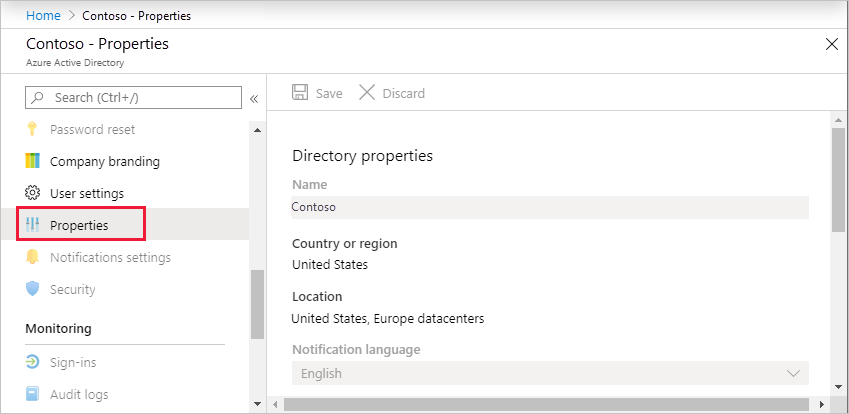
1.3 Under Manage, select Properties.
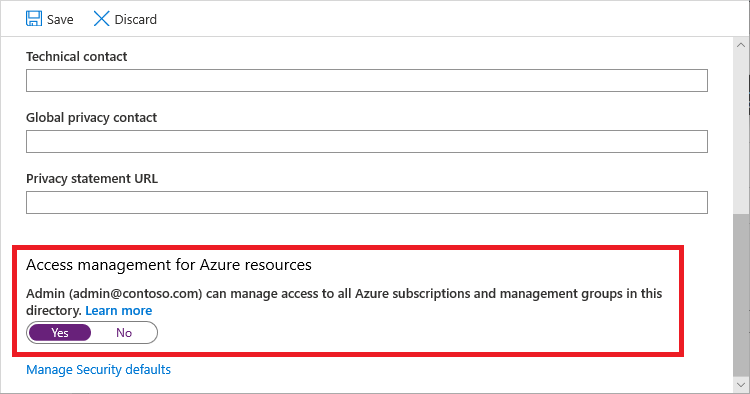
1.4 Under Access management for Azure resources, set the toggle to Yes.
2. Grant Access to User and/or Service principal at root scope “/” to deploy Azure landing zone reference implementation
Please ensure you are logged in as a user with UAA role enabled in Microsoft Entra tenant and logged in user is not a guest user.
Bash
#sign into AZ CLI, this will redirect you to a web browser for authentication, if required
az login

#if you do not want to use a web browser you can use the following bash
read -sp "Azure password: " AZ_PASS && echo && az login -u <username> -p $AZ_PASS

#assign Owner role at Tenant root scope ("/") as a User Access Administrator to current user (gets object Id of the current user (az login))
az role assignment create --scope '/' --role 'Owner' --assignee-object-id $(az ad signed-in-user show --query id --output tsv) --assignee-principal-type User

#(optional) assign Owner role at Tenant root scope ("/") as a User Access Administrator to service principal (set spn_displayname to your service principal displayname)
spn_displayname='<ServicePrincipal DisplayName>'
az role assignment create --scope '/' --role 'Owner' --assignee-object-id $(az ad sp list --display-name "$spn_displayname" --query '[].id' -o tsv) --assignee-principal-type ServicePrincipal
PowerShell
#sign in to Azure from Powershell, this will redirect you to a web browser for authentication, if required
Connect-AzAccount

#get object Id of the current user (that is used above)
$user = Get-AzADUser -UserPrincipalName (Get-AzContext).Account

#assign Owner role at Tenant root scope ("/") as a User Access Administrator to current user
New-AzRoleAssignment -Scope '/' -RoleDefinitionName 'Owner' -ObjectId $user.Id

#(optional) assign Owner role at Tenant root scope ("/") as a User Access Administrator to service principal (set $spndisplayname to your service principal displayname)
$spndisplayname = "<ServicePrincipal DisplayName>"
$spn = (Get-AzADServicePrincipal -DisplayName $spndisplayname).id
New-AzRoleAssignment -Scope '/' -RoleDefinitionName 'Owner' -ObjectId $spn
Please note, it may take up to 15-30 minutes for permission to propagate at tenant root scope. It is highly recommended that you log out and log back in.
The Owner privileged root tenant scope is required in the deployment of the Azure landing zone. However post deployment, and as your use of Azure landing zone matures, you are able to limit the scope of the Service principal roleAssignments to a subsection of the Management Group hierarchy.
Eg. "/providers/Microsoft.Management/managementGroups/YourMgGroup".