Overview
The Azure AI Landing Zone is an enterprise-scale, production-ready reference architecture designed to deploy secure and resilient AI applications and agents on Azure. The Bicep implementation is maintained in a dedicated repository.
Source repository: Azure/bicep-ptn-aiml-landing-zone
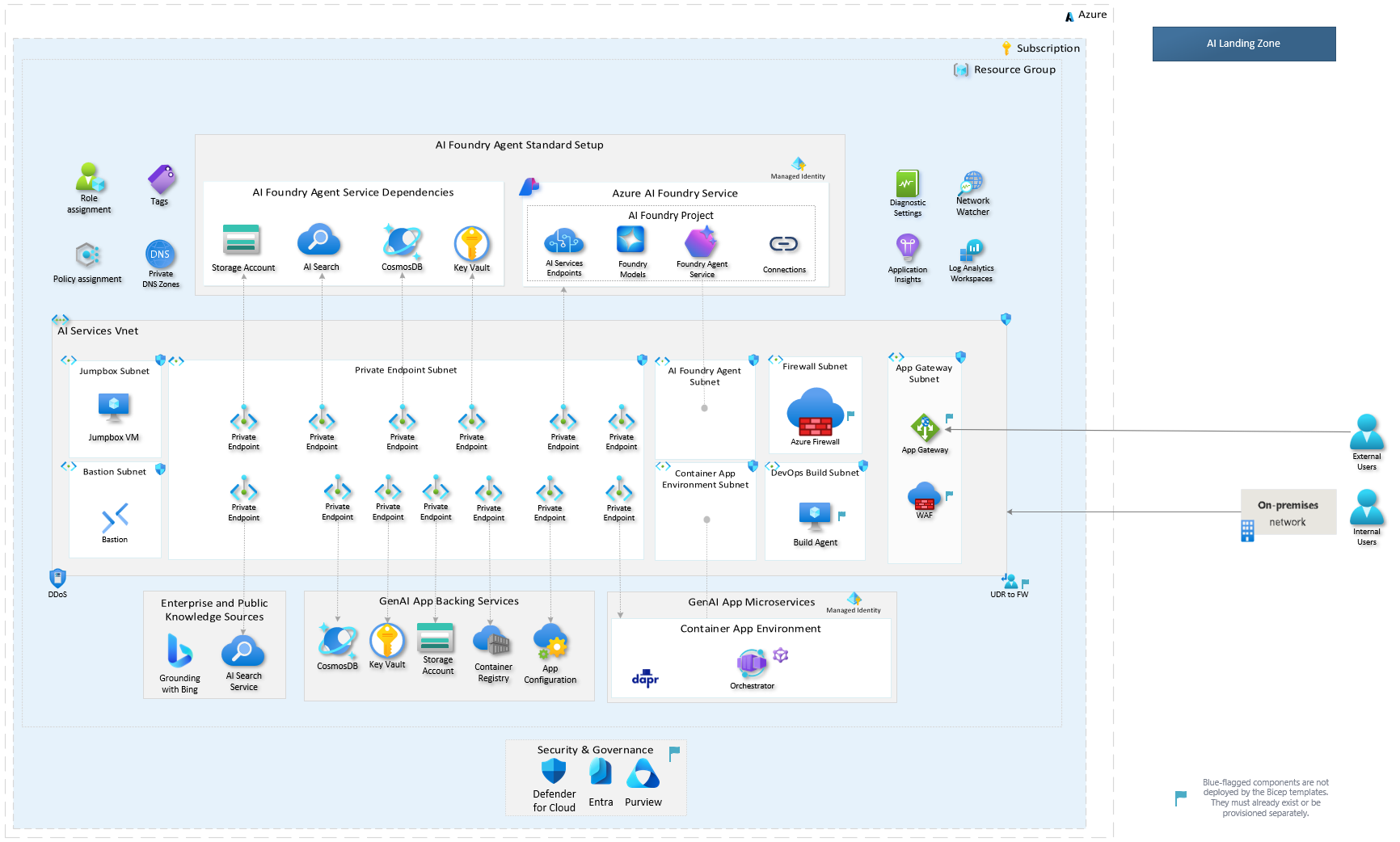
Deployment modes
The template supports two deployment modes that you can choose based on your security requirements:
| Mode | Network isolation | Jumpbox VM | Use case |
|---|---|---|---|
| Basic | No | Optional | Quick demos and development environments |
| Zero Trust | Yes | Yes (via Bastion) | Production workloads requiring full network isolation |
Both modes are deployed using the Azure Developer CLI (azd). See How to Deploy for step-by-step instructions.
What gets deployed
The template provisions a complete AI application environment with the following core services:
- Microsoft Foundry — AI Foundry account and project with model deployments
- Azure AI Search — Search service for retrieval-augmented generation (RAG)
- Azure Cosmos DB — Database for conversation history and application data
- Azure Container Apps — Container runtime with managed environment and workload profiles
- Azure Container Registry — Private registry for container images
- Azure Key Vault — Secrets and certificate management
- Azure App Configuration — Centralized application configuration
- Azure Storage Account — Blob storage for documents and data
- Azure Application Insights — Application monitoring and diagnostics
- Azure Log Analytics — Centralized logging
When network isolation is enabled, the deployment additionally provisions:
- Virtual network with private endpoints for all services
- Network Security Groups (NSGs)
- Azure Bastion for secure VM access
- Jumpbox VM with pre-installed development tools
- Private DNS zones for name resolution
Every service can be individually toggled on or off via deploy parameters. See Parameterization for the full reference.
Role assignments
The deployment configures role-based access control (RBAC) for service-to-service communication using managed identities. See Permissions for the complete list of role assignments.
Next steps
- How to Deploy — Prerequisites and deployment instructions
- Parameterization — Full parameter reference
- Permissions — Role assignments provisioned by the template